1. መግቢያ
Thank you for choosing the EvoFox Ronin Wired Mechanical Gaming Keyboard. This manual provides detailed instructions for setting up, operating, and maintaining your keyboard to ensure optimal performance and longevity. The EvoFox Ronin is designed for a superior typing and gaming experience, featuring advanced sound dampening, customizable switches, and dynamic RGB lighting.

Image 1.1: EvoFox Ronin Wired Mechanical Gaming Keyboard (Black)
ቁልፍ ባህሪዎች
- 9-Layer Gasket Structure: Advanced design for reduced noise, improved stability, and enhanced tactile feedback.
- Hot-Swappable Outemu Red Silent Switches: Customizable, durable, and smooth typing experience with included switch puller.
- የየቁልፍ አርጂቢ የጀርባ ብርሃን 21 effects and Audio Sync Mode for personalized and immersive lighting.
- የተወሰነ የድምጽ መጠን ቁልፍ፦ Convenient control over audio levels.
- Powerful Windows Software: Program keys, create macros, control backlighting, and manage profiles with onboard memory.
- የፕላትፎርም ተሻጋሪነት፡ Easily switch between Windows and Mac modes.
- Detachable Braided USB-C Cable: Robust 1.5m cable with EMI ring for reliable connection and portability.
2. የጥቅል ይዘቶች
እባክዎ ሁሉም እቃዎች በጥቅልዎ ውስጥ መኖራቸውን ያረጋግጡ፡-
- 1 x EvoFox Ronin Mechanical Gaming Keyboard
- 1 x የቁልፍ መጎተቻ
- 4 x Outemu Red Switches (Spare)
- 1 x የተጠቃሚ መመሪያ
3. ምርት አብቅቷልview
3.1 የጋኬት መዋቅር
The EvoFox Ronin features an advanced 9-layer gasket structure. This design incorporates silicone gaskets, a mounting plate, and multiple layers of vibration and sound dampening materials to provide a stable, quiet, and comfortable typing experience by minimizing unwanted noise and resonance.
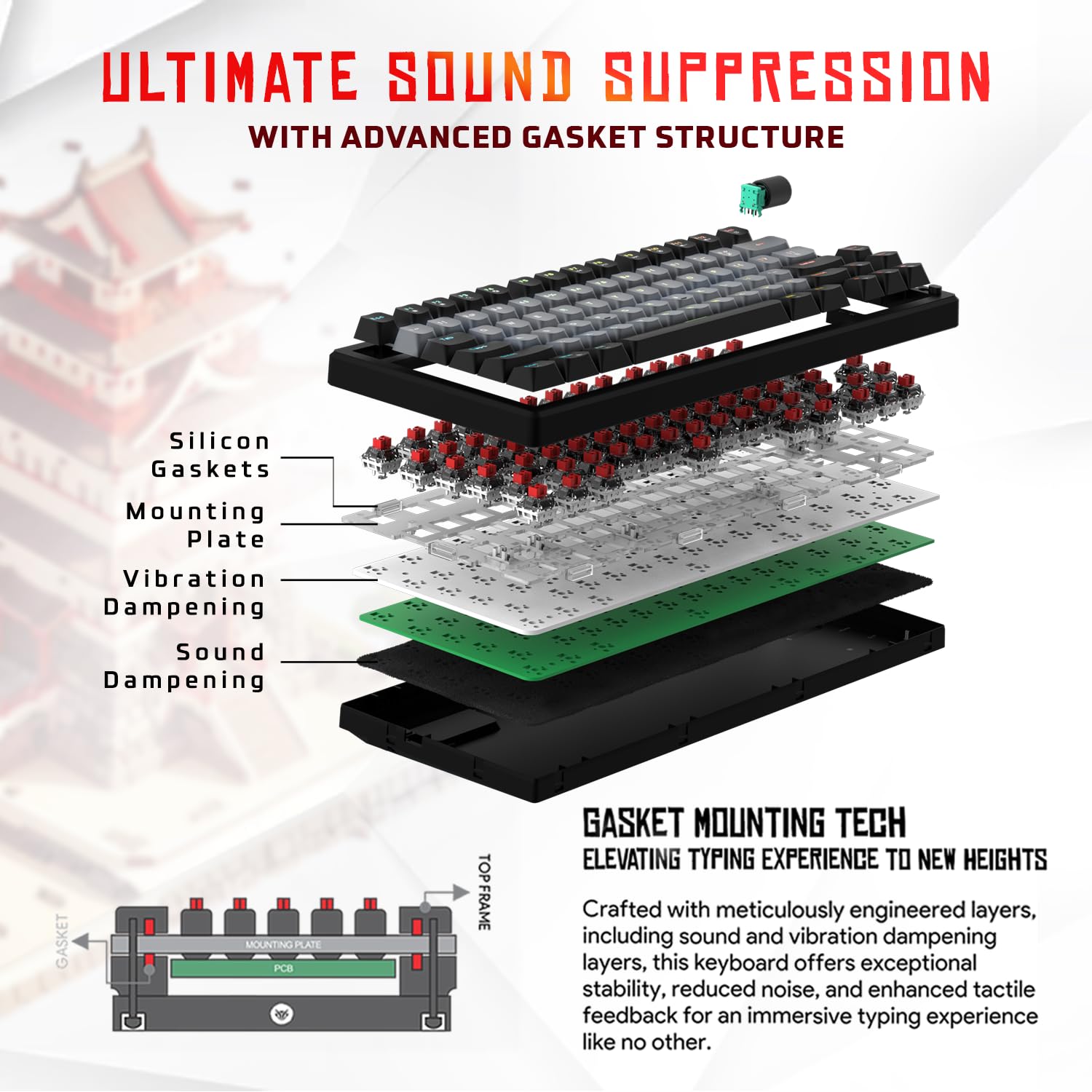
ምስል 3.1፡ ፈነዳ view of the 9-layer gasket structure, showing silicone gaskets, mounting plate, and dampንብርብሮችን ማደስ።
3.2 Outemu Red Silent Switches
The keyboard is equipped with Outemu Red Dust Proof Switches, known for their linear and silent operation. These switches are hot-swappable, allowing users to easily replace them with other compatible 3-pin mechanical switches without soldering, enabling full customization of the typing feel.
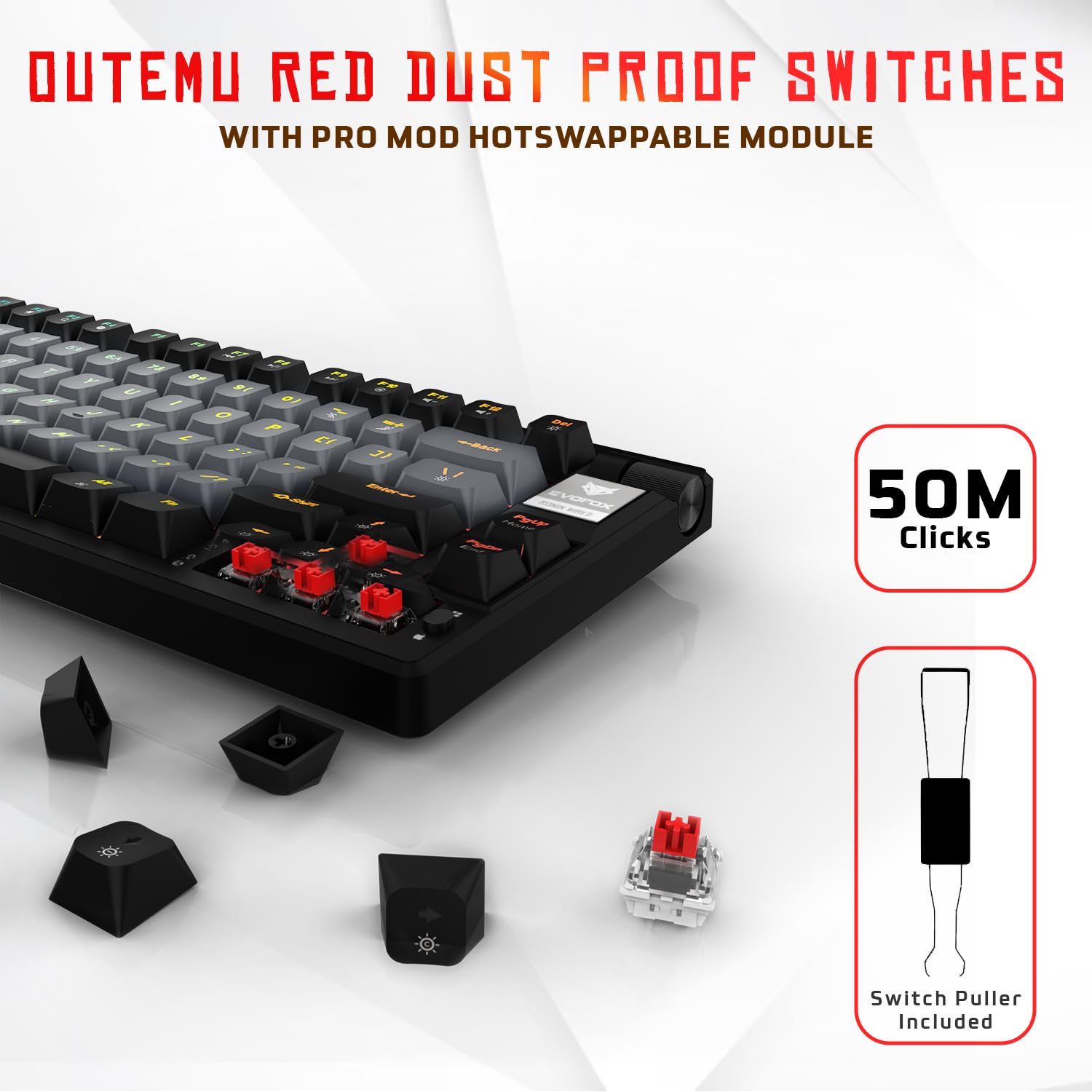
Image 3.2: Close-up of Outemu Red switches and the included switch puller, demonstrating hot-swappable functionality.
3.3 Per-Key RGB Backlighting
Each key on the EvoFox Ronin features individual RGB backlighting, offering 16 million colors and 21 pre-set lighting effects. The lighting can be customized directly on the keyboard or through the dedicated software, including an Audio Sync Mode that reacts to sound.

Image 3.3: The EvoFox Ronin keyboard showcasing its customizable per-key RGB backlighting.
3.4 Dedicated Volume Knob
A metal volume knob is integrated into the keyboard for quick and precise audio adjustments. Rotate to change volume, and press to mute/unmute.
3.5 Detachable USB-C Cable
The keyboard connects via a robust 1.5-meter braided USB-C cable, which is detachable for easy portability and storage. The cable includes an EMI ring to minimize signal interference.

Image 3.4: Features of the EvoFox Ronin, including the volume knob, detachable USB-C cable, and double-height adjustable legs.
4. የማዋቀር መመሪያዎች
Follow these steps to set up your EvoFox Ronin keyboard:
- የቁልፍ ሰሌዳውን ይንቀሉት፡- የቁልፍ ሰሌዳውን እና ሁሉንም መለዋወጫዎች ከማሸጊያው ላይ በጥንቃቄ ያስወግዱት።
- የዩኤስቢ-ሲ ገመዱን ያገናኙ፡ የተሰጠውን ገመድ የዩኤስቢ-ሲ ጫፍ በቁልፍ ሰሌዳው ጀርባ ላይ ወዳለው ወደብ ያስገቡ።
- ከኮምፒዩተር ጋር ይገናኙ; Plug the USB-A end of the cable into an available USB port on your computer (PC or Mac).
- የአሽከርካሪ ጭነት; The keyboard is plug-and-play. Your operating system should automatically detect and install the necessary drivers.
- አማራጭ የሶፍትዌር ጭነት፡ For advanced customization, download the dedicated Windows software from the official EvoFox webጣቢያ.
5. የአሠራር መመሪያዎች
5.1 መሰረታዊ ቁልፍ ተግባራት
The EvoFox Ronin functions as a standard TKL (Tenkeyless) keyboard. All keys perform their labeled functions. The keyboard supports N-Key Rollover, ensuring every key press is registered accurately, even during rapid input.
5.2 መልቲሚዲያ እና የተግባር ቁልፎች
Access multimedia and additional functions by pressing the Fn key in combination with the designated F-keys or other keys. Refer to the keycap legends for specific functions (e.g., Fn + F1 for media player, Fn + F2 for volume down).
5.3 RGB የመብራት መቆጣጠሪያ
You can control the RGB lighting directly from the keyboard:
- ተጽዕኖዎች ለውጥ ተጠቀም Fn + \| to cycle through 21 different lighting effects.
- ብሩህነትን ማስተካከል; ተጠቀም Fn + ወደ ላይ ቀስት። ብሩህነትን ለመጨመር እና Fn + የታች ቀስት ብሩህነትን ለመቀነስ.
- ፍጥነት አስተካክል; ተጠቀም Fn + ግራ ቀስት የውጤት ፍጥነትን ለመቀነስ እና Fn + የቀኝ ቀስት የውጤት ፍጥነትን ለመጨመር።
- Audio Sync Mode: Activate specific modes that react to audio input.
5.4 የሶፍትዌር ማበጀት
The dedicated Windows software allows for comprehensive customization:
- ቁልፍ ፕሮግራሚንግ፡ ማንኛውንም ቁልፍ ወደተለየ ተግባር እንደገና ያስተካክሉ።
- ማክሮ ፈጠራ፡- ውስብስብ የቁልፍ ቅደም ተከተሎችን በአንድ ቁልፍ ላይ ይቅረጹ እና ይመድቡ።
- Backlighting Effects: Fine-tune RGB colors, effects, brightness, and speed.
- ፕሮfile አስተዳደር፡ ብዙ ፕሮፌሽኖችን ይፍጠሩ እና ያስቀምጡfiles ለተለያዩ መተግበሪያዎች ወይም ጨዋታዎች.
- የድምጽ መስጫ መጠን፡ Adjust the polling rate up to 1000Hz.

Image 5.1: Screenshot of the EvoFox Ronin's dedicated software, showing options for light settings, button settings, and macro management.
5.5 Cross-Platform Compatibility
The keyboard supports both Windows and Mac operating systems. Use the designated key combination (typically Fn + አሸነፈ or similar, refer to keycap legends) to switch between modes, ensuring correct key mapping for your OS.
6. ጥገና
6.1 የቁልፍ ሰሌዳውን ማጽዳት
የቁልፍ ሰሌዳዎን ገጽታ እና ተግባር ለመጠበቅ፦
- ከማጽዳትዎ በፊት የቁልፍ ሰሌዳውን ከኮምፒዩተርዎ ያላቅቁት.
- ከቁልፍ መክፈቻዎች መካከል አቧራ እና ፍርስራሾችን ለማስወገድ የታመቀ አየርን ይጠቀሙ።
- የቁልፍ ቁልፎቹን እና የቁልፍ ሰሌዳውን ገጽ በለስላሳ፣ በትንሹ መamp ጨርቅ. ከመጠን በላይ እርጥበትን ያስወግዱ.
- ኃይለኛ ኬሚካሎችን ወይም አጥፊ ማጽጃዎችን አይጠቀሙ።
6.2 መቀየሪያዎችን በመተካት
The EvoFox Ronin features hot-swappable switches, allowing for easy replacement without soldering:
- የቁልፍ ሰሌዳውን ከኮምፒዩተርዎ ያላቅቁት።
- የተፈለገውን የቁልፍ ክዳን በቀስታ ለማስወገድ የተካተተውን የቁልፍ ክዳን መጎተቻ ይጠቀሙ።
- Use the included switch puller to carefully grip the top and bottom clips of the switch and pull it straight up.
- Align the pins of the new switch with the holes on the PCB and gently press it down until it clicks into place. Ensure the pins are not bent.
- የቁልፍ መያዣውን ይተኩ.

Image 6.1: A keycap being removed from the keyboard using a keycap puller.
7. መላ መፈለግ
If you encounter issues with your EvoFox Ronin keyboard, refer to the following common solutions:
- የቁልፍ ሰሌዳ ምላሽ አይሰጥም፡
- የዩኤስቢ-ሲ ገመድ ከቁልፍ ሰሌዳው እና ከኮምፒዩተር ጋር ደህንነቱ በተጠበቀ ሁኔታ መገናኘቱን ያረጋግጡ።
- የቁልፍ ሰሌዳውን በኮምፒተርዎ ላይ ካለው የተለየ የዩኤስቢ ወደብ ለማገናኘት ይሞክሩ።
- የኮምፒዩተር-ተኮር ችግርን ለማስወገድ የቁልፍ ሰሌዳውን በሌላ ኮምፒውተር ላይ ይሞክሩት።
- ኮምፒተርዎን እንደገና ያስጀምሩ.
- RGB መብራት አይሰራም/ትክክል አይደለም፡
- Check the on-board lighting controls (Fn key combinations) to ensure brightness is not set to zero or an effect is not disabled.
- ሶፍትዌሩን የሚጠቀሙ ከሆነ፣ እየሰራ መሆኑን እና ትክክለኛው ፕሮፐር መሆኑን ያረጋግጡ።file ንቁ ነው።
- Reinstall the keyboard software if issues persist.
- የማይመዘገቡ ቁልፎች፡-
- በኪፕ ክዳኑ ወይም በማብሪያ / ማጥፊያው ስር ምንም አይነት ቆሻሻ አለመኖሩን ያረጋግጡ።
- If a specific key is not working, try replacing its switch (refer to Section 6.2).
- Check for bent pins on the switch if you recently replaced one.
- Software Issues (e.g., Antivirus Flagging):
- Ensure you download the software from the official EvoFox website to avoid unofficial versions.
- If your antivirus flags the software, you may need to add an exception for the software's executable file. Proceed with caution and only if you trust the source.
- Contact EvoFox support for the latest software version or assistance.
8. ዝርዝሮች
| ባህሪ | ዝርዝር |
|---|---|
| የምርት ስም | EvoFox |
| የሞዴል ስም | EvoFox Ronin TKL Wired |
| የቁልፍ ሰሌዳ መግለጫ | መካኒካል |
| የግንኙነት ቴክኖሎጂ | ዩኤስቢ-ሲ (ገመድ ያለው) |
| መቀየሪያዎች | Outemu Red Silent Dust Proof Switches (Hot-Swappable) |
| የኋላ መብራት | Per-Key RGB (16 Million Colors, 21 Effects, Audio Sync Mode) |
| የድምጽ መስጫ ደረጃ | እስከ 1000Hz |
| ቁልፍ ሮሎቨር | N-Key Rollover (All Anti-Ghosting Keys) |
| ልዩ ባህሪያት | Advanced Gasket Structure, Compact TKL Design, Multimedia Keys, Pro Mod Hotswap Module, Powerful Windows Software, Dedicated Volume Controller |
| ተስማሚ መሣሪያዎች | ላፕቶፕ ፣ ፒሲ |
| የሃርድዌር መድረክ | ፒሲ/ማክ/ሊኑክስ/ዩኒክስ |
| የኬብል ርዝመት | 1.5m Detachable Braided Type-C with EMI Ring |
| ቁሳቁስ | ፕላስቲክ |
| የምርት ልኬቶች | 32 x 13.5 x 2.6 ሴ.ሜ |
| የእቃው ክብደት | 640 ግ |
| የትውልድ ሀገር | ቻይና |
9. ዋስትና እና ድጋፍ
The EvoFox Ronin Mechanical Gaming Keyboard comes with a standard manufacturer's warranty. Please refer to the warranty card included in your package for specific terms and conditions, including warranty period and coverage details.
For technical support, troubleshooting assistance, or warranty claims, please contact EvoFox customer support. You can find contact information on the official EvoFox website or through the manufacturer, Allied Electronics & Magnetics Private Limited.
አምራች፡ Allied Electronics & Magnetics Private Limited
አድራሻ፡- C-64/4, Okhla Phase - 2, New Delhi - 110020


