1. መግቢያ
Thank you for choosing the LEVN LM101 Wireless Microphone System. This system is designed to provide high-quality audio recording for various applications, including vlogging, live streaming, interviews, and content creation. It features dual wireless lavalier microphones, dual receivers (USB-C and Lightning), AI noise cancellation, and a portable charging case, offering extensive compatibility with iOS, Android, and PC devices.
2. በሳጥኑ ውስጥ ያለው
- 2 x ገመድ አልባ የላቫሊየር ማይክሮፎኖች (ማስተላለፎች)
- 2 x Receivers (1 x USB-C, 1 x Lightning)
- 1 x የመሙያ መያዣ
- 1 x ዩኤስቢ-ሲ ባትሪ መሙያ ገመድ
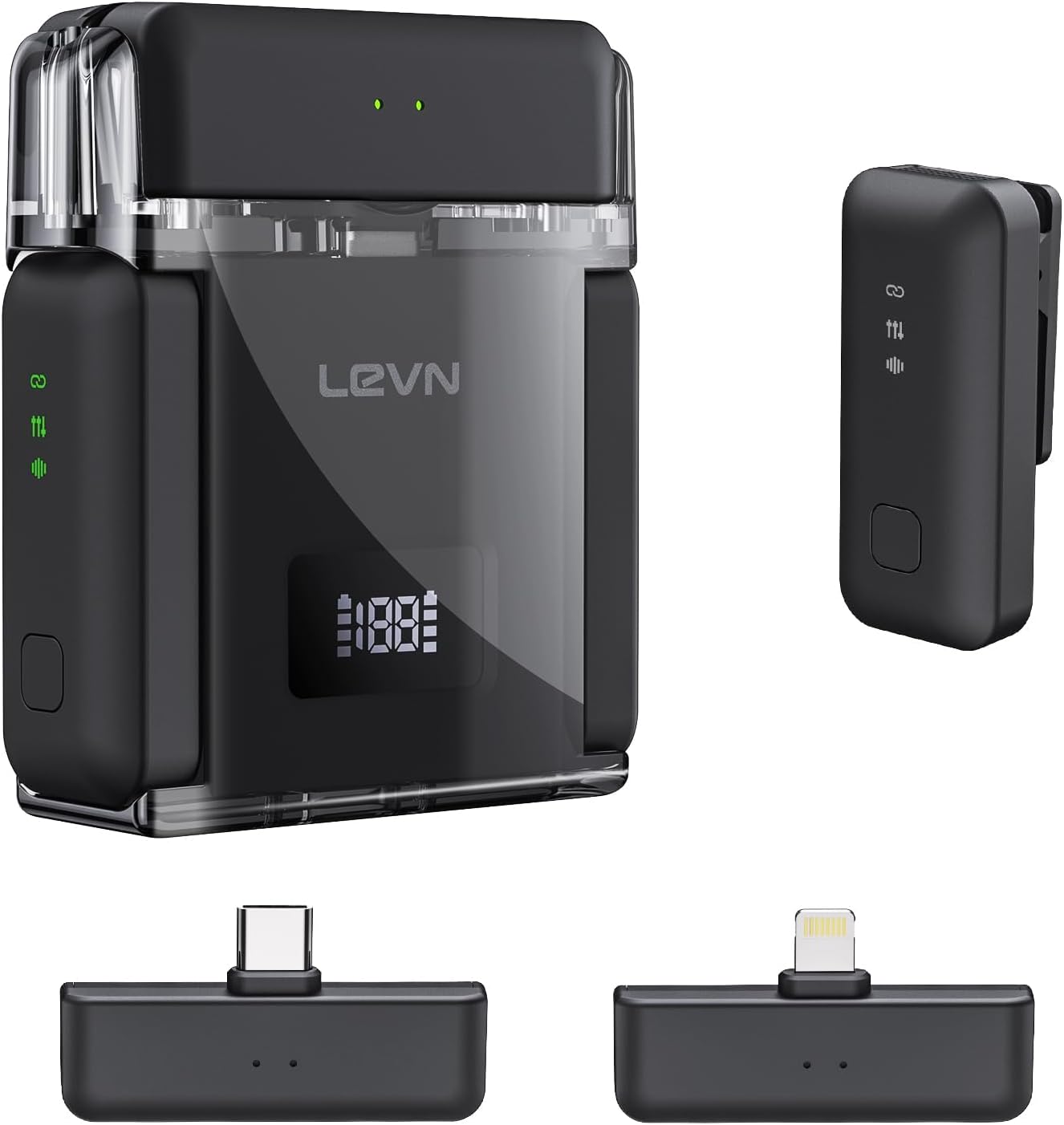
3. ምርት አብቅቷልview
The LEVN LM101 system consists of two compact wireless lavalier microphones (transmitters), two receivers for broad device compatibility, and a portable charging case. Each microphone features a clip for easy attachment and an omnidirectional pickup pattern. The receivers are designed for direct connection to your recording device's port.
ቁልፍ አካላት፡-
- ገመድ አልባ ማይክሮፎኖች; Small, clip-on devices with built-in batteries and AI noise cancellation.
- ተቀባዮች ፦ USB-C and Lightning connectors for compatibility with various smartphones, tablets, and computers.
- የመሙያ መያዣ፡ Stores and recharges the microphones, extending their operational time.
4. የማዋቀር መመሪያዎች
4.1 ስርዓቱን መሙላት
Before first use, ensure all components are fully charged. Place the microphones into the charging case. Connect the charging case to a power source using the provided USB-C cable. The charging case provides up to 30 hours of extended battery life for the microphones, with approximately 6 hours of continuous recording per microphone on a single charge. The charging time for the case is less than 1.5 hours.

4.2 ተቀባዩን ማገናኘት
- Identify the correct receiver for your device: USB-C for Android phones, PCs, and newer iPhones/iPads; Lightning for older iPhones/iPads.
- Plug the appropriate receiver directly into your recording device's charging/data port.
- The receiver's green indicator light will illuminate, signifying it is ready to connect.

4.3 አውቶማቲክ ማጣመር
Once the receiver is plugged in and powered on, simply take the microphones out of the charging case. The microphones will automatically power on and pair with the receiver. No manual pairing steps are required. The receiver's green light will remain steady, indicating a successful connection and readiness for recording.
5. የአሠራር መመሪያዎች
5.1 ቀረጻ ኦዲዮ
- Ensure the microphone is securely clipped to your clothing, ideally near your mouth for optimal sound capture.
- Confirm the receiver is connected to your device and the green indicator light is solid.
- Open your preferred recording application (e.g., camera app, voice recorder, streaming software) on your smartphone, tablet, or PC.
- Start recording. The system will automatically capture audio through the wireless microphone.

5.2 የ AI ጫጫታ ማስወገጃ
The LEVN LM101 features 3-level AI noise cancellation (Weak/Medium/Strong) to reduce ambient noise. To activate or adjust the noise cancellation, press the dedicated noise reduction button on the microphone. A single press will cycle through the noise reduction levels. This feature is particularly useful in noisy environments to ensure clear voice capture.

5.3 ገመድ አልባ ክልል
The system offers a stable wireless transmission range of up to 328 feet (100 meters) in open environments. This allows for flexible recording setups without compromising audio quality or signal stability.

5.4 Versatile Scenarios
The LEVN LM101 is suitable for a wide array of content creation scenarios, including:
- Vlogging and YouTube videos
- Live streaming on various platforms
- ኢንተርviews and podcasts
- Online meetings and presentations

6. ጥገና
- ማጽዳት፡ Use a soft, dry cloth to clean the microphones, receivers, and charging case. Avoid using liquids or abrasive cleaners.
- ማከማቻ፡ ስርዓቱን ከአቧራ እና ከጉዳት ለመከላከል ጥቅም ላይ በማይውልበት ጊዜ በቻርጅ መያዣው ውስጥ ያስቀምጡት። ከቀጥታ የፀሐይ ብርሃን እና ከፍተኛ የሙቀት መጠን ራቅ ባለ ቀዝቃዛና ደረቅ ቦታ ያስቀምጡት።
- የባትሪ እንክብካቤ የባትሪውን ዕድሜ ለማራዘም ባትሪዎቹን በተደጋጋሚ ሙሉ በሙሉ ከማላቀቅ ይቆጠቡ። ያለማቋረጥ ጥቅም ላይ ባይውልም እንኳ ስርዓቱን በየጊዜው እንደገና ይሙሉት።
7. መላ መፈለግ
- ዝቅተኛ ድምጽ የለም
- ተቀባዩ ሙሉ በሙሉ ወደ መሳሪያዎ ወደብ ውስጥ መግባቱን ያረጋግጡ።
- Check if the microphone is powered on and paired (solid green light on receiver).
- Verify your device's audio input settings are configured to use the external microphone.
- Adjust the recording volume within your recording application.
- ጣልቃ ገብነት/ደካማ የድምጽ ጥራት፡
- Move closer to the receiver to reduce potential signal dropouts.
- Ensure there are no major obstructions (e.g., thick walls, large metal objects) between the microphone and receiver.
- Activate or adjust the AI noise cancellation feature on the microphone.
- Avoid using the system near other strong wireless signals (Wi-Fi routers, other 2.4Ghz devices).
- ማይክሮፎኑ ኃይል እየሞላ አይደለም፦
- Ensure the microphones are correctly seated in the charging case.
- Verify the charging case is connected to a working power source and the USB-C cable is functional.
- Check the charging case's battery level.
8. ዝርዝሮች
| ባህሪ | ዝርዝር |
|---|---|
| የሞዴል ስም | LM101 |
| የምርት ስም | LEVN |
| የማይክሮፎን ቅጽ ምክንያት | ላቫሊየር |
| የግንኙነት ቴክኖሎጂ | ገመድ አልባ (2.4ጂ) |
| የማገናኛ አይነት | መብረቅ፣ ዩኤስቢ ዓይነት-ሲ |
| ተስማሚ መሣሪያዎች | Laptop, Smartphone (iOS & Android) |
| ገመድ አልባ ክልል | እስከ 328 ጫማ (100ሜ) |
| የባትሪ ዕድሜ (ማይክሮፎን) | Up to 6 hours (continuous recording) |
| ጠቅላላ የባትሪ ህይወት (ከኃይል መሙያ መያዣ ጋር) | እስከ 30 ሰዓታት ድረስ |
| የኃይል መሙያ ጊዜ (ጉዳይ) | ከ 1.5 ሰዓታት በታች |
| ልዩ ባህሪያት | 1-Touch Recording, Battery Indicator Light, Clip, 3-Level AI Noise Reduction |
| የዋልታ ንድፍ | ሁሉን አቀፍ |
| የእቃው ክብደት | 0.11 ኪሎግራም (3.87 አውንስ) |
| የሰርጦች ብዛት | 2 |
9. ዋስትና እና ድጋፍ
Specific warranty details and direct support contact information are not provided in the available product data. Please refer to the product packaging or the manufacturer's official webየዋስትና ጥያቄዎችን እና የደንበኛ ድጋፍ ጥያቄዎችን ለማግኘት ጣቢያ።