1. መግቢያ
ስለገዙ እናመሰግናለንasing the LONPOO Portable CD Player Boombox, model ZXG-608B. This device offers versatile audio playback options including CD, Bluetooth 5.3, FM radio, USB, and AUX input, along with a microphone port for added functionality. Its compact design and rechargeable battery make it suitable for various environments.
This manual provides essential information for safe operation, setup, and maintenance of your boombox. Please read it thoroughly before use and retain it for future reference.

Image 1.1: The LONPOO ZXG-608B Portable CD Boombox highlighting its multiple playback options: Bluetooth, CD, FM Radio, USB, MIC Port, and AUX-IN.
2. የደህንነት መረጃ
- የኃይል ምንጭ፡- Use only the provided AC power cable or the internal rechargeable battery. Ensure the voltagሠ ከመሳሪያው መስፈርቶች ጋር ይዛመዳል.
- ውሃ እና እርጥበት; Do not expose the device to rain, moisture, or immerse it in water. Avoid placing objects filled with liquids, such as vases, on the device.
- ሙቀት፡ መሳሪያውን እንደ ራዲያተሮች፣ ሙቀት መመዝገቢያዎች፣ ምድጃዎች ወይም ሌሎች ሙቀትን አምጪ መሳሪያዎች ካሉ የሙቀት ምንጮች ያርቁ።
- የአየር ማናፈሻ; ትክክለኛውን አየር ማናፈሻ ማረጋገጥ. የአየር ማናፈሻ ክፍተቶችን አያግዱ።
- ማጽዳት፡ ከማጽዳትዎ በፊት መሳሪያውን ከኃይል መውጫው ያላቅቁት። ደረቅና ለስላሳ ጨርቅ ይጠቀሙ። ፈሳሽ ማጽጃዎችን ወይም ኤሮሶል ማጽጃዎችን አይጠቀሙ።
- አገልግሎት መስጠት፡ ይህንን ምርት እራስዎ ለማገልገል አይሞክሩ። ሁሉንም አገልግሎት ወደ ብቃት ላለው የአገልግሎት ሠራተኛ ያማክሩ።
- የሲዲ አያያዝ፡ Handle CDs by their edges. Avoid touching the data side. Keep CDs clean and free from scratches.
- የባትሪ ደህንነት፡ Do not disassemble, crush, or expose the built-in battery to extreme temperatures. Dispose of batteries according to local regulations.
3. የጥቅል ይዘቶች
ሁሉም እቃዎች በጥቅሉ ውስጥ መኖራቸውን ያረጋግጡ፡-
- 1x LONPOO Portable CD Player Boombox (Model ZXG-608B)
- 1 x የኤሲ የኃይል ገመድ
- 1 x የርቀት መቆጣጠሪያ (ባትሪዎች አልተካተቱም።)
- 1x የተጠቃሚ መመሪያ (ይህ ሰነድ)

Image 3.1: Contents of the package, including the boombox, remote control, AC power cable, and user manual. The image also shows the product dimensions: 20 cm (7.8 inches) height, 23 cm (9 inches) width, and 15 cm (5.9 inches) depth, with a weight of 4.4 lbs.
4. ምርት አብቅቷልview
ከቦምቦክስዎ ዋና ዋና ክፍሎች እና መቆጣጠሪያዎች ጋር እራስዎን ይወቁ።
4.1 የፊት ፓነል መቆጣጠሪያዎች እና ማሳያ

ምስል 4.1፡ ፊት view of the boombox and its remote control. The front panel features a large LCD display, STANDBY button, MODE button, previous/next track buttons, a large volume knob, EQ button, and USB port.
- LCD ማሳያ፡- Shows track number, time, mode, and other status indicators.
- የመጠባበቂያ አዝራር፦ ክፍሉን ያበራል ወይም ያጠፋል።
- MODE አዝራር፡- Switches between CD, Bluetooth, FM Radio, USB, and AUX modes.
- Previous/Next Buttons (|<>|): ትራኮችን/ጣቢያዎችን ያስሳል።
- Play/Pause/Scan Button (▶/SCAN): Plays/pauses media or scans FM radio stations.
- የማቆሚያ አዝራር (■): መልሶ ማጫወት ያቆማል።
- የድምፅ ቁልፍ; የድምጽ ውፅዓት ደረጃን ያስተካክላል።
- ኢኩኪ ቁልፍ Cycles through equalizer presets (Flat, Rock, Pop, Classic, Jazz).
- የዩኤስቢ ወደብ፡ For playing digital audio files ከዩኤስቢ ፍላሽ አንፃፊ።
- የጆሮ ማዳመጫ ጃክ ለግል ማዳመጥ።
4.2 የኋላ ፓነል ግንኙነቶች
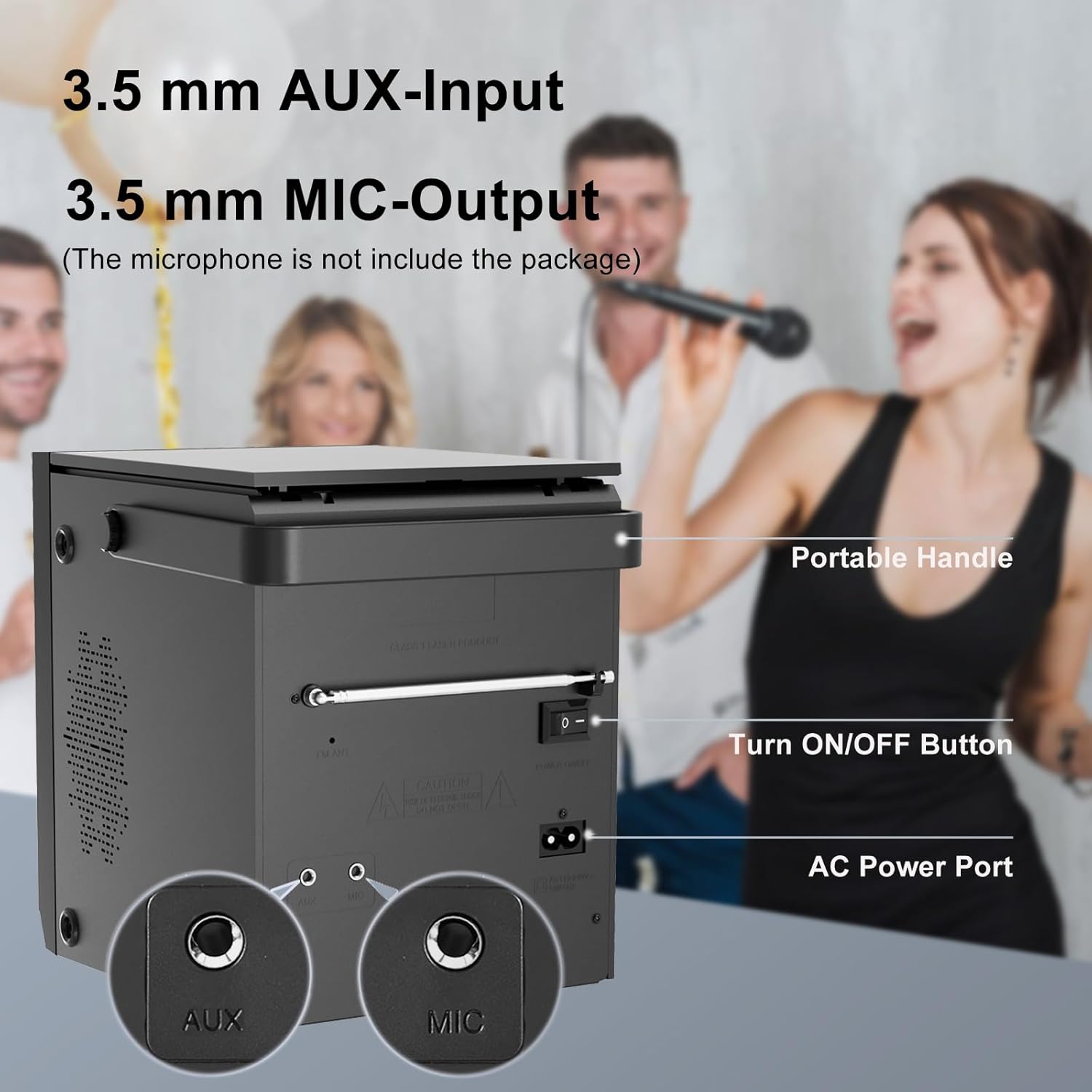
Image 4.2: Rear panel of the boombox, detailing the 3.5 mm AUX-Input, 3.5 mm MIC-Output, the main ON/OFF button, and the AC Power Port. A portable handle is also visible at the top.
- AUX ግቤት (3.5ሚሜ): ውጫዊ የድምጽ መሳሪያዎችን ያገናኙ.
- MIC Output (3.5mm): Connect a microphone for karaoke or voice input.
- አብራ/አጥፋ አዝራር፡- ለክፍሉ ዋና የኃይል ማብሪያ / ማጥፊያ.
- የኤሲ ኃይል ወደብ፡- Connect the AC power cable for power and charging.
- ኤፍኤም አንቴና የተሻለ የኤፍኤም ሬዲዮ አቀባበል እንዲኖር ያሳድጉ።
4.3 Top-Loading CD Compartment

Image 4.3: The top-loading CD compartment shown open with a CD inside. Icons illustrate playback options: Play in order, Single cycle, Repeat all, and Random play.
The CD compartment is located on the top of the unit. Gently lift the lid to access it.
4.4 የርቀት መቆጣጠሪያ
The included remote control allows for convenient operation from a distance. (Batteries not included. Requires 2x AAA batteries, typically.)
5. ማዋቀር
5.1 የኃይል ግንኙነት
- የኤሲ ኃይል Connect the supplied AC power cable to the AC Power Port on the rear of the boombox and then to a standard wall outlet.
- ዳግም ሊሞላ የሚችል ባትሪ፡ The boombox has a built-in 2000 mAh rechargeable battery, providing over 5 hours of continuous use at medium volume. The battery charges automatically when connected to AC power.

Image 5.1: The boombox powered by its internal rechargeable battery, capable of providing approximately 5 hours of playback.
5.2 የመነሻ ኃይል በርቷል
- Ensure the main ON/OFF switch on the rear panel is in the "ON" position.
- የሚለውን ይጫኑ ተጠንቀቅ መሣሪያውን ለማብራት ከፊት ፓነል ወይም በርቀት መቆጣጠሪያው ላይ ያለውን ቁልፍ ይጫኑ።
- የኤል ሲ ዲ ማሳያው ያበራል።
6. የአሠራር መመሪያዎች
6.1 ሲዲ መልሶ ማጫወት
- የሚለውን ይጫኑ MODE button until "CD" mode is selected on the display.
- የሲዲውን ክፍል ክዳን በመሳሪያው አናት ላይ ይክፈቱ።
- Place a CD with the label side facing up. Gently close the lid.
- The boombox will read the CD, and playback should start automatically. If not, press the ▶/SCAN አዝራር።
- የሚለውን ተጠቀም |<>| ትራኮችን ለመዝለል ቁልፎች.
- የሚለውን ይጫኑ ▶/SCAN መልሶ ማጫወት ለአፍታ ለማቆም/ለመቀጠል አዝራር።
- የሚለውን ይጫኑ ■ አቁም መልሶ ማጫዎትን ለማስቆም አዝራር።
- የሚለውን ይጫኑ ድገም button on the remote control to cycle through repeat modes (Single, All, Random).
6.2 የብሉቱዝ ሁነታ
ማስታወሻ፡- This device supports Bluetooth connection for audio input from external devices but does not support Bluetooth earphones.
- የሚለውን ይጫኑ MODE button until "BT" or "Bluetooth" is displayed. The unit will enter pairing mode, indicated by a flashing Bluetooth icon or "PAIR".
- በብሉቱዝ የነቃለት መሳሪያዎ (ለምሳሌ፣ ስማርትፎን፣ ታብሌት) ላይ፣ ብሉቱዝን ያንቁ እና የሚገኙ መሳሪያዎችን ይፈልጉ።
- Select "LONPOO ZXG-608B" (or similar name) from the list.
- አንዴ ከተጣመረ በኋላ የቦምቦክስ ድምፅ ያሰማል፣ እና የብሉቱዝ አመልካች ብልጭ ድርግም ማለት ያቆማል።
- You can now play audio from your connected device through the boombox.

Image 6.1: Illustrates the process of pairing a smartphone with the boombox via Bluetooth for wireless audio streaming.
6.3 ኤፍኤም ሬዲዮ
- Extend the FM antenna on the rear panel for optimal reception.
- የሚለውን ይጫኑ MODE "ኤፍኤም" ሁነታ እስኪመረጥ ድረስ አዝራር።
- ተጭነው ይያዙት። ▶/SCAN የሚገኙ የኤፍኤም ጣቢያዎችን በራስ ሰር ለመቃኘት እና ለማስቀመጥ አዝራር።
- የሚለውን ተጠቀም |<>| በተቀመጡ ጣቢያዎች መካከል ለማሰስ አዝራሮች።
6.4 የዩኤስቢ መልሶ ማጫወት
- በፊት ፓነል ላይ ባለው የዩኤስቢ ወደብ ላይ የዩኤስቢ ፍላሽ አንፃፊ ያስገቡ።
- የሚለውን ይጫኑ MODE "ዩኤስቢ" ሁነታ እስኪመረጥ ድረስ አዝራሩን ይጫኑ።
- ክፍሉ በራስ-ሰር ተኳሃኝ ኦዲዮን ፈልጎ ማጫወት ይጀምራል files (ለምሳሌ MP3)።
- የሚለውን ተጠቀም |<>| ትራኮችን ለመዝለል ቁልፎች.
- የሚለውን ይጫኑ ▶/SCAN መልሶ ማጫወት ለአፍታ ለማቆም/ለመቀጠል አዝራር።
- የሚለውን ይጫኑ ■ አቁም መልሶ ማጫዎትን ለማስቆም አዝራር።
6.5 AUX ግቤት
- Connect an external audio device (e.g., MP3 player, smartphone) to the AUX Input port on the rear panel using a 3.5mm audio cable (not included).
- የሚለውን ይጫኑ MODE "AUX" ሁነታ እስኪመረጥ ድረስ አዝራሩን ይጫኑ።
- ከተገናኘው ውጫዊ መሣሪያዎ መልሶ ማጫወትን እና የድምጽ መጠንን ይቆጣጠሩ።

Image 6.2: Demonstrates connecting external devices like a smartphone via AUX input and using the USB port for playback.
6.6 የማይክሮፎን ግቤት
- Connect a microphone (not included) to the MIC Output port on the rear panel.
- Adjust the volume using the main volume knob. The microphone input will mix with the currently playing audio source.

Image 6.3: Shows the boombox being used with a microphone, illustrating its karaoke function.
6.7 የማመጣጠኛ (EQ) ቅንብሮች
የሚለውን ይጫኑ EQ button on the front panel or remote control to cycle through preset equalizer modes:
- ጠፍጣፋ
- ሮክ
- ፖፕ
- ክላሲክ
- ጃዝ

Image 6.4: Highlights the 20W stereo sound output and lists the available 3 repeat modes (Single, All, Random) and 5 EQ modes (Flat, Rock, Pop, Classic, Jazz).
7. ጥገና
- ማጽዳት፡ የቤቱን ውጫዊ ክፍል ለስላሳና ደረቅ ጨርቅ ይጥረጉ። የማጽጃ ማጽጃዎችን ወይም ሟሟቶችን አይጠቀሙ።
- የሲዲ ሌንስ እንክብካቤ; የሲዲ መልሶ ማጫወት ችግሮች ከተከሰቱ፣ ለገበያ የቀረበ የሲዲ ሌንስ ማጽጃ ዲስክ ይጠቀሙ።
- የባትሪ ዕድሜ; To prolong battery life, avoid fully discharging the battery frequently. Charge the unit regularly, even if not in use for extended periods.
- ማከማቻ፡ When storing the unit for a long time, ensure it is powered off and disconnected from the AC supply. Store in a cool, dry place.
8. መላ መፈለግ
| ችግር | ሊሆን የሚችል ምክንያት | መፍትሄ |
|---|---|---|
| ኃይል የለም | AC cable not connected; Main power switch off; Battery depleted. | Check AC connection; Ensure rear ON/OFF switch is ON; Charge the battery. |
| CD not playing / "NO DISC" error | CD inserted incorrectly; CD is dirty or scratched; CD lens is dirty; Incompatible CD format. | Reinsert CD label side up; Clean CD; Use a CD lens cleaner; Ensure CD is audio CD format. |
| ብሉቱዝ አይጣመርም። | Boombox not in BT mode; Device too far; Bluetooth already connected to another device. | Select BT mode; Move device closer; Disconnect from other devices and try again. |
| ደካማ የኤፍኤም ሬዲዮ አቀባበል | አንቴና አልተራዘመም; ደካማ ምልክት. | የኤፍኤም አንቴናውን ሙሉ በሙሉ ያራዝሙ፤ ለተሻለ ምልክት ክፍሉን እንደገና ያስቀምጡት። |
| የዩኤስቢ መልሶ ማጫወት ችግሮች | የዩኤስቢ ድራይቭ በትክክል አልገባም፤ ተኳሃኝ አይደለም file ቅርጸት; የዩኤስቢ ድራይቭ ተበላሽቷል። | የዩኤስቢ ድራይቭን እንደገና ያስገቡ፤ ያረጋግጡ files are MP3 or compatible; Try a different USB drive. |
| ከAUX ምንም ድምፅ የለም። | AUX cable not connected; Incorrect mode selected; Volume too low on external device. | Check AUX cable connection; Select AUX mode; Increase volume on external device. |
9. ዝርዝሮች
- ሞዴል፡ ZXG-608B
- የምርት ስም፡ ሎንፖ
- የምርት ልኬቶች (L x W x H)፦ 4.72 x 7.09 x 5.91 ኢንች (12 x 18 x 15 ሴሜ)
- የእቃው ክብደት፡ 5.63 ፓውንድ (2.55 ኪ.ግ)
- የድምጽ ማጉያ ውፅዓት፡- 20 ዋ አርኤምኤስ (10 ዋ x 2)
- ግንኙነት፡ Bluetooth 5.3, USB, AUX Input (3.5mm), MIC Port (3.5mm)
- የኃይል ምንጭ፡- AC Power (Corded Electric) / Built-in Rechargeable Battery
- የባትሪ አቅም፡- 2000 ሚአሰ
- Playback Time (Battery): >5 hours (at medium volume)
- የሚደገፍ ሚዲያ፡ Audio CD, CD-R/RW, USB (MP3)
- ሬዲዮ መቃኛ FM
- EQ ሁነታዎች፡- Flat, Rock, Pop, Classic, Jazz
- የተካተቱ መለዋወጫዎች፡- AC Power Cable, Remote Control, User Manual
10. ዋስትና እና ድጋፍ
LONPOO products are designed for reliability and performance. For warranty information, please refer to the warranty card included with your purchase or contact LONPOO customer support.
If you encounter any issues or have questions regarding your LONPOO Portable CD Player Boombox, please contact our customer support team for assistance. Contact details can typically be found on the official LONPOO webጣቢያ ወይም በምርቱ ማሸጊያ ላይ.


