መግቢያ
Thank you for choosing the Ourlife Mini Drone. This drone is equipped with dual 4K cameras, offering high-quality photo and video capture, and can be controlled via a smartphone app for real-time viewing. Designed for ease of use, it features one-button takeoff/landing, altitude hold, headless mode, and gesture control, making it suitable for beginners and enthusiasts alike. Its compact, foldable design ensures portability for all your adventures. Please read this manual carefully before operation to ensure safe and optimal performance.
የደህንነት መመሪያዎች
Always prioritize safety when operating your drone. Failure to follow these guidelines may result in injury, damage to property, or legal issues.
- መመሪያውን ያንብቡ፡- Fully understand all instructions and warnings before first flight.
- ክፍት ቦታ፡ Always fly in open, unobstructed areas, away from people, animals, buildings, and power lines. Avoid flying in strong winds.
- የእይታ መስመር፡ ሁልጊዜም ድሮኑን በመጠቀም የእይታ መስመርን ይጠብቁ።
- የባትሪ ደህንነት፡ Use only original batteries and charging cables. Do not overcharge or short-circuit batteries. Discontinue use if batteries are damaged or swollen.
- የፕሮፔለር ደህንነት; Keep fingers, hair, and loose clothing away from rotating propellers. Always turn off the drone before handling propellers.
- የዕድሜ ገደብ፡- ይህ ምርት ዕድሜያቸው 14 እና ከዚያ በላይ ለሆኑ ተጠቃሚዎች ይመከራል።
- የህግ ተገዢነት፡- Be aware of and comply with local laws and regulations regarding drone operation.
የጥቅል ይዘቶች
ሁሉም እቃዎች በጥቅልዎ ውስጥ መኖራቸውን ያረጋግጡ፡-

Image: Contents of the Ourlife Mini Drone package, showing the drone, remote control, two rechargeable batteries, a screwdriver, four protective frames, four main propellers, a USB charging cable, and an instruction manual.
- Ourlife Mini Drone x 1
- የርቀት መቆጣጠሪያ x 1
- Rechargeable Drone Battery x 2
- ስዊድራይዘር x 1
- Protective Frame x 4
- ዋና ፕሮፔለር x 4 (መለዋወጫ)
- የዩኤስቢ ኃይል መሙያ ገመድ x 1
- የመመሪያ መመሪያ x 1
Note: The remote control requires 3 AAA batteries, which are not included.
ምርት አልቋልview
Familiarize yourself with the drone and remote control components.

Image: The Ourlife Mini Drone in its unfolded state, alongside its remote control, two drone batteries, and the drone in its folded, compact form.
ድሮን አካላት
- የሚታጠፉ ክንዶች፡ ለአነስተኛ ማከማቻ እና ተንቀሳቃሽነት።
- አምራቾች Four main propellers for flight.
- ድርብ ካሜራዎች፡- Front 4K camera (120° adjustable) and bottom optical flow lens for stable flight and diverse shooting angles.
- የባትሪ ክፍል፡ ከድሮኑ ጀርባ ላይ ይገኛል።
- የ LED መብራቶች; Indicate drone status and orientation.

ምስል፡ መቀራረብ view of the Ourlife Mini Drone's dual camera system, highlighting the adjustable front camera and the lower lens for stable flight. The front camera can be adjusted by 120 degrees.
የርቀት መቆጣጠሪያ አቀማመጥ
- የግራ ጆይስቲክ፡ ከፍታ (ወደላይ/ወደታች) እና መሽከርከርን (ወደግራ/ቀኝ) ይቆጣጠራል።
- የቀኝ ጆይስቲክ፡ ወደ ፊት/ወደ ኋላ እና ወደ ግራ/ቀኝ እንቅስቃሴን ይቆጣጠራል።
- የአንድ-ቁልፍ መውረጃ/ማረፊያ ቁልፍ፦ አውቶማቲክ መነሳት ወይም ማረፍን ይጀምራል።
- ራስ የሌለው ሁነታ አዝራር፡ Activates/deactivates headless mode.
- የፍጥነት መቀየሪያ አዝራር፡- Toggles between different flight speeds (low, medium, high).
- 360° የመገልበጥ አዝራር፦ Executes a 360-degree flip.
- የስልክ መያዣ፡ For mounting your smartphone to view የFPV ምግብ።
ማዋቀር
1. የድሮን ባትሪ መሙላት
- የዩኤስቢ ኃይል መሙያ ገመዱን ከድሮን ባትሪ ጋር ያገናኙ።
- Plug the USB end into a 5V/1A USB adapter (not included) or a computer USB port.
- The indicator light on the cable will show charging status. It will turn off or change color when fully charged.
2. የድሮን ባትሪ መትከል
- ሰው አልባው መጥፋቱን ያረጋግጡ።
- Insert the charged battery into the battery compartment at the rear of the drone until it clicks into place.
3. የርቀት መቆጣጠሪያ ባትሪዎችን መጫን
- በርቀት መቆጣጠሪያው ጀርባ ያለውን የባትሪውን ክፍል ይክፈቱ።
- በፖላሪቲ ምልክቶች መሰረት 3 AAA ባትሪዎችን (አልተካተተም) አስገባ።
- የባትሪውን ክፍል ደህንነቱ በተጠበቀ ሁኔታ ይዝጉ።
4. የፕሮፔለር መከላከያዎችን ማያያዝ
- Carefully attach the four protective frames to each motor arm of the drone.
- Ensure they are securely fastened to prevent detachment during flight.
5. App Installation (KY UFO)
- Scan the QR code provided in the manual or search for "KY UFO" in your smartphone's app store (App Store for iOS, Google Play for Android).
- መተግበሪያውን ያውርዱ እና ይጫኑት።
- Turn on the drone, then go to your phone's Wi-Fi settings and connect to the drone's Wi-Fi network (usually named "KY-UFO-XXXXXX").
- Open the KY UFO app to access the real-time FPV feed and advanced controls.
የአሠራር መመሪያዎች
1. ድሮን እና የርቀት መቆጣጠሪያን ማጣመር
- ድራጊውን ጠፍጣፋ በሆነ ጠፍጣፋ መሬት ላይ ያድርጉት ፡፡
- የድሮኑን የኃይል ማብሪያ / ማጥፊያ ያብሩ። የድሮኑ አመላካች መብራቶች ብልጭ ድርግም ይላሉ።
- የርቀት መቆጣጠሪያውን ያብሩ።
- Push the left joystick all the way up, then pull it all the way down. The drone's lights will stop flashing and remain solid, indicating successful pairing.
2. መሰረታዊ የበረራ መቆጣጠሪያዎች
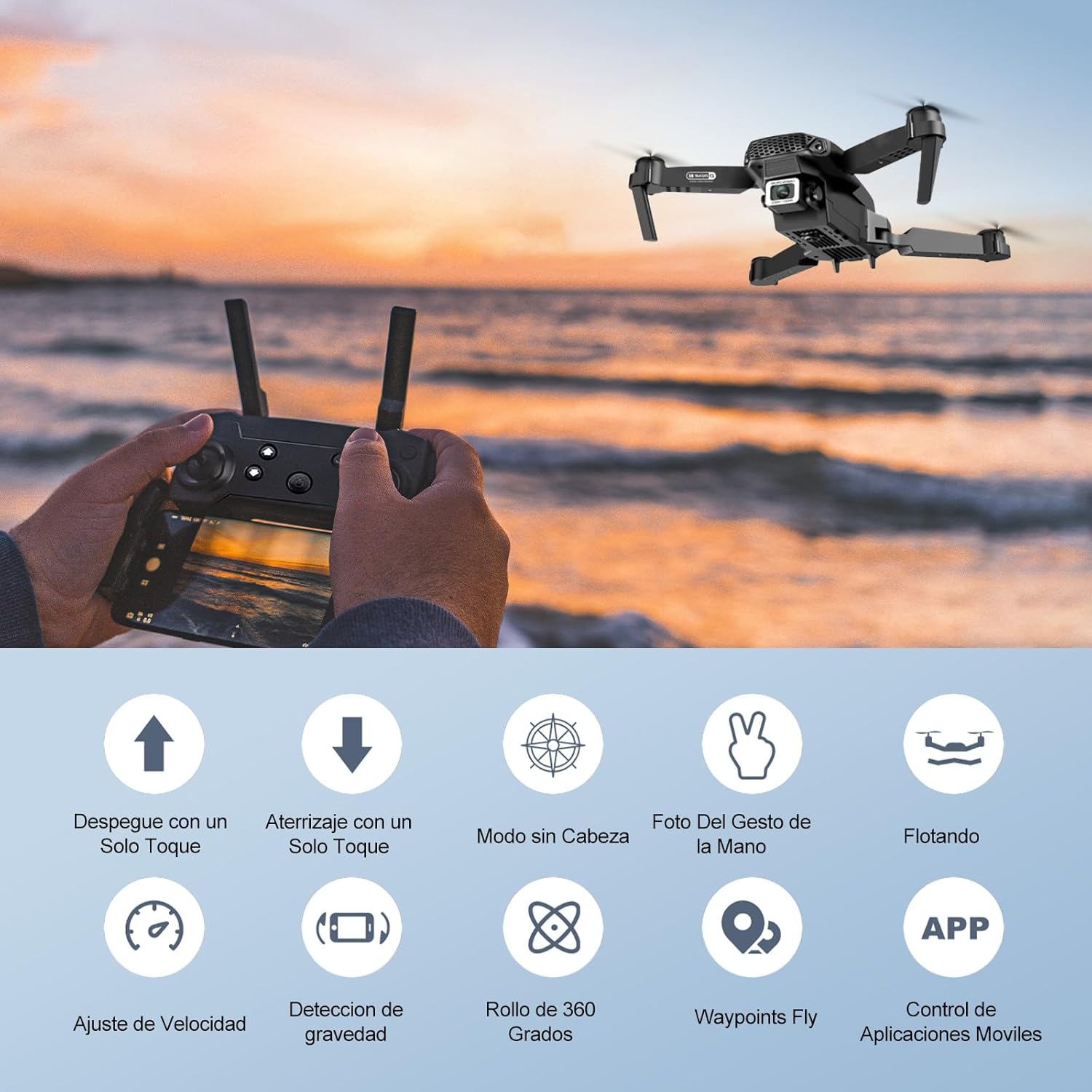
Image: Icons representing various flight features: One-touch takeoff, One-touch landing, Headless Mode, Hand Gesture Photo, Floating (Altitude Hold), Speed Adjustment, Gravity Detection, 360 Degree Roll, Waypoints Fly, and APP Control.
- አንድ-ቁልፍ መነሳት፡- የሚለውን ይጫኑ አንድ-ቁልፍ መነሳት/ማረፊያ button. The drone will automatically ascend and hover at a certain altitude.
- አንድ-ቁልፍ ማረፊያ፡ የሚለውን ይጫኑ አንድ-ቁልፍ መነሳት/ማረፊያ button again. The drone will automatically descend and land.
- ከፍታ መያዝ፡ The drone maintains its current altitude automatically, allowing for stable hovering.
- የግራ ጆይስቲክ (ስሮትል/ያው):
- Push up/down: Increase/decrease altitude.
- Push left/right: Rotate drone left/right.
- Right Joystick (Forward/Backward/Sideways):
- Push up/down: Fly forward/backward.
- Push left/right: Fly left/right (strafe).

Image: The Ourlife Mini Drone taking off or landing with a single button press, illustrating the ease of use for beginners.
3. የላቀ የበረራ ባህሪያት
- ጭንቅላት የሌለው ሁነታ: የሚለውን ይጫኑ ጭንቅላት የሌለው ሁነታ button. In this mode, the drone's orientation is relative to the pilot, regardless of the drone's actual front. This simplifies control, especially for beginners.
- 360° መገልበጥ፡ Fly the drone to a height of at least 2 meters. Press the 360 ° መገልበጥ button, then push the right joystick in any direction to perform a flip in that direction.
- Gesture Control (Photos/Videos): With the KY UFO app open, make specific hand gestures in front of the drone's camera to trigger photo or video recording.
- "V" Gesture: Triggers photo capture.
- የእጅ ምልክት፡- Triggers video recording.
- የመንገድ ነጥብ በረራ፡- In the KY UFO app, draw a desired flight path on your smartphone screen. The drone will automatically follow this path.
- የፍጥነት ማስተካከያ; የሚለውን ይጫኑ የፍጥነት መቀየሪያ button to cycle through low, medium, and high-speed modes. Adjust according to your skill level and environmental conditions.
- የFPV የእውነተኛ ጊዜ ስርጭት፡ Connect your smartphone to the drone's Wi-Fi. Open the KY UFO app to view live video feed from the drone's camera on your phone screen.
- የስበት ኃይል ማነሳሳት፡ In the KY UFO app, activate gravity induction mode. You can then control the drone's movement by tilting your smartphone.

Image: The Ourlife Mini Drone performing a 360-degree flip in the air and demonstrating the Waypoints Fly feature, where the drone follows a pre-drawn path.

Image: Demonstrates 1080P FPV Real-Time Transmission, showing a live view from the drone. Also illustrates gesture control for taking photos (V-sign) and recording videos (palm gesture), and the 120-degree adjustable camera angle.
ጥገና
- ማጽዳት፡ ድሮንን እና የርቀት መቆጣጠሪያውን ለማጽዳት ለስላሳ ደረቅ ጨርቅ ይጠቀሙ። ኃይለኛ ኬሚካሎችን ወይም ፈሳሾችን አይጠቀሙ.
- የፕሮፔለር መተካት If propellers are damaged, replace them with spare ones provided. Ensure correct propeller (A or B) is installed on the corresponding motor.
- የባትሪ እንክብካቤ ባትሪዎቹን ቀዝቃዛና ደረቅ ቦታ ያስቀምጡ። ሙሉ በሙሉ የተሞሉ ወይም ሙሉ በሙሉ የተሟሉ ባትሪዎችን ለረጅም ጊዜ አያስቀምጡ። ለረጅም ጊዜ ማከማቻ እስከ 50% ድረስ ይሙሉ።
- ማከማቻ፡ When not in use, store the drone and its accessories in a safe, dry place, away from direct sunlight and extreme temperatures.
መላ መፈለግ
| ችግር | ሊሆን የሚችል ምክንያት | መፍትሄ |
|---|---|---|
| ድሮን ለርቀት መቆጣጠሪያ ምላሽ አይሰጥም። | Not paired; low battery (drone/remote); interference. | Re-pair drone and remote. Charge batteries. Move to an area with less interference. |
| በበረራ ወቅት ድሮን ይንቀሳቀሳል። | ያልተስተካከለ; በሚነሳበት ጊዜ ያልተስተካከለ ወለል; ነፋስ. | Calibrate the gyroscope (refer to app instructions). Take off from a flat surface. Avoid flying in windy conditions. |
| Camera feed is not showing in app. | Not connected to drone Wi-Fi; app issue. | Ensure phone is connected to the drone's Wi-Fi network. Restart the app and drone. |
| አጭር የበረራ ጊዜ። | ባትሪ ሙሉ በሙሉ አልተሞላም; የድሮ ባትሪ. | ከበረራዎ በፊት ባትሪው ሙሉ በሙሉ መሙላቱን ያረጋግጡ። አሮጌ ባትሪዎችን መተካት ያስቡበት። |
| ድሮን በቀላሉ ይወድቃል። | Lack of experience; strong wind; damaged propellers. | Practice in open areas. Avoid strong winds. Replace damaged propellers. |
ዝርዝሮች

Image: Diagram showing the dimensions of the Ourlife Mini Drone (unfolded and folded) and its remote control in inches.
| ባህሪ | ዝርዝር |
|---|---|
| የምርት ስም | Ourlአይፍ |
| የሞዴል ቁጥር | AF-E88-BK |
| የምርት ክብደት | 430 ግ (በግምት 0.95 ፓውንድ) |
| የምርት ልኬቶች (የተስፋፉ) | 28 x 22 x 5 ሴሜ (በግምት 11 x 8.7 x 2 ኢንች) |
| የምርት ልኬቶች (የታጠፈ) | 12.5 x 8.1 x 5.3 ሴሜ (በግምት 4.9 x 3.2 x 2.1 ኢንች) |
| የባትሪ ዓይነት | ሊቲየም አዮን (2 ተካትቷል) |
| የቪዲዮ ቀረጻ ጥራት | 4K (Dual Cameras) |
| የግንኙነት ቴክኖሎጂ | ዋይ ፋይ |
| የመቆጣጠሪያ ዘዴ | የርቀት መቆጣጠሪያ፣ የስማርትፎን መተግበሪያ |
| ቀለም | ጥቁር |
ዋስትና እና ድጋፍ
Ourlife provides post-sale warranty support for this product. If you encounter any issues with the drone, remote control, or the KY UFO application during flight or operation, please do not hesitate to contact the seller directly for assistance.
For optimal performance and to minimize potential issues, it is recommended to conduct initial flight tests in an open space, especially when using the propeller protectors. Please note that wind interference may occur when operating outdoors.


