1. መግቢያ
Thank you for choosing the Duux Bora Smart Dehumidifier. This manual provides essential information for the safe and efficient operation of your device. Please read it thoroughly before use and retain it for future reference.
The Bora dehumidifier is designed to create a healthier indoor environment by effectively managing high humidity levels. It can remove up to 30 liters of moisture per day, helping to prevent mold and bacterial growth. Featuring an integrated hygrostat for automatic humidity regulation and an active carbon filter for odor removal, the Bora ensures cleaner air. Remote control is available via the Duux application.
2. ጠቃሚ የደህንነት መመሪያዎች
የእሳት፣ የኤሌክትሪክ ንዝረት እና የአካል ጉዳት አደጋን ለመቀነስ የኤሌክትሪክ ዕቃዎችን ሲጠቀሙ ሁል ጊዜ መሰረታዊ የደህንነት ጥንቃቄዎችን ይከተሉ።
- መሣሪያውን ከመሥራቱ በፊት ሁሉንም መመሪያዎች ያንብቡ።
- የኃይል አቅርቦቱ ከቮልዩ ጋር መመሳሰሉን ያረጋግጡtage በደረጃ መለያው ላይ ተገልጿል.
- እርጥበት ማድረቂያውን በተበላሸ ገመድ ወይም መሰኪያ አይጠቀሙ።
- መሳሪያውን ከሙቀት ምንጮች፣ ቀጥታ የፀሐይ ብርሃን እና ተቀጣጣይ ቁሶች ያርቁ።
- የአየር መግቢያዎችን ወይም መውጫዎችን አታግድ.
- ክፍሉን ሁል ጊዜ በተረጋጋ እና ደረጃ ላይ ያድርጉት።
- ከማጽዳቱ፣ ከመንከባከብዎ በፊት ወይም በማይጠቀሙበት ጊዜ ክፍሉን ይንቀሉት።
- ክፍሉን፣ የኤሌክትሪክ ገመድ፣ ወይም ውሃ ወይም ሌላ ፈሳሾችን አታስጠምቁ።
- ይህ መሳሪያ ለደህንነታቸው ኃላፊነት ባለው ሰው ቁጥጥር ወይም መመሪያ ካልተሰጣቸው በስተቀር የአካል፣ የስሜት ወይም የአዕምሮ ችሎታዎች ወይም የልምድ እና የእውቀት እጥረት ላላቸው ሰዎች (ልጆችን ጨምሮ) ለመጠቀም የታሰበ አይደለም።
- ልጆች ከመሳሪያው ጋር እንደማይጫወቱ ለማረጋገጥ ክትትል ሊደረግባቸው ይገባል.
3. ምርት አብቅቷልview
Familiarize yourself with the components of your Duux Bora Dehumidifier.

ምስል 3.1፡ ፊት ለፊት view of the Duux Bora Dehumidifier, showing its sleek design and a smartphone displaying the control app interface.

ምስል 3.2፡ የኋላ view of the dehumidifier, highlighting the removable air filter cover and the continuous drainage port.

ምስል 3.3፡ Top panel of the dehumidifier, displaying the digital screen and touch controls for various functions.
ቁልፍ አካላት፡-
- የቁጥጥር ፓነል Located on the top, with digital display and touch buttons.
- የአየር ማስገቢያ/ወጪ፡ አየር ለመሳብ እና ለማውጣት።
- የውሃ ማጠራቀሚያ; 4-liter capacity, located at the bottom front.
- ንቁ የካርቦን ማጣሪያ; Located behind the rear air inlet.
- ቀጣይነት ያለው የፍሳሽ ማስወገጃ ወደብ፦ For connecting a hose for continuous operation.
- Casters ለቀላል ተንቀሳቃሽነት።
4. ማዋቀር
- ማሸግ፡ Carefully remove the dehumidifier from its packaging. Retain all packaging materials for future transport or storage.
- አቀማመጥ፡-
- ክፍሉን በጠንካራ ደረጃ ላይ ያስቀምጡት.
- Ensure there is at least 20 cm (8 inches) of space around the air inlets and outlets for proper airflow.
- ክፍሉን በሙቀት ምንጮች አጠገብ ወይም በቀጥታ የፀሐይ ብርሃን ውስጥ ከማስቀመጥ ይቆጠቡ.
- The dehumidifier is suitable for various rooms up to 50 square meters, including basements, laundry rooms, and living areas.
- የኃይል ግንኙነት; የኤሌክትሪክ ገመዱን መሬት ላይ ወዳለው የኤሌክትሪክ ሶኬት ይሰኩት። ጥራዝ ያረጋግጡtagሠ ከክፍሉ መስፈርቶች (240 ቮልት) ጋር ይዛመዳል።
- የውሃ ማጠራቀሚያ መትከል; ባለ 4 ሊትር የውሃ ማጠራቀሚያ በትክክል ወደ ክፍሉ ውስጥ መግባቱን ያረጋግጡ.

ምስል 4.1፡ The 4-liter water tank being pulled out from the dehumidifier for emptying or inspection.
- ቀጣይነት ያለው የፍሳሽ ማስወገጃ (አማራጭ): For continuous operation without emptying the water tank, connect a suitable hose (not included) to the continuous drainage port at the back of the unit. Ensure the hose is sloped downwards to allow gravity drainage.
5. የአሠራር መመሪያዎች
5.1. የቁጥጥር ፓነል አሠራር
ምስል 5.1፡ ዝርዝር view of the control panel with digital display and function buttons.
The control panel allows you to manage all functions of the dehumidifier. Refer to the icons on the panel for specific functions.
- የኃይል ቁልፍ፡- ክፍሉን ያበራል ወይም ያጠፋል.
- ሁነታ ምርጫ፡- Cycle through various operating modes (e.g., Auto, Continuous, Laundry Drying).
- የእርጥበት ቅንብር; Adjust the desired humidity level using the up/down arrows. The integrated hygrostat will maintain this level.
- ሰዓት ቆጣሪ፡ ለራስ-ሰር መዝጊያ ሰዓት ቆጣሪ ያዘጋጁ።
- የደጋፊ ፍጥነት፡ Select between 2 fan speeds.
5.2. Smart Control via Duux App
The Duux Bora can be controlled remotely using the Duux application on your smartphone or tablet.

ምስል 5.2፡ The Duux mobile application displaying current humidity and control options for the Bora dehumidifier.
- Download the Duux app from your device's app store.
- Follow the in-app instructions to pair your Bora dehumidifier.
- Once connected, you can power the unit on/off, adjust settings, and receive notifications (e.g., when the water tank is full) from anywhere.
5.3. Laundry Drying Mode
The innovative Laundry Drying Mode is designed to efficiently dry clothes indoors.
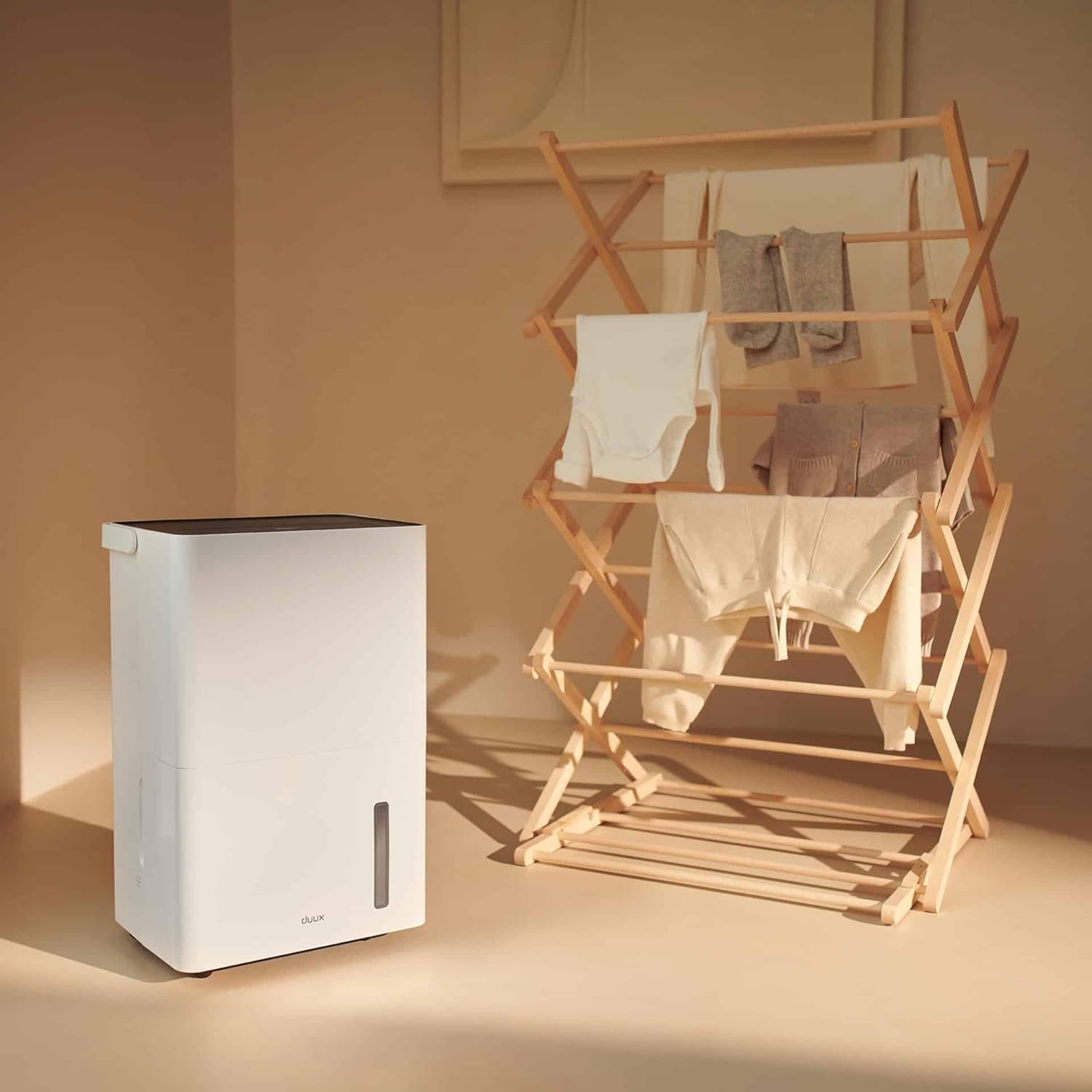
ምስል 5.3፡ The dehumidifier positioned near a laundry rack, demonstrating its use in drying clothes.
- Activate this mode via the control panel or the Duux app.
- This mode operates continuously to remove moisture from the air, accelerating the drying process of laundry.
- It can significantly reduce energy consumption compared to traditional tumble dryers.
6. ጥገና
መደበኛ ጥገና የእርጥበት ማስወገጃዎን ጥሩ አፈጻጸም እና ረጅም ጊዜ ያረጋግጣል።
6.1. የውሃ ማጠራቀሚያውን ባዶ ማድረግ
- የውሃ ማጠራቀሚያው ሲሞላ፣ መሳሪያው በራስ-ሰር ይዘጋል እና የአመላካች መብራት ያበራል።
- የውኃ ማጠራቀሚያውን ከፊት ለፊት በኩል በጥንቃቄ ያውጡ.
- የተሰበሰበውን ውሃ ወደ መታጠቢያ ገንዳ ወይም ፍሳሽ ውስጥ ይጥሉት.

ምስል 6.1፡ A user emptying the collected water from the dehumidifier's tank into a sink.
- Reinsert the empty water tank firmly into the unit until it clicks into place. The unit will resume operation.
6.2. የአየር ማጣሪያውን ማጽዳት
The active carbon filter should be cleaned regularly (e.g., every two weeks or as needed) to maintain air quality and dehumidifier efficiency.
- የእርጥበት ማስወገጃውን ከኃይል ማሰራጫው ያላቅቁት.
- Locate the filter cover at the back of the unit.
- Remove the filter cover and carefully pull out the active carbon filter.

ምስል 6.2፡ A user demonstrating the removal of the active carbon filter from the rear of the dehumidifier.
- Clean the filter with a vacuum cleaner or wash it gently with lukewarm water. Allow it to air dry completely before reinstallation.
- ደረቅ ማጣሪያውን እንደገና ያስገቡ እና የማጣሪያውን ሽፋን ይተኩ።
6.3. አጠቃላይ ጽዳት
- የክፍሉን ውጫዊ ገጽታ ለስላሳ, መamp ጨርቅ. ገላጭ ማጽጃዎችን ወይም ፈሳሾችን አይጠቀሙ.
- ከማጽዳቱ በፊት ክፍሉ እንዳልተሰካ ያረጋግጡ።
7. መላ መፈለግ
የደንበኛ ድጋፍን ከማነጋገርዎ በፊት እባክዎ የሚከተሉትን የተለመዱ ጉዳዮችን እና መፍትሄዎችን ይመልከቱ።
| ችግር | ሊሆን የሚችል ምክንያት | መፍትሄ |
|---|---|---|
| ክፍል አይበራም። | የኃይል አቅርቦት የለም፤ የኃይል ገመድ አልተሰካም፤ የውሃ ማጠራቀሚያው ሙሉ ወይም በስህተት ገብቷል። | የኃይል ግንኙነትን ያረጋግጡ; የውሃ ማጠራቀሚያውን ባዶ ያድርጉ እና እንደገና ያስገቡ። |
| እርጥበት ማድረቂያ (dehumidifier) ውሃ አይሰበስብም። | Room temperature too low; Humidity level already low; Air filter clogged; Unit in fan-only mode. | Ensure room temperature is above 5°C (41°F); Check desired humidity setting; Clean air filter; Select dehumidification mode. |
| ክፍል ጫጫታ ነው። | ዩኒት በደረጃ ወለል ላይ አይደለም; የአየር ማጣሪያ ተዘግቷል; የውስጥ አካላት መንቀጥቀጥ. | በጠፍጣፋ መሬት ላይ ያስቀምጡ፤ የአየር ማጣሪያን ያጽዱ፤ ጫጫታው ከቀጠለ ድጋፍ ሰጪውን ያነጋግሩ። |
| የመተግበሪያ ግንኙነት ችግሮች። | Wi-Fi signal weak; Incorrect pairing procedure; App requires update. | Ensure strong Wi-Fi signal; Re-attempt pairing as per app instructions; Update Duux app. |
| ከመሳሪያው የሚወጣ ደስ የማይል ሽታ። | Active carbon filter needs cleaning or replacement. | Clean or replace the active carbon filter. |
8. ዝርዝሮች
| ባህሪ | ዝርዝር |
|---|---|
| የምርት ስም | ዱክስ |
| የሞዴል ቁጥር | DXDH30 |
| ቀለም | ነጭ |
| የመጥፋት ችሎታ | በቀን እስከ 30 ሊትር |
| የውሃ ማጠራቀሚያ አቅም | 4 ሊትር |
| ጥራዝtage | 240 ቮልት |
| የምርት ልኬቶች (L x W x H) | 24.7 x 33.7 x 51 ሴ.ሜ |
| የእቃው ክብደት | 16.5 ኪ |
| የፍጥነት ብዛት | 2 |
| ራስ-ሰር መዝጋት | Yes (when water tank is full) |
| ልዩ ባህሪያት | Integrated Hygrostat, Active Carbon Filter, Laundry Drying Mode, Smart App Control |
| የሚመከር የወለል አካባቢ | እስከ 50 ካሬ ሜትር |
| የተካተቱ አካላት | 1 ንቁ የካርቦን ማጣሪያ |
9. Warranty and Spare Parts
Duux products are manufactured to high-quality standards. While specific warranty details are not provided in this manual, please refer to your purchase documentation or the official Duux webየዋስትና መረጃ ለማግኘት አጠቃላይ ጣቢያ።
መለዋወጫ አቅርቦት፡- Spare parts for the Duux Bora Dehumidifier are available for up to 10 years from the date of purchase, ensuring long-term usability and repairability.
10. የደንበኛ ድጋፍ
If you encounter any issues not covered in the troubleshooting section or require further assistance, please contact Duux customer support.
- Visit the official Duux webበተደጋጋሚ የሚጠየቁ ጥያቄዎች፣ የድጋፍ ግብዓቶች እና የእውቂያ መረጃ ጣቢያ።
- Utilize the Duux app for remote monitoring and potential in-app support features.


