1. መግቢያ
The Andesfit Bluetooth Blood Pressure Monitor is designed for accurate and convenient blood pressure measurement at home. This device combines advanced technology with user-friendly features, allowing you to monitor your health effectively and share data with healthcare professionals. It is FDA Cleared and CE Certified, ensuring high quality and safety standards.

Figure 1: Andesfit Blood Pressure Monitor with included cuffs and companion app.
2. ምን ይካተታል
Your Andesfit Blood Pressure Monitor package includes the following components:
- Andesfit Blood Pressure Monitor Unit
- Large Blood Pressure Cuff (9-17 inches arm circumference)
- Extra Large Blood Pressure Cuff (13-21 inches arm circumference)
- 4 AA ባትሪዎች (ተጨምሯል)
- USB Type-C Cable (for power, not charging batteries)
- የማጠራቀሚያ ቦርሳ
- የተጠቃሚ መመሪያ (ይህ ሰነድ)

Figure 2: All components included in the Andesfit Blood Pressure Monitor package.
3. ማዋቀር
3.1 መሳሪያውን ማብቃት
The monitor can be powered using the included AA batteries or via the USB Type-C cable. USB power is prioritized if both are connected.
- የባትሪ ጭነት; Open the battery compartment on the back of the monitor. Insert the 4 AA batteries, ensuring correct polarity (+/-). Close the compartment.
- USB ኃይል: Connect the provided USB Type-C cable to the monitor's USB port and plug the other end into a compatible USB power source (e.g., wall adapter, power bank). Note: The USB port is for power supply only and does not charge the batteries.

Figure 3: Dual power mode options for the monitor.
3.2 ኩምቡን ማያያዝ
Select the appropriate cuff size (Large or Extra Large) for your arm. Connect the cuff's air tube securely into the air jack on the side of the monitor unit.

Figure 4: The two included cuff sizes for optimal fit.
3.3 App Installation (Optional but Recommended)
For enhanced tracking and data management, download the "ANDESFITBP" app from your smartphone's app store (Apple App Store or Google Play Store). The app allows for unlimited data storage and easy sharing.
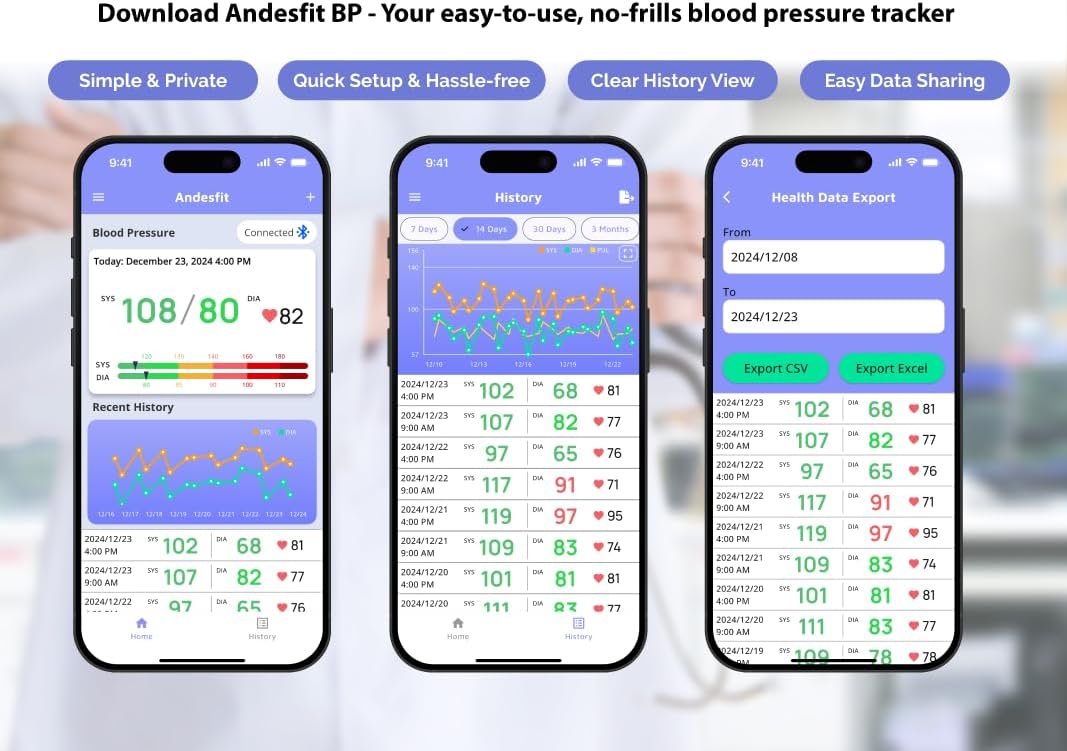
ምስል 5 - ተጠናቀቀview of the Andesfit BP app features.
ማስታወሻ፡- The app does not require personal data input or login, ensuring your privacy. Data is stored locally on your device and can be synced with Apple Health or Google Fit.
4. የአሠራር መመሪያዎች
4.1 መለካት
- ለመለካት ይዘጋጁ፡- ጀርባዎ ተደግፎ እግሮችዎን መሬት ላይ አድርገው በምቾት ይቀመጡ። ክንድዎን በጠረጴዛ ላይ ያድርጉት፣ ይህም የልብ ጡንቻዎ እንዲረጋጋ ያደርጋል። በመለኪያ ጊዜ ከመናገር ወይም ከመንቀሳቀስ ይቆጠቡ።
- ጉንፉን ይተግብሩ፦ Wrap the cuff around your bare upper arm, ensuring the air tube is positioned correctly (usually aligned with your middle finger). The cuff should be snug but not too tight.
- መለኪያ ጀምር፡ Press the "START/STOP" button on the monitor. The cuff will automatically inflate and then slowly deflate as it measures your blood pressure.
- ውጤቶች አንብብ፡- Your Systolic (SYS), Diastolic (DIA), and Pulse (PUL) readings will be displayed on the large 6-inch color LED screen. The screen also features a WHO color-coded indicator for easy interpretation of your blood pressure level.
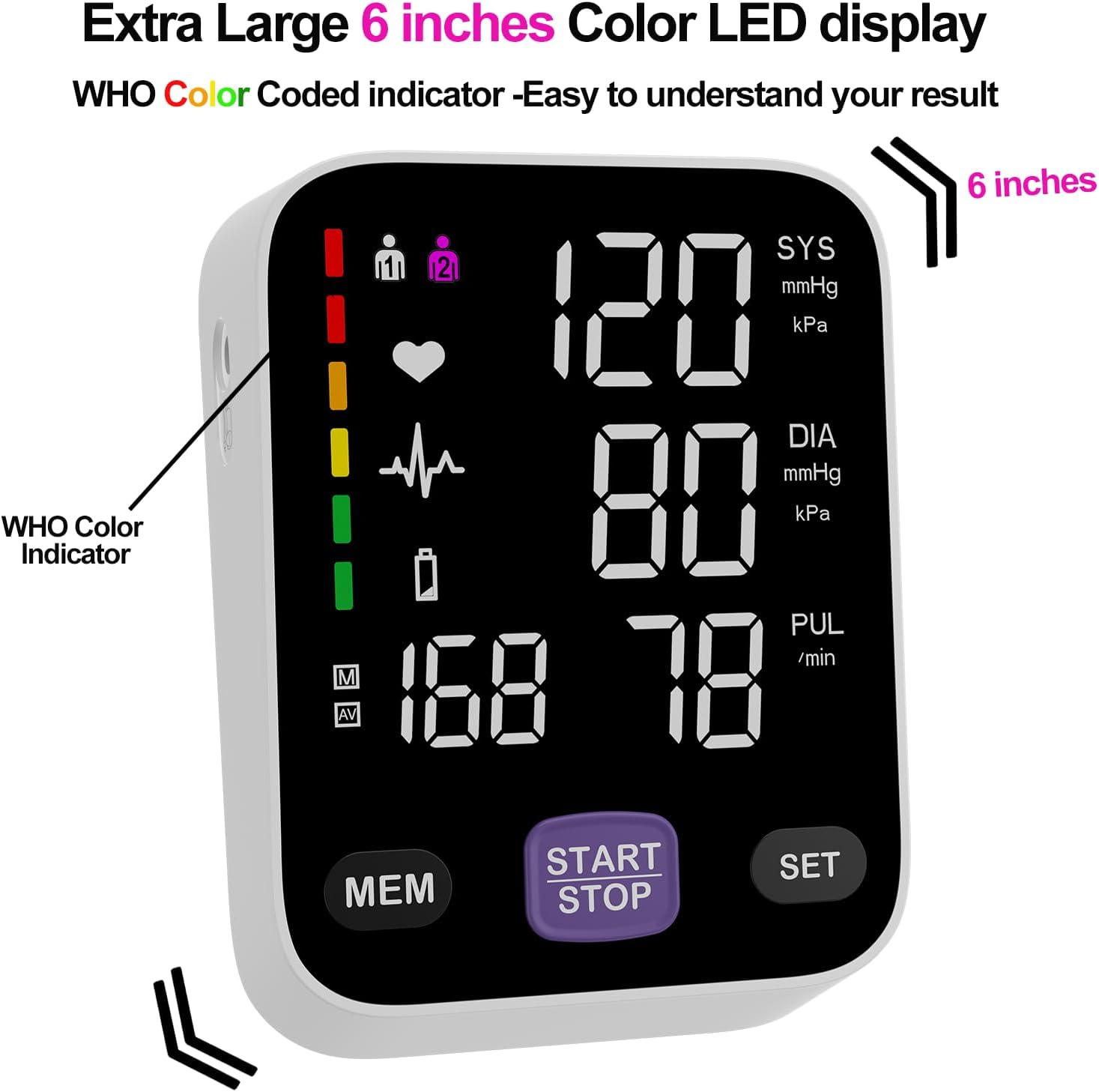
Figure 6: The monitor's large color LED display with WHO color indicator.
4.2 Using the App with the Monitor
Once the app is installed and Bluetooth is enabled on your smartphone, simply switch on your blood pressure monitor and open the app. The app will automatically connect to the device. Your measurement readings will be synced and stored in the app, providing a comprehensive history of your blood pressure trends.
You can export your data as CSV files to share with your doctor or for personal record-keeping.
Video 1: Official Andesfit video demonstrating the Bluetooth blood pressure monitor and app connectivity.
5. ጥገና
- ማጽዳት፡ ተቆጣጣሪውን እና ለስላሳ እና ደረቅ ጨርቅ ይጥረጉ። ገላጭ ማጽጃዎችን አይጠቀሙ ወይም መሳሪያውን በውሃ ውስጥ አያጥቡት.
- ማከማቻ፡ መሳሪያውን በተዘጋጀው የማከማቻ ከረጢት ውስጥ ከቀጥታ የፀሐይ ብርሃን እና ከፍተኛ የሙቀት መጠን ራቅ ባለ ቀዝቃዛና ደረቅ ቦታ ያስቀምጡት።
- የባትሪ መተካት፡ ዝቅተኛ የባትሪ አመልካች በማሳያው ላይ ሲታይ ሁሉንም 4 የ AA ባትሪዎች ይተኩ።
6. መላ መፈለግ
If you encounter issues with your Andesfit Blood Pressure Monitor, please refer to the following common solutions:
| ችግር | ሊሆን የሚችል ምክንያት | መፍትሄ |
|---|---|---|
| ምንም ማሳያ/መሣሪያ አይበራም። | Batteries are low or incorrectly installed; USB cable not connected properly. | Replace batteries or ensure correct polarity. Check USB cable connection. |
| ትክክለኛ ያልሆኑ ንባቦች | Improper cuff placement; movement or talking during measurement; incorrect posture. | Ensure cuff is correctly applied and snug. Remain still and silent during measurement. Sit upright with feet flat. |
| መተግበሪያ በብሉቱዝ አይገናኝም። | Bluetooth is off on phone/monitor; app permissions not granted. | Ensure Bluetooth is enabled on both devices. Check app permissions in phone settings. Restart app/monitor. |
7. ዝርዝሮች
| ባህሪ | ዝርዝር |
|---|---|
| የምርት ልኬቶች | 4.5"ኤል x 4.2" ዋ x 1.9"ሰ |
| የንጥል ሞዴል ቁጥር | A02-SEB |
| ባትሪዎች | 4 AA ባትሪዎች (ተጨምሯል) |
| አምራች | Shenzhen GoodlyMed Technology Co., Ltd. |
| የኃይል ምንጭ | በባትሪ የተጎላበተ/የዩኤስቢ ዓይነት-ሲ |
| የማሳያ ዓይነት | LED Color Display (6 inches) |
| የካፍ መጠኖች | 9-17 inches (Large), 13-21 inches (Extra Large) |
| የውሂብ ማከማቻ | 2 users * 199 readings (device), Unlimited (app) |
| የምስክር ወረቀቶች | FDA Cleared & CE Certified |
8. ዋስትና እና ድጋፍ
Andesfit products are designed for reliability and performance. For information regarding warranty coverage and technical support, please contact Andesfit directly. You can find contact details on the official Andesfit webጣቢያ ወይም በግዢ መድረክዎ በኩል።
የመመለሻ መመሪያ፡ ይህ ምርት በተለምዶ በመደበኛ የችርቻሮ ውሎች መሠረት ተመላሽ ገንዘብ ወይም ምትክ ለማድረግ የ30-ቀን የመመለሻ ፖሊሲ አለው።


