መግቢያ
Thank you for choosing the TECKNET Wireless Doorbell TK-WD004. This manual provides detailed instructions for the installation, operation, and maintenance of your new doorbell system. Please read this manual thoroughly before use to ensure proper functionality and safety.
The TECKNET Wireless Doorbell offers a reliable and convenient solution for your home or office. Key features include a long wireless range of up to 400 meters, IP65 waterproof rating for outdoor use, 60 selectable melodies, 5 adjustable volume levels, and RGB indicators for visual alerts.
የጥቅል ይዘቶች
እባክዎን ጥቅሉን ለሚከተሉት ነገሮች ያረጋግጡ፡
- 1 x ገመድ አልባ የበር ደወል አስተላላፊ (የግፊት ቁልፍ)
- 1 x Wireless Doorbell Receiver (Chime Unit)
- 1 x CR2032 Lithium Battery (pre-installed in transmitter)
- Mounting Hardware (screws, anchors, double-sided adhesive tape)
- የተጠቃሚ መመሪያ

Image: The package contents, showing the doorbell transmitter, receiver, and installation accessories.
ምርት አልቋልview
The TECKNET Wireless Doorbell system consists of two main components: the transmitter (push button) and the receiver (chime unit).
Transmitter (Push Button)
- የግፊት ቁልፍ፡- የበር ደወል ቃጭሉን ያነቃቃል።
- የ LED አመልካች፡- አዝራሩ ሲጫን ያበራል።
- የባትሪ ክፍል፡ የ CR2032 ባትሪ ይይዛል።
- የውሃ መከላከያ ሲasing: IP65 rated for outdoor durability.
Receiver (Chime Unit)
- ተናጋሪ፡- Emits the selected melody.
- የድምጽ መጠን አዝራር፡- Adjusts the chime volume (5 levels, 0-120 dB).
- የዜማ ምርጫ አዝራር፡ በ60 የሚገኙ ዜማዎች ውስጥ ይሽከረከራል።
- ሁነታ አዝራር፡- Selects between LED flash, chime, or both.
- የRGB አመልካች፡ Provides visual alerts with customizable lighting modes.
- የኃይል መሰኪያ Plugs directly into a standard electrical outlet.

ምስል: ዝርዝር view of the doorbell receiver and transmitter, highlighting the RGB indicator, melody selection buttons, volume control, and the push button.
ማዋቀር እና መጫን
The TECKNET Wireless Doorbell is designed for easy installation. Follow these steps to set up your doorbell system.
Step 1: Install the Receiver
- Plug the receiver into a standard electrical outlet in your desired location. Ensure the outlet is easily accessible and within the wireless range of the transmitter.
- The receiver does not require batteries.
Step 2: Install the Transmitter (Push Button)
The transmitter can be installed using either adhesive tape or screws.
Option A: Adhesive Mounting
- Clean the mounting surface thoroughly to ensure it is dry and free of dust or grease.
- Peel off one side of the double-sided adhesive tape and apply it firmly to the back of the transmitter.
- Peel off the other side of the tape and press the transmitter firmly onto the desired location (e.g., door frame or wall). Hold for at least 30 seconds.
አማራጭ ለ፡ ስክሩ ማፈናቀል
- ማስተላለፊያውን ክፈት ሐasinግ በጥንቃቄ።
- Mark the positions for the screw holes on your desired mounting surface.
- አስፈላጊ ከሆነ የሙከራ ቀዳዳዎችን ይቆፍሩ እና የግድግዳ መልሕቆችን ያስገቡ።
- Secure the transmitter base to the wall using the provided screws.
- Reattach the transmitter casing.

Image: Visual guide for installing the doorbell transmitter using either adhesive tape or screws.
Note: The transmitter comes with a pre-installed CR2032 lithium battery, offering a lifespan of up to 3 years.
የአሠራር መመሪያዎች
1. ዜማዎችን መቀየር
- Press the "Melody Selection" button on the receiver to cycle through the 60 available melodies.
- Once you hear your desired melody, stop pressing the button. The receiver will automatically save your selection.

Image: The doorbell receiver displaying musical notes, illustrating the selection of 60 different melodies.
2. የድምጽ መጠን ማስተካከል
- Press the "Volume" button on the receiver to adjust the sound level.
- There are 5 adjustable volume levels, ranging from 0 dB (mute) to 120 dB.
- The mute mode (0 dB) is useful for quiet environments or when visual alerts are preferred.
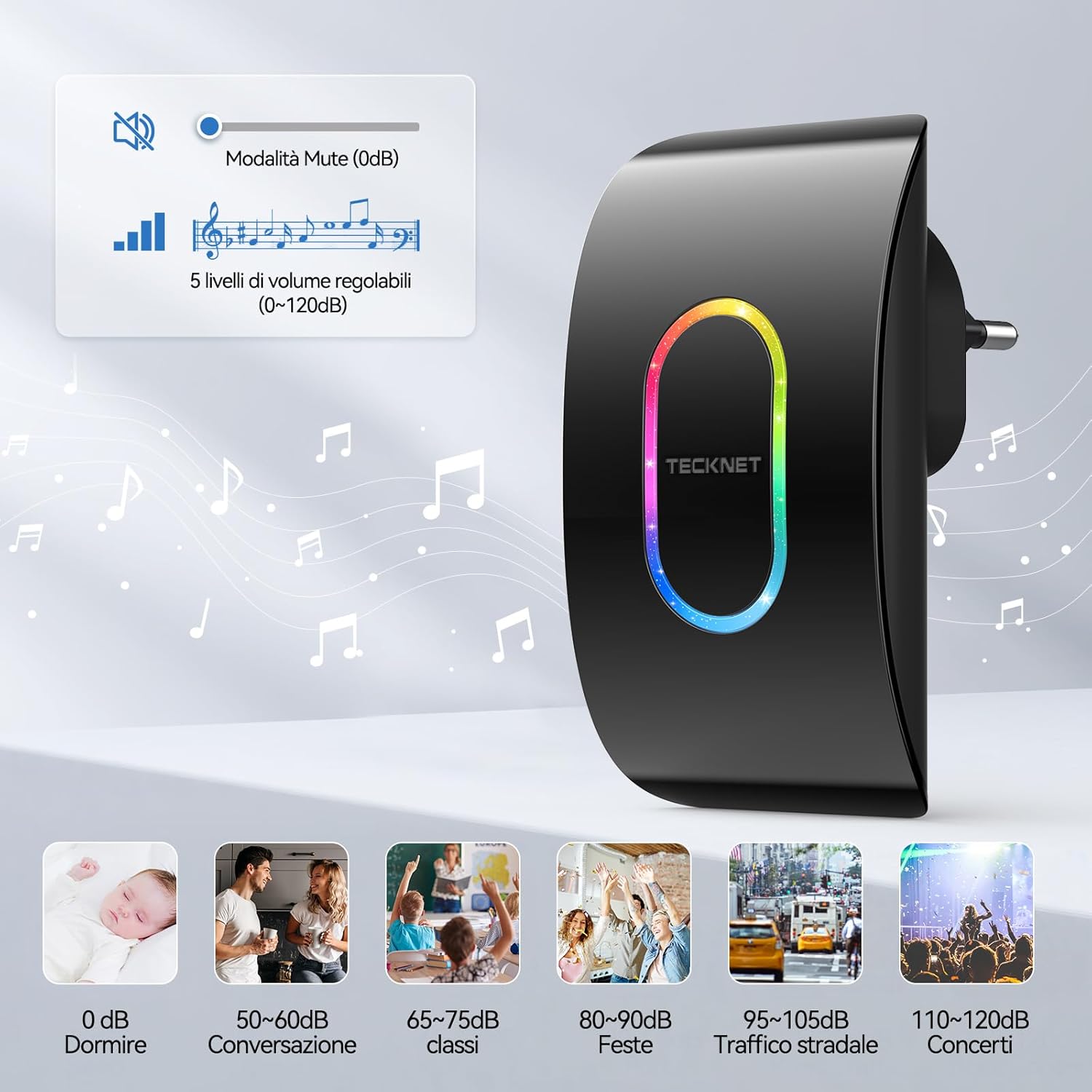
Image: A visual representation of the 5 volume levels, from silent (0 dB) to loud (120 dB), with corresponding typical sound environments.

Image: The doorbell receiver in silent mode, ideal for environments like a baby's room.
3. Selecting Lighting Modes (RGB Indicators)
- Press the "Mode" button on the receiver to switch between different notification modes.
- Available modes typically include:
- LED and Chime: Both sound and visual alert.
- Only LED: Visual alert only (silent mode).
- Only Chime: Sound alert only (no LED flash).
- The RGB indicator also offers various flash patterns such as "Ghost Flash", "Marching Flash", and "Breathing Flash" for visual distinction.

Image: Illustration of the three distinct RGB flash modes: Ghost Flash, Marching Flash, and Breathing Flash, providing visual cues for doorbell activation.

Image: The doorbell receiver's side view with labeled buttons for mode, melody, and volume, alongside visual examples of the three working modes: LED and chime, LED only, and chime only.
4. የማስታወስ ተግባር
The doorbell receiver features a memory function that retains your last selected melody and volume level even after a power outage or if unplugged.

Image: A graphic illustrating the doorbell's memory function, which saves your preferred melody and volume settings.
ጥገና
የባትሪ መተካት (ማስተላለፊያ)
The transmitter uses a CR2032 lithium battery with an estimated lifespan of up to 3 years. When the transmitter's LED indicator no longer lights up or the range decreases significantly, it's time to replace the battery.
- አስተላላፊውን በጥንቃቄ ይክፈቱ ሐasing.
- የድሮውን CR2032 ባትሪ ያስወግዱ።
- አወንታዊው (+) ጎን ወደላይ የሚያይ አዲስ የCR2032 ባትሪ ያስገቡ።
- ሐን ዝጋasinሰ በአስተማማኝ ሁኔታ.
ማጽዳት
Wipe the doorbell units with a soft, dry cloth. Do not use abrasive cleaners or solvents, as these may damage the surface or internal components.
የአየር ሁኔታ መቋቋም
The transmitter is IP65 rated, meaning it is protected against dust ingress and low-pressure water jets from any direction. It is designed to withstand various weather conditions, including temperatures from -20°C (-4°F) to 60°C (140°F).

Image: The doorbell transmitter demonstrating its IP65 waterproof and dustproof capabilities, along with its operational temperature range.
መላ መፈለግ
| ችግር | ሊሆን የሚችል ምክንያት | መፍትሄ |
|---|---|---|
| የበር ደወል አይጮህም። |
|
|
| አጭር የገመድ አልባ ክልል። |
|
|
| Chime sounds intermittently. |
|
|
ዝርዝሮች
| ባህሪ | ዝርዝር |
|---|---|
| የሞዴል ቁጥር | TK-WD004 |
| ገመድ አልባ ክልል | እስከ 400 ሜትር (1300 ጫማ) |
| ዜማዎች | 60 ሊመረጡ የሚችሉ ቃጭሎች |
| የድምጽ ደረጃዎች | 5 adjustable levels (0 dB to 120 dB) |
| የውሃ መከላከያ ደረጃ (ማስተላለፊያ) | IP65 |
| የአሠራር ሙቀት | -20°ሴ እስከ 60°ሴ (-4°F እስከ 140°ፋ) |
| አስተላላፊ ባትሪ | 1 x CR2032 ሊቲየም ባትሪ (ተካቷል) |
| የተቀባይ ኃይል | AC powered (plugs into outlet) |
| የምርት ልኬቶች | Receiver: 8.7 x 7.5 x 11.2 cm; Transmitter: 5.8 x 4.1 x 7.5 cm (approximate, based on image) |
| ክብደት | 160 grams (total package weight) |

Image: Visual representation of the dimensions for both the receiver and the transmitter units.
ዋስትና እና ድጋፍ
TECKNET provides a 36-month support period for this product. If you encounter any issues during the use of the product, please contact the professional TECKNET customer service team for assistance.
For further support or warranty claims, please refer to the contact information provided on the TECKNET official webጣቢያ ወይም የግዢ ሰነድዎ።


