1. መግቢያ
This manual provides detailed instructions for the installation, operation, and maintenance of your GENBOLT GB220K 2.5K PTZ Dual-Lens WiFi/PoE Security Camera. Please read this manual thoroughly before using the product to ensure proper functionality and safety. Keep this manual for future reference.

Figure 1: GENBOLT GB220K 2.5K PTZ Dual-Lens WiFi/PoE Security Camera. This image shows the camera's front view, highlighting its dual lenses and the 2.5K resolution, 10X zoom, and PoE capabilities.
2. የጥቅል ይዘቶች
Verify that all items listed below are included in your package. If any items are missing or damaged, please contact GENBOLT customer support.
- GENBOLT GB220K Security Camera
- የኃይል አስማሚ
- የመገጣጠም ቅንፍ
- የአውታረ መረብ ገመድ
- የውሃ መከላከያ ኪት
- ብሎኖች እና የግድግዳ መሰኪያዎች
- የተጠቃሚ መመሪያ (ይህ ሰነድ)

Figure 2: Included Components. This image displays the camera along with its accessories: power adapter, mounting bracket, network cable, waterproof kit, screws, and user manual.
3. የደህንነት መረጃ
- ካሜራው እንዳይወድቅ በተረጋጋ ቦታ ላይ መጫኑን ያረጋግጡ።
- Use only the provided power adapter or a compatible PoE switch to power the camera.
- Avoid placing the camera directly facing strong light sources to prevent image quality degradation.
- ካሜራውን ለከፍተኛ የሙቀት መጠን ወይም ለቆሻሻ አካባቢዎች አያጋልጡት።
- Keep the camera away from children.
4. ማዋቀር እና መጫን
4.1 ካሜራውን መጫን
The GENBOLT GB220K camera is designed for ceiling mount installation. Ensure the mounting surface is strong enough to support the camera's weight.
- ለመጫን በጣራው ላይ ተስማሚ ቦታ ይምረጡ.
- Use the mounting template (if provided) to mark the drill holes.
- Drill holes according to the marks and insert the wall plugs.
- የተሰጡትን ዊንጮችን በመጠቀም የመትከያውን ቅንፍ ወደ ጣሪያው ይጠብቁ።
- ካሜራውን ወደ መጫኛው ቅንፍ ያያይዙት.

Figure 3: Ceiling Installation. This image illustrates the camera mounted on a ceiling, demonstrating its wide coverage area with pan and tilt functionality.
4.2 Powering the Camera (DC & PoE)
The camera supports both DC power and Power over Ethernet (PoE).
- የዲሲ ኃይል Connect the provided power adapter to the camera's DC power input and plug it into a power outlet.
- ነጥብ: - Connect an Ethernet cable from a PoE-enabled switch or NVR to the camera's Ethernet port. This will provide both power and data connectivity.

Figure 4: DC and PoE Connection Options. This diagram illustrates how to connect the camera using either a DC power adapter or a PoE switch for both power and network.
4.3 Network Connection (WiFi & PoE)
The camera supports both 2.4GHz/5GHz Dual-Band WiFi and wired Ethernet (PoE) connections.
- ባለገመድ ግንኙነት (PoE): If using PoE, the network connection is established automatically once the Ethernet cable is connected to a PoE switch/NVR.
- Wireless Connection (WiFi):
- Download the 'GENBOLT CAM' app from your smartphone's app store.
- Ensure your phone's location services and Bluetooth are enabled.
- Open the app, tap 'Add Camera', and follow the on-screen instructions to connect to your WiFi network. You may need to scan a QR code displayed on your phone with the camera lens.
Video 1: Bluetooth Network Connection Method. This video demonstrates the process of connecting the camera to your network using the GENBOLT CAM app via Bluetooth setup.
Video 2: Camera Connection Instructions. This video provides a general guide on how to establish a connection with your GENBOLT camera.
5. የአሠራር መመሪያዎች
5.1 ቀጥታ ስርጭት View & መልሶ ማጫወት
የቀጥታ የቪዲዮ ምግቦች ይድረሱ እና እንደገናview ተመዝግቧል footage through the 'GENBOLT CAM' app or compatible desktop client.

Figure 5: Multi-Platform Access. This image shows the GENBOLT CAM app interface on various devices (smartphone, tablet, laptop, desktop), demonstrating live view and playback capabilities across multiple platforms.
5.2 Pan/Tilt/Zoom Control
The camera features Pan-Tilt-Zoom (PTZ) functionality, allowing you to adjust the viewየርቀት አንግል.
- ፓን ካሜራውን እስከ 355 ዲግሪ አግድም አዙረው።
- ዘንበል ካሜራውን እስከ 90 ዲግሪ ድረስ በአቀባዊ ያስተካክሉት።
- 10X ሃይብሪድ ዙም፦ Utilize the dual lenses for 10X hybrid zoom to view details or a wider area. The camera automatically zooms 3X when human motion is detected.
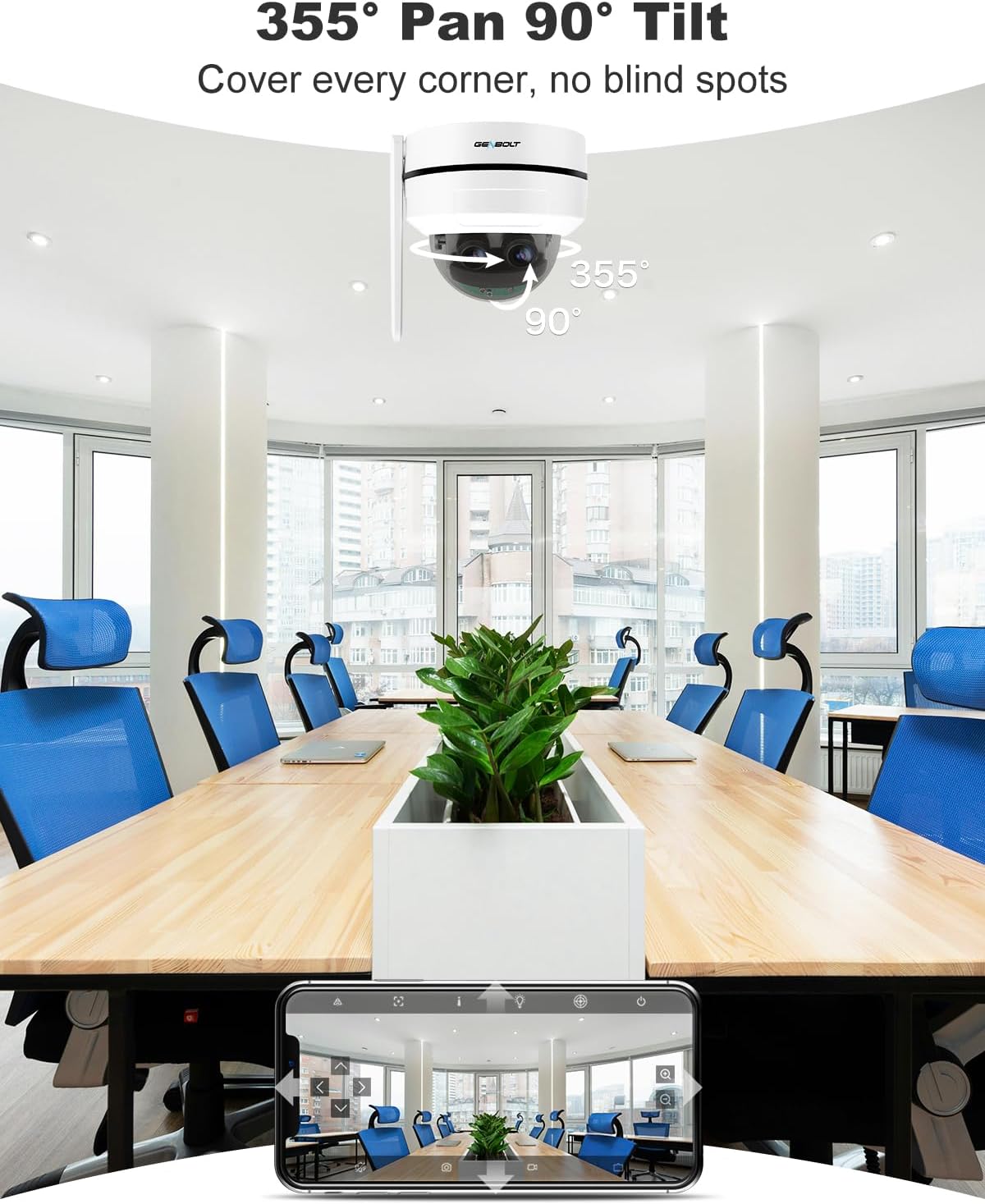
Figure 6: Pan and Tilt Coverage. This image illustrates the camera's ability to pan 355 degrees horizontally and tilt 90 degrees vertically, covering a wide area without blind spots.

Figure 7: Dual Lens & 10X Hybrid Zoom. This image highlights the camera's dual lens system, featuring a 4mm lens for a wide overview and a 12mm lens for detailed close-ups, enabling 10X hybrid zoom.
5.3 ባለ ሁለት መንገድ ኦዲዮ
The integrated microphone and speaker allow for two-way communication through the camera.
- Use the app to speak through the camera's speaker.
- Listen to audio from the camera's surroundings through the app.

Figure 8: Two-Way Audio. This image demonstrates the camera's two-way audio feature, allowing communication between the camera's location and the user via the mobile app.
5.4 የእንቅስቃሴ ማወቂያ እና ማንቂያዎች
The camera can detect motion and send instant alerts to your device.
- Configure motion detection zones and sensitivity in the app.
- Receive push notifications or email alerts when motion is detected.
- Set up customizable sound alarms (e.g., siren, dog barking) to deter intruders.
- The auto-tracking feature allows the camera to follow detected human movement.

Figure 9: Auto Tracking. This image shows the camera's auto-tracking feature, where it follows a moving person, ensuring important events are captured.

Figure 10: Customizable Sound Alarm. This image illustrates the camera's ability to trigger a customizable siren or other sounds to deter potential intruders, with app settings shown.
5.5 የምሽት ራዕይ
The camera provides clear surveillance even in low-light conditions with its IR night vision feature.
- Automatically switches to night vision mode in dark environments.
- Night vision range up to 15 meters.
5.6 የማከማቻ አማራጮች
Recordings can be stored locally or in the cloud.
- የማይክሮ ኤስዲ ካርድ፡ እስከ 128GB ድረስ ይደግፋል (አልተካተተም)።
- የደመና ማከማቻ፡ Offers a 7-day free trial. Uploads events to an encryption server for secure playback.

Figure 11: Flexible Storage Options. This image displays the mobile app interface, illustrating the available storage methods: cloud storage (with a 7-day free trial) and TF card storage (up to 128GB).
6. ጥገና
- የካሜራ ሌንስን ለስላሳና ደረቅ ጨርቅ አዘውትረው ያጽዱ፤ ይህም የምስል ጥራት ግልጽ እንዲሆን ያደርጋል።
- የኬብል ግንኙነቶችን በየጊዜው ይፈትሹ፤ የመበስበስ ወይም የመጎዳት ምልክቶችን ለማየት።
- Ensure the camera's firmware is updated to the latest version for optimal performance and security.
- If using an SD card, consider formatting it periodically to maintain performance.
7. መላ መፈለግ
7.1 ምንም ኃይል የለም
- የኃይል አስማሚው ደህንነቱ በተጠበቀ ሁኔታ ከካሜራ እና ከኃይል መውጫው ጋር መገናኘቱን ያረጋግጡ።
- If using PoE, ensure the Ethernet cable is properly connected to a PoE-enabled switch/NVR and that the switch/NVR is powered on.
7.2 ከዋይፋይ ጋር መገናኘት አይቻልም
- Ensure your WiFi network is 2.4GHz or 5GHz compatible.
- Verify the WiFi password entered is correct.
- Move the camera closer to the WiFi router to improve signal strength.
- ካሜራውን እና ራውተርዎን እንደገና ያስጀምሩ።
7.3 ደካማ የምስል ጥራት
- የካሜራውን ሌንስ ያጽዱ.
- ካሜራውን የሚያግዱ ምንም እንቅፋቶች አለመኖራቸውን ያረጋግጡ view.
- Check your network connection speed. A slow connection can affect streaming quality.
7.4 Auto Tracking Not Working
- Ensure the auto-tracking feature is enabled in the app settings.
- Verify that the camera's field of view ግልጽ ነው እና እንቅፋት የለውም።
- አስፈላጊ ከሆነ የእንቅስቃሴ ማወቂያ ስሜታዊነትን ያስተካክሉ።
ለተጨማሪ እርዳታ እባክዎን የድጋፍ ክፍሉን ይመልከቱ።
8. ዝርዝሮች
| የሞዴል ቁጥር | GB220K |
| የቪዲዮ ጥራት | 2.5K HD (4MP+4MP Dual Lens) |
| አጉላ | 10X ሃይብሪድ ዙም |
| የፓን / ዘንበል አንግል | ፓን፡ 355 ዲግሪ፣ ማዘንበል፡ 90 ዲግሪ |
| የምሽት ራዕይ ክልል | 15 ሜትር |
| ግንኙነት | 2.4/5GHz Dual WiFi, Power over Ethernet (PoE) |
| ማከማቻ | MicroSD Card (Max 128GB, not included), Cloud Storage |
| ኦዲዮ | ባለ ሁለት መንገድ ንግግር (አብሮ የተሰራ ማይክሮፎን እና ድምጽ ማጉያ) |
| ዘላቂነት | IK10 Vandalproof, IP66 Waterproof |
| የመጫኛ አይነት | የጣሪያ ተራራ |
| መጠኖች | 15 x 14.99 x 15 ሴ.ሜ |
| ክብደት | 890 ግ |

Figure 12: 2.5K Image Quality. This image visually compares the clarity of 2.5K resolution against 1080P, demonstrating the superior detail captured by the camera.

Figure 13: Reliable Protection. This image emphasizes the camera's robust design with IK10 vandal resistance and IP66 weatherproofing, ensuring durability in various environments.
9. ዋስትና እና ድጋፍ
- የ30-ቀን ገንዘብ ተመላሽ ዋስትና፡ If you are not satisfied with your purchase, you may return it within 30 days for a full refund or exchange.
- የ1-ዓመት የተወሰነ ዋስትና፡ The GENBOLT GB220K camera is covered by a 1-year limited warranty against manufacturing defects.
- 24/7 Lifetime Free Technical Support: For any technical issues or questions, please contact GENBOLT customer support.
የእውቂያ መረጃ፡-
- Visit the official GENBOLT webለድጋፍ ሀብቶች ጣቢያ.
- Refer to the 'GENBOLT CAM' app for in-app support options.
Video 3: 4K Dual Lens WiFi Security Camera Outdoor with PoE. This video showcases the features and capabilities of a GENBOLT dual-lens security camera, including WiFi and PoE connectivity, similar to the GB220K model.