1. መግቢያ
Thank you for choosing the Sharkoon AK6 RGB ATX PC Case. This manual provides essential information for the proper installation, operation, and maintenance of your new PC case. Please read this guide thoroughly before beginning the assembly process to ensure optimal performance and longevity of your components.
2. የደህንነት መረጃ
- በፒሲ መያዣ ውስጥ ያሉትን ማንኛውንም ክፍሎች ከመጫንዎ ወይም ከማስወገድዎ በፊት የኃይል አቅርቦቱን ከግድግዳ ሶኬት ሁልጊዜ ያላቅቁ።
- የተስተካከሉ የመስታወት ፓነሎችን በጥንቃቄ ይያዙ። በቀላሉ የሚሰበሩ እና ከተጣሉ ወይም ከተነኩ ሊሰበሩ ይችላሉ።
- Avoid exposing the case to extreme temperatures, humidity, or direct sunlight.
- ትናንሽ ክፍሎችን እና ዊንጮችን ከልጆች እጅ ያርቁ።
- በኤሌክትሮኒክስ ክፍሎች ላይ የኤሌክትሮስታቲክ ፍሳሽ (ESD) ጉዳት እንዳይደርስ ለመከላከል ተገቢውን መሬት መዘርጋት ያረጋግጡ።
3. የጥቅል ይዘቶች
እባክዎ ሁሉም እቃዎች በጥቅልዎ ውስጥ መኖራቸውን ያረጋግጡ፡-
- Sharkoon AK6 RGB ATX ፒሲ መያዣ
- Accessory box (containing screws, cable ties, and other small parts)
- የተጠቃሚ መመሪያ (ይህ ሰነድ)
4. ምርት አብቅቷልview
The Sharkoon AK6 RGB ATX PC Case is designed with a modern glass aesthetic, featuring seamless integration of tempered glass on the front and side panels. It includes four pre-installed 120mm addressable RGB PWM fans for optimal airflow and visual appeal. The case supports a wide range of components, including BTF motherboards, and offers ample space for high-performance hardware.

Figure 4.1: Front interior view of the Sharkoon AK6 RGB PC case, showcasing the pre-installed addressable RGB fans and the spacious main chamber.

ምስል 4.2: ማዕዘን view of the Sharkoon AK6 RGB PC case, highlighting the tempered glass side panel and the top mesh for ventilation.

ምስል 4.3: የኋላ view of the Sharkoon AK6 RGB PC case, showing the I/O shield cutout, rear exhaust fan mount, and expansion slots.
የፊት I/O ፓነል
The front I/O panel is located on the side of the case and includes:
- የኃይል አዝራር
- ዳግም አስጀምር አዝራር
- 2 x USB Ports (Type-A)
- 1 x የዩኤስቢ ዓይነት-ሲ ወደብ
- Audio Jacks (TRRS)
5. ማዋቀር እና መጫን
Follow these steps to install your components into the Sharkoon AK6 RGB PC Case.
5.1 ጉዳዩን ማዘጋጀት
- መያዣውን ጠፍጣፋ እና የተረጋጋ ቦታ ላይ ያድርጉት።
- Carefully remove the tempered glass side panel by unscrewing the thumb screws at the rear and gently pulling the panel away.
- Remove the rear metal side panel by unscrewing the thumb screws.
5.2 የማዘርቦርድ ጭነት
The AK6 RGB supports Mini-ITX, Micro-ATX, ATX, and BTF motherboards.
- Install the I/O shield into the cutout at the rear of the case (if not pre-installed on your motherboard).
- Align your motherboard with the standoffs inside the case. Ensure all standoffs match the motherboard's mounting holes.
- ማዘርቦርዱን ከአባሪ ሳጥኑ ውስጥ ተገቢውን ዊንጮችን በመጠቀም ደህንነቱን ይጠብቁ።
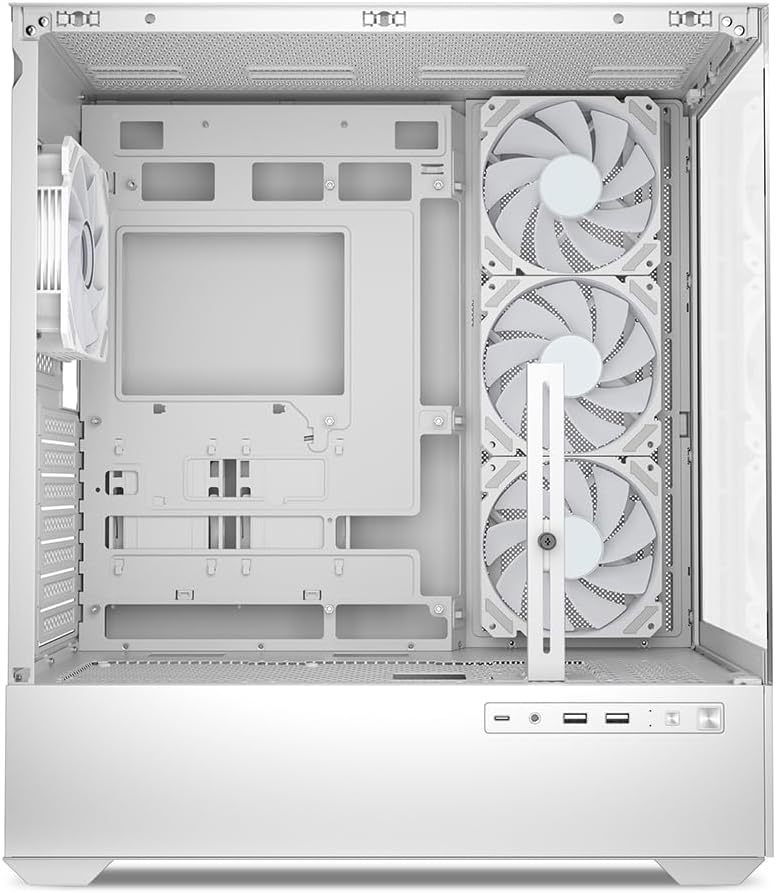
ምስል 5.1: የውስጥ view of the Sharkoon AK6 RGB PC case, illustrating the motherboard tray, cable management cutouts, and front fan mounting points.
5.3 የኃይል አቅርቦት መጫኛ
The case features a bottom-mount power supply design.
- የኃይል አቅርቦቱን (PSU) ከሳጥኑ ግርጌ ጀርባ ላይ ወደሚገኘው የተወሰነ ክፍል ያንሸራትቱት።
- Align the PSU with the screw holes at the rear of the case.
- በተሰጡት ዊንጮች (ዊንጮች) PSUን ያስጠብቁ።
5.4 የማከማቻ መሣሪያ ጭነት
The AK6 RGB supports up to two 3.5" HDDs or four 2.5" SSDs.
- For 3.5" HDDs: Locate the drive cages beneath the PSU shroud. Slide the HDD into a drive tray and secure it with screws.
- For 2.5" SSDs: SSDs can be mounted on the dedicated brackets behind the motherboard tray or on the 3.5" drive trays using adapter screws.
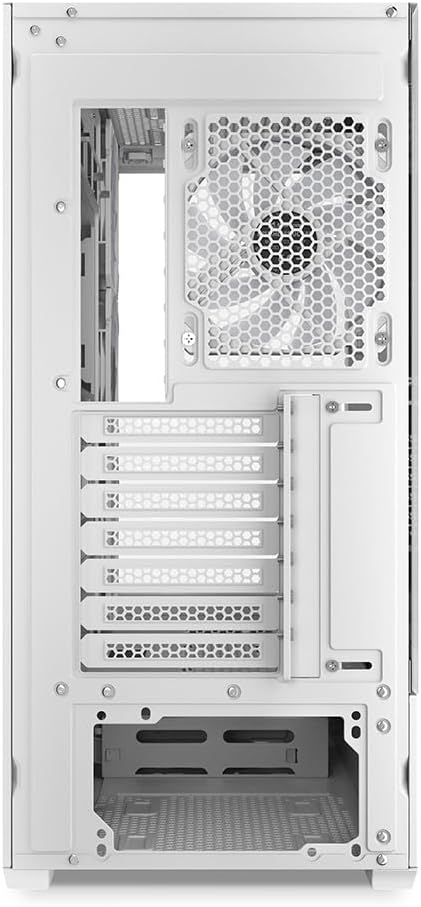
ምስል 5.2: የኋላ የውስጥ ክፍል view of the Sharkoon AK6 RGB PC case, detailing the drive cages for 3.5-inch HDDs and 2.5-inch SSDs, and the power supply shroud area.
5.5 የግራፊክስ ካርድ እና የማስፋፊያ ካርድ መጫኛ
- አስፈላጊውን የማስፋፊያ ማስገቢያ መሸፈኛዎች ከሳጥኑ ጀርባ ያስወግዱ።
- የግራፊክስ ካርድዎን ወይም ሌሎች የማስፋፊያ ካርዶችዎን በእናትቦርድዎ ላይ ባሉ ተገቢ የ PCIe ማስገቢያዎች ውስጥ ያስገቡ።
- Secure the cards with screws. The case includes a rubberized graphics card support for larger cards.
5.6 CPU Cooler and Radiator Installation
The case supports CPU coolers up to 17 cm in height and allows for extensive liquid cooling setups.
- በአምራቹ መመሪያ መሰረት የሲፒዩ ማቀዝቀዣዎን ይጫኑ።
- For liquid cooling, the case can accommodate a 360mm radiator at the top and an additional 280mm radiator.
5.7 የኬብል አስተዳደር
Utilize the cable management cutouts and tie-down points behind the motherboard tray to route and secure cables. This improves airflow and aesthetics.
6. የአሠራር መመሪያዎች
6.1 በማብራት ላይ
After all components are installed and cables are connected, replace the side panels. Connect the power cable to your PSU and a wall outlet, then press the power button on the front I/O panel to start your system.
6.2 RGB Fan Control
The AK6 RGB comes with four pre-installed addressable RGB PWM fans. These fans are connected to an RGB controller which also provides connections for up to four LED elements and four PWM fans. The RGB lighting can typically be controlled via your motherboard's RGB software (if compatible) or through a dedicated button on the case (if present and connected).
6.3 የአየር ፍሰት ማመቻቸት
The case is designed for ideal airflow, with three inverted fans drawing air from the side into the case. The top and rear fan mounts allow for additional exhaust fans. Ensure proper fan orientation for optimal cooling performance.

ምስል 6.1: ዘፀample of a fully assembled system within the Sharkoon AK6 RGB PC case, featuring various components and active RGB lighting.
7. ጥገና
መደበኛ ጥገና የፒሲዎን ክፍሎች ረጅም ጊዜ እና አፈጻጸም ለማረጋገጥ ይረዳል።
- የአቧራ ማጣሪያዎች; Periodically clean the removable dust filters (e.g., on the top and bottom) to maintain optimal airflow and prevent dust buildup inside the case. Use compressed air or a soft brush.
- የመስታወት ፓነሎች፡ የተስተካከለ የመስታወት ፓነሎችን ለስላሳ፣ ከላጣ ነፃ በሆነ ጨርቅ እና በመስታወት ማጽጃ ያጽዱ። መሬቱን ሊቧጭሩ የሚችሉ ሻካራ ቁሳቁሶችን ያስወግዱ።
- የቤት ውስጥ ጽዳት: ከውስጣዊ ክፍሎች እና ማራገቢያዎች አቧራ ለማስወገድ የተጨመቀ አየር ይጠቀሙ። ከማጽዳትዎ በፊት ስርዓቱ መብራቱን እና መሰኪያውን ነቅሎ ያረጋግጡ።
8. መላ መፈለግ
If you encounter issues with your PC case, refer to the following common troubleshooting steps:
- ኃይል የለም፡ Ensure the power supply is properly connected to the wall outlet and the motherboard. Check all internal power cables (24-pin ATX, 8-pin CPU, PCIe power).
- አድናቂዎች አይሽከረከሩም/አርጂቢ አይሰራም፡ Verify that all fan and RGB cables are correctly connected to the motherboard or the included RGB controller. Check your motherboard's BIOS/UEFI settings or RGB software for fan speed and lighting control.
- የፊት ግቤት/ኦ ወደቦች አይሰሩም፦ Confirm that the front panel connectors (USB, audio, power/reset switches) are correctly plugged into the corresponding headers on your motherboard.
- ከመጠን በላይ ማሞቅ; Ensure all fans are spinning correctly and oriented for proper airflow. Clean dust filters and internal components. Verify CPU cooler installation.
For further assistance, please contact Sharkoon support.
9. ዝርዝሮች
| ባህሪ | ዝርዝር መግለጫ |
|---|---|
| የምርት ስም | ሻርኮን |
| የሞዴል ስም | AK6 RGB |
| የሞዴል ቁጥር | C-AK6W |
| የጉዳይ ዓይነት | ATX ታወር |
| ቀለም | ነጭ |
| ቁሳቁስ | የቀዘቀዘ ብርጭቆ |
| የማዘርቦርድ ተኳኋኝነት | Mini ITX, Micro ATX, ATX, BTF |
| የኃይል አቅርቦት መጫኛ ዓይነት | የታችኛው ተራራ |
| የማቀዝቀዣ ዘዴ | አየር |
| ቀድሞ የተጫኑ አድናቂዎች | 4 x 120mm Addressable RGB PWM Fans |
| ከፍተኛው የሲፒዩ ማቀዝቀዣ ቁመት | 17 ሴ.ሜ |
| ከፍተኛው ግራፊክስ ካርድ ርዝመት | 41 cm (with rubberized support) |
| ከፍተኛው የ PSU ርዝመት | 23.5 ሴ.ሜ |
| የራዲያተር ድጋፍ | Top: up to 360mm, Additional: up to 280mm |
| Drive Bays | 2 x 3.5" HDD or 4 x 2.5" SSD |
| የፊት I / O ወደቦች | 2 x USB Type-A, 1 x USB Type-C, Audio (TRRS) |
| የእቃው ክብደት | 6.1 ኪ |
| ልዩ ባህሪያት | RGB Lighting, Unique Glass Appearance, BTF Motherboard Support |
10. ዋስትና
Sharkoon products are manufactured to high quality standards. For detailed warranty information, please refer to the warranty card included with your product or visit the official Sharkoon webጣቢያ. ዋስትናው በተለምዶ የቁሳቁሶችን ጉድለቶች እና በመደበኛ አጠቃቀም ላይ ያሉ የአሰራር ጉድለቶችን ይሸፍናል።
11. ድጋፍ
If you require technical assistance or have questions regarding your Sharkoon AK6 RGB ATX PC Case, please visit the official Sharkoon website for support resources, FAQs, and contact information. You may also find updated drivers or software for the RGB controller there.
Webጣቢያ፡ www.sharkoon.com


