መግቢያ
Thank you for choosing the Vortex Blast Portable Bluetooth Speaker. This manual provides essential information for setting up, operating, and maintaining your speaker. Designed for home, outdoors, and parties, the Vortex Blast delivers powerful 30W sound with deep bass, features an IPX6 waterproof rating, Bluetooth 5.2 connectivity, TWS functionality for stereo sound, and dynamic LED light effects.
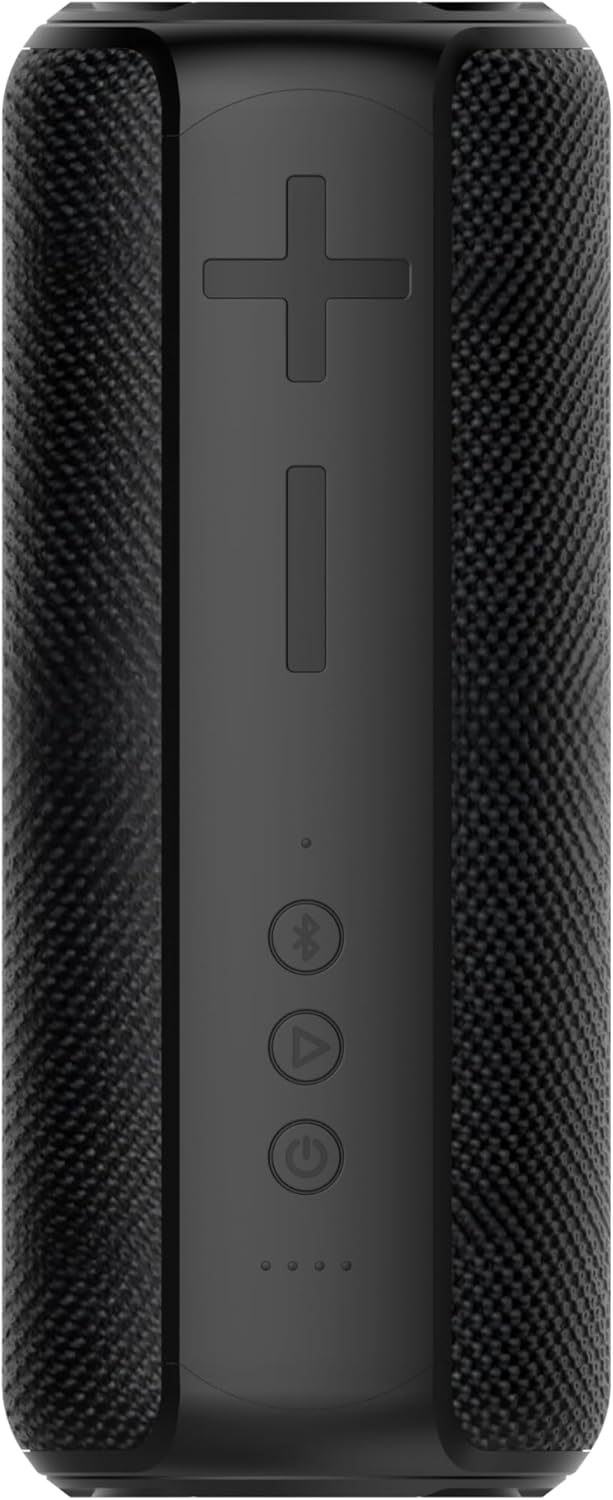
Image: The Vortex Blast Portable Bluetooth Speaker, showcasing its sleek black design and cylindrical shape.
የጥቅል ይዘቶች
እባክዎ ለሚከተሉት ዕቃዎች ሳጥኑ ላይ ምልክት ያድርጉ።
- 1 x Vortex Blast Portable Bluetooth Speaker
- 1 x ዩኤስቢ-ሲ ባትሪ መሙያ ገመድ
- 1 x AUX ኦዲዮ ገመድ
- 1 x የኃይል አስማሚ
- 1 x የተጠቃሚ መመሪያ (ይህ ሰነድ)
ምርት አልቋልview
Familiarize yourself with the controls and ports of your Vortex Blast speaker:

ምስል፡ ከላይ ወደ ታች view of the Vortex Blast speaker, highlighting the control panel with power, play/pause, Bluetooth, and volume buttons.
የቁጥጥር ፓነል
- የኃይል አዝራር (⑂): ለማብራት/ለማጥፋት ተጭነው ይያዙ። ሙዚቃን ለማጫወት/ለማቆም አጭር ይጫኑ።
- የድምጽ መጠን መጨመር (+): ድምጽ ለመጨመር አጭር ይጫኑ። ለቀጣዩ ትራክ ረጅም ይጫኑ።
- ድምጽ መቀነስ (-): የድምጽ ቅነሳን ለማግኘት አጭር ይጫኑ። ለቀዳሚው ትራክ ረጅም ይጫኑ።
- Bluetooth Button (⑃): Short press to enter pairing mode. Double tap to toggle LED lights on/off.
- የ LED አመልካቾች Four small lights indicating battery level and charging status.

ምስል፡ መቀራረብ view of the back of the Vortex Blast speaker, showing the charging port and auxiliary input port, protected by a rubber flap.
Ports (located under a protective flap):
- የዩኤስቢ-ሲ ኃይል መሙያ ወደብ፡- ድምጽ ማጉያውን ለመሙላት.
- AUX ግቤት፡ መሳሪያዎችን በ 3.5 ሚሜ የድምጽ ገመድ ለማገናኘት.
ማዋቀር
1. አፈጉባ Charውን ኃይል መሙላት
Before first use, fully charge your Vortex Blast speaker. Connect the provided USB-C charging cable to the speaker's charging port and the power adapter to a wall outlet. The LED indicators will show charging progress and turn off when fully charged. A full charge provides approximately 10 hours of playtime.
2. ማብራት / ማጥፋት
- To power on: Press and hold the Power button (⑂) for 2-3 seconds until you hear an audible prompt and the LED lights illuminate.
- To power off: Press and hold the Power button (⑂) for 2-3 seconds until you hear an audible prompt and the LED lights turn off.
3. የብሉቱዝ ማጣመር
- Ensure the speaker is powered on and the Bluetooth indicator light is blinking, indicating it's in pairing mode.
- በመሳሪያዎ ላይ (ስማርትፎን፣ ታብሌት፣ ላፕቶፕ) ብሉቱዝን ያንቁ እና የሚገኙ መሳሪያዎችን ይፈልጉ።
- Select "Vortex Blast" from the list.
- አንዴ ከተገናኘ በኋላ የማረጋገጫ ድምጽ ይሰማሉ፣ እና የብሉቱዝ አመልካች መብራቱ ጠንካራ ይሆናል።
ማሳሰቢያ፡ ድምጽ ማጉያው ሲበራ ከመጨረሻው የተጣመረ መሣሪያ ጋር በራስ-ሰር ለመገናኘት ይሞክራል።
4. እውነተኛ ገመድ አልባ ስቴሪዮ (TWS) ማጣመር
To achieve a true stereo sound experience, you can pair two Vortex Blast speakers together:
- Ensure both Vortex Blast speakers are powered on and not connected to any other Bluetooth devices.
- On one speaker, short press the Bluetooth button (⑃). It will enter TWS pairing mode.
- The two speakers will automatically search for and connect to each other. You will hear a confirmation sound once paired.
- Once TWS paired, connect your device to one of the speakers via Bluetooth as described in step 3. Both speakers will now play audio in stereo.
የአሠራር መመሪያዎች
ሙዚቃ መልሶ ማጫወት፡
- አጫውት/ ለአፍታ አቁም፡ Short press the Power button (⑂).
- የድምጽ ማስተካከያ; የድምጽ መጨመሪያ (+) ወይም የድምጽ መጨመሪያ (-) አዝራሮችን በአጭሩ ይጫኑ።
- ቀጣይ ትራክ፡ የድምጽ መጨመሪያ (+) ቁልፍን በረጅሙ ተጫን።
- ቀዳሚ ትራክ የድምጽ ቁልቁል (-) ቁልፍን በረጅሙ ተጫን።
የ LED ብርሃን ማሳያ;
The Vortex Blast speaker features dynamic LED light effects that enhance your music experience.

Image: The Vortex Blast speaker with its vibrant LED light ring illuminated, showcasing the dynamic light effects.
- To toggle the LED lights on or off: Double tap the Bluetooth button (⑃).
- The lights will cycle through various modes automatically.
የ ‹XX› ሁነታ
Connect an external audio device using the provided 3.5mm AUX audio cable. The speaker will automatically switch to AUX mode. In this mode, volume control can be managed via the speaker or the connected device, but track control must be done on the connected device.
ጥገና
- ማጽዳት፡ Use a soft, dry cloth to clean the speaker. Do not use harsh chemicals or abrasive materials.
- የውሃ መጋለጥ; While IPX6 waterproof, avoid prolonged submersion. Ensure the protective flap over the ports is securely closed before exposure to water.
- ማከማቻ፡ የድምፅ ማጉያውን ከከፍተኛ ሙቀት እና ቀጥተኛ የፀሐይ ብርሃን ርቆ በቀዝቃዛና ደረቅ ቦታ ያከማቹ።
- የባትሪ እንክብካቤ To prolong battery life, charge the speaker regularly, even if not in frequent use. Avoid completely draining the battery.
መላ መፈለግ
| ችግር | መፍትሄ |
|---|---|
| ተናጋሪው አይበራም። | Ensure the battery is charged. Connect the speaker to a power source using the provided cable and adapter. |
| ከብሉቱዝ መሳሪያ ጋር ማጣመር አይቻልም። |
|
| ምንም ድምጽ ወይም ዝቅተኛ ድምጽ የለም. |
|
| የ LED መብራቶች እየሰሩ አይደሉም. | Double tap the Bluetooth button (⑃) to toggle the LED lights on/off. |
| TWS ማጣመር አልተሳካም። |
|
ዝርዝሮች
| ባህሪ | ዝርዝር |
|---|---|
| የሞዴል ስም | ፍንዳታ |
| የምርት ስም | ሽክርክሪት |
| የድምጽ ማጉያ አይነት | ተንቀሳቃሽ ድምጽ ማጉያ |
| የግንኙነት ቴክኖሎጂ | ብሉቱዝ 5.2 |
| የድምጽ ማጉያ ከፍተኛ የውጤት ኃይል | 30 ዋት |
| የድምጽ ውፅዓት ሁኔታ | ስቴሪዮ (ከTWS ጋር) |
| የውሃ መቋቋም ደረጃ | IPX6 የውሃ መከላከያ |
| የባትሪ ህይወት | እስከ 10 ሰዓታት ድረስ |
| የኃይል ምንጭ | በባትሪ የተጎላበተ |
| የምርት ልኬቶች | 3.34" ዲ x 3.34" ዋ x 8.46" ኤች |
| የእቃው ክብደት | 2.64 ፓውንድ |
| የመቆጣጠሪያ ዘዴ | ንካ |
ዋስትና እና ድጋፍ
The Vortex Blast Portable Bluetooth Speaker comes with a የተወሰነ ዋስትና. ለተወሰኑ የአገልግሎት ውሎች እባክዎን በጥቅልዎ ውስጥ የተካተተውን የዋስትና ካርድ ይመልከቱ።
For technical support, troubleshooting assistance, or warranty claims, please contact Vortex customer service through the retailer's platform or visit the official Vortex webጣቢያ.


