መግቢያ
Welcome to your RCA Wave-68 True Wireless Earbuds. This manual provides detailed instructions on how to set up, operate, maintain, and troubleshoot your earbuds to ensure optimal performance and a seamless audio experience. Please read this manual thoroughly before using your device.
የጥቅል ይዘቶች
- RCA Wave-68 እውነተኛ ገመድ አልባ የጆሮ ማዳመጫዎች (ግራ እና ቀኝ)
- የመሙያ መያዣ
- የዩኤስቢ ባትሪ መሙያ ገመድ
- የተጠቃሚ መመሪያ
ምርት አልቋልview
Familiarize yourself with the components of your RCA Wave-68 earbuds and charging case.

ምስል፡ The RCA Wave-68 earbuds are shown inside their open charging case. The case features a digital display indicating the battery levels of both the case and individual earbuds.
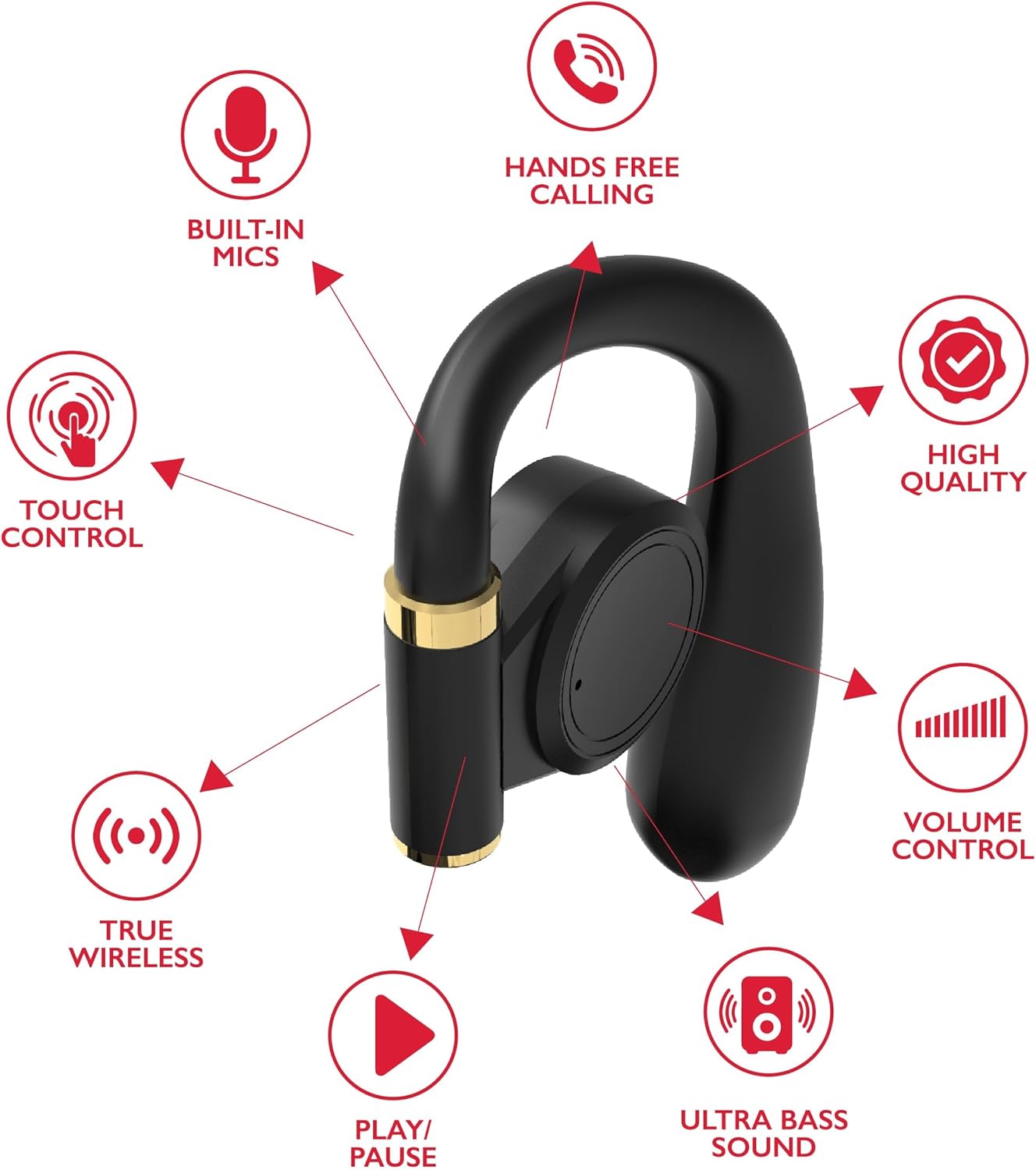
ምስል፡ A diagram highlights key features of a single RCA Wave-68 earbud, including built-in mics, hands-free calling, touch control, true wireless connectivity, play/pause function, ultra bass sound, volume control, and high-quality audio.
ማዋቀር
1. የጆሮ ማዳመጫውን እና መያዣውን መሙላት
Before first use, fully charge the earbuds and charging case. Place the earbuds into the charging case. Connect the USB charging cable to the charging port on the case and to a power source. The digital display on the case will show the charging status. A full charge provides approximately 20 hours of total playtime with the charging case.
2. የብሉቱዝ ማጣመር
- አብራ፡ Open the charging case. The earbuds will automatically power on and enter pairing mode. You may see a blinking light indicator on the earbuds.
- ብሉቱዝን ያንቁ፡ በመሳሪያዎ ላይ (ስማርትፎን፣ ታብሌት፣ ወዘተ)፣ ብሉቱዝን አንቃ።
- መሣሪያ ይምረጡ፡- ፈልግ "RCA Wave-68" in the list of available Bluetooth devices and select it to connect.
- ማረጋገጫ፡- Once connected, the earbuds will indicate successful pairing, and the light indicator may stop blinking or turn off.
If pairing fails, ensure the earbuds are charged and within range of your device. Turn off Bluetooth on other nearby devices to avoid interference.
የአሠራር መመሪያዎች
ኃይል አብራ/ አጥፋ
- አብራ፡ የኃይል መሙያ መያዣውን ይክፈቱ፣ እና የጆሮ ማዳመጫዎቹ በራስ-ሰር ይበራሉ። በአማራጭ፣ በሁለቱም የጆሮ ማዳመጫዎች ላይ ያለውን የንክኪ መቆጣጠሪያ ቦታ ለ3 ሰከንዶች ተጭነው ይያዙት።
- ኃይል ዝጋ: የጆሮ ማዳመጫዎቹን ወደ ቻርጅ መሙያ መያዣው መልሰው ያስቀምጡና ክዳኑን ይዝጉ። በራስ-ሰር ያጠፋሉ። በአማራጭ፣ በሁለቱም የጆሮ ማዳመጫዎች ላይ ያለውን የንክኪ መቆጣጠሪያ ቦታ ለ5 ሰከንዶች ተጭነው ይያዙት።
የንክኪ መቆጣጠሪያዎች
የRCA Wave-68 የጆሮ ማዳመጫዎች የድምጽ መልሶ ማጫወትን፣ ጥሪዎችን እና የድምጽ ረዳት ተግባራትን ለማስተዳደር የሚረዱ ሊታወቁ የሚችሉ የንክኪ መቆጣጠሪያዎችን ያካትታሉ።
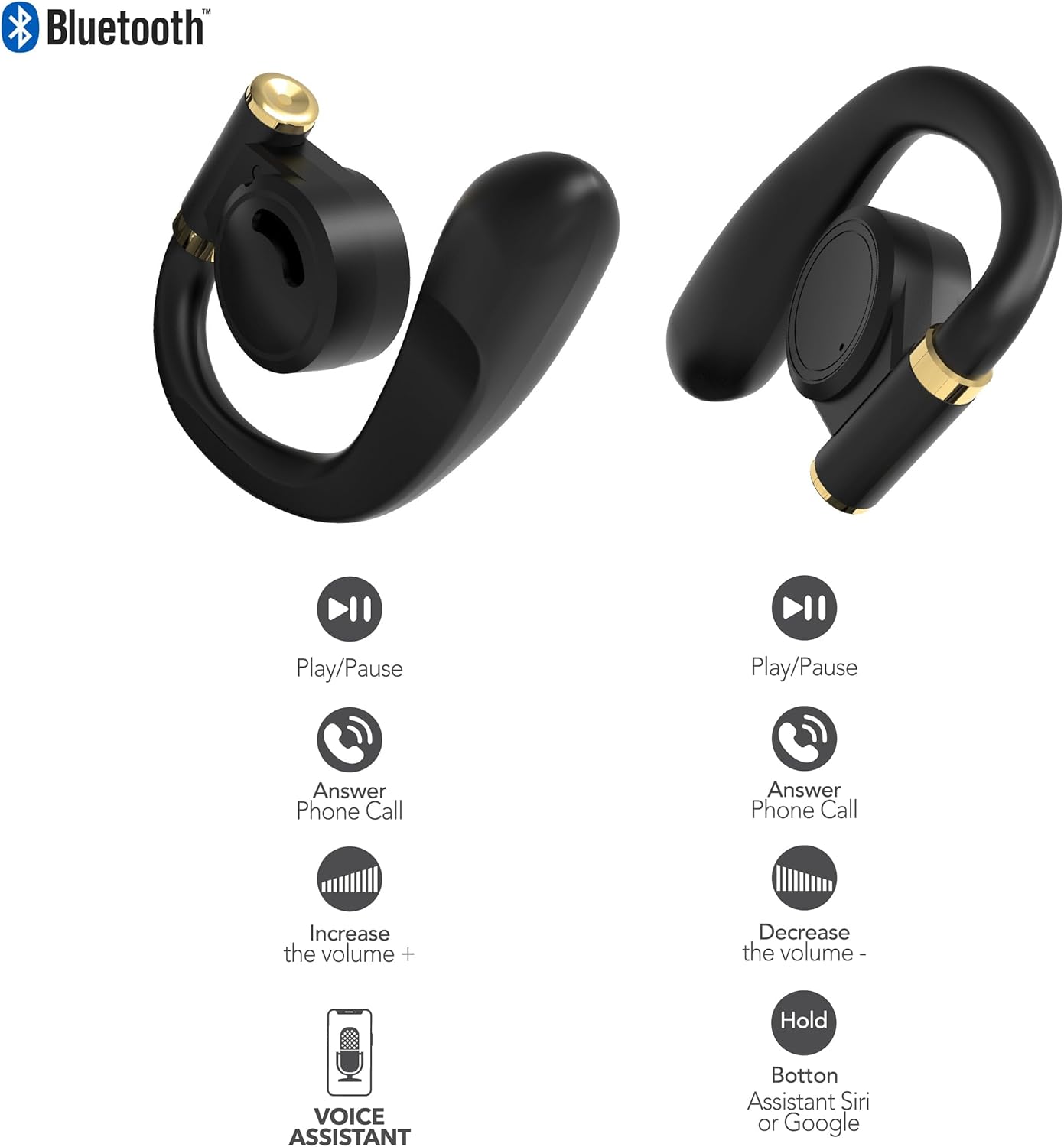
ምስል፡ This diagram illustrates the touch control functions for both the left and right RCA Wave-68 earbuds, including play/pause, answer phone call, volume increase/decrease, and activating the voice assistant.
- አጫውት/ ለአፍታ አቁም፡ በሁለቱም የጆሮ ማዳመጫዎች ላይ አንድ ጊዜ መታ ያድርጉ።
- ቀጣይ ትራክ፡ የቀኝ የጆሮ ማዳመጫውን ሁለቴ መታ ያድርጉ።
- ቀዳሚ ትራክ የግራ የጆሮ ማዳመጫውን ሁለቴ መታ ያድርጉ።
- ድምጽ ጨምር ትክክለኛውን የጆሮ ማዳመጫ ሶስቴ ይንኩ።
- ጥራዝ ታች የግራ የጆሮ ማዳመጫውን ሶስት ጊዜ መታ ያድርጉ።
- መልስ/ጥሪ ጨርስ፡ በገቢ ጥሪ ወይም ንቁ ጥሪ ወቅት በሁለቱም የጆሮ ማዳመጫውን አንድ ጊዜ መታ ያድርጉ።
- ጥሪን ውድቅ አድርግ፡ በገቢ ጥሪ ጊዜ ሁለቱንም የጆሮ ማዳመጫውን ለ2 ሰከንድ ተጭነው ይያዙ።
- የድምጽ ረዳትን (Siri/Google ረዳትን) አግብር፦ የትኛውንም የጆሮ ማዳመጫ ለ3 ሰከንድ ተጭነው ይያዙ።
ግልጽነት ሁነታ
The Transparency Mode allows you to hear your surroundings while still enjoying your audio. This feature is useful for awareness in environments like busy streets or public transport.
- Activate/Deactivate Transparency Mode: Consult your device's Bluetooth settings or specific app if available, or refer to the product's quick start guide for a specific touch control gesture if not listed above.
ጥገና
ማጽዳት
አዘውትሮ ማጽዳት የድምፅን ጥራት እና ንፅህናን ለመጠበቅ ይረዳል.
- የጆሮ ማዳመጫውን እና የኃይል መሙያ መያዣውን ለማጽዳት ለስላሳ፣ ደረቅ፣ ከተሸፈነ ጨርቅ ነጻ የሆነ ጨርቅ ይጠቀሙ።
- ሻካራ ማጽጃዎችን፣ አልኮልን ወይም ኬሚካዊ ፈሳሾችን አይጠቀሙ።
- Gently remove any earwax or debris from the earbud tips and speaker mesh using a small, clean brush or cotton swab.
ማከማቻ
ጥቅም ላይ በማይውልበት ጊዜ የጆሮ ማዳመጫዎቹን ከአቧራ እና ከጉዳት ለመጠበቅ በኃይል መሙያ መያዣቸው ውስጥ ያከማቹ።
- ከከፍተኛ ሙቀት ርቆ በቀዝቃዛና ደረቅ ቦታ ያከማቹ።
- ለረጅም ጊዜ ለፀሐይ ብርሃን ወይም እርጥበት መጋለጥን ያስወግዱ።
መላ መፈለግ
በእርስዎ RCA Wave-68 የጆሮ ማዳመጫዎች ላይ ችግሮች ካጋጠሙዎት የሚከተሉትን የተለመዱ መፍትሄዎች ይመልከቱ፡
- Earbuds not powering on automatically: Ensure the charging case is charged. Place earbuds back in the case, close the lid, then open it again. If issues persist, manually power on by pressing and holding the touch control area for 3 seconds.
- የጆሮ ማዳመጫዎች የማይጣመሩ Make sure both earbuds are fully charged. Turn off Bluetooth on your device, then turn it back on. Forget "RCA Wave-68" from your device's Bluetooth list and attempt to pair again. Ensure no other devices are actively connected to the earbuds.
- ከአንድ የጆሮ ማዳመጫ ድምጽ የለም Place both earbuds back into the charging case, close the lid, and then take them out again. This often re-syncs them. Check your device's audio balance settings.
- Charging case not displaying battery info/not charging: Ensure the USB cable is securely connected to both the case and the power source. Try a different USB cable or power adapter. Clean the charging port on the case for any debris.
- ዝቅተኛ ድምጽ ወይም ዝቅተኛ የድምፅ ጥራት; Adjust the volume on both your device and the earbuds. Ensure the earbuds are properly seated in your ears for a good seal. Clean any debris from the earbud speaker mesh.
- የጆሮ ማዳመጫዎች መውደቅ; Ensure you are using the correct ear tip size for a secure and comfortable fit.
ዝርዝሮች
| ባህሪ | ዝርዝር |
|---|---|
| የሞዴል ስም | ሞገድ-68 |
| የምርት ስም | አርሲኤ |
| የግንኙነት ቴክኖሎጂ | ገመድ አልባ (ብሉቱዝ) |
| የብሉቱዝ ስሪት | 5.3 |
| የባትሪ ህይወት | እስከ 20 ሰዓታት (ከክፍያ መያዣ ጋር) |
| የመቆጣጠሪያ ዘዴ | ንካ |
| የጆሮ አቀማመጥ | በጆሮ ውስጥ |
| የቅጽ ምክንያት | በጆሮ ውስጥ |
| ቁሳቁስ | ፕላስቲክ, ሲሊኮን |
| ልዩ ባህሪያት | Built-In Voice Assistant, Transparency Mode |
| ዩፒሲ | 850068964468 |
የደህንነት መረጃ
- የጆሮ ማዳመጫዎችን ወይም የኃይል መሙያ መያዣውን አያሰራጩ ወይም አያርትዑ።
- መሳሪያውን ለከፍተኛ ሙቀት፣ እርጥበት ወይም ፈሳሽ ከማጋለጥ ይቆጠቡ።
- የመስማት ችግርን ለመከላከል የጆሮ ማዳመጫዎቹን ለረጅም ጊዜ በከፍተኛ ድምጽ አይጠቀሙ።
- ልጆች እና የቤት እንስሳት በማይደርሱበት ቦታ ያስቀምጡ.
- በአካባቢው ደንቦች መሰረት መሳሪያውን በሃላፊነት ያስወግዱ.
ዋስትና እና ድጋፍ
RCA products are designed for reliability and performance. For warranty information or technical support, please refer to the warranty card included in your package or visit the official RCA support webጣቢያ. ለዋስትና ጥያቄዎች እባክዎ የግዢ ማረጋገጫዎን ያቆዩ።


