1. መግቢያ
ስለገዙ እናመሰግናለንasing the LONPOO LP-816 Compact Micro HiFi System. This manual provides essential information for the safe and efficient operation of your new audio system. Please read this manual thoroughly before use and retain it for future reference.
2. የደህንነት መመሪያዎች
- የኃይል ምንጭ፡- የኃይል አቅርቦቱን ጥራዝ ያረጋግጡtage በዩኒቱ ላይ ከተጠቀሰው ደረጃ ጋር ይዛመዳል።
- የአየር ማናፈሻ; የአየር ማናፈሻ ክፍተቶችን አያግዱ። ለትክክለኛው የአየር ፍሰት በክፍሉ ዙሪያ በቂ ቦታ ይፍቀዱ.
- ውሃ እና እርጥበት; መሳሪያውን ለዝናብ፣ ለእርጥበት ወይም ለሚያንጠባጥብ/ለሚያረጭ ፈሳሽ አያጋልጡት። እንደ የአበባ ማስቀመጫዎች ባሉ ፈሳሾች የተሞሉ ነገሮችን በመሳሪያው ላይ አያስቀምጡ።
- ሙቀት፡ ክፍሉን ከሙቀት ምንጮች ለምሳሌ ራዲያተሮች፣ ሙቀት መመዝገቢያዎች፣ ምድጃዎች ወይም ሌሎች መሳሪያዎችን (ያጠቃልላል) ያርቁ ampማሞቂያዎች) ሙቀትን ያመነጫሉ.
- ማጽዳት፡ ከማጽዳትዎ በፊት መሳሪያውን ከግድግዳው መውጫ ያላቅቁት። ለስላሳ እና ደረቅ ጨርቅ ብቻ ይጠቀሙ። ፈሳሽ ማጽጃዎችን ወይም ኤሮሶል ማጽጃዎችን አይጠቀሙ።
- አገልግሎት መስጠት፡ ይህንን ምርት እራስዎ ለማገልገል አይሞክሩ። ሁሉንም አገልግሎት ወደ ብቃት ላለው የአገልግሎት ሠራተኛ ያማክሩ።
- አቀማመጥ፡- መሳሪያውን እንዳይወድቅ ለመከላከል በተረጋጋና ጠፍጣፋ መሬት ላይ ያስቀምጡት።
3. የጥቅል ይዘቶች
ከዚህ በታች የተዘረዘሩት ሁሉም እቃዎች በጥቅልዎ ውስጥ መካተታቸውን ያረጋግጡ፡-
- LONPOO LP-816 Micro HiFi System Unit
- የርቀት መቆጣጠሪያ
- የኃይል አስማሚ
- ኤፍኤም አንቴና
- የተጠቃሚ መመሪያ (ይህ ሰነድ)
4. ምርት አብቅቷልview
4.1 Front and Rear Panel Controls
Familiarize yourself with the various buttons, ports, and indicators on your LP-816 system.
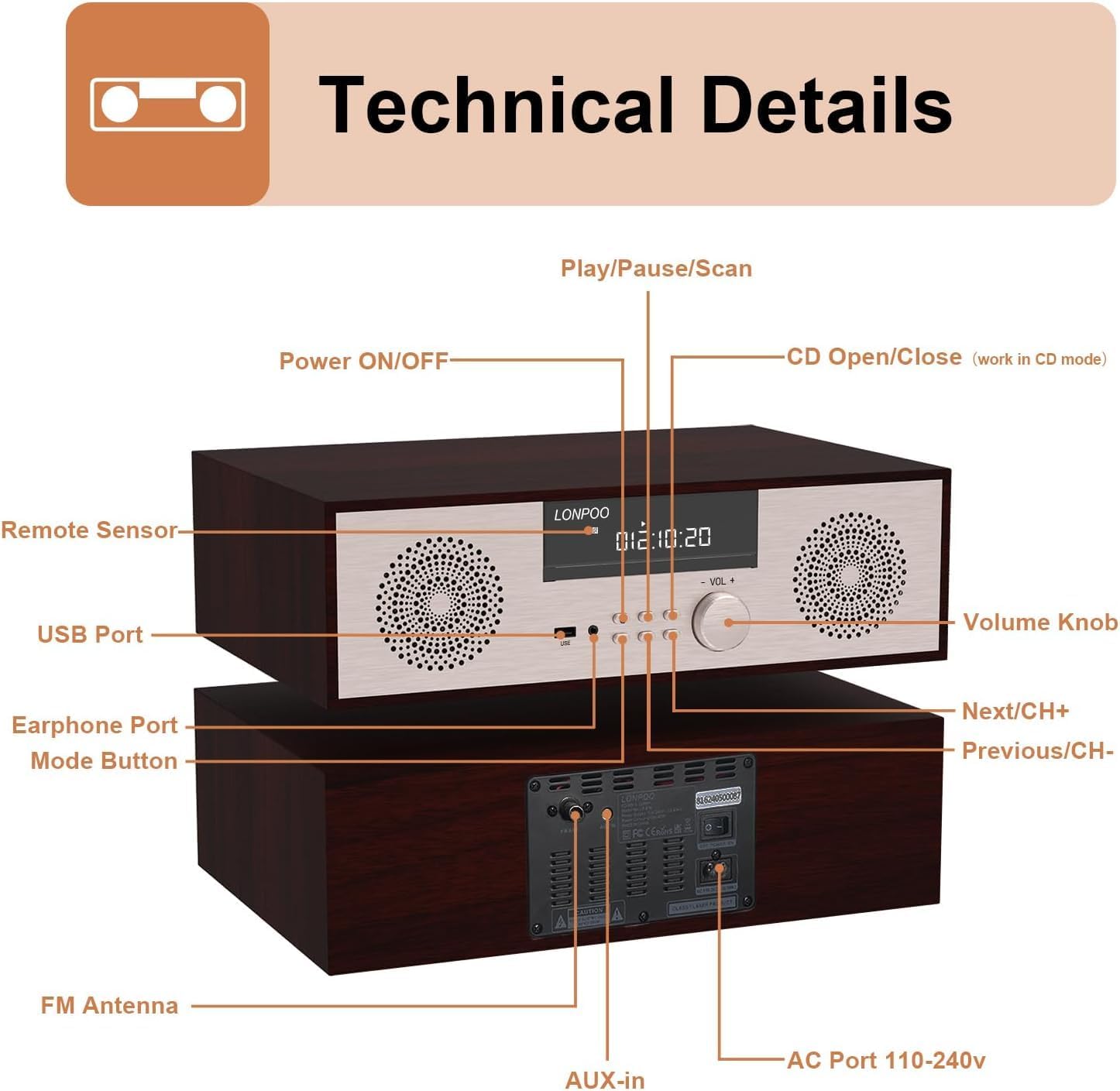
ምስል: የፊት እና የኋላ view of the LONPOO LP-816 system, highlighting the LCD display, control buttons, volume knob, USB port, earphone port, mode button, remote sensor, CD compartment, AUX-in, FM antenna port, and AC power port.
- አብራ/አጥፋ፡ ክፍሉን ያበራል ወይም ያጠፋል.
- LCD ማሳያ፡- የአሁኑን ሁነታ፣ የትራክ መረጃ፣ ድግግሞሽ እና ጊዜ ያሳያል።
- የሲዲ ክፍል፡ የድምጽ ሲዲዎችን ለማስገባት።
- የዩኤስቢ ወደብ፡ Connect USB flash drives for audio playback.
- የጆሮ ማዳመጫ ወደብ የጆሮ ማዳመጫዎችን ለማገናኘት 3.5 ሚሜ መሰኪያ።
- ሁነታ አዝራር፡- Switches between CD, FM, Bluetooth, AUX, and USB modes.
- Play/Pause/Scan Button: Controls playback and initiates FM scan.
- Next/CH+ Button: Skips to the next track or FM preset.
- Previous/CH- Button: Skips to the previous track or FM preset.
- የድምፅ ቁልፍ; የድምጽ መጠኑን ያስተካክላል።
- የርቀት ዳሳሽ ከርቀት መቆጣጠሪያው ምልክቶችን ይቀበላል።
- AUX-ውስጥ፡ ውጫዊ የድምጽ መሳሪያዎችን ለማገናኘት 3.5 ሚሜ መሰኪያ.
- ኤፍኤም አንቴና Connects the included FM antenna for radio reception.
- AC Port 110-240V: የኃይል አስማሚውን ያገናኛል.
4.2 የርቀት መቆጣጠሪያ
The remote control provides convenient access to all functions of the LP-816 system.

Image: Close-up of the LONPOO LP-816 remote control, showing various buttons for power, mode selection, volume, track control, EQ, and numeric input.
Insert two AAA batteries (not included) into the remote control, observing the correct polarity.
5. ማዋቀር
5.1 አቀማመጥ
Place the LP-816 system on a flat, stable surface. Ensure there is adequate space around the unit for proper ventilation. Avoid placing it near strong magnetic fields or direct sunlight.
5.2 የኤፍ ኤም አንቴናን ማገናኘት
Connect the supplied FM antenna to the 'FM Antenna' port on the rear of the unit. Extend the antenna fully for optimal FM reception.
5.3 የኃይል ግንኙነት
Connect the power adapter to the 'AC Port 110-240V' on the rear of the unit, then plug the adapter into a wall outlet.
6. የአሠራር መመሪያዎች
6.1 ማብራት / ማጥፋት
Press the 'Power ON/OFF' button on the front panel or the remote control to turn the unit on or off.
6.2 ሲዲ መልሶ ማጫወት
To play an audio CD:
- Press the 'Mode' button until 'CD' mode is selected on the display.
- Press the 'CD Open/Close' button (if available on the unit or remote) or gently insert the CD into the slot. The unit will automatically load the CD.
- The CD will begin playing automatically. If not, press the 'Play/Pause' button.
- Use the 'Next/CH+' and 'Previous/CH-' buttons to skip tracks.
- መልሶ ማጫወትን ለአፍታ ለማቆም ወይም ለመቀጠል 'Play/Pause' የሚለውን ይጫኑ።

Image: The LONPOO LP-816 system with its CD player compartment open, ready to accept a disc.
6.3 ኤፍኤም ሬዲዮ
ኤፍኤም ሬዲዮን ለማዳመጥ፡-
- Press the 'Mode' button until 'FM' mode is selected.
- ራስ-ሰር ቅኝት; Press and hold the 'Play/Pause/Scan' button to automatically scan and save available FM stations.
- በእጅ ማስተካከል Use the 'Next/CH+' and 'Previous/CH-' buttons to manually tune to a specific frequency.
- ቅድመ-ቅምጦችን መምረጥ; Use the 'Next/CH+' and 'Previous/CH-' buttons (short press) to cycle through saved preset stations.

Image: The LONPOO LP-816 system displaying an FM radio frequency (87.50 MHz) on its screen, with a visual representation of the FM band.
6.4 የብሉቱዝ ግንኙነት
የብሉቱዝ መሣሪያን ለማገናኘት፡-
- Press the 'Mode' button until 'BT' (Bluetooth) mode is selected. The display will show 'BT' and the unit will enter pairing mode.
- በብሉቱዝ የነቃለት መሳሪያዎ (ለምሳሌ፣ ስማርትፎን) ላይ፣ ብሉቱዝን ያንቁ እና የሚገኙ መሳሪያዎችን ይፈልጉ።
- Select 'LP-816' from the list of devices.
- Once paired, the unit will indicate a successful connection, and you can play audio from your device through the LP-816.

Image: The LONPOO LP-816 system displaying 'BT' on its screen, with a smartphone nearby showing a successful Bluetooth connection to 'LP-816'.
6.5 AUX-in ግንኙነት
To play audio from an external device via AUX-in:
- Connect a 3.5mm audio cable (not included) from the headphone jack or line-out of your external device to the 'AUX-in' port on the rear of the LP-816.
- የ'AUX' ሁነታ እስኪመረጥ ድረስ 'ሞድ' የሚለውን ቁልፍ ይጫኑ።
- Play audio from your external device. The sound will be output through the LP-816 speakers.
6.6 የዩኤስቢ መልሶ ማጫወት
ኦዲዮ ለማጫወት files from a USB flash drive:
- Insert a USB flash drive into the 'USB Port' on the front panel.
- Press the 'Mode' button until 'USB' mode is selected.
- ክፍሉ በራስ-ሰር ተኳሃኝ ኦዲዮን ፈልጎ ማጫወት ይጀምራል files ከዩኤስቢ አንጻፊ.
- Use the 'Next/CH+' and 'Previous/CH-' buttons to skip tracks.

Image: A close-up of the LONPOO LP-816 system's front panel, showing a USB flash drive inserted into the USB port.
6.7 የጆሮ ማዳመጫ ውፅዓት
Connect standard 3.5mm headphones to the 'Earphone Port' on the front panel for private listening. When headphones are connected, sound will no longer be output from the main speakers.
7. ጥገና
7.1 ጽዳት
To clean the unit, first unplug it from the power outlet. Use a soft, dry, lint-free cloth to wipe the exterior surfaces. Do not use abrasive cleaners, waxes, or solvents as they may damage the finish.
7.2 የሲዲ ማጫወቻ እንክብካቤ
Handle CDs by their edges to avoid fingerprints and scratches. If a CD is dirty, wipe it gently with a soft, dry cloth from the center outwards. Do not use solvents or abrasive cleaners on CDs.
8. መላ መፈለግ
| ችግር | ሊሆን የሚችል ምክንያት | መፍትሄ |
|---|---|---|
| ኃይል የለም | የኃይል ገመድ አልተገናኘም; የኃይል መውጫው ንቁ አይደለም። | የኃይል ገመድ ደህንነቱ በተጠበቀ ሁኔታ መገናኘቱን ያረጋግጡ። የተለየ የኃይል መውጫ ይሞክሩ። |
| ድምጽ የለም። | Volume too low; Mute function active; Incorrect mode selected; Headphones connected | Increase volume. Deactivate mute. Select correct input mode. Disconnect headphones. |
| ሲዲ አይጫወትም። | CD inserted incorrectly; CD is dirty or scratched; CD format not supported | Reinsert CD correctly. Clean or replace CD. Ensure CD is an audio CD. |
| ብሉቱዝ አይገናኝም። | Bluetooth not in pairing mode; Device too far; Device already connected to another unit | Ensure unit is in BT pairing mode. Move device closer. Disconnect from other devices. |
| ደካማ ኤፍኤም አቀባበል | Antenna not extended; Weak signal; Interference | Extend and adjust FM antenna. Relocate unit for better signal. |
9. ዝርዝሮች
- ሞዴል፡ LP-816
- የምርት ልኬቶች (L x W x H)፦ 15.8 x 10.5 x 4.5 ኢንች
- የእቃው ክብደት፡ 11.57 ፓውንድ
- የግንኙነት ቴክኖሎጂ; ረዳት፣ ብሉቱዝ፣ ዩኤስቢ
- የድምጽ ማጉያ አይነት፡ ስቴሪዮ
- የድምጽ ውፅዓት፡- 40 ዋት አር.ኤም.ኤስ.
- ባህሪያት፡ CD Player, FM Radio, Bluetooth, AUX-in, Headphone Output, DSP Technology
10. ዋስትና እና ድጋፍ
LONPOO products are designed and manufactured to the highest quality standards. For warranty information and technical support, please refer to the warranty card included with your product or visit the official LONPOO webጣቢያ. የግዢ ደረሰኝህን እንደ ግዢ ማረጋገጫ አቆይ።


