1. መግቢያ
This manual provides detailed instructions for the proper use, setup, and maintenance of your Pard NV009-850nm Digital Night Vision Monocular. Please read this manual thoroughly before operating the device to ensure optimal performance and longevity. This device is designed for wildlife observation, hunting, and general outdoor viewበተለያዩ የብርሃን ሁኔታዎች ውስጥ።

Image 1.1: The Pard NV009-850nm Digital Night Vision Monocular. This image displays the compact and ergonomic design of the monocular, highlighting its main body, objective lens, and eyepiece.
2. ምርት አብቅቷልview
2.1 የጥቅል ይዘቶች
ሳጥኑን ሲያስወግዱ፣ ከዚህ በታች የተዘረዘሩት ሁሉም እቃዎች መኖራቸውን ያረጋግጡ፡
- Pard NV009-850nm Digital Night Vision Monocular
- የመከላከያ ተሸካሚ መያዣ
- የዩኤስቢ ባትሪ መሙያ ገመድ
- Wrist Strap / Neck Strap
- የተጠቃሚ መመሪያ (ይህ ሰነድ)

Image 2.1: Contents of the Pard NV009-850nm package. This image shows the monocular, its carrying case, charging cable, straps, and the user manual, all neatly arranged.
2.2 ቁልፍ ባህሪያት
- Daytime and Nighttime Operation: Seamless transition between full-color daytime viewing and monochrome night vision mode.
- ባለከፍተኛ ጥራት ምስል; Features a 1920x1080 FHD CMOS image sensor and a 1024x768 OLED display for clear, detailed visuals.
- Adjustable IR Illuminator: Integrated 850nm IR illuminator with three intensity levels, providing effective illumination up to 200 meters.
- የፎቶ እና የቪዲዮ ቀረጻ፡ Capture 2608x1944 resolution photos and 1920x1080 Full HD videos directly to a Micro SD card.
- ኦፕቲካል እና ዲጂታል ማጉላት፡ Offers 4.7x optical magnification and 1.5x-3.0x digital zoom for precise target observation.
- የWi-Fi ግንኙነት፡- Connects to smart mobile devices via the "PardVision" app for remote viewኢንጂንግ እና የውሂብ ዝውውር።
- የሥዕል-ውስጥ-ሥዕል (PIP) ሁነታ፡- Provides a magnified inset view of the central area for enhanced detail without losing the wider field of view.
- ዘላቂ ንድፍ; IP67 waterproof rating ensures reliability in various outdoor conditions.

Image 2.2: Comparison of day and night vision modes. This image illustrates the monocular's capability to provide full-color images during the day and clear monochrome images at night, featuring a fox in both scenarios.

Image 2.3: Nighttime viewing range illustration. This graphic demonstrates the monocular's effective viewing distance of up to 200 meters (656 feet) in low-light conditions, showing a wild boar as an example target.

Image 2.4: Enhanced image quality demonstration. This image compares a blurred, lower-quality image with a sharp, enhanced image, illustrating the effectiveness of the PARD Visual Light Enhancement Algorithm (VLEA) and OLED display.
3. ማዋቀር
3.1 የባትሪ ጭነት
- Locate the battery compartment cover, typically on the underside or side of the monocular.
- ሽፋኑን በአመላካቹ መሰረት በማዞር ወይም በማንሸራተት ይክፈቱት።
- Insert a fully charged 18650 type battery (not included) with the correct polarity (+/-) as indicated inside the compartment.
- የባትሪውን ክፍል ሽፋን ደህንነቱ በተጠበቀ ሁኔታ ይዝጉ።
3.2 ማይክሮ ኤስዲ ካርድ ማስገቢያ
The device supports Micro SD cards for storing photos and videos.
- Locate the Micro SD card slot, usually protected by a rubber cover.
- ማይክሮ ኤስዲ ካርዱ ወደ ቦታው እስኪገባ ድረስ ቀስ ብለው ወደ ማስገቢያው ያስገቡ። ካርዱ በትክክል አቅጣጫውን መያዙን ያረጋግጡ።
- Close the rubber cover to protect the slot from dust and moisture.
3.3 የመጀመሪያ የኃይል ማብሪያ እና የትኩረት ማስተካከያ
- መሳሪያውን ለማብራት የኃይል አዝራሩን ተጭነው ይቆዩ።
- Adjust the diopter ring on the eyepiece until the on-screen display (OSD) text appears sharp and clear to your eye.
- Rotate the objective lens focus ring to bring the observed image into sharp focus.
4. የአሠራር መመሪያዎች
4.1 ማብራት / ማጥፋት
- አብራ፡ የኃይል አዝራሩን ተጭነው ለ 3 ሰከንድ ያህል ይያዙ።
- ኃይል ዝጋ: መሳሪያው እስኪጠፋ ድረስ የኃይል አዝራሩን ለ 3 ሰከንዶች ያህል ተጭነው ይያዙት።
4.2 Mode Selection (Day/Night)
The NV009-850nm automatically adjusts to ambient light, but you can manually switch modes:
- ዋናው viewing interface, short press the Mode button to toggle between Day (color) and Night (monochrome) vision modes.
4.3 IR Illuminator Adjustment
The integrated IR illuminator enhances visibility in complete darkness.
- Activate the IR illuminator by pressing its dedicated button (if available) or through the menu.
- Short press the IR button to cycle through the three intensity levels (Low, Medium, High) or to turn it off.

Image 4.1: IR Illuminator functionality. This graphic illustrates the 200m adjustable beam IR illuminator with its three intensity levels, showing how it illuminates a target in darkness.
4.4 የማጉላት ተግባር
- Use the designated zoom buttons (often '+' and '-') to adjust the digital magnification. The optical magnification is fixed at 4.7x.
4.5 ፎቶ እና ቪዲዮ ቀረጻ
- ፎቶ፡ In viewing mode, short press the Photo button to capture an image.
- ቪዲዮ፡ Short press the Video button to start recording. Press again to stop recording.

Image 4.2: Video recording and playback function. This image shows the monocular's ability to capture and play back high-definition video, with a simulated screen displaying a recorded scene of a fox.
4.6 መልሶ ማጫወት
- Enter the Playback menu via the main menu.
- Navigate through your recorded photos and videos using the directional buttons.
- Select an item to view it on the OLED display.
4.7 Wi-Fi Connectivity (PardVision App)
- Download the "PardVision" app from your device's app store (Apple App Store or Google Play Store).
- On the monocular, enable Wi-Fi through the system settings. The device will broadcast a Wi-Fi network.
- Connect your smartphone or tablet to the monocular's Wi-Fi network.
- Open the PardVision app to view a live feed, control settings, and transfer files.
4.8 Picture-in-Picture (PIP) Mode
- Activate PIP mode through the quick menu or system settings.
- A magnified window will appear on the main display, showing a zoomed-in view of the central area.
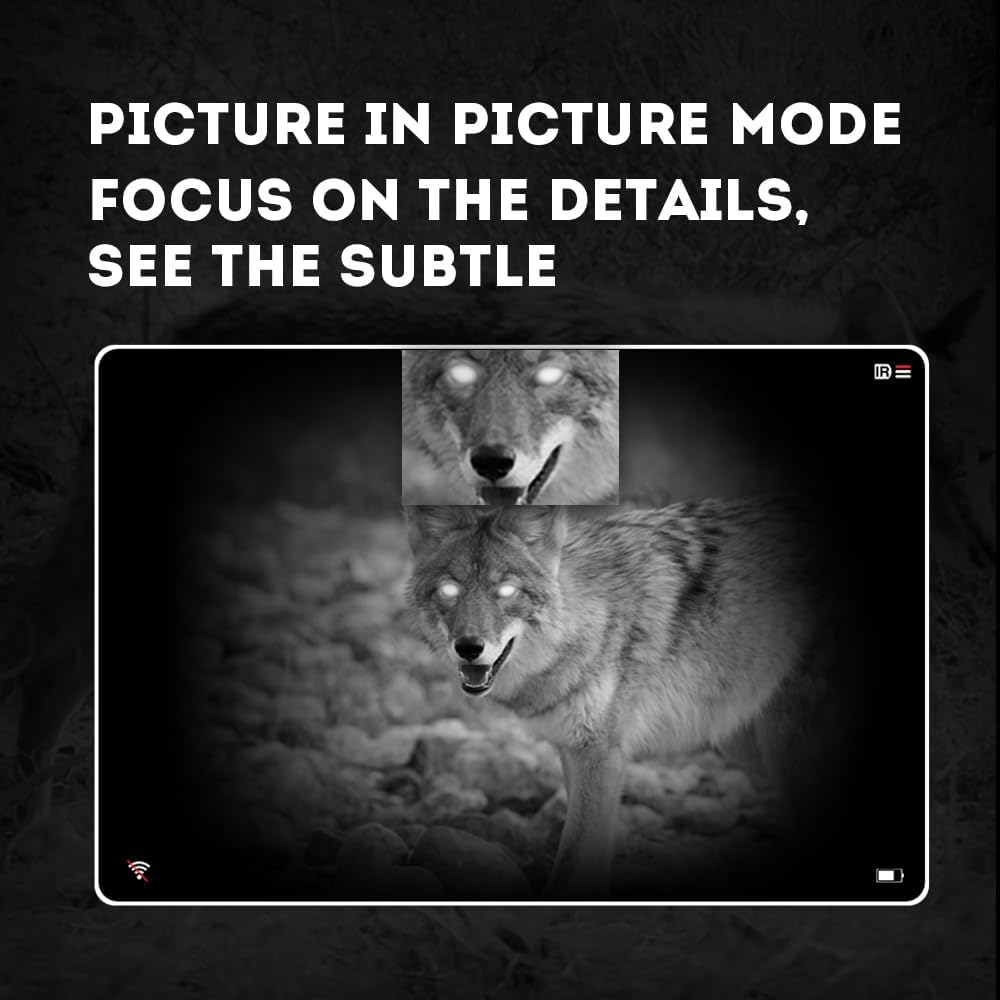
Image 4.3: Picture-in-Picture (PIP) mode. This image demonstrates how PIP mode allows users to focus on specific details within the main view, showing a magnified inset of a coyote's face.
5. ጥገና
5.1 መሳሪያውን ማጽዳት
- ሌንሶች፡- Use a soft, lint-free cloth specifically designed for optical lenses. For stubborn smudges, use a small amount of lens cleaning solution. Avoid abrasive materials.
- አካል፡ የሞኖኩላሩን አካል በለስላሳ፣ d ይጥረጉamp ጨርቅ. ኃይለኛ ኬሚካሎችን ወይም ፈሳሾችን አይጠቀሙ.
5.2 የባትሪ እንክብካቤ
- Always use high-quality, rechargeable 18650 batteries.
- መሣሪያው ለረጅም ጊዜ ጥቅም ላይ የማይውል ከሆነ ባትሪውን ያስወግዱት።
- ባትሪዎችን በቀዝቃዛና ደረቅ ቦታ ውስጥ ያከማቹ.
5.3 ማከማቻ
- Store the monocular in its protective carrying case when not in use.
- መሳሪያውን በደረቅ አካባቢ፣ ከፀሀይ ብርሀን እና ከፍተኛ የሙቀት መጠን ያርቁ።
6. መላ መፈለግ
If you encounter issues with your Pard NV009-850nm, refer to the following common problems and solutions:
| ችግር | ሊሆን የሚችል ምክንያት | መፍትሄ |
|---|---|---|
| መሣሪያው አይበራም። | ዝቅተኛ ወይም የተሟጠጠ ባትሪ፤ የተሳሳተ የባትሪ ጭነት | Charge or replace the battery; Reinstall battery with correct polarity. |
| ምስሉ ደብዛዛ ነው | Improper focus adjustment; Dirty lens | Adjust the diopter and objective lens focus rings; Clean the lenses. |
| No image in night mode | IR illuminator is off or set too low | Turn on the IR illuminator and adjust its intensity. |
| የWi-Fi ግንኙነት ችግሮች | Wi-Fi not enabled on device; Incorrect app settings | Ensure Wi-Fi is enabled on the monocular; Check app permissions and settings. |
| ፎቶዎችን/ቪዲዮዎችን መቅረጽ አይቻልም | No Micro SD card; SD card full or corrupted | Insert a Micro SD card; Delete old files or format the card (backup important data first). |
If the problem persists after attempting these solutions, please contact Pard customer support.
7. ዝርዝሮች
| ባህሪ | ዝርዝር |
|---|---|
| የምርት ስም | Pard |
| የሞዴል ስም | PARD Night Vision Monocular |
| የሞዴል ቁጥር | NV009-850nm |
| ቀለም | ጥቁር |
| የምርት ልኬቶች (LxWxH) | 7.16" x 2.24" x 2.79" (18.19 ሴሜ x 5.69 ሴሜ x 7.09 ሴሜ) |
| የእቃው ክብደት | 340 ግራም |
| ቁሳቁስ | አሉሚኒየም |
| የዓላማ ሌንስ ዲያሜትር | 25 ሚሊሜትር |
| የአይን እፎይታ | 25 ሚሊሜትር |
| የምሽት የማየት ችሎታ | አዎ |
| IR Illuminator Wavelength | 850nm (with 940nm option available in other variants) |
| CMOS Sensor Resolution | 1920x1080 ፒክሰሎች |
| የማሳያ ማያ ገጽ | 1024x768 OLED |
| የጨረር ማጉላት | 4.7x |
| ዲጂታል ማጉላት | 1.5x-3.0x |
| የፎቶ ጥራት | 2608x1944 ፒክሰሎች |
| የቪዲዮ ጥራት | 1920x1080 ፒክሰሎች |
| የውሃ መከላከያ ደረጃ | IP67 |
| ተስማሚ መሣሪያዎች | Camera (for recording) |
| የመጫኛ አይነት | Rail Mount (if applicable for accessories) |
8. ዋስትና እና ድጋፍ
8.1 የዋስትና መረጃ
The Pard NV009-850nm Digital Night Vision Monocular comes with a የ 1 ዓመት ዋስትና ከተገዛበት ቀን ጀምሮ። ይህ ዋስትና በመደበኛ አጠቃቀም ወቅት የማምረቻ ጉድለቶችን እና ብልሽቶችን ይሸፍናል። አላግባብ መጠቀም፣ አደጋዎች፣ ያልተፈቀዱ ማሻሻያዎች ወይም ተገቢ ያልሆነ ጥገና የሚደርስ ጉዳትን አይሸፍንም።
ለዋስትና ጥያቄዎች እባክዎ የግዢ ማረጋገጫዎን ያቆዩ።
8.2 የደንበኛ ድጋፍ
For technical assistance, warranty claims, or any questions regarding your device, please contact Pard customer support through the official Pard website or your retailer. When contacting support, please have your model number (NV009-850nm) and purchase date available.


