1. መግቢያ
This manual provides detailed instructions for the CRKD NEO S Controller Purple Wave, Model 24-NS-FC. This versatile controller is designed for an immersive gaming experience across multiple platforms, including PC, iPhone, iPad, Android, Nintendo Switch/Switch 2, and Smart TV. It features a detachable 5-fret attachment, Hall Effect thumbsticks, and customizable controls via the CRKD Companion app.
ምን ይካተታል፡
- CRKD NEO S Purple Wave Edition Controller
- 5-Fret Guitar Grip Attachment
- Microfiber String Bag
- Velcro Wrist Strap
- ዩኤስቢ-ሲ ወደ ዩኤስቢ-ኤ ባትሪ መሙያ ገመድ
2. የደህንነት መረጃ
Please read all safety instructions before using the CRKD NEO S Controller. Failure to follow these instructions may result in injury or damage to the device.
- Do not expose the controller to extreme temperatures, direct sunlight, or high humidity.
- መቆጣጠሪያውን ለጠንካራ ተጽእኖዎች ከመጣል ወይም ከመጫን ይቆጠቡ።
- መቆጣጠሪያውን ለመበተን ወይም ለመቀየር አይሞክሩ. ይህ ዋስትናውን ያጣል።
- መቆጣጠሪያውን እና መለዋወጫዎቹን ትናንሽ ልጆች እንዳያገኙ ያድርጉ።
- Use only the provided USB-C to USB-A cable for charging.
- If the controller becomes hot, emits smoke, or shows any signs of malfunction, discontinue use immediately and contact support.
3. ምርት አብቅቷልview
Familiarize yourself with the components and features of your CRKD NEO S Controller.

ምስል 3.1: የፊት view of the CRKD NEO S Controller Purple Wave, showing the D-pad, action buttons, Hall Effect thumbsticks, and central function buttons.
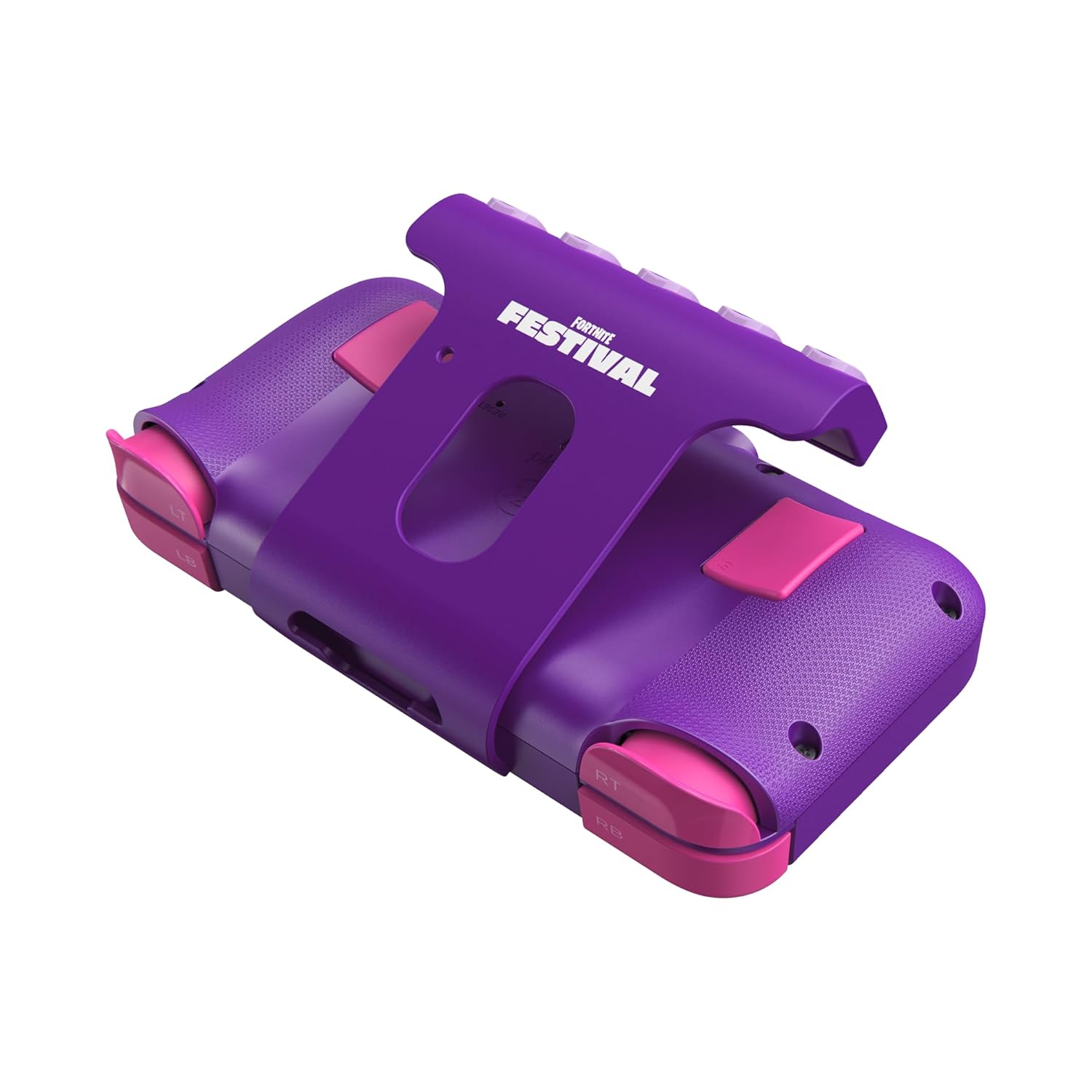
ምስል 3.2: የኋላ view of the CRKD NEO S Controller with the 5-fret guitar grip attachment installed, highlighting the shoulder buttons and back paddles.

Figure 3.3: The CRKD NEO S Controller being held, demonstrating its ergonomic design and compact size.
ቁልፍ ባህሪዎች
- Hall Effect Thumbsticks: Provides zero stick drift and precise control.
- Ergonomic ንድፍ; Comfortable for extended gaming sessions.
- የገመድ አልባ የብሉቱዝ ግንኙነት; Seamless pairing with various devices.
- ባለገመድ ግንኙነት፡ Optional USB-C wired mode for low-latency gaming.
- No Deadzone Mode: Enhances thumbstick responsiveness.
- Swappable Stick Tops: Customize the feel of your thumbsticks.
- Adjustable Trigger Actuation Points: የማስነሻ ትብነትን በጥሩ ሁኔታ ማስተካከል።
- የሚስተካከለው ንዝረት; Customize haptic feedback.
- Re-mappable Back Buttons: Assign single inputs or sequences for added versatility.
- የእንቅስቃሴ መቆጣጠሪያዎች፡- Supported for Nintendo Switch only.
- Rumble Support: Provides immersive feedback.
- የቱርቦ ተግባር Enables rapid input for specific buttons.
- CRKD Companion App: Connects to the app for advanced customization and firmware updates.
4. ማዋቀር
4.1 የመጀመሪያ ደረጃ መሙላት
Before first use, fully charge your CRKD NEO S Controller. Connect the provided USB-C to USB-A charging cable to the controller's USB-C port and the other end to a compatible USB-A power source (e.g., computer, wall adapter).
4.2 Attaching the 5-Fret Guitar Grip
The 5-fret attachment is designed for rhythm games like Fortnite Festival. To attach:
- Align the attachment with the bottom edge of the controller.
- Gently slide the attachment onto the controller until it clicks securely into place.
To detach, press the release buttons (if present) or gently slide the attachment off.

Figure 4.2.1: The 5-fret attachment connected to the CRKD NEO S Controller.
4.3 ገመድ አልባ ማጣመር
The CRKD NEO S Controller supports Bluetooth wireless connectivity. Follow these steps to pair with your device:
- ኔንቲዶ ቀይር፡ Go to 'Controllers' > 'Change Grip/Order' on your Switch. Press and hold the Home button on the NEO S Controller for several seconds until the indicator lights flash, then release. The controller will appear on the Switch screen.
- PC (Windows), Android, Steam Deck, Legion Go, Rog Ally: Ensure Bluetooth is enabled on your device. On the NEO S Controller, press and hold the Home button and the Up directional button simultaneously for several seconds until the indicator lights flash rapidly. This puts the controller into Xbox/PC pairing mode. Select 'CRKD NEO S' from your device's Bluetooth settings.
- አይፎን/አይፓድ፡ Ensure Bluetooth is enabled on your iOS device. Press and hold the Home button on the NEO S Controller for several seconds until the indicator lights flash. Select 'CRKD NEO S' from your device's Bluetooth settings.
- ስማርት ቲቪ፡ Refer to your Smart TV's manual for Bluetooth pairing instructions. Generally, enable Bluetooth on the TV and put the controller into the appropriate pairing mode (Home button for general Bluetooth, Home + Up for Xbox/PC mode if supported).

Figure 4.3.1: Illustration of the wireless connection capability of the CRKD NEO S Controller.
5. የአሠራር መመሪያዎች
5.1 መሰረታዊ ቁጥጥሮች
The CRKD NEO S Controller features standard gaming controls:
- ዲ-ፓድ፡ አቅጣጫዊ ግቤት።
- የተግባር አዝራሮች (A፣ B፣ X፣ Y)፦ Primary game actions.
- የአውራ ጣት: ለእንቅስቃሴ እና ለካሜራ ቁጥጥር የአናሎግ ግብዓት።
- የትከሻ አዝራሮች (LB፣ RB) እና ቀስቅሴዎች (LT፣ RT): Secondary actions and analog input.
- የኋላ አዝራሮች፡ Programmable for custom inputs.
5.2 Using the 5-Fret Attachment
When the 5-fret attachment is connected, it functions as dedicated input for rhythm games. The five frets correspond to specific notes or actions within compatible games. Ensure the attachment is securely connected for optimal performance.

ምስል 5.2.1: መቀራረብ view of the 5-fret attachment, showing the individual fret buttons.
5.3 CRKD Companion App
The CRKD Companion app (available for mobile devices) allows for advanced customization and management of your controller. Features include:
- የአዝራር ማስተካከያ; Customize the function of any button, including the back buttons.
- Trigger Sensitivity Adjustment: Fine-tune the actuation points of the LT/RT triggers.
- Thumbstick Deadzone Adjustment: Optimize thumbstick responsiveness.
- የንዝረት ጥንካሬ; Adjust rumble feedback.
- የጽኑዌር ዝማኔዎች ፦ የመቆጣጠሪያዎን ሶፍትዌር ወቅታዊ ያድርጉት።
- የምርት ምዝገባ Register your controller and view its unique product number and rarity ranking.

Figure 5.3.1: The CRKD CTRL Dashboard within the companion app, showing various customization options.

Figure 5.3.2: The 'Configure Attachment' screen in the CRKD Companion app, allowing customization of the 5-fret attachment buttons.

Figure 5.3.3: Adjusting trigger sensitivity within the CRKD Companion app.

Figure 5.3.4: The 'Deadzone Adjustment' interface for thumbsticks in the CRKD Companion app.
6. ጥገና
6.1 ጽዳት
መቆጣጠሪያዎን ለማጽዳት፣ ለስላሳ እና ደረቅ ጨርቅ ይጠቀሙ። ለጠንካራ ቆሻሻ፣ ትንሽ ጠጣርampጨርቁን በውሃ ያጠቡ። ኃይለኛ ኬሚካሎችን፣ መሟሟቶችን ወይም የማጽጃ ማጽጃዎችን አይጠቀሙ፣ ምክንያቱም እነዚህ ኬሚካሎች የመቆጣጠሪያውን አጨራረስ ወይም የውስጥ ክፍሎችን ሊጎዱ ይችላሉ።
6.2 ማከማቻ
Store the controller in a cool, dry place away from direct sunlight and extreme temperatures. Use the provided microfiber string bag for protection when not in use or during transport.
7. መላ መፈለግ
If you encounter issues with your CRKD NEO S Controller, refer to the following common solutions:
| ችግር | ሊሆን የሚችል መፍትሄ |
|---|---|
| ተቆጣጣሪው አይበራም። | መቆጣጠሪያው ሙሉ በሙሉ መሙላቱን ያረጋግጡ። የዩኤስቢ-ሲ ገመድን በመጠቀም ከኃይል ምንጭ ጋር ያገናኙት። |
| በብሉቱዝ በኩል ማጣመር አልተቻለም። |
|
| Buttons or thumbsticks are unresponsive. |
|
| 5-Fret attachment not working correctly. | Ensure the attachment is securely connected. Check the CRKD Companion app for specific settings related to the attachment. |
| ተቆጣጣሪው በተደጋጋሚ ይቋረጣል. |
|
8. ዝርዝሮች
| ባህሪ | ዝርዝር |
|---|---|
| የሞዴል ቁጥር | 24-NS-FC |
| ግንኙነት | ብሉቱዝ ገመድ አልባ፣ ዩኤስቢ-ሲ ገመድ ያለው |
| ተኳኋኝነት | PC, iPhone, iPad, Android, Nintendo Switch/Switch 2, Smart TV |
| አውራ ጣት | የአዳራሽ ተፅእኖ ዳሳሾች |
| ባትሪ | 1 LR44 ባትሪ (ተጨምሯል) |
| መጠኖች | 8.86 x 5.63 x 2.24 ኢንች (ግምታዊ) |
| ክብደት | 1.04 ፓውንድ (ግምታዊ) |
| አምራች | CRKD |
9. ዋስትና እና ድጋፍ
For warranty information, technical support, or further assistance, please visit the official CRKD webጣቢያ ወይም የደንበኛ አገልግሎታቸውን ያነጋግሩ። ለዋስትና ጥያቄዎች የግዢ ማረጋገጫዎን ያስቀምጡ።
የሲአርኬዲ ኦፊሴላዊ Webጣቢያ፡ በአማዞን ላይ የCRKD መደብርን ይጎብኙ


