1. መግቢያ
This manual provides detailed instructions for the setup, operation, and maintenance of your THOMSON 8-inch Digital Photo Frame (Model: TRDF-8001C). Please read this manual thoroughly before using the device to ensure proper functionality and to maximize your enjoyment of its features. This digital photo frame is designed to display your cherished photos and videos with an 8-inch IPS HD screen, offering a clear and vibrant viewልምድ.
2. በሳጥኑ ውስጥ ያለው
ማሸጊያውን ሲከፍቱ፣ እባክዎን ከዚህ በታች የተዘረዘሩት ሁሉም እቃዎች መኖራቸውን እና በጥሩ ሁኔታ ላይ መሆናቸውን ያረጋግጡ፡-
- THOMSON 8-inch Digital Photo Frame
- የርቀት መቆጣጠሪያ
- የኃይል አስማሚ
- የፎቶ ፍሬም ማቆሚያ
- የተጠቃሚ መመሪያ

Figure 2.1: Contents of the THOMSON Digital Photo Frame package.
3. ማዋቀር
3.1 የኃይል ግንኙነት
- Connect the power adapter to the DC-IN port on the back of the digital photo frame.
- የኃይል አስማሚውን ወደ መደበኛ የኤሌክትሪክ ሶኬት ይሰኩት።
- The frame will automatically power on.
3.2 የመጀመሪያ ማዋቀር
- Upon first startup, you will be prompted to select your preferred language. Use the navigation buttons on the remote control or the physical buttons on the back of the frame to select and confirm.
- የአሁኑን ቀን እና ሰዓት ያዘጋጁ።
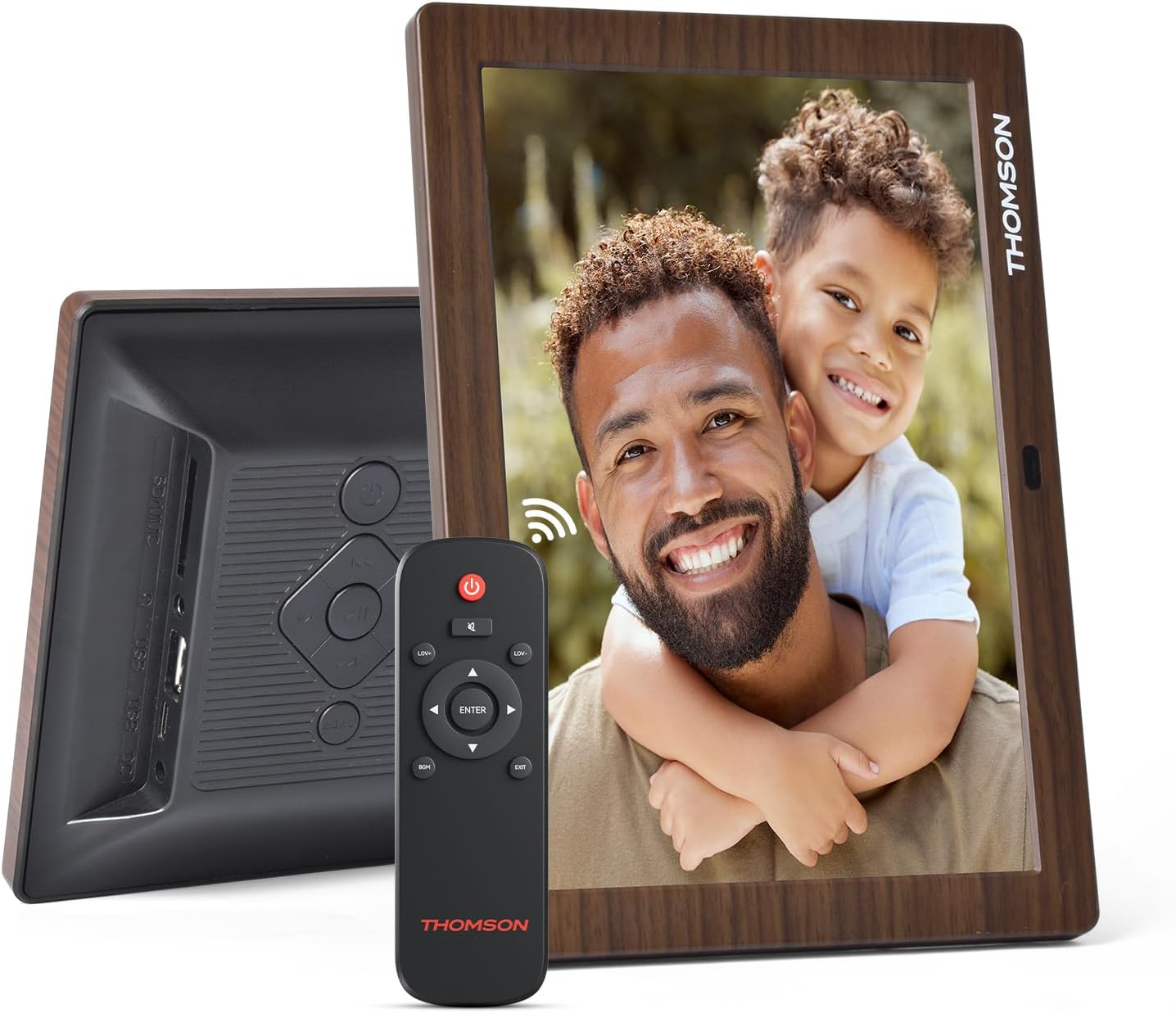
ምስል 3.1: የኋላ view of the frame with power input and physical controls.
3.3 ማቆሚያውን መትከል
The digital photo frame can be placed on a flat surface using the included stand. Insert the stand into the designated slot on the back of the frame. The frame also supports wall mounting using the integrated mounting holes.
4. የአሠራር መመሪያዎች
4.1 የማሳያ ባህሪያት
- 8-inch IPS HD Screen: Enjoy clear and vibrant images with a 1280x800 resolution from various viewing ማዕዘኖች.
- ራስ-ሰር ማሽከርከር; The built-in gravity sensor automatically adjusts the photo orientation (landscape or portrait) for optimal viewing

Figure 4.1: The 8-inch IPS HD screen provides a high-quality display for your memories.
4.2 የሚዲያ መልሶ ማጫወት
The frame supports playback of photos, music, and videos. You can navigate through your media using the remote control or the physical buttons.
- Photo Slideshow: Configure slideshow intervals and transition effects in the settings.
- ሙዚቃ መልሶ ማጫወት፡ እያለ የጀርባ ሙዚቃን ያጫውቱ viewፎቶዎች ውስጥ።
- ቪዲዮ መልሶ ማጫወት፡ Enjoy your favorite video clips directly on the frame.

Figure 4.2: User interface for media selection and playback options.
4.3 Remote Control and Physical Buttons
Control your digital photo frame conveniently using the included remote control or the physical buttons located on the back of the frame.
- የርቀት መቆጣጠሪያ ተግባራት; Power on/off, adjust volume, navigate images, control background music, and access menus.
- አካላዊ ቁልፎች፡- Provide direct control for essential functions, useful for elderly users.

Figure 4.3: Remote control for convenient operation of the frame.
4.4 Expansion Modes
The frame supports various expansion options for storing your media:
- SD/SDHC/MMC Card: Expand storage up to 32 GB.
- USB-A/Type-C/U-disk: Connect USB drives for additional media.
- ማስታወሻ፡- This frame does not have built-in storage. An external memory card or USB drive is required for media storage.

Figure 4.4: Memory expansion slots on the back of the frame.
4.5 Automatic Power On/Off
You can set a customized automatic start and stop time for the frame to conserve energy and manage display times.

Figure 4.5: Setting automatic power on/off times for convenience.
5. ጥገና
- ማያ ገጹን ማጽዳት; Use a soft, dry, lint-free cloth to gently wipe the screen. For stubborn marks, slightly dampጨርቁን በውሃ ወይም በስክሪን ማጽጃ መፍትሄ ያድርቁት። ጠንከር ያሉ ኬሚካሎችን ያስወግዱ።
- ፍሬሙን ማጽዳት; ክፈፉን ለስላሳ እና ደረቅ ጨርቅ ይጥረጉ.
- ማከማቻ፡ When not in use for extended periods, disconnect the power adapter and store the frame in a cool, dry place away from direct sunlight.
6. መላ መፈለግ
| ችግር | ሊሆን የሚችል ምክንያት | መፍትሄ |
|---|---|---|
| ፍሬም አይበራም። | የኃይል አስማሚ አልተገናኘም ወይም የተሳሳተ። | የኃይል አስማሚው ከክፈፉ እና ከሚሰራው የኃይል መውጫ ጋር ደህንነቱ በተጠበቀ ሁኔታ መገናኘቱን ያረጋግጡ። የተለየ መውጫ ይሞክሩ። |
| ምንም ምስሎች/ቪዲዮዎች አይታዩም። | No memory card/USB drive inserted or media files are corrupted/unsupported. | Insert a memory card or USB drive with supported media fileኤስ. ይፈትሹ file formats (JPEG for photos, MP4 for videos). Ensure the memory card/USB drive is properly inserted. |
| የርቀት መቆጣጠሪያ አይሰራም። | ዝቅተኛ ባትሪ ወይም እንቅፋት። | Replace the remote control battery. Ensure there are no obstructions between the remote and the frame's IR receiver. |
| Images are distorted or incorrect orientation. | Incorrect display settings or disabled auto-rotation. | Check display settings in the menu. Ensure the auto-rotation feature is enabled if desired. |
7. ዝርዝሮች
- የሞዴል ቁጥር፡- TRDF-8001C
- የስክሪን መጠን፡ 8 ኢንች
- ጥራት፡ 1280x800 (WXGA)
- ምጥጥነ ገጽታ፡ 16፡10
- የማሳያ ቴክኖሎጂ፡ አይፒኤስ ኤችዲ
- ግንኙነት፡ DC-4.0, USB-A, Type-C, SD Card, 3.5MM earphone jack
- የማህደረ ትውስታ መስፋፋት; SD/SDHC/MMC card up to 32GB, U-disk
- የኃይል ምንጭ፡- ባለገመድ ኤሌክትሪክ
- የተጠቃሚ በይነገጽ ግቤት፡ Buttons, Remote Control
- የክፈፍ ቁሳቁስ፡ ፕላስቲክ
- የምርት መጠኖች: 24.4 x 18 x 2.51 ሴ.ሜ
- የምርት ክብደት: 240 ግራም
8. ዋስትና እና ድጋፍ
For warranty information and customer support, please refer to the documentation included in your product packaging or visit the official Thomson webጣቢያ. ለማንኛውም የዋስትና የይገባኛል ጥያቄዎች የግዢ ደረሰኝዎን እንደ ግዢ ማረጋገጫ ያቆዩት።


