1. መግቢያ
This manual provides essential information for the safe and efficient use of your MESWAO 15.6 Inch Pro Android 14 Tablet. Please read this manual thoroughly before operating the device and retain it for future reference.
2. የደህንነት መረጃ
- ጡባዊውን ለከፍተኛ ሙቀት፣ ለቀጥታ የፀሐይ ብርሃን ወይም ለከፍተኛ እርጥበት አያጋልጡት።
- ታብሌቱን ከመጣል ወይም ለከባድ ጉዳት ከማጋለጥ ይቆጠቡ።
- Use only the provided power adapter and Type-C cable for charging.
- ጡባዊውን ከውሃ እና ከሌሎች ፈሳሾች ያርቁ.
- Do not attempt to disassemble or repair the tablet yourself. Contact customer support for assistance.
- Ensure proper ventilation when using the tablet for extended periods.
3. የጥቅል ይዘቶች
ሁሉም እቃዎች በጥቅሉ ውስጥ መኖራቸውን ያረጋግጡ፡-
- 1 x MESWAO 15.6 inch Android Tablet
- 1 x የኃይል አስማሚ
- 1 x አይነት C ገመድ
- 1 x የተጠቃሚ መመሪያ
- 1 x ዓይነት-C ወደ ዩኤስቢ አስማሚ
- 1 x Stuck pin
4. መሣሪያ አብቅቷልview
Familiarize yourself with the physical components of your MESWAO tablet.
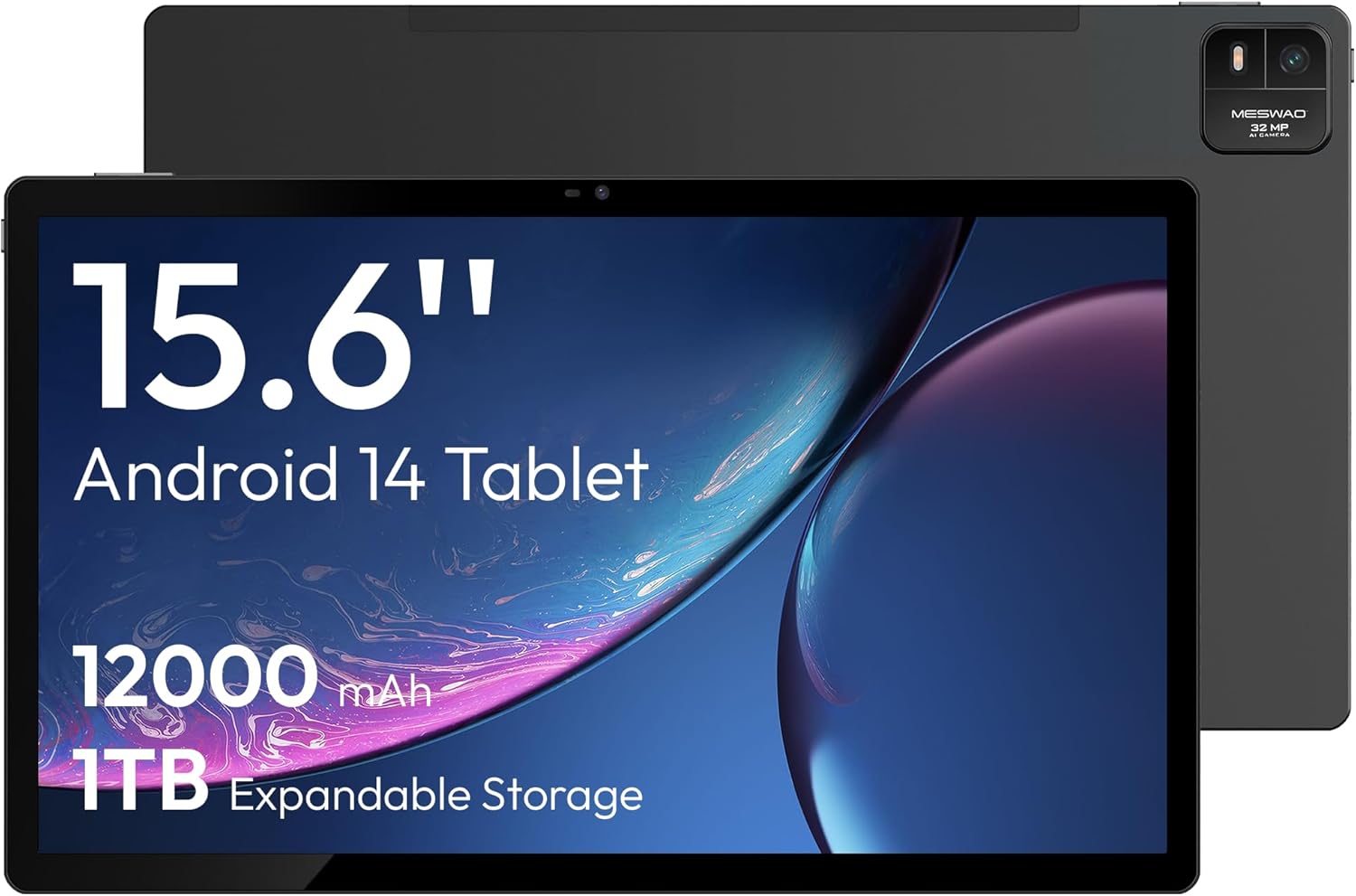
ምስል 4.1፡ ፊት ለፊት view of the MESWAO 15.6-inch Android 14 Tablet, highlighting the large display and key specifications such as 12000mAh battery and 1TB expandable storage.
ምስል 4.2፡ ከጎን እና ከኋላ view of the tablet, indicating the location of the quad speakers, Type-C port, TF card slot, power button, volume controls, and front/rear cameras.
ቁልፍ አካላት፡-
- ባለ 15.6 ኢንች ኤፍኤችዲ አይፒኤስ ማሳያ፡- ለመጥለቅ ትልቅ ማያ viewing
- የፊት ካሜራ፡ ለቪዲዮ ጥሪዎች እና የራስ ፎቶዎች።
- የኋላ ካሜራ (32 ሜፒ): ፎቶዎችን እና ቪዲዮዎችን ለማንሳት።
- የኃይል ቁልፍ፡- To turn the tablet on/off or put it to sleep.
- የድምጽ አዝራሮች፡- የድምጽ ደረጃዎችን ለማስተካከል።
- ዓይነት-ሲ ወደብ: ለክፍያ እና የውሂብ ማስተላለፍ.
- የ TF ካርድ ማስገቢያ For expandable storage (MicroSD card).
- ባለአራት ድምጽ ማጉያዎች፡- ለድምጽ ውፅዓት።
5. ማዋቀር
5.1 የመጀመሪያ ደረጃ መሙላት
Before first use, fully charge the tablet. Connect the provided Type-C cable to the tablet's Type-C port and the power adapter to a wall outlet. The tablet supports 30W fast charging.

ምስል 5.1፡ The tablet connected to its charger, showing the charging indicator on the screen.
5.2 ማብራት / ማጥፋት
- ለማብራት፡- ማያ ገጹ እስኪበራ ድረስ የኃይል አዝራሩን ተጭነው ይያዙ ፡፡
- ለማጥፋት፡- የኃይል አዝራሩን ተጭነው ይያዙ እና ከዚያ በስክሪኑ ላይ ካሉት አማራጮች 'Power off' የሚለውን ይምረጡ።
- ለመተኛት/መነቃቃት፡- የኃይል ቁልፉን በአጭሩ ይጫኑ።
5.3 የመጀመሪያ ውቅር
Upon first power-on, follow the on-screen prompts to set up your Android 14 operating system. This includes selecting your language, connecting to Wi-Fi, and signing in with your Google account.
5.4 የ Wi-Fi ግንኙነት
- ወደ ሂድ ቅንብሮች > አውታረ መረብ እና በይነመረብ > ዋይ ፋይ.
- Wi-Fi ቀይር On.
- ከዝርዝሩ ውስጥ የሚፈልጉትን አውታረ መረብ ይምረጡ።
- የይለፍ ቃሉን ከተጠየቀ ያስገቡ እና መታ ያድርጉ ተገናኝ. The tablet supports dual-band Wi-Fi (2.4GHz and 5GHz).
5.5 የማይክሮ ኤስዲ ካርድ ማስገባት
To expand storage up to 1TB, insert a MicroSD card:
- የቲኤፍ ካርድ ማስገቢያውን በጡባዊው ጎን ላይ ያግኙት።
- Use the provided stuck pin to gently press into the small hole next to the slot to eject the tray.
- Place the MicroSD card into the tray with the gold contacts facing down.
- ትሪውን በጥንቃቄ ወደ ጡባዊው ውስጥ ያስገቡ።

ምስል 5.2፡ Illustration of the tablet's internal storage and the option for expandable storage via MicroSD card.
6. ጡባዊውን መሥራት
6.1 መሰረታዊ ዳሰሳ
The Android 14 operating system uses touch gestures for navigation:
- መታ ያድርጉ፡ አንድ ንጥል ይምረጡ ወይም መተግበሪያ ይክፈቱ።
- ያንሸራትቱ በስክሪኖች ወይም ዝርዝሮች ውስጥ ይሸብልሉ.
- መቆንጠጥ ምስሎችን አሳንስ ወይም አሳንስ እና web ገጾች.
- ሎንግ ፕሬስ የአውድ ምናሌዎችን ይድረሱ ወይም አዶዎችን ያንቀሳቅሱ።
6.2 የማሳያ ባህሪያት
The 15.6-inch FHD IPS display offers a resolution of 1920 x 1080 pixels, providing clear and vibrant visuals for various applications.

ምስል 6.1፡ Comparison of the MESWAO 15.6-inch display size to an A4 sheet of paper and a smaller tablet, emphasizing its expansive viewing አካባቢ.
6.3 አፈጻጸም
Powered by the Helio G99 octa-core processor and 8GB RAM, the tablet delivers efficient performance for multitasking, gaming, and media consumption.

ምስል 6.2፡ An illustration of the Helio G99 Octa-Core chipset, detailing its technical specifications and performance benefits.
6.4 የካሜራ አጠቃቀም
The tablet features a 32MP rear camera and a 5MP front camera. Open the Camera app to capture photos and videos.
6.5 ኦዲዮ
The quad speakers provide clear audio. You can connect Bluetooth headphones or use the Type-C port for audio output with a suitable adapter.
6.6 አንድሮይድ 14 ባህሪያት
The tablet runs on Android 14, offering features such as:
- Smooth Multitasking: Efficiently switch between applications.
- የወላጅ ቁጥጥር; Manage content and usage for children.
- Enhanced Privacy & UI: Improved security and user interface experience.

ምስል 6.3፡ The Android 14 operating system interface, showcasing various applications and system features.
7. ጥገና
7.1 መሳሪያውን ማጽዳት
የጡባዊውን ስክሪን እና አካል ለማፅዳት ለስላሳ፣ ከተሸፈነ ጨርቅ ነጻ የሆነ ጨርቅ ይጠቀሙ። ኃይለኛ ኬሚካሎችን ወይም ሻካራ ቁሳቁሶችን ከመጠቀም ይቆጠቡ.
7.2 የሶፍትዌር ዝመናዎች
ጥሩ አፈጻጸም እና ደህንነት ለማረጋገጥ የስርዓት ዝመናዎችን በመደበኛነት ያረጋግጡ። ወደ ቅንብሮች > ስርዓት > የስርዓት ዝመና.
7.3 የባትሪ እንክብካቤ
የባትሪ ዕድሜን ለማራዘም;
- በተደጋጋሚ ባትሪውን ሙሉ በሙሉ ከመሙላት ይቆጠቡ።
- Do not expose the tablet to high temperatures.
- ባትሪው ከሞላ በኋላ ቻርጅ መሙያውን ይንቀሉት።
8. መላ መፈለግ
8.1 ጡባዊ አልበራም
- ባትሪው መሙላቱን ያረጋግጡ። ባትሪ መሙያውን ያገናኙ እና ለማብራት ከመሞከርዎ በፊት ጥቂት ደቂቃዎችን ይጠብቁ.
- ዳግም እንዲጀመር ለማስገደድ ቢያንስ ለ10-15 ሰከንድ የኃይል ቁልፉን ተጭነው ይቆዩ።
8.2 የ Wi-Fi ግንኙነት ጉዳዮች
- የእርስዎን Wi-Fi ራውተር እንደገና ያስጀምሩ።
- በጡባዊ ቅንጅቶች ውስጥ አውታረ መረቡን ይረሱ እና እንደገና ያገናኙ።
- ጡባዊው በWi-Fi ምልክት ክልል ውስጥ መሆኑን ያረጋግጡ።
8.3 ቀርፋፋ አፈጻጸም
- አላስፈላጊ የጀርባ መተግበሪያዎችን ዝጋ።
- ለመተግበሪያዎች የመሸጎጫ ውሂብን ያጽዱ።
- በቂ ነፃ የማከማቻ ቦታ ያረጋግጡ።
8.4 ስክሪን ምላሽ የማይሰጥ
- ጡባዊውን እንደገና ያስጀምሩ.
- ማያ ገጹ ንጹህ እና ከቆሻሻ የጸዳ መሆኑን ያረጋግጡ።
9. ዝርዝሮች
| ባህሪ | ዝርዝር መግለጫ |
|---|---|
| የሞዴል ስም | MES-B3 |
| ስርዓተ ክወና | አንድሮይድ 14 |
| የማሳያ መጠን | 15.6 ኢንች |
| የማያ ጥራት | 1920 x 1080 ፒክሰሎች (ኤፍኤችዲ) |
| ፕሮሰሰር | MediaTek ሄሊዮ G99 Octa-ኮር |
| ግራፊክስ ኮፕሮሰሰር | ማሊ-ጂ75 |
| ራም | 8 ጊባ |
| የውስጥ ማከማቻ (ሮም) | 256 ጊባ |
| ሊሰፋ የሚችል ማከማቻ | በማይክሮ ኤስዲ ካርድ እስከ 1 ቴባ |
| የኋላ ካሜራ | 32 ሜፒ |
| የፊት ካሜራ | 5 ሜፒ |
| የባትሪ አቅም | 12000mAh |
| በመሙላት ላይ | 30 ዋ ፈጣን ባትሪ መሙላት |
| የገመድ አልባ ግንኙነት | Dual-Band Wi-Fi (802.11a/b/ac/ad/ax), Bluetooth |
| የእቃው ክብደት | 4.55 ፓውንድ |
| የምርት ልኬቶች | 14.49 x 8.66 x 0.39 ኢንች |
10. ዋስትና እና ድጋፍ
10.1 የዋስትና መረጃ
Your MESWAO tablet comes with a የ 12-ወር ዋስትና የማምረቻ ጉድለቶችን ይሸፍናል። የዋስትና ጥያቄዎችን ለማግኘት የግዢ ማረጋገጫዎን ያስቀምጡ።
10.2 የደንበኛ ድጋፍ
For technical assistance, troubleshooting, or warranty inquiries, please contact MESWAO customer support. Our support team is available to assist you.
- የ24-ሰዓት የደንበኛ ድጋፍ፡ እርዳታ በየሰዓቱ ይገኛል።
- Local After-sales Centers: Service centers are available in regions including the US, Germany, Japan, and more.
- Quick Response Flow: Issues reported receive a team response within 24 hours, aiming for prompt problem resolution or replacement.