1. መግቢያ
Thank you for choosing the FLYLINKTECH 5000A Jump Starter. This portable device is designed to provide instant power to jump-start 12V vehicles, charge electronic devices, and offer emergency lighting. Please read this manual thoroughly before use to ensure safe and optimal performance.
2. ጠቃሚ የደህንነት መረጃ
- Always ensure the jump starter is fully charged before use.
- የቀዘቀዘ ባትሪ ለመዝለል አይሞክሩ።
- cl ን ያገናኙamps correctly: red to positive (+), black to negative (-). Reverse polarity can cause damage.
- ቀይ እና ጥቁር cl አያገናኙampአብረው s.
- ልጆች በማይደርሱበት ቦታ ያስቀምጡ.
- በደንብ በተሸፈነ አካባቢ ውስጥ ይጠቀሙ ፡፡
- መሳሪያውን ለረጅም ጊዜ ለከፍተኛ ሙቀት ወይም ቀጥተኛ የፀሐይ ብርሃን ከማጋለጥ ይቆጠቡ።
- If the device becomes excessively hot during use, disconnect it immediately.
- ለተወሰኑ የዝላይ ጅምር ሂደቶች የተሽከርካሪዎን የባለቤት መመሪያ ይመልከቱ።
3. የጥቅል ይዘቶች
ሁሉም እቃዎች በጥቅልዎ ውስጥ መኖራቸውን ያረጋግጡ፡-
- FLYLINKTECH 5000A Jump Starter (Model BD10)
- ስማርት ጃምፐር ኬብሎች
- የዩኤስቢ-ሲ ኃይል መሙያ ገመድ
- የኢቪአ ማከማቻ ጉዳይ
- የተጠቃሚ መመሪያ

Image: Contents of the FLYLINKTECH 5000A Jump Starter package, including the jump starter unit, smart jumper cables, USB-C charging cable, and EVA storage case.
4. ምርት አብቅቷልview
Familiarize yourself with the components and ports of your jump starter:
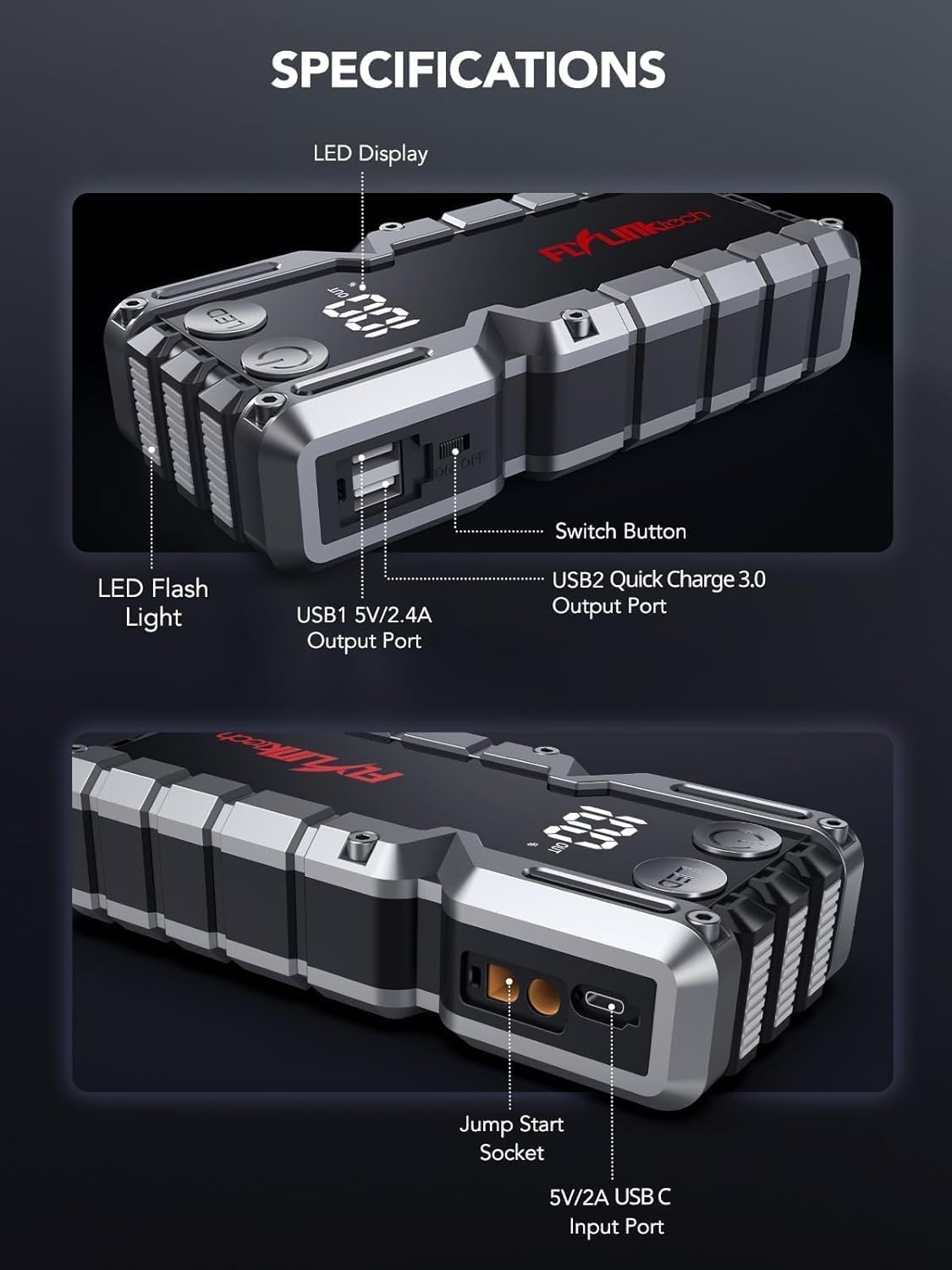
ምስል፡ ዝርዝር view of the jump starter showing the LED display, LED flashlight, power button, switch button, USB1 5V/2.4A output port, USB2 Quick Charge 3.0 output port, Jump Start Socket, and 5V/2A USB-C input port.
- የ LED ማሳያ የባትሪ ኃይልን ያሳያልtage.
- የ LED የእጅ ባትሪ; ማብራት በበርካታ ሁነታዎች ያቀርባል.
- የኃይል ቁልፍ፡- Activates the device and controls flashlight modes.
- ቀይር አዝራር፡- ዋናው የኃይል መቆጣጠሪያ።
- USB1 ውፅዓት (5V/2.4A): Standard USB charging port.
- USB2 ውፅዓት (QC3.0): Quick Charge 3.0 port for faster charging.
- Jump Start Socket: Connects to the smart jumper cables.
- USB-C Input (5V/2A): Used to recharge the jump starter.
5. የዝላይ ጀማሪን መሙላት
Before first use, fully charge the jump starter. It is recommended to recharge the unit every 3-6 months to maintain battery health.
- የቀረበውን የዩኤስቢ-ሲ የኃይል መሙያ ገመድ በመዝለያ ማስጀመሪያው ላይ ካለው የዩኤስቢ-ሲ ግቤት ወደብ ጋር ያገናኙ።
- Connect the other end of the USB-C cable to a 5V/2A USB wall adapter (not included) or a car charger.
- የኤልኢዲ ማሳያው የኃይል መሙያ ሂደቱን ያሳያል። ማሳያው 100% ሲታይ መሳሪያው ሙሉ በሙሉ ይሞላል።

Image: The jump starter connected via USB to charge a smartphone and a tablet, demonstrating its power bank functionality.
6. ተሽከርካሪዎን በመጀመር ላይ ይዝለሉ
Follow these steps carefully to safely jump-start your 12V vehicle:
- Prepare the Jump Starter: Ensure the jump starter is at least 50% charged. Turn off your vehicle's ignition and all accessories (headlights, radio, etc.).
- Connect Smart Jumper Cables: Insert the blue plug of the smart jumper cables into the Jump Start Socket on the jump starter. Ensure a firm connection. The indicator light on the smart clamp will flash red and green.
- ከተሽከርካሪ ባትሪ ጋር ያገናኙ;
- ያያይዙት። ቀይ (+) clamp ወደ ተሽከርካሪዎ ባትሪ አወንታዊ ተርሚናል ይሂዱ።
- ያያይዙት። ጥቁር (-) clamp ወደ ተሽከርካሪዎ ባትሪ አሉታዊ ተርሚናል ይሂዱ።
Once connected correctly, the indicator light on the smart clamp will turn solid green.
- ተሽከርካሪውን ይጀምሩ; Go into your vehicle and start the engine. If the vehicle does not start immediately, wait 30 seconds and try again. If it still doesn't start, press the "BOOST" button on the smart clamp for 3 seconds until the green light turns solid, then try starting the car again within 30 seconds.
- ኬብሎችን ያስወግዱ፦ Once the engine starts, immediately remove the smart jumper cables from the vehicle battery, then disconnect them from the jump starter.

Image: Visual guide for jump-starting: 1. Insert jump clamp into booster. 2. Connect clamps to car battery. 3. Start your car. 4. Remove clamps.

Image: The smart clamps connected to the jump starter, illustrating the 10-layer safety protections including short circuit, reverse charge, over charge, reverse polarity, over discharge, over current, reverse connection, and high temperature protection.
7. እንደ ፓወር ባንክ መጠቀም
The jump starter can also be used to charge your electronic devices.
- Connect your device's USB charging cable to either the USB1 (5V/2.4A) or USB2 (QC3.0) output port on the jump starter.
- የዝላይ አስጀማሪው መሳሪያዎን በራስ-ሰር መሙላት ይጀምራል።
- The LED display will show the remaining battery capacity of the jump starter.

Image: The jump starter functioning as a portable power bank, with two USB output ports (5V/2.4A and Quick Charge 3.0) actively charging a smartphone and a tablet.
8. የ LED የእጅ ባትሪ በመጠቀም
The built-in 600-lumen LED flashlight has three modes for various situations:
- ለማብራት/ማጥፋት፡- Press and hold the LED button for 3 seconds.
- ወደ ዑደት ሁነታዎች፡ Once the light is on, short press the LED button to switch between:
- ቋሚ በርቷል፡ ለአጠቃላይ ብርሃን.
- የኤስ.ኦ.ኤስ. Flashes the international SOS signal for emergencies.
- የስትሮብ ሁነታ፡ Rapid flashing for warning or signaling.

Image: The jump starter with its LED flashlight active, illustrating the three available modes: standard flashlight, SOS signal, and strobe light for emergencies.
9. ጥገና
- ማጽዳት፡ መሳሪያውን ለስላሳና ደረቅ ጨርቅ ይጥረጉ። ጠጣር ኬሚካሎችን ወይም ሻካራ ቁሳቁሶችን አይጠቀሙ።
- ማከማቻ፡ Store the jump starter in its EVA case in a cool, dry place away from direct sunlight. Ensure it is charged to at least 50% before storing for extended periods. Recharge every 3-6 months.
- የባትሪ እንክብካቤ The internal lithium-ion battery is designed for long life. Avoid fully discharging the unit frequently.

Water-resistant design.

Rugged ABS shell for drop resistance.

Operates in extreme temperatures (-4°F to 140°F).
10. መላ መፈለግ
| ችግር | ሊሆን የሚችል ምክንያት | መፍትሄ |
|---|---|---|
| Vehicle won't start after connecting. | Jump starter battery too low; incorrect clamp connection; vehicle battery completely dead. | የዝላይ ማስጀመሪያው ሙሉ በሙሉ መሙላቱን ያረጋግጡ። cl ን ያረጋግጡ።amp connections (red to +, black to -). Press the "BOOST" button on the smart clamp for 3 seconds and try again. |
| ብልጥ clamp indicator light is red/flashing. | የተገላቢጦሽ ፖላሪቲ፤ አጭር ዑደት፤ ከመጠን በላይ የሙቀት መጠን። | ግንኙነት አቋርጥ clamps and re-connect correctly. Check for any short circuits. Allow unit to cool down if overheated. |
| ጀማሪው እየሞላ አይደለም። | Faulty charging cable or adapter; loose connection. | Ensure USB-C cable and adapter are working and connected securely. Try a different cable or adapter. |
| የ LED የእጅ ባትሪ አይሰራም። | Not activated correctly; low battery. | Press and hold the LED button for 3 seconds to activate. Ensure the jump starter has sufficient charge. |
11. ዝርዝሮች
| ባህሪ | ዝርዝር |
|---|---|
| ከፍተኛ የአሁኑ | 5000 ኤ |
| የባትሪ አቅም | 18000mAh (66.6 ዋ ሰ) |
| ጀምር ጥራዝtage | 12 ቪ |
| የሞተር ተኳሃኝነት | እስከ 9.0L ጋዝ / 8.0 ሊ ዲሴል |
| የዩኤስቢ ውጤት 1 | 5V/2.4A |
| የዩኤስቢ ውጤት 2 | QC3.0 |
| የዩኤስቢ-ሲ ግቤት | 5V/2A |
| የ LED የእጅ ባትሪ | 600-Lumen (Constant, SOS, Strobe) |
| የአሠራር ሙቀት | -4°F እስከ 140°F (-20°ሴ እስከ 60°ሴ) |
| መጠኖች | 4.2 x 9 x 19 ሴ.ሜ |
| ክብደት | 540 ግ (1.19 ፓውንድ) |
| የደህንነት ጥበቃዎች | 10-Layer (Short Circuit, Reverse Polarity, Over-Current, etc.) |
12. ዋስትና እና ድጋፍ
The FLYLINKTECH 5000A Jump Starter comes with an industry-leading የ 3 ዓመት ዋስትና ከተገዛበት ቀን ጀምሮ. ይህ ዋስትና የማምረቻ ጉድለቶችን ይሸፍናል እና አስተማማኝ አፈፃፀምን ያረጋግጣል።
For technical support, warranty claims, or any questions regarding your product, please contact FLYLINKTECH customer service through the retailer's platform or visit our official webጣቢያ.
እባክዎ ለዋስትና ማረጋገጫ የግዢ ማረጋገጫዎን ያቆዩ።


