1. መግቢያ እና በላይview
The OPTIMA D1200+ 12V Performance Charger and Maintainer is designed for advanced battery care, charging, and maintenance. This device features quick-connect interchangeable cable assemblies, including the OPTIMA Li POWERLINK, battery clamps, and ring terminal cable assemblies, enhancing user convenience.
A wall organizer bracket is included to keep the D1200+ off the floor and store cable assemblies when not in use. The D1200+ supports four distinct performance battery type profiles for 12V OPTIMA LiFePO4, AGM, Auto/Marine lead-acid, and powersports lead-acid batteries. Its robust, weatherproof construction incorporates an integrated storage bin and a foldable carry handle for portability and durability.

ምስል 1.1፡ ፊት ለፊት view of the OPTIMA D1200+ Battery Charger and Maintainer. This image displays the main control panel and the overall compact design of the unit.
2. የማዋቀር መመሪያዎች
- ክፍሉን ይንቀሉት፡- Carefully remove the OPTIMA D1200+ and all accessories from its packaging.
- ለጉዳት ምርመራ; Before use, inspect the charger and all cables for any signs of damage. Do not use if damaged.
- የግንኙነት ዘዴን ይምረጡ፡- Select the appropriate quick-connect cable assembly for your battery:
- OPTIMA Li POWERLINK (for OPTIMA Lithium batteries)
- ባትሪ ክሊamps (for temporary connections)
- Ring Terminal Cable Assemblies (for semi-permanent installations)
- ከባትሪ ጋር ተገናኝ፡ Ensure the charger is unplugged from the AC power outlet. Connect the chosen cable assembly to the 12V battery terminals, observing correct polarity (red to positive, black to negative).
- ከ AC ኃይል ጋር ይገናኙ፡ Once securely connected to the battery, plug the charger's AC power cord into a standard 120V AC electrical outlet.
- Wall Organizer Bracket: Utilize the provided wall organizer bracket to mount the D1200+ for convenient storage and to keep cables tidy when not in use.

ምስል 2.1፡ አንግል view of the OPTIMA D1200+ showing the foldable carry handle in an upright position, highlighting its portability.
3. የአሠራር መመሪያዎች
3.1 ባለብዙ-ኤስtagሠ በላይ መሙላትview
The OPTIMA D1200+ employs a digital, multi-stage charging process to optimize battery performance and extend its lifespan. The charger automatically sequences through four stagኢ፡
- Stage 1 - System Check and Battery Analyzing:
- The status bar will pulse blue.
- The D1200+ performs a self-test, analyzes the battery connection, and checks the battery's charging capability by outputting a small current.
- The "Connected" LED illuminates green, indicating a good connection.
- ይህ ኤስtage takes approximately 1 minute. During this mode, the battery type can be changed.
- Stage 2 - Charging:
- The status bar will be solid red.
- The D1200+ applies its available charging amps (temperature-controlled) until the battery voltage reaches 14.4 VDC (for OPTIMA LiFePO4 battery setting).
- Stage 3 - Conditioning:
- The status bar will be solid amber.
- Batteries are held at 14.4 VDC (for OPTIMA LiFePO4 battery setting) to complete charging and condition the connected battery.
- Upon completion, the D1200+ transitions to Auto Maintain mode.
- Stage 4 - Auto Maintain (Energy Saver Mode):
- The status bar will be solid green.
- This indicates that Stagሠ 2 መሙላት እና ኤስtage 3 conditioning are complete.
- The D1200+ monitors and maintains the battery only when necessary to ensure a full state of charge, reducing AC power consumption.
3.2 Selecting a Charging Profile
The OPTIMA D1200+ offers four selectable performance profiles to optimize charging for different 12V battery types:
- OPTIMA LiFePO4
- ኤጂኤም (የሚስብ ብርጭቆ ምንጣፍ)
- Auto/Marine Lead-Acid
- Powersports Lead-Acid
Refer to the device's display and controls to select the appropriate battery type during Stage 1 (System Check and Battery Analyzing) or as indicated in the full manual for specific button presses.
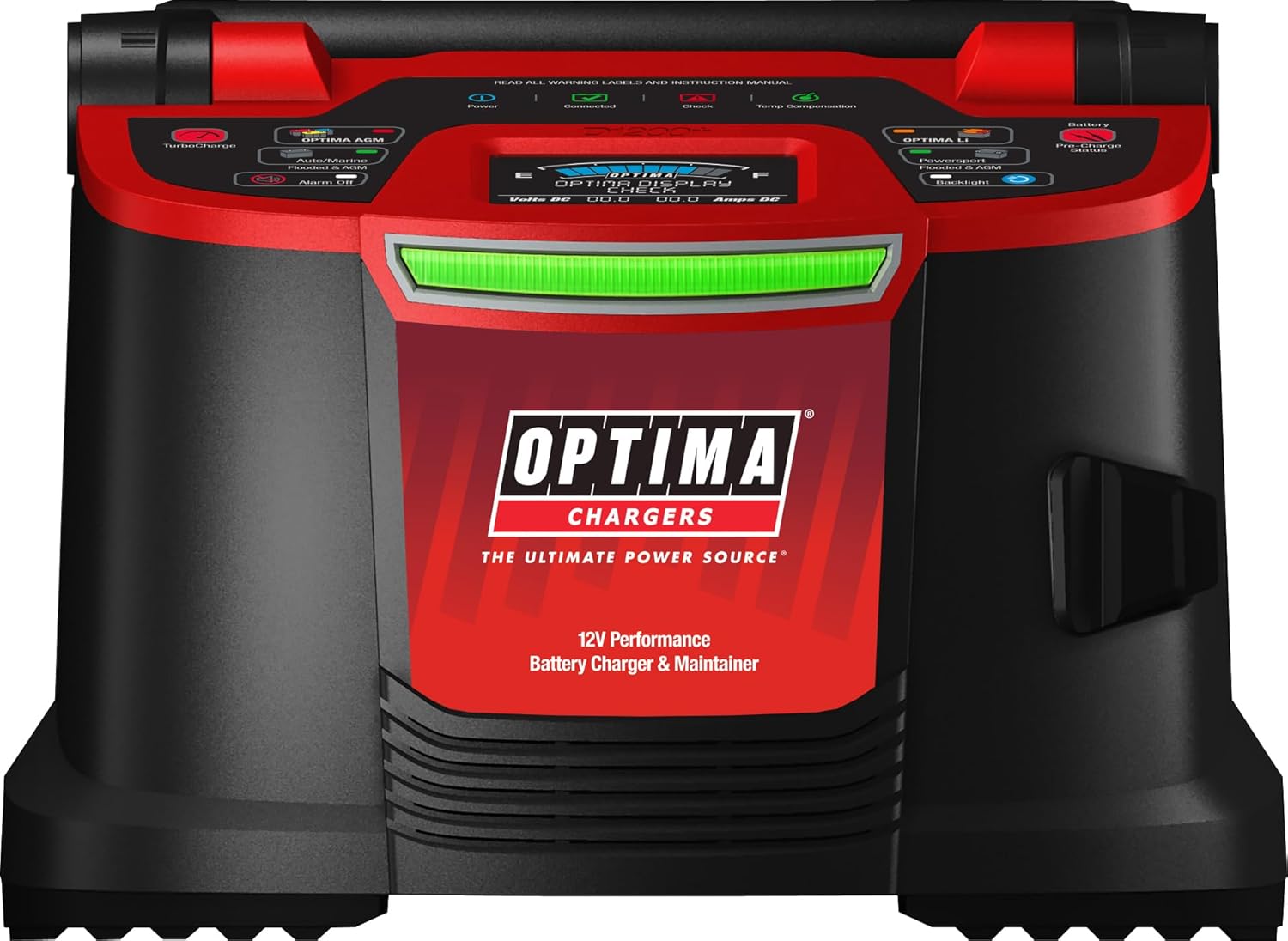
ምስል 3.1፡ ከፍተኛ view of the OPTIMA D1200+ control panel, showing the various indicators and selection buttons for different battery types and charging modes.
4. የደህንነት ባህሪያት
The OPTIMA D1200+ incorporates several safety and operational features for user protection and reliable performance:
- ከስፓርክ-ነጻ የግንኙነት ቴክኖሎጂ፡- Designed to prevent sparks during connection to the battery terminals.
- ተገላቢጦሽ የዋልታነት ጥበቃ Automatically detects and protects against incorrect battery terminal connections.
- ከመጠን በላይ የሙቀት መከላከያ Monitors internal temperature and adjusts charging or shuts down to prevent overheating.
- At-a-Glance Charge Status Bar: Provides clear visual indication of the charging stage (blue, red, amber, green).
- Alphanumeric Display: Offers detailed battery state of charge and status messages.
- Battery Connected and Check Icons: Visual indicators for connection status and potential issues.
5. ጥገና
To ensure optimal performance and longevity of your OPTIMA D1200+ charger:
- ማጽዳት፡ Periodically wipe the exterior of the charger with a soft, dry cloth. Do not use harsh chemicals or abrasive cleaners.
- የኬብል ምርመራ; Regularly inspect all cables and connectors for wear, cuts, or damage. Replace any damaged components immediately.
- ማከማቻ፡ Store the charger in a cool, dry place when not in use. Utilize the integrated cable management bin and wall organizer bracket for tidy storage.
- ራስ-ሰር የመቆየት ሁኔታ; The charger's Auto Maintain (Energy Saver) mode automatically monitors and maintains the battery's full state of charge, requiring minimal user intervention during long-term connection.
6. መላ መፈለግ
6.1 Fault Mode Indications
If a fault condition occurs during any charging stage, the OPTIMA D1200+ will enter fault mode and cease outputting power. The following indicators will be observed:
- The status bar will turn OFF.
- The "Check" LED will illuminate red.
- The alphanumeric display will provide additional information regarding the specific fault.
Common fault conditions include:
- Bad Connection: Ensure all cable connections to the battery and AC outlet are secure.
- የተገላቢጦሽ ዋልታ; Verify that the positive (+) charger lead is connected to the positive (+) battery terminal and the negative (-) charger lead to the negative (-) battery terminal.
- ባትሪ ቁtage Out of Range: The charger will fault if the battery voltage is below 2.5VDC or above 15.5VDC.
- የተሳሳተ የባትሪ መጠንtage: If a 6V battery is connected instead of a 12V battery, the "Check" LED will pulse red.
The OPTIMA D1200+ will return to Stage 1 (System Check) once all fault conditions are cleared.
7. ዝርዝሮች
| ባህሪ | ዝርዝር መግለጫ |
|---|---|
| የሞዴል ቁጥር | D1200+ |
| የምርት ስም | ኦፕቲማ |
| አምራች | የኦፕቲማ ባትሪዎች |
| የምርት ልኬቶች | 7.5 x 8.5 x 10.25 ኢንች |
| የእቃው ክብደት | 7.93 ፓውንድ |
| የውጤት ቁtage | 12 ቮልት (ዲሲ) |
| ግብዓት Voltage | 120 ቮልት |
| የአሁኑ ደረጃ አሰጣጥ | 15 Amps |
8. ዋስትና እና ድጋፍ
For warranty information, technical support, or service inquiries regarding your OPTIMA D1200+ Battery Charger and Maintainer, please contact Optima Batteries directly.
You can find more information and contact details by visiting the official OPTIMA store or support channels.
Official OPTIMA Store: Visit the OPTIMA Store on Amazon


