1. መግቢያ
The Evelame Smart Ring (Model R11) is a sophisticated health and fitness tracker designed to provide real-time insights into your well-being. This compact, wearable device monitors various essential health metrics and supports multiple sports activities, all while offering convenient gesture control. This manual provides detailed instructions to help you get the most out of your smart ring.
2. ምርት አብቅቷልview
The Evelame Smart Ring is engineered with advanced sensors to accurately track your health data. Its sleek design ensures comfort for continuous wear, and its robust construction makes it suitable for various environments.
ቁልፍ ባህሪዎች
- አጠቃላይ የጤና ክትትል; Tracks heart rate, blood pressure, and SpO2 levels.
- የላቀ የእንቅልፍ ክትትል፡ Monitors deep sleep, light sleep, REM sleep, and wake times.
- Multi-Sport Activity Tracking: Supports various activities including running, walking, cycling, hiking, yoga, golf, jump rope, and dancing.
- የእጅ ምልክት ቁጥጥር፡- Allows for seamless interaction, such as remote photo capture.
- IP68 የውሃ መከላከያ; Designed for durability and resistance to water and dust, suitable for swimming and daily wear.
- ልፋት የሌለው የብሉቱዝ ግንኙነት፡- Pairs easily with Android (5.0+) and iOS (10.0+) devices via a free accompanying app.
- ረጅም የባትሪ ህይወት; Provides 3-5 days of usage on a single charge.
- ፕሪሚየም ቁሶች፡- Constructed with a stainless steel outer layer and an epoxy resin inner layer for comfort and durability.
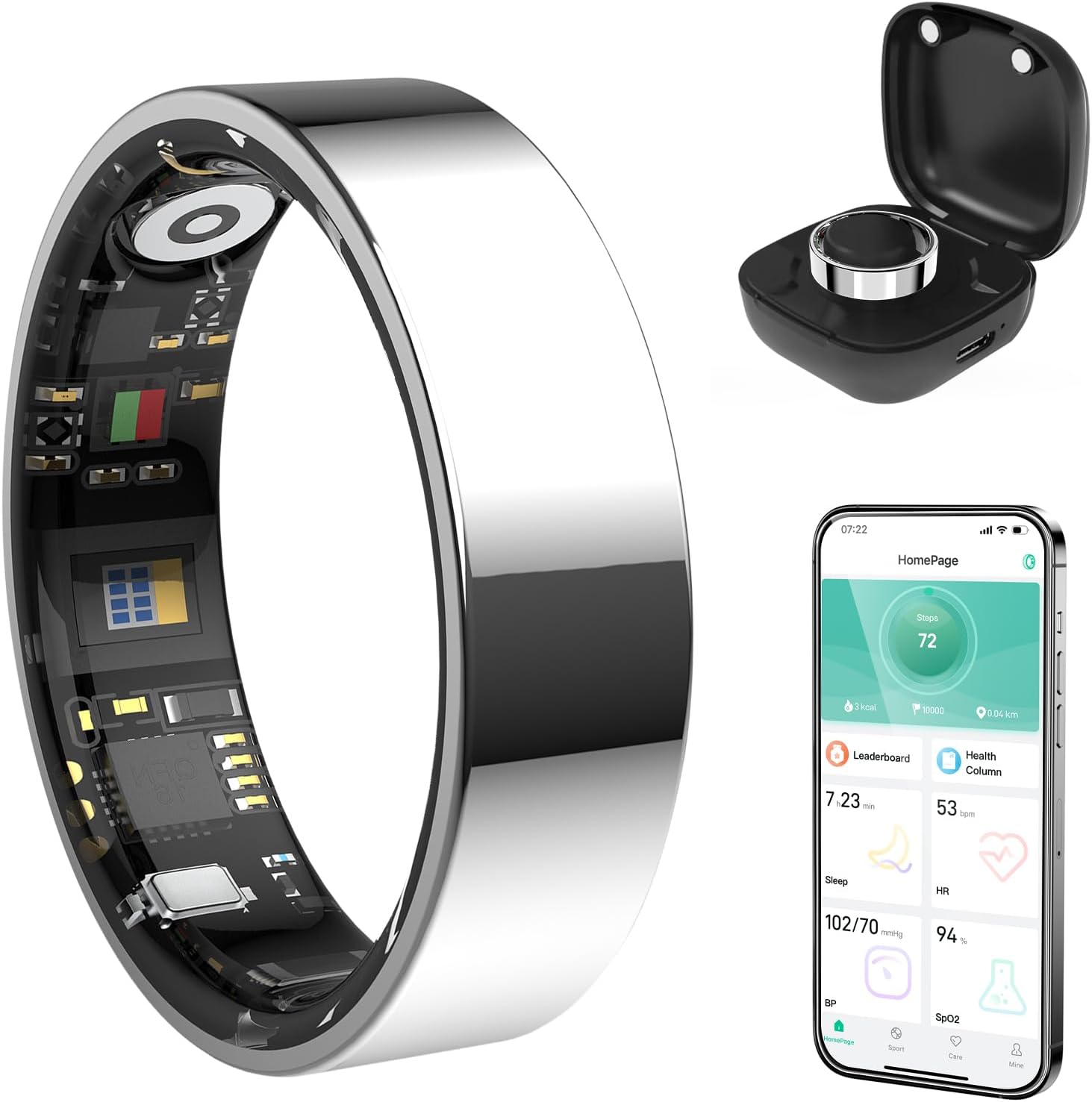
ምስል 1፡ Evelame Smart Ring, showing the ring itself, its charging case, and a smartphone displaying the companion app's interface with health data.
3. የማዋቀር መመሪያ
3.1 Unboxing እና የመጀመሪያ ክፍያ
Upon receiving your Evelame Smart Ring, carefully unbox the device. The package includes the smart ring, a charging cable, and a user guide.
- Remove the smart ring from its packaging.
- Connect the provided charging cable to a USB power source.
- Attach the magnetic end of the charging cable to the charging contacts inside the ring. Ensure the ring is securely connected and the charging indicator light illuminates.
- Allow the ring to fully charge before first use. This typically takes approximately 2 hours.
ቪዲዮ 1 Unboxing and initial charging process of the Evelame Smart Ring. This video demonstrates how to connect the charging cable to the ring and initiate the charging process.
3.2 መተግበሪያ ማውረድ እና ማጣመር
To access your health data and customize settings, download the companion app:
- Scan the QR code provided in the user guide or search for "Smart Health" in your device's app store (compatible with Android 5.0+ and iOS 10.0+).
- መተግበሪያውን ይጫኑ እና መለያ ይፍጠሩ።
- በእርስዎ ዘመናዊ ስልክ ላይ ብሉቱዝን ያንቁ።
- Open the "Smart Health" app, navigate to the device section, and select "Add Device."
- Follow the on-screen prompts to pair your Evelame Smart Ring with your smartphone.

ምስል 2፡ Visual guide for downloading the companion app and connecting the smart ring via Bluetooth, including screenshots of the app interface.
3.3 Proper Wearing Style
For optimal accuracy of health measurements (blood pressure, SpO2, heart rate), ensure the sensor inside the ring is facing your fingerpad while wearing it. The ring should fit comfortably, not too tight or too loose.

ምስል 3፡ Illustration demonstrating the correct way to wear the Evelame Smart Ring for accurate sensor readings, with the sensor positioned against the fingerpad.

ምስል 4፡ Guide for measuring finger size to ensure a perfect fit for the Evelame Smart Ring, showing different ring sizes and measurement steps.
4. የአሠራር መመሪያዎች
4.1 የጤና ክትትል
The Evelame Smart Ring continuously monitors your health metrics. View real-time and historical data through the "Smart Health" app.
- የልብ ምት: Access the Heart Rate section in the app to see your current heart rate and historical trends.
- የደም ግፊት; Navigate to the Blood Pressure section for readings. Some measurements may require manual initiation within the app for accuracy.
- ስፒኦ2 (የደም ኦክስጅን) Check your blood oxygen levels in the dedicated SpO2 section.
- የእንቅልፍ ክትትል; The ring automatically tracks your sleep patterns. Review detailed sleep analysis, including deep sleep, light sleep, and REM duration, in the Sleep section of the app.

ምስል 5፡ Visual representation of the Evelame Smart Ring's health tracking capabilities, including sleep, heart rate, blood pressure, and blood oxygen monitoring.
ቪዲዮ 2 Demonstrates the health monitoring and fitness tracking features of the Smart Ring, showcasing how data is displayed in the companion app.
ቪዲዮ 3 This video focuses on the sleep tracking capabilities of the Smart Ring, showing how it monitors sleep patterns and provides insights.
4.2 የእንቅስቃሴ ክትትል
The ring automatically detects and tracks various sports activities. View your activity data, including steps, distance, and calorie consumption, in the app's Sports section.
- እርምጃዎች፡- The ring counts your daily steps and calculates distance covered.
- የስፖርት ሁነታዎች፡- Select specific sports modes within the app (e.g., running, walking, cycling) to get more tailored tracking data for your workouts.

ምስል 6፡ The Evelame Smart Ring's ability to track various sports activities, including running, cycling, ropeskipping, walking, yoga, golf, jump rope, and dancing, with app interface exampሌስ.
4.3 የእጅ ምልክት ቁጥጥር
Utilize the gesture control feature for convenient actions, such as remote photo capture:
- Ensure your phone's camera app is open and connected to the smart ring via Bluetooth.
- Perform the designated gesture (e.g., a simple swipe of your finger) to remotely trigger the camera shutter.

ምስል 7፡ A family using the smart ring's gesture control feature to capture a remote photo with their smartphone, highlighting convenience.
5. ጥገና
5.1 ጽዳት
To maintain optimal performance and hygiene, clean your smart ring regularly:
- ቀለበቱን በለስላሳ፣ d ይጥረጉamp ጨርቅ.
- ኃይለኛ ኬሚካሎችን ወይም ሻካራ ቁሳቁሶችን ከመጠቀም ይቆጠቡ, ምክንያቱም እነዚህ የቀለበቱን መጨረሻ እና ዳሳሾችን ሊጎዱ ይችላሉ.
- ከመሙላቱ በፊት የኃይል መሙያ እውቂያዎቹ ንጹህ እና ደረቅ መሆናቸውን ያረጋግጡ።
5.2 የውሃ መቋቋም (IP68)
The Evelame Smart Ring is IP68 waterproof, meaning it can withstand immersion in water up to 1.5 meters for 30 minutes. It is suitable for:
- ገላ መታጠብ
- እጆችን መታጠብ
- መዋኘት (ጥልቀት የሌለው ውሃ)
- የዝናብ ሁኔታዎች
Avoid prolonged exposure to hot water, steam, or high-pressure water jets, as this may compromise the water resistance over time.

ምስል 8፡ The Evelame Smart Ring demonstrating its IP68 waterproof capability, shown being worn by a person underwater.
6. መላ መፈለግ
6.1 የግንኙነት ጉዳዮች
- የማይጣመር ቀለበት፡ Ensure Bluetooth is enabled on your phone and the ring is charged. Restart both the ring (by placing it on the charger) and your phone.
- ውሂብ አይመሳሰልም፦ Check your phone's internet connection and ensure the app is running in the background. Try manually syncing data within the app.
6.2 ትክክለኛ ያልሆኑ ንባቦች
- Heart Rate/SpO2/Blood Pressure: Verify the ring is worn correctly with the sensor facing your fingerpad. Ensure the ring is clean and free from obstructions. Avoid taking measurements during intense physical activity.
- የእንቅልፍ ክትትል; Ensure the ring is worn throughout the entire sleep period.
6.3 የባትሪ ጉዳዮች
- Ring not charging: Check the charging cable and adapter for damage. Ensure the magnetic connection is secure and the charging contacts on the ring are clean.
- አጭር የባትሪ ዕድሜ; Reduce the frequency of continuous monitoring for certain metrics if possible. Ensure the ring is fully charged before use.

ምስል 9፡ The Evelame Smart Ring in its charging case, illustrating the charging mechanism and highlighting its 3-5 day battery life.
7. ዝርዝሮች
| ባህሪ | ዝርዝር |
|---|---|
| የሞዴል ቁጥር | R11 |
| የምርት ስም | Evelame |
| ግንኙነት | ብሉቱዝ |
| የስርዓተ ክወና ተኳኋኝነት | iOS 10.0+ ወይም አንድሮይድ 5.0+ |
| የውሃ መቋቋም | IP68 (እስከ 50 ሜትር) |
| የባትሪ አቅም | 4 Amp Hours (1 CR5 battery included) |
| የባትሪ ህይወት | 3-5 ቀናት |
| የማህደረ ትውስታ ማከማቻ አቅም | 4 ጊባ |
| የእቃው ክብደት | 3.2 አውንስ (0.09 ኪሎ ግራም) |
| ልዩ ባህሪያት | Activity Tracker, Gesture Control, Lightweight, Multisport Tracker |
8. ዋስትና እና ድጋፍ
For warranty information and customer support, please refer to the documentation included with your product or visit the official Evelame webጣቢያ። በዚህ መመሪያ ውስጥ ያልተካተቱ ማናቸውም ችግሮች ካጋጠሙዎት፣ እባክዎን ለእርዳታ የደንበኞች አገልግሎት ቡድናችንን ያነጋግሩ።