መግቢያ
Welcome to your JLab Go Lux ANC Wireless Headphones. This manual provides detailed instructions to help you get the most out of your new headphones, covering setup, operation, maintenance, and troubleshooting.
በሣጥኑ ውስጥ ያለው
- JLab Go Lux ANC Wireless Headphones
- የዩኤስቢ-ሲ ኃይል መሙያ ገመድ

Image: JLab Go Lux ANC Headphones and included USB-C charging cable.
ምርት አልቋልview
Familiarize yourself with the key components and controls of your JLab Go Lux ANC Wireless Headphones.

ምስል፡ መቀራረብ view of the right earcup, highlighting the power button, volume controls, and ANC/Be Aware mode button.
ቁልፍ ባህሪዎች
- የተቀላቀለ አክቲቭ ኖይዝ ሰርሲሊንግ (ANC)፦ Reduces external distractions by up to 30 dB.
- ንቁ ይሁኑ ሁነታ፦ ኦዲዮን በሚያዳምጡበት ጊዜ አካባቢዎን እንዲሰሙ ይፈቅድልዎታል።
- የክላውድ አረፋ ምቾት፡ Ergonomically shaped Form-Fit Earcups with 1-inch Cloud Foam cushions and adjustable hinges for extended comfort.
- የጄላብ መተግበሪያ ማበጀት፡ Personalize ANC/Be Aware settings, touch controls, and sound preferences.
- ክሪስታል አጽዳ ጥሪዎች፡- Equipped with noise-canceling microphones for clear communication.
- የብሉቱዝ ባለብዙ ነጥብ፦ በአንድ ጊዜ ከሁለት መሳሪያዎች ጋር ይገናኙ.
- የገመድ አልባ መጋራት ሁነታ፡- Share audio wirelessly between two Lux headphones.
- ጎግል ፈጣን ጥንድ እና የማይክሮሶፍት ስዊፍት ጥንድ፡ Effortless pairing with Android and Windows devices.
- Google የእኔን መሣሪያ አግኝ፡ የተሳሳተ ቦታ ከተገኘ የጆሮ ማዳመጫዎን ያግኙ።
- የሚታጠፍ ንድፍ Rotating earcups for compact storage and portability.
ማዋቀር
1. የመነሻ ኃይል መሙላት
Before first use, fully charge your headphones using the provided USB-C cable. The LED indicator will show charging status.
2. ማብራት / ማጥፋት
- አብራ፡ የ LED አመልካች እስኪበራ ድረስ የኃይል አዝራሩን ተጭነው ይቆዩ።
- ኃይል ዝጋ: የ LED አመልካች እስኪጠፋ ድረስ የኃይል አዝራሩን ተጭነው ይቆዩ.
3. የብሉቱዝ ማጣመር
- Turn on your JLab Go Lux ANC headphones.
- የጆሮ ማዳመጫዎቹ በራስ-ሰር ወደ ማጣመሪያ ሁነታ ይገባሉ (LED ሰማያዊ/ቀይ ያበራል።)
- On your device (smartphone, laptop, etc.), open Bluetooth settings and select "JLab Go Lux ANC" from the list of available devices.
- አንዴ ከተገናኘ በኋላ፣ ኤልኢዲው ወደ ሰማያዊ ቀለም ይለወጣል።
ጎግል ፈጣን ጥንድ እና የማይክሮሶፍት ስዊፍት ጥንድ፡ For supported Android and Windows 10/11 devices, simply turn on your headphones near the device, and a pop-up notification will prompt you to connect with a single click.
4. የጄላብ መተግበሪያ ማበጀት
Download the JLab App from the App Store or Google Play Store to unlock full customization options for your headphones.
- የANC/Be Aware ቅንብሮችን ያብጁ።
- የንክኪ መቆጣጠሪያዎችን ያስተካክሉ።
- Fine-tune sound with the equalizer (JLab Signature, Balance, Bass Boost presets available).
- Enable Safe Hearing with volume limits.
- የሶፍትዌር ዝመናዎችን ይቀበሉ።

Image: The JLab App interface on a smartphone, demonstrating sound and noise control customization options.
የአሠራር መመሪያዎች
1. Active Noise Cancelling (ANC) & Be Aware Mode
Toggle between ANC, Be Aware, and ANC Off modes using the dedicated button on the earcup.
- ድብልቅ ኤኤንሲ፡ Eliminates external distractions for an immersive audio experience.
- ንቁ ይሁኑ ሁነታ፦ የድባብ ድምጾችን እንዲያልፉ ያስችላል፣ ይህም አካባቢዎን እንዲያውቁ ያስችልዎታል።

Image: A person wearing the headphones, demonstrating the use of ANC or Be Aware mode in a public environment.
2. የጥሪ ተግባራት
The built-in noise-canceling microphones ensure clear calls.
- መልስ/ጥሪ ጨርስ፡ ባለብዙ-ተግባር አዝራሩን ነጠላ ይጫኑ።
- ጥሪን ውድቅ አድርግ፡ የባለብዙ ተግባር አዝራሩን ተጭነው ይያዙ።
- የድምፅ ረዳት አግብር ባለብዙ ተግባር አዝራሩን ሁለቴ ይጫኑ።

Image: A person engaged in a phone call while wearing JLab Go Lux ANC headphones, emphasizing the clear call feature.
3. የሙዚቃ መልሶ ማጫወት
- አጫውት/ ለአፍታ አቁም፡ ባለብዙ-ተግባር አዝራሩን ነጠላ ይጫኑ።
- ድምጽ ጨምር የ'+' አዝራሩን በአጭሩ ይጫኑ።
- ጥራዝ ታች የ'-' አዝራሩን በአጭሩ ይጫኑ።
- ቀጣይ ትራክ፡ የ'+' አዝራሩን ለረጅም ጊዜ ይጫኑ።
- ቀዳሚ ትራክ የ'-' አዝራሩን ለረጅም ጊዜ ይጫኑ።
4. Bluetooth Multipoint
Connect your headphones to two devices simultaneously. For example, connect to your laptop for work calls and your phone for music. The headphones will intelligently switch between devices.
5. Wireless Share Mode
Share your audio with another pair of JLab Lux headphones. Refer to the JLab App or JLab support for detailed instructions on activating Wireless Share Mode.
6. Google Find My Device
If you misplace your headphones, use the Google Find My Device feature to locate them. Ensure this feature is enabled and configured on your connected Android device.

Image: A person using the Google Find My Device app on a smartphone to locate their JLab headphones.
ምቾት እና የአካል ብቃት
The JLab Go Lux ANC headphones are designed for comfort during extended use.
- Form-Fit Earcups: Ergonomically shaped to the natural outline of the ear.
- Cloud Foam Cushions: 1-inch thick cushions provide plush comfort.
- የሚስተካከሉ ማጠፊያዎች; Customize the fit for various head sizes and shapes.

Image: A person wearing JLab Go Lux ANC headphones, showcasing the comfortable Cloud Foam earcups.
የኃይል መሙያ እና የባትሪ ህይወት
Your JLab Go Lux ANC headphones offer extended battery life.
- የባትሪ ህይወት፡ Up to 70+ hours of playtime (40+ hours with ANC on).
- በመሙላት ላይ፡ Use the included USB-C cable to charge. A full charge typically takes a few hours.
- የ LED አመልካች፡- The LED light on the earcup indicates charging status and battery level.
ጥገና
- Clean headphones with a soft, damp ጨርቅ. ኃይለኛ ኬሚካሎችን ያስወግዱ.
- ጥቅም ላይ በማይውልበት ጊዜ ቀዝቃዛና ደረቅ ቦታ ውስጥ ያከማቹ.
- ለከፍተኛ ሙቀት ወይም እርጥበት አይጋለጡ.
- The headphones are not water resistant. Avoid contact with liquids.
- The foldable design with rotating earcups allows for compact storage.
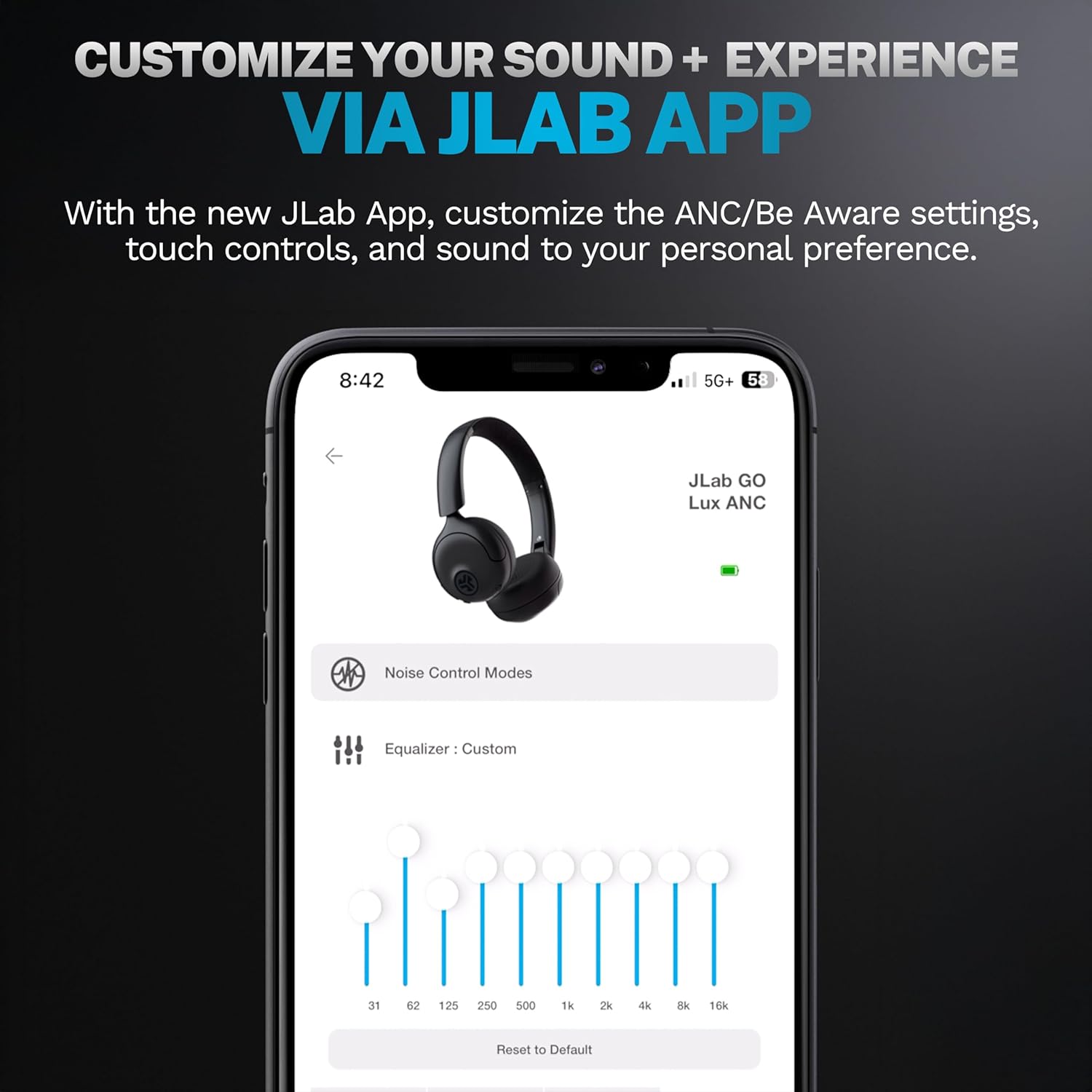
Image: JLab Go Lux ANC headphones in their folded position, demonstrating portability.
መላ መፈለግ
| ችግር | መፍትሄ |
|---|---|
| የጆሮ ማዳመጫዎች አይበሩም። | Ensure headphones are charged. Press and hold the power button for 3-5 seconds. |
| ከመሳሪያ ጋር ማጣመር አይቻልም | Make sure Bluetooth is enabled on your device. Ensure headphones are in pairing mode (flashing blue/red LED). Forget the device in your Bluetooth settings and re-pair. |
| ድምጽ ወይም ዝቅተኛ ድምጽ የለም | Check volume levels on both headphones and your connected device. Ensure headphones are properly connected. |
| ኤኤንሲ ውጤታማ እየሰራ አይደለም። | የኤኤንሲ ሁነታ መስራቱን ያረጋግጡ። በጆሮዎ ላይ ጥሩ ማህተም እንዲኖር ለማድረግ የጆሮ ማዳመጫውን ተስማሚ ያስተካክሉ። |
| የጥሪ ጥራት ጉዳዮች | Ensure microphones are not obstructed. Check your device's connection and signal strength. |
ዝርዝሮች
| ባህሪ | ዝርዝር |
|---|---|
| የሞዴል ስም | HBGOLUXANCMVE20WEB |
| የግንኙነት ቴክኖሎጂ | ገመድ አልባ (ብሉቱዝ) |
| የብሉቱዝ ስሪት | 5.0 |
| የጆሮ ማዳመጫ ቅርጽ | በጆሮ ላይ |
| የድምፅ መቆጣጠሪያ ባህሪያት | የተቀላቀለ አክቲቭ ኖይስ ሰርዚንግ፣ Нежено ሁነታ |
| የድምጽ ሾፌር ዓይነት | ተለዋዋጭ ሾፌር (40 ሚሜ) |
| የድግግሞሽ ምላሽ | 20 Hz - 20 kHz |
| ስሜታዊነት | 104 ዲቢቢ |
| የባትሪ ህይወት | Up to 70+ hours (40+ hours with ANC) |
| የመቆጣጠሪያ ዘዴ | ንካ፣ የመተግበሪያ ቁጥጥር |
| የእቃው ክብደት | 10.6 አውንስ (0.3 ኪሎ ግራም) |
| የምርት ልኬቶች | 2.95 x 6.1 x 7.48 ኢንች |
| የውሃ መቋቋም ደረጃ | የውሃ መቋቋም አይደለም |
ዋስትና እና ድጋፍ
የእርስዎ JLab Go Lux ANC ገመድ አልባ የጆሮ ማዳመጫዎች ከሚከተሉት ጋር ይመጣሉ የጄላብ የ2 ዓመት ዋስትና.
For detailed warranty information, product support, or to contact customer service, please visit the official JLab webጣቢያ ወይም ከምርትዎ ጋር የተካተተውን የዋስትና ካርድ ይመልከቱ።
እንዲሁም መጎብኘት ይችላሉ በአማዞን ላይ JLab መደብር ለተጨማሪ መረጃ እና መለዋወጫዎች።


