1. መግቢያ
Welcome to the user manual for your new Tiqvi 7-inch Digital Photo Frame. This device is designed to help you easily display and share your cherished photos and videos with family and friends, no matter where they are. Featuring a vibrant IPS touch screen, WiFi connectivity, and compatibility with the intuitive Frameo app, your digital photo frame offers a modern way to relive memories. Please read this manual carefully to ensure proper setup, operation, and maintenance of your device.

This image illustrates the Tiqvi digital photo frame in use, showcasing a vibrant family photo on its screen. Next to it, a smartphone displays the Frameo application, highlighting the seamless integration for sharing memories directly to the frame.
2. በሣጥኑ ውስጥ ያለው ምንድን ነው?
እባክዎ ሁሉም እቃዎች መኖራቸውን እና በጥሩ ሁኔታ ላይ መሆናቸውን ለማረጋገጥ የጥቅል ይዘቱን ያረጋግጡ።
- የቲኪቪ 7-ኢንች ዲጂታል ፎቶ ፍሬም
- የኃይል አስማሚ
- ሊነጠል የሚችል አቋም
- የተጠቃሚ መመሪያ (ይህ ሰነድ)

This image displays all items typically found inside the product packaging: the Tiqvi digital photo frame itself, its power adapter, and a detachable stand. Key dimensions of the frame are also provided for reference.
3. የማዋቀር መመሪያ
3.1 Powering On Your Frame
Connect the provided power adapter to the DC port on the back of the digital photo frame. Plug the adapter into a standard electrical outlet. The frame will automatically power on.
3.2 ከ Wi-Fi ጋር በመገናኘት ላይ
Upon first power-on, the frame will guide you through the initial setup process, including connecting to your Wi-Fi network.
- የሚመርጡትን ቋንቋ ይምረጡ።
- የሰዓት ሰቅዎን ይምረጡ።
- ከዝርዝሩ ውስጥ የ Wi-Fi አውታረ መረብዎን ይምረጡ።
- Enter your Wi-Fi password using the on-screen keyboard and tap "Connect".
- Once connected, the frame will display a unique Frameo ID.
3.3 የፍሬሞ መተግበሪያን መጫን
To send photos and videos to your frame, you need to download the Frameo app on your smartphone or tablet.
- ፈልግ "Frameo" in the Apple App Store (for iOS devices) or Google Play Store (for Android devices).
- መተግበሪያውን ያውርዱ እና ይጫኑት።
- መተግበሪያውን ይክፈቱ እና መለያ ይፍጠሩ ወይም ይግቡ።
- Add your frame by entering the unique Frameo ID displayed on your digital photo frame.

This image emphasizes the integration with the Frameo app, showing the frame alongside the Google Play and App Store logos, indicating where users can download the necessary application for managing and sharing photos.
4. Operating Your Digital Photo Frame
4.1 ፎቶዎችን እና ቪዲዮዎችን መላክ
Once your frame is connected to the Frameo app, you can easily send photos and short videos (up to 15 seconds) from your smartphone.
- የFrameo መተግበሪያን በስማርትፎንዎ ላይ ይክፈቱ።
- ለመላክ የሚፈልጓቸውን ፎቶዎች ወይም ቪዲዮዎች ይምረጡ።
- Choose your Tiqvi frame as the recipient.
- Add a caption if desired, then tap "Send".
Photos and videos will appear on your frame shortly after being sent, provided the frame is connected to Wi-Fi. You can connect up to 500 users to share memories with your frame.

This image illustrates the ease of sharing photos and videos with the Tiqvi digital photo frame. It shows a photo being sent from a smartphone to the frame, symbolizing the ability to connect and share memories with loved ones anywhere.
4.2 የንክኪ ማያ ገጽ አሰሳ
The Tiqvi digital photo frame features an intuitive touch screen for easy navigation.
- ወደ ግራ/ቀኝ ያንሸራትቱ፦ Navigate through photos.
- መታ ያድርጉ፡ Access settings, view photo details, or pause slideshow.
- ለማጉላት ቆንጥጦ: Zoom in or out on photos.
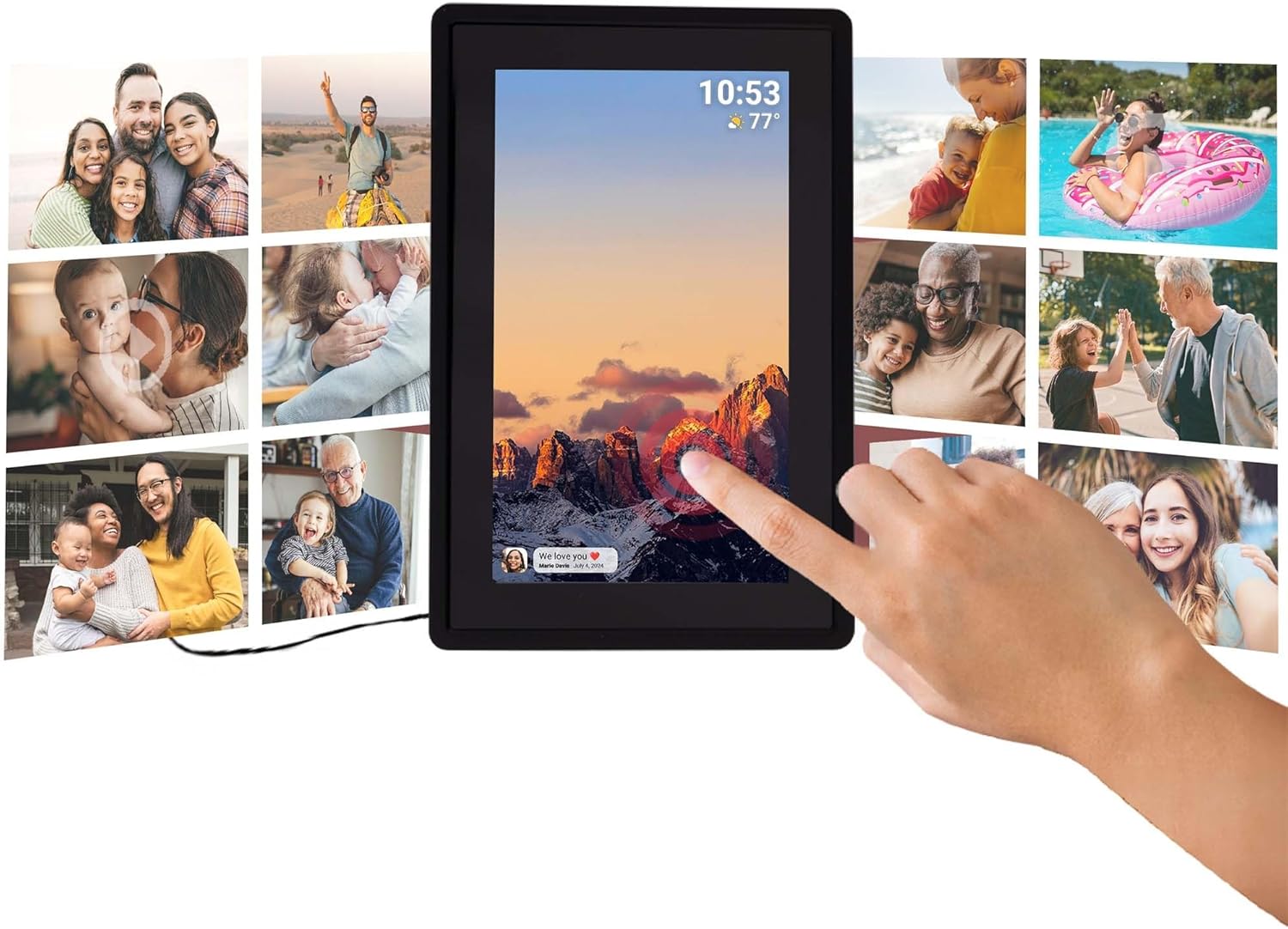
This image illustrates the intuitive touch screen functionality of the digital photo frame, showing a hand interacting directly with the display to navigate through photos and settings.
4.3 Auto-Rotate Function
The frame automatically detects its orientation (landscape or portrait) and adjusts the display of photos accordingly, ensuring your memories are always shown correctly.

Two Tiqvi digital photo frames are shown, one in landscape and one in portrait orientation, demonstrating how the auto-rotate function automatically adjusts the photo display for perfect viewing
5. ማከማቻ
Your Tiqvi digital photo frame comes with 16 ጂቢ የውስጥ ማህደረ ትውስታ, capable of storing thousands of photos and short videos.
For additional storage, the frame includes a የማይክሮ ኤስዲ ካርድ ማስገቢያ, supporting cards up to 32 ጊባ. This allows you to expand the frame's capacity significantly.

ይህ በዝርዝር view of the frame's screen highlights its key technical specifications and features, including WiFi connectivity, 16GB internal storage, the 7-inch IPS display with 1024x600 resolution, support for microSD cards up to 32GB, and compatibility with the Frameo application.

This visual demonstrates the extensive storage capability of the digital photo frame, showing a screen filled with a diverse collage of photos.
6. ዝርዝሮች
| ባህሪ | ዝርዝር መግለጫ |
|---|---|
| የምርት ስም | ቲኪቪ |
| የሞዴል ቁጥር | TVH10005 |
| የስክሪን መጠን | 7 ኢንች |
| የማሳያ ዓይነት | አይፒኤስ ንክኪ ማያ ገጽ |
| ጥራት | 1024x600 (16:9 aspect ratio) |
| የውስጥ ማህደረ ትውስታ | 16 ጊባ |
| ውጫዊ ማከማቻ | MicroSD card slot (max. 32GB) |
| ግንኙነት | ዋይፋይ |
| የመተግበሪያ ተኳኋኝነት | ፍሬም መተግበሪያ |
| ቀለም | ጥቁር |
| የኃይል ምንጭ | Electric (AC Adapter) |
| የምርት ልኬቶች (L x W x H) | 22 x 15 x 2.51 ሴ.ሜ |
| የምርት ክብደት | 600 ግራም |
7. ጥገና
7.1 ፍሬሙን ማጽዳት
To keep your digital photo frame in optimal condition, follow these cleaning guidelines:
- ስክሪን፡ ስክሪኑን በቀስታ ለማጽዳት ለስላሳ፣ ከላጣ ነፃ የሆነ ጨርቅ (ለምሳሌ፣ ማይክሮፋይበር ጨርቅ) ይጠቀሙ። ለጠንካራ ቆሻሻዎች፣ ትንሽ ይጥረጉ።ampጨርቁን በውሃ ወይም ስክሪን ማጽጃ በተለይ ለኤሌክትሮኒክስ ተብሎ የተነደፈ። ኃይለኛ ኬሚካሎችን ወይም ገላጭ ቁሳቁሶችን ያስወግዱ.
- የፍሬም አካል፡ Wipe the body of the frame with a dry or slightly damp ለስላሳ ጨርቅ። ከመጠን በላይ እርጥበት አይጠቀሙ።
- ኃይል ዝጋ: Always unplug the power adapter before cleaning.
7.2 አጠቃላይ እንክብካቤ
- ክፈፉን በቀጥታ የፀሐይ ብርሃን ወይም በሙቀት ምንጮች አቅራቢያ ከማስቀመጥ ይቆጠቡ።
- Keep the frame away from water and high humidity.
- Do not drop or subject the frame to strong impacts.
8. መላ መፈለግ
If you encounter any issues with your Tiqvi digital photo frame, please refer to the table below for common problems and their solutions.
| ችግር | ሊሆን የሚችል ምክንያት | መፍትሄ |
|---|---|---|
| ፍሬም አይበራም። | የኃይል አስማሚ አልተገናኘም ወይም የተሳሳተ መውጫ። | Ensure the power adapter is securely plugged into the frame and a working electrical outlet. Try a different outlet. |
| ከWi-Fi ጋር መገናኘት አልተቻለም። | የተሳሳተ የይለፍ ቃል፣ ደካማ ምልክት ወይም የራውተር ችግር። | Double-check the Wi-Fi password. Move the frame closer to the router. Restart your Wi-Fi router. |
| ፎቶዎች በክፈፉ ላይ አይታዩም። | Frame not connected to Wi-Fi, incorrect Frameo ID, or app issue. | Verify Wi-Fi connection on the frame. Ensure the correct Frameo ID is entered in the app. Restart the Frameo app on your phone. |
| ስክሪን ምላሽ አይሰጥም። | ጊዜያዊ የሶፍትዌር ችግር። | የኃይል አስማሚውን ያላቅቁ፣ ለ10 ሰከንዶች ይጠብቁ፣ ከዚያም ፍሬሙን እንደገና ለማስጀመር መልሰው ይሰኩት። |
| Photos are blurry or low quality. | Original photo resolution is low. | Ensure you are sending high-resolution photos to the frame for best display quality. |
9. ዋስትና እና ድጋፍ
9.1 የአምራች ዋስትና
Your Tiqvi digital photo frame is covered by a የ 1 ዓመት የአምራች ዋስትና from the date of purchase. This warranty covers defects in materials and workmanship under normal use. It does not cover damage caused by misuse, accidents, unauthorized modifications, or external causes. Please retain your proof of purchase for warranty claims.
9.2 የደንበኛ ድጋፍ
For further assistance, technical support, or warranty inquiries, please refer to the product packaging or the official Tiqvi website for contact information. When contacting support, please have your product model number (TVH10005) and purchase details ready.


