1. መግቢያ
Thank you for choosing the EvoFox Deathray v2 Pro Gaming Keyboard. This manual provides detailed instructions for setting up, operating, and maintaining your new gaming keyboard. Please read this manual carefully to ensure optimal performance and longevity of your device.
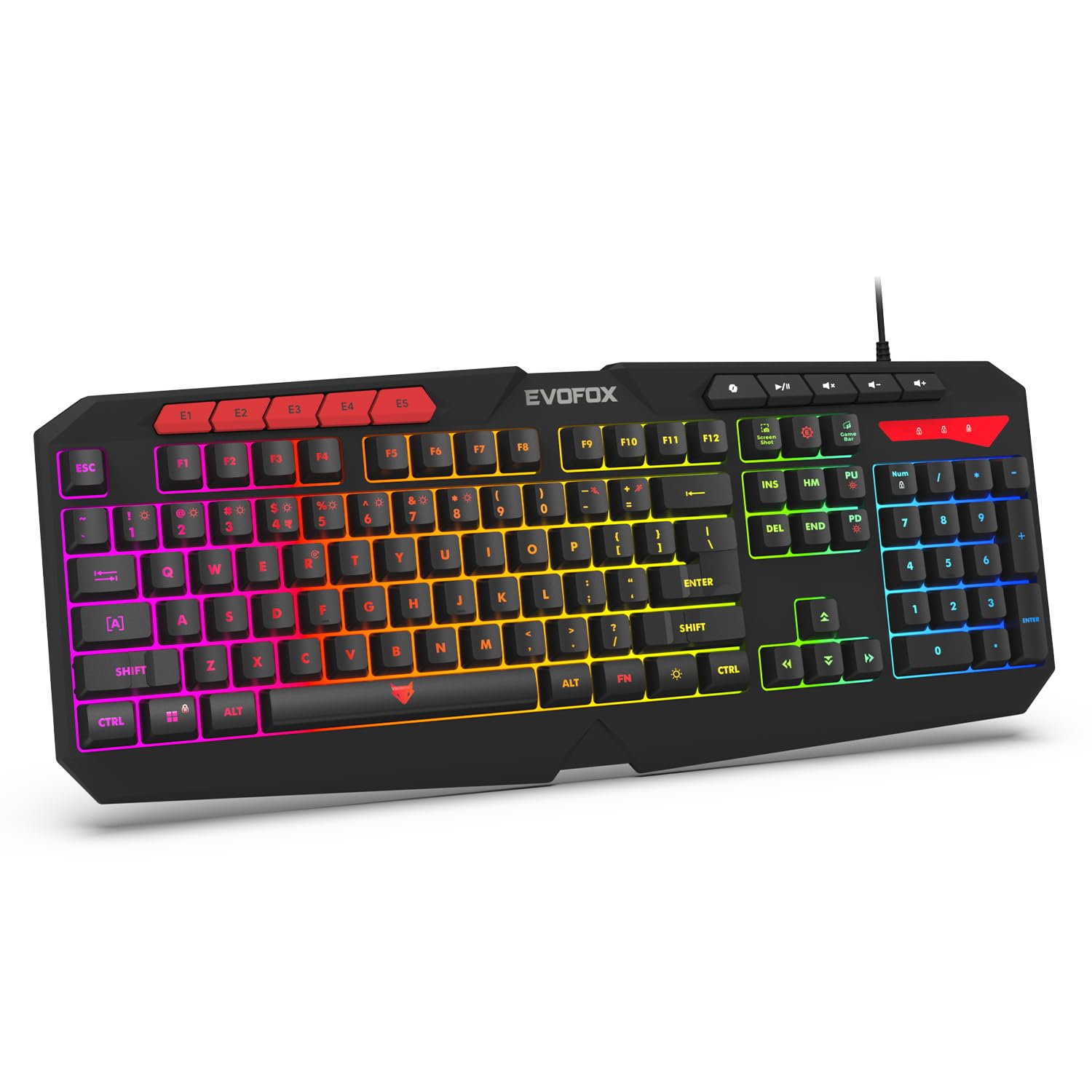
Image 1.1: EvoFox Deathray v2 Pro Gaming Keyboard overview.
2. የጥቅል ይዘቶች
- EvoFox Deathray v2 Pro Gaming Keyboard
- የተጠቃሚ መመሪያ
3. የማዋቀር መመሪያዎች
3.1 የቁልፍ ሰሌዳውን በማገናኘት ላይ
- Unpack the EvoFox Deathray v2 Pro Gaming Keyboard from its packaging.
- በኮምፒተርዎ (ፒሲ ወይም ላፕቶፕ) ላይ የሚገኝ የዩኤስቢ ወደብ ያግኙ።
- የቁልፍ ሰሌዳውን የዩኤስቢ ማገናኛ ወደ ዩኤስቢ ወደብ ይሰኩት.
- The keyboard will automatically install the necessary drivers. This process may take a few moments.
- Once installed, the RGB backlighting will illuminate, indicating the keyboard is ready for use.
The keyboard features a durable 1.8m braided cable for reliable connectivity.

Image 3.1: Keyboard with durable braided cable and soft membrane keys.
4. የአሠራር መመሪያዎች
4.1 RGB የጀርባ ብርሃን ማበጀት
The EvoFox Deathray v2 Pro features 6-zone customizable RGB backlighting with 8 dynamic lighting modes. You can personalize your gaming setup for an immersive experience.
- የመብራት ሁነታዎችን መለወጥ; Use the dedicated lighting control keys (often indicated by a sun or lightbulb icon, or through a combination with the Fn key) to cycle through the 8 available dynamic lighting modes.
- ብጁ መብራት፡ Refer to the keyboard's software (if available, check the official EvoFox website) for advanced custom lighting profiles and per-key RGB customization.

Image 4.1: Keyboard showcasing 6-zone RGB backlighting with 7 lighting presets and 1 custom lighting option.

Image 4.2: Comparison illustrating the difference between RGB lighting with full color customization per zone and standard rainbow lighting with fixed color zones.
4.2 ፕሮግራም ሊደረጉ የሚችሉ ማክሮ ቁልፎች
The keyboard includes 5 programmable macro keys (E1-E5) to streamline your gameplay with customizable macros for lightning-fast responses. These keys allow you to record and assign complex sequences of commands to a single key press.
- ማክሮ ቀረጻ፡ Typically, macro recording is initiated by a dedicated macro recording key (often labeled 'MR' or similar, or accessed via Fn key combination). Follow the on-screen prompts or software instructions to record your desired key sequence.
- Assigning Macros: Once recorded, assign the macro to one of the programmable macro keys (E1-E5) using the keyboard's software.

Image 4.3: Highlight of the 5 programmable macro keys (E1-E5) for executing complex commands.
4.3 Special Function Keys
Access essential tools quickly with dedicated shortcuts for Screenshot, Macro Recording, and Xbox Game Bar. These functions are typically accessed via specific keys or Fn key combinations.
- Screenshot Key: Captures a screenshot of your display.
- Macro Recording Key: Initiates macro recording.
- Xbox Game Bar Key: Opens the Xbox Game Bar interface for gaming features.
- የቅጂ ቁልፍ፡- Activates the Copilot feature (if supported by your operating system).

Image 4.4: Illustration of special function keys for Screenshot, Macro Recording, Xbox Game Bar, and Copilot.
4.4 ፀረ-መናፍስት ቁልፎች
The keyboard features 19 anti-ghosting keys, ensuring flawless input during high-stakes moments. This technology allows multiple key presses to be registered simultaneously and accurately, preventing missed commands.

Image 4.5: Keyboard layout highlighting the 19 anti-ghosting keys for precise, uninterrupted gameplay.
4.5 Ergonomic Full-Size Layout
Designed for comfort during extended gaming sessions, the keyboard features an ergonomic full-size layout with soft and silent membrane keys. This design aims to provide precision without sacrificing ease of use.
5. ጥገና
5.1 የቁልፍ ሰሌዳውን ማጽዳት
- ከማጽዳትዎ በፊት የቁልፍ ሰሌዳውን ከኮምፒዩተርዎ ያላቅቁት.
- ለስላሳ፣ ከቆሸሸ ነፃ የሆነ ጨርቅ በትንሹ ተጠቀምampየቁልፍ ሰሌዳውን ወለል ለማፅዳት በውሃ ወይም በመጠኑ የጽዳት መፍትሄ።
- በቁልፍ መካከል አቧራ እና ፍርስራሾች, የታመቀ አየር ይጠቀሙ.
- Avoid using harsh chemicals, abrasive cleaners, or solvents, as these can damage the keyboard's finish and key legends.
- ከኮምፒውተርዎ ጋር እንደገና ከማገናኘትዎ በፊት የቁልፍ ሰሌዳው ሙሉ በሙሉ ደረቅ መሆኑን ያረጋግጡ።
6. መላ መፈለግ
6.1 የቁልፍ ሰሌዳ ምላሽ አይሰጥም
- የዩኤስቢ ግንኙነትን ያረጋግጡ፡- የዩ ኤስ ቢ ገመዱ ደህንነቱ በተጠበቀ ሁኔታ በኮምፒዩተርዎ ላይ በሚሰራ የዩኤስቢ ወደብ ላይ መሰካቱን ያረጋግጡ። የተለየ የዩኤስቢ ወደብ ይሞክሩ።
- ኮምፒተርን እንደገና ያስጀምሩ; አንዳንድ ጊዜ ቀላል ዳግም ማስጀመር የግንኙነት ችግሮችን መፍታት ይችላል።
- የአሽከርካሪ ዳግም መጫን; If the issue persists, try uninstalling the keyboard drivers from your computer's Device Manager and then reconnecting the keyboard to allow for automatic reinstallation.
6.2 RGB የኋላ መብራት እየሰራ አይደለም
- የብሩህነት ቅንብሮችን ያረጋግጡ፡ Ensure the brightness level is not set to minimum or off. Use the dedicated lighting control keys to adjust brightness.
- የዑደት ሁነታዎች፡- Cycle through different RGB modes to see if any mode activates.
- የሶፍትዌር ፍተሻ፡- ብጁ ፕሮ የሚጠቀሙ ከሆነfiles, ensure the keyboard software is running and configured correctly.
6.3 የማክሮ ቁልፎች አይሰሩም
- የሶፍትዌር ማዋቀር፡- Verify that macros are correctly recorded and assigned to the desired keys within the keyboard's software.
- ሶፍትዌር እየሄደ ነው፦ Ensure the keyboard's macro software (if applicable) is running in the background.
7. ዝርዝሮች
| ባህሪ | ዝርዝር መግለጫ |
|---|---|
| የምርት ስም | EvoFox |
| ሞዴል | 498 |
| የምርት ልኬቶች | 44.7 x 17.2 x 2.6 ሴ.ሜ |
| የእቃው ክብደት | 565 ግ |
| የሃርድዌር መድረክ | ዊንዶውስ |
| ተስማሚ መሣሪያዎች | ላፕቶፕ ፣ ፒሲ |
| ልዩ ባህሪያት | Compact Design, Silent Membrane Keyboard, True Prims RGB |
| የቁልፍ ሰሌዳ መግለጫ | ጨዋታ |
| የማገናኛ አይነት | ዩኤስቢ |
| ቁሳቁስ | ኤቢኤስ ፕላስቲክ |
| የትውልድ ሀገር | ቻይና |
8. ዋስትና እና ድጋፍ
8.1 የዋስትና መረጃ
The EvoFox Deathray v2 Pro Gaming Keyboard typically comes with a የ 1 ዓመት የተወሰነ ዋስትና ከተገዛበት ቀን ጀምሮ. ይህ ዋስትና የማምረቻ ጉድለቶችን ይሸፍናል እና በመደበኛ አጠቃቀም ላይ እንደታሰበው የምርት ተግባራትን ያረጋግጣል። ለዋስትና ጥያቄዎች እባክዎ የግዢ ማረጋገጫዎን ያቆዩ።
8.2 የደንበኛ ድጋፍ
For technical assistance, warranty claims, or any product-related inquiries, please contact EvoFox customer support through their official website or the contact information provided with your product packaging. You may also refer to the Amkette helpline mentioned in some product documentation.


