1. መግቢያ
This manual provides detailed instructions for the safe and effective use of your TOTAL TMT57026 Laser Distance Meter. Please read this manual thoroughly before operating the device and keep it for future reference. This device is designed for accurate distance measurements up to 70 meters, suitable for various professional and DIY applications.
2. የደህንነት መመሪያዎች
- የጨረር ጨረር; This device emits Class 2 laser radiation. Do not stare into the laser beam or direct it at other people or animals.
- የዓይን መከላከያ; ለጨረር ጨረር ቀጥተኛ የዓይን መጋለጥን ያስወግዱ.
- የአሠራር አካባቢ; መሳሪያውን በፈንጂ ከባቢ አየር ውስጥ ወይም ተቀጣጣይ በሆኑ ቁሳቁሶች አቅራቢያ አይጠቀሙ።
- የውሃ መቋቋም; ይህ መሳሪያ ነው። ውሃን የማይቋቋምለውሃ ወይም ለከፍተኛ እርጥበት መጋለጥን ያስወግዱ።
- ጥገና፡- Only qualified personnel should repair the device.
- ባትሪዎች፡ Use only specified AAA batteries. Do not mix old and new batteries or different types of batteries.
3. ምርት አብቅቷልview
Familiarize yourself with the components of your TOTAL TMT57026 Laser Distance Meter.
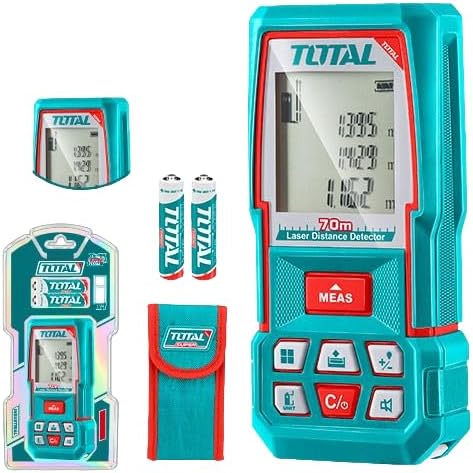
Figure 1: The TOTAL TMT57026 Laser Distance Meter, showing the device itself, two AAA batteries, a carrying pouch, and retail packaging. The device features a digital display and multiple function buttons.
ቁልፍ አካላት፡-
- የሌዘር ኤሚተር/ሪሲቨር፡ በመሳሪያው አናት ላይ ይገኛል.
- ማሳያ ማያ: Shows measurements, units, and mode indicators.
- የMEAS አዝራር፦ Initiates single or continuous measurement.
- UNIT አዝራር፡- Changes measurement units (e.g., meters, feet, inches).
- C/O Button: Clears the last measurement or turns the device off.
- የተግባር አዝራሮች፡ For area, volume, addition, subtraction, and other calculations.
- የባትሪ ክፍል፡ በመሳሪያው ጀርባ ላይ ይገኛል.
4. ማዋቀር
4.1 የባትሪ ጭነት
- በመሳሪያው ጀርባ ላይ የባትሪውን ክፍል ሽፋን ያግኙ.
- ሽፋኑን ለመክፈት ሽፋኑን ያንሸራትቱ ወይም ይክፈቱት።
- Insert two (2) AAA 1.5V disposable batteries, ensuring correct polarity (+/-). The device includes two AAA batteries.
- የባትሪውን ክፍል ደህንነቱ በተጠበቀ ሁኔታ ይዝጉ።
4.2 ማብራት / ማጥፋት
- ለማብራት፡- የሚለውን ይጫኑ MEAS button briefly. The display will light up.
- ለማጥፋት፡- ተጭነው ይያዙት። ሲ/ኦ ለ3 ሰከንዶች ያህል አዝራር። እንዲሁም መሳሪያው ለተወሰነ ጊዜ እንቅስቃሴ-አልባ ከሆነ በኋላ የባትሪ ዕድሜን ለመቆጠብ በራስ-ሰር ይጠፋል።
5. የአሠራር መመሪያዎች
5.1 መሰረታዊ የርቀት መለኪያ
- መሣሪያው መብራቱን ያረጋግጡ።
- የሌዘር ጨረሩን ወደ ኢላማው ወለል ያመልክቱ።
- የሚለውን ይጫኑ MEAS button once. The laser will activate, and the measurement will appear on the display.
- The measurement will be held on the screen until a new measurement is taken or the device is turned off.
5.2 ቀጣይነት ያለው መለኪያ (ክትትል)
- ተጭነው ይያዙት። MEAS አዝራር በግምት 2 ሰከንዶች.
- The device will enter continuous measurement mode, displaying real-time distance as you move the device.
- የሚለውን ይጫኑ MEAS button again to stop continuous measurement and hold the last value.
5.3 የመለኪያ ክፍሎችን መለወጥ
- የሚለውን ይጫኑ UNIT button repeatedly to cycle through available units: meters (m), feet (ft), and inches (in).
- የተመረጠው ክፍል በማሳያው ላይ ይታያል።
5.4 የቦታ እና የመጠን መለኪያ
The device supports calculation of area and volume. Refer to the icons on the function buttons for specific modes.
- Press the appropriate function button (e.g., the button with the square icon for area, or cube icon for volume).
- Follow the on-screen prompts to take the required measurements (e.g., length, width for area; length, width, height for volume).
- The calculated result will be displayed.
5.5 መደመር እና መቀነስ
የሚለውን ተጠቀም +/- button to add or subtract measurements.
- Take the first measurement.
- የሚለውን ይጫኑ +/- button to select addition or subtraction mode.
- Take the second measurement. The device will automatically perform the calculation and display the result.
6. ጥገና
6.1 ጽዳት
- መሳሪያውን ለስላሳ, መamp ጨርቅ. ገላጭ ማጽጃዎችን ወይም ፈሳሾችን አይጠቀሙ.
- የሌዘር ሌንሱን እንደ ጽዳት ካሜራ ሌንሶች ተመሳሳይ ለስላሳ፣ ልጣጭ የሌለው ጨርቅ በጥንቃቄ ያጽዱ።
6.2 ማከማቻ
- መሳሪያውን ደረቅና ቀዝቃዛ ቦታ ላይ ያስቀምጡት፤ ከፀሐይ ብርሃንና ከፍተኛ የሙቀት መጠን ራቅ ያድርጉት።
- ለረጅም ጊዜ ከተከማቸ፣ እንዳይፈስ ለመከላከል ባትሪዎቹን ያስወግዱ።
6.3 የባትሪ መተካት
- When the battery indicator on the display shows low power, replace both AAA batteries following the instructions in Section 4.1.
7. መላ መፈለግ
| ችግር | ሊሆን የሚችል ምክንያት | መፍትሄ |
|---|---|---|
| መሣሪያው አይበራም። | ባትሪዎች ሞተዋል ወይም በስህተት ተጭነዋል። | የባትሪውን ዋልታ ያረጋግጡ ወይም በአዲስ AAA ባትሪዎች ይተኩ። |
| ትክክለኛ ያልሆኑ መለኪያዎች. | Laser lens is dirty; target surface is too reflective/non-reflective; device is unstable. | Clean the laser lens. Measure against a suitable, stable surface. Ensure device is held steady. |
| የሌዘር ጨረር አይታይም። | Bright ambient light; laser is off. | Operate in lower light conditions. Ensure device is powered on and MEAS button is pressed. |
| ማሳያ የስህተት ኮድ ያሳያል። | ከክልል ውጭ መለካት; የውስጥ ስህተት. | Ensure target is within 0.05m to 70m range. Try restarting the device. If error persists, contact support. |
8. ዝርዝሮች
- ሞዴል፡ TMT57026
- የምርት ስም፡ ጠቅላላ
- የመለኪያ ክልል፡ ከ 0.05 እስከ 70 ሜትር
- የመለኪያ ክፍሎች፡- Meters (m), Feet (ft), Inches (in)
- ሌዘር ክፍል፡ ክፍል 2
- ባትሪዎች፡ 2 x AAA, 1.5V (included)
- የባትሪ ዓይነት፡ ሊጣል የሚችል
- Automatic Laser Shut-off: Yes (after inactivity)
- Automatic Device Shut-off: Yes (after inactivity)
- የምርት መጠኖች: በግምት 17 x 5 x 0.1 ሴ.ሜ
- የእቃው ክብደት፡ Approximately 160 g (0.16 Kilograms)
- ቁሳቁስ፡ ፕላስቲክ
- ቀለም፡ ቱርኩይስ
- የውሃ መቋቋም ደረጃ; የውሃ መቋቋም አይደለም
- አምራች፡ ጠቅላላ
- የትውልድ ሀገር፡- ቻይና
9. ዋስትና እና ድጋፍ
For warranty information and technical support, please contact TOTAL customer service. Keep your purchase receipt as proof of purchase.
For further assistance, please refer to the official TOTAL webጣቢያ ወይም የአካባቢዎን አከፋፋይ ያነጋግሩ።