1. መግቢያ
This manual provides instructions for the KRPTQJoo replacement remote control for Samsung Smart Televisions. This remote is designed as a direct replacement and does not require any pairing or programming. Simply insert batteries and begin use.
ጠቃሚ ማስታወሻ፡- This remote is not universal. It is specifically designed to be compatible with the Samsung TV models listed in this manual. Some buttons may not function if your specific TV model does not support the corresponding feature. Always refer to your television's original manual for feature compatibility.
2. ተስማሚ የቲቪ ሞዴሎች
This replacement remote control is compatible with various Samsung Smart Television models, including but not limited to:
- UE60JU6850U, UE60JU6870U, UE60JU6872U
- UE65JU6400K, UE65JU6400U, UE65JU6400W, UE65JU6450U, UE65JU6470U, UE65JU6475U
- UE75JU6400K, UE75JU6400U, UE75JU6400W
- UE32J6300AK, UE32J6300AW, UE32J6302AK, UE32J6350SU, UE32J6370SU
- UE40J6200AU, UE40J6200AW, UE40J6202AK, UE40J6250SU, UE40J6270SU, UE40J6272SU, UE40J6275SU, UE40J6300AK
If your model number is not listed, please contact customer support for assistance.
3. ዝርዝሮች
| የምርት ስም | መተኪያ ቲቪ የርቀት መቆጣጠሪያ |
| የምርት ስም | KRPTQJoo |
| ሞዴል (ASIN) | B0F19F7PDM |
| የኃይል ምንጭ | 2 x AAA ባትሪዎች (አልተካተተም) |
| ተስማሚ መሣሪያዎች | ሳምሰንግ ስማርት ቴሌቪዥኖች |
| ቀለም | ጥቁር |
4. ማዋቀር
4.1 ባትሪዎችን መጫን
- የባትሪውን ክፍል ከርቀት መቆጣጠሪያው ጀርባ ያግኙት።
- የባትሪውን ሽፋን ወደ ታች ያንሸራትቱ ወይም መቀርቀሪያውን ይጫኑ እና ለመክፈት ያንሱ።
- ሁለት (2) AAA ባትሪዎችን አስገባ፣ አወንታዊ (+) እና አሉታዊ (-) ተርሚናሎች በክፍሉ ውስጥ ካሉት ምልክቶች ጋር በትክክል መገጣጠም።
- ደህንነቱ በተጠበቀ ሁኔታ ጠቅ እስኪያደርግ ድረስ የባትሪውን ሽፋን ወደ ቦታው በማንሸራተት ይተኩ።
ማስታወሻ፡- Batteries are not included and must be purchased separately. Always use new batteries for optimal performance. Do not mix old and new batteries, or different types of batteries.
4.2 የመጀመሪያ አጠቃቀም
This remote control is designed to work immediately with compatible Samsung Smart Televisions without any programming or pairing. After installing the batteries, point the remote control towards your television and press the ኃይል ቴሌቪዥንዎን ለማብራት አዝራር።
5. የርቀት መቆጣጠሪያውን መስራት
5.1 የርቀት መቆጣጠሪያ አቀማመጥ
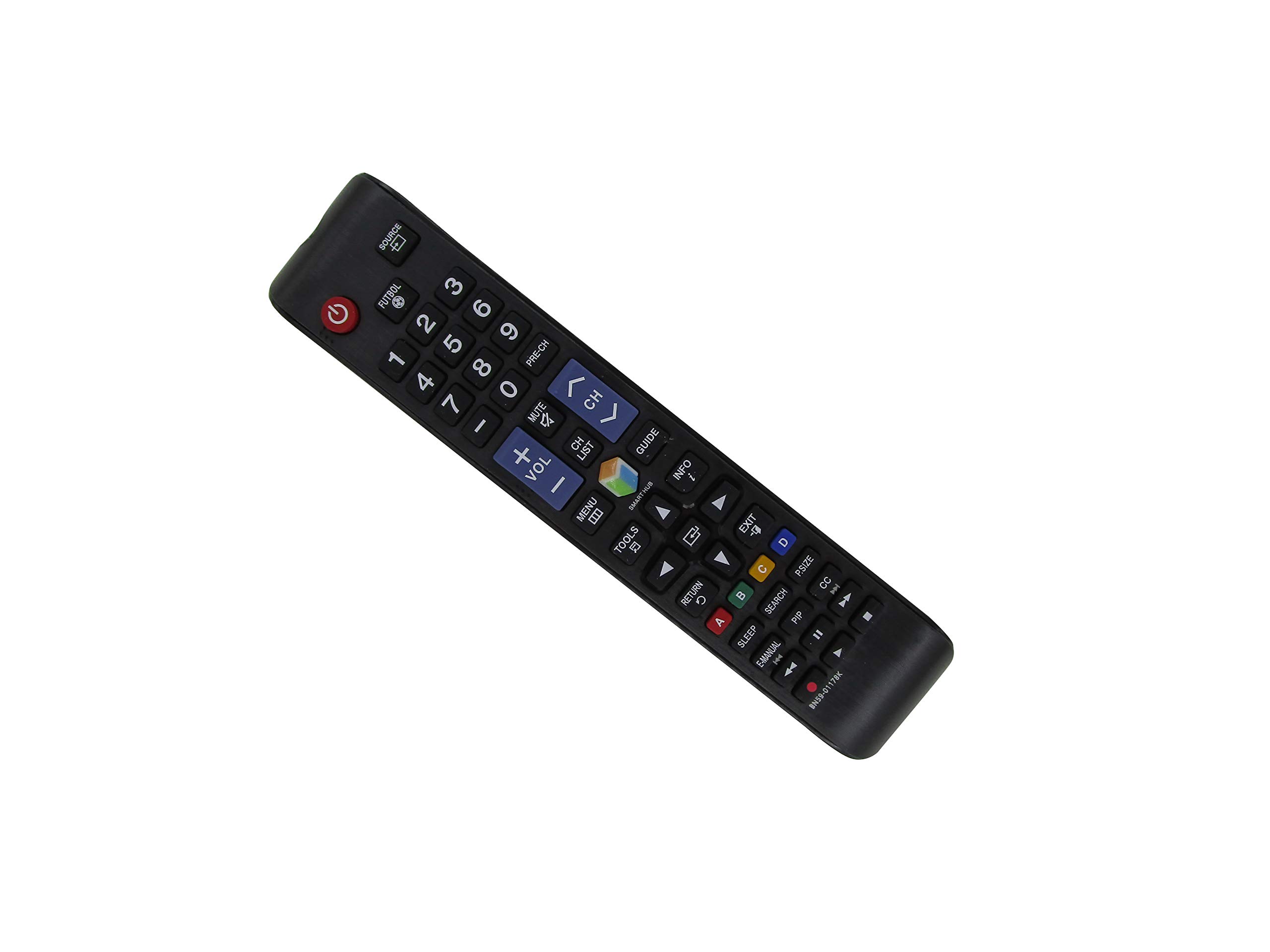
ምስል 1፡ ፊት ለፊት view of the remote control. This image displays the full button layout including power, source, number pad, volume, channel controls, navigation buttons, and special function keys like Smart Hub, Menu, Tools, and colored buttons (A, B, C, D).

ምስል 2፡ ተመለስ view of the remote control. This image shows the smooth, ergonomic design and the location of the battery compartment cover.
5.2 መሰረታዊ ተግባራት
- ኃይል አዝራር፡- ቴሌቪዥኑን ያበራል ወይም ያጠፋል።
- ምንጭ አዝራር፡- የግቤት ምንጮችን (HDMI፣ AV፣ ወዘተ) ይመርጣል።
- የቁጥር ሰሌዳ (0-9): የሰርጥ ቁጥሮችን በቀጥታ ያስገባል።
- ቮልት +/- አዝራሮች፡- የድምፅ ደረጃን ያስተካክላል.
- CH +/- አዝራሮች፡- ቻናሎችን በቅደም ተከተል ይለውጣል።
- ድምጸ-ከል አድርግ አዝራር፡- የቴሌቪዥኑን ድምጸ-ከል ያደርገዋል ወይም ያጠፋል።
- ምናሌ አዝራር፡- የቲቪውን ዋና ሜኑ ይደርሳል።
- Smart Hub አዝራር፡- Opens the Smart Hub interface for apps and streaming services.
- የአሰሳ አዝራሮች (ወደላይ፣ ወደታች፣ ወደ ግራ፣ ቀኝ፣ አስገባ)፦ ምናሌዎችን ለማሰስ እና አማራጮችን ለመምረጥ ያገለግላል።
- ተመለስ አዝራር፡- ወደ ቀዳሚው ማያ ገጽ ወይም ምናሌ ይመለሳል።
- ውጣ አዝራር፡- ከአሁኑ ምናሌ ወይም መተግበሪያ ይወጣል።
- ባለቀለም አዝራሮች (A፣ B፣ C፣ D) These buttons perform specific functions depending on the TV model or current application. Refer to your TV's on-screen prompts.
6. ጥገና
6.1 ጽዳት
የርቀት መቆጣጠሪያውን ለማጽዳት፣ ለስላሳና ደረቅ ጨርቅ በቀስታ ይጥረጉት። ፈሳሽ ማጽጃዎችን፣ የሚረጩ ወይም የማጥፊያ ቁሳቁሶችን አይጠቀሙ፣ ምክንያቱም እነዚህ መሳሪያዎች የርቀት መቆጣጠሪያውን ገጽ ወይም የውስጥ ክፍሎችን ሊጎዱ ይችላሉ።
6.2 የባትሪ መተካት
Replace batteries when the remote control's response becomes sluggish or stops working. Always replace both AAA batteries at the same time. Dispose of used batteries according to local regulations.
6.3 ማከማቻ
የርቀት መቆጣጠሪያውን በቀጥታ ከፀሀይ ብርሀን እና ከከፍተኛ ሙቀት ርቆ በቀዝቃዛና ደረቅ ቦታ ያከማቹ። የርቀት መቆጣጠሪያው ረዘም ላለ ጊዜ ጥቅም ላይ የማይውል ከሆነ, እንዳይፈስ ለመከላከል ባትሪዎቹን ለማስወገድ ይመከራል.
7. መላ መፈለግ
| ችግር | ሊሆን የሚችል መፍትሄ |
|---|---|
| የርቀት መቆጣጠሪያ አይሰራም። |
|
| አንዳንድ አዝራሮች አይሰሩም። |
|
| Remote response is slow or intermittent. |
|
8. ዋስትና እና ድጋፍ
KRPTQJoo provides customer support for this product. If you encounter any issues or have questions regarding the compatibility or functionality of your remote control, please contact us directly.
We aim to respond to inquiries within 12 hours to ensure your satisfaction. When contacting support, please provide your product's ASIN (B0F19F7PDM) and your specific Samsung TV model number for quicker assistance.