1. መግቢያ
Thank you for choosing the Acer B277UD6b monitor. This manual provides essential information for setting up, operating, and maintaining your monitor. Please read this manual thoroughly before using the product to ensure proper installation and optimal performance. Keep this manual for future reference.

ምስል 1.1፡ ፊት view of the Acer B277UD6b monitor, showcasing its sleek design and display area.
2. የደህንነት መረጃ
በሞኒተሩ ላይ ጉዳት እንዳይደርስ ለመከላከል እና ደህንነትዎን ለማረጋገጥ የሚከተሉትን የደህንነት ጥንቃቄዎች ይከተሉ፡
- ማሳያውን በማይረጋጋ ጋሪ፣ ቁም ወይም ጠረጴዛ ላይ አታስቀምጡ።
- የአየር ማናፈሻ ክፍተቶችን አያግዱ ፡፡
- Do not use near water or in high humidity environments.
- በአምራቹ የቀረበውን የኤሌክትሪክ ገመድ እና አስማሚ ብቻ ይጠቀሙ።
- ሁሉንም አገልግሎቶች ብቁ ለሆኑ የአገልግሎት ሰራተኞች ያመልክቱ።
- ከማጽዳትዎ በፊት ማሳያውን ከግድግዳው መውጫ ያላቅቁት።
3. የጥቅል ይዘቶች
ሁሉም እቃዎች በጥቅልዎ ውስጥ መኖራቸውን ያረጋግጡ። ማንኛቸውም ነገሮች ከጠፉ ወይም ከተበላሹ፣ ቸርቻሪዎን ያነጋግሩ።
- Acer B277UD6b Monitor
- መቆሚያ (መሠረት እና አንገት) ተቆጣጠር
- Power Cord (AC-In C14)
- የማሳያPort ገመድ
- HDMI ገመድ
- ቪጂኤ ገመድ
- የተጠቃሚ መመሪያ እና ሰነድ
4. ማዋቀር
4.1. የክትትል መቆሚያውን ማገጣጠም
- መቆጣጠሪያውን በጥንቃቄ ያስወግዱ እና ከማሸጊያው ውስጥ ክፍሎችን ይቁሙ.
- የማቆሚያውን አንገት ወደ መቆጣጠሪያ ፓነል ያያይዙት. ደህንነቱ በተጠበቀ ሁኔታ ወደ ቦታው ጠቅ ማድረጉን ወይም ከቀረበ በዊንች መያያዙን ያረጋግጡ።
- Attach the stand base to the stand neck. Tighten the thumb screw or screws at the bottom of the base to secure it.
- የተሰበሰበውን ማሳያ በተረጋጋ እና ጠፍጣፋ መሬት ላይ ያድርጉት።

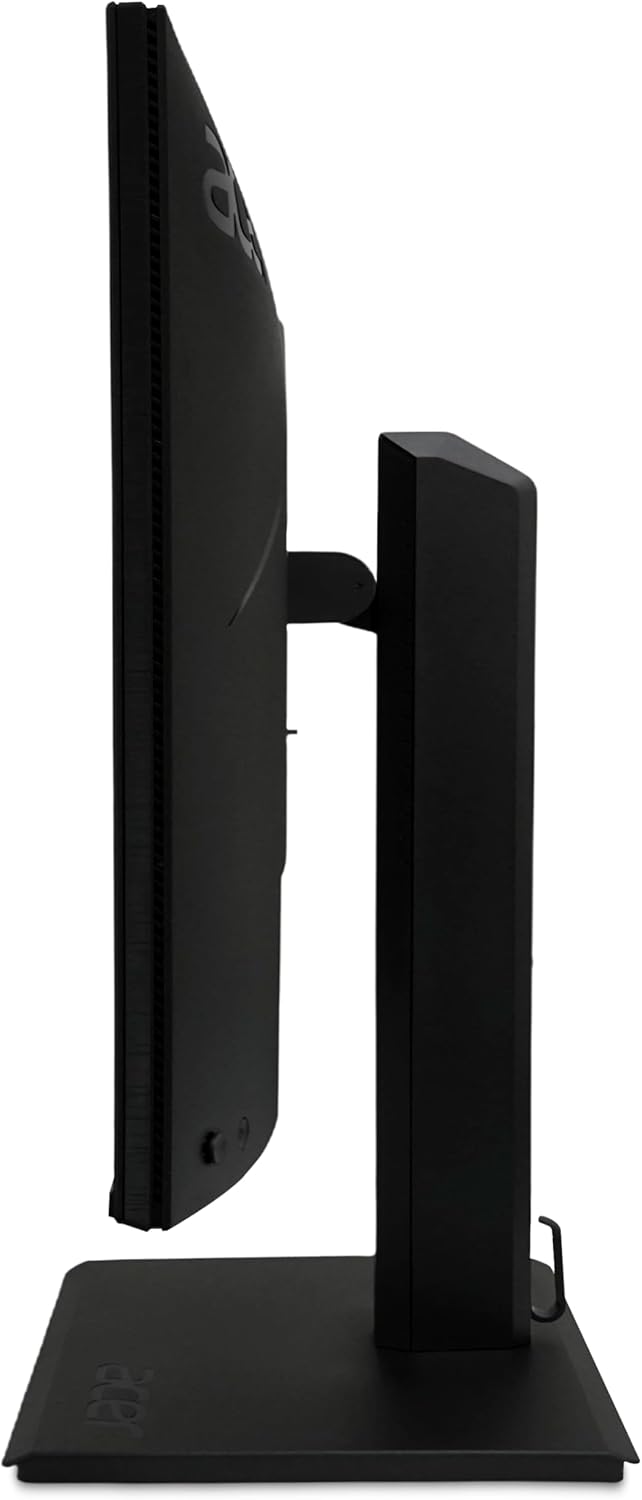
ምስል 4.1፡ ጎን view of the Acer B277UD6b monitor, illustrating its profile and stand attachment point.
4.2. ተቆጣጣሪውን ማገናኘት
ተገቢውን ኬብል በመጠቀም ሞኒተሩን ከኮምፒውተርዎ እና ከኃይል ምንጭዎ ጋር ያገናኙ።
- የኃይል ግንኙነት; Connect the power cord to the AC-In C14 port on the monitor and then to a wall outlet.
- የቪዲዮ ግንኙነት፡- ከሚከተሉት የቪዲዮ ግንኙነቶች ውስጥ አንዱን ይምረጡ፡
- ማሳያ ወደብ፡ የDisplayPort ገመድን አንድ ጫፍ ከሞኒተሩ የDisplayPort ግብዓት ጋር፣ ሌላኛውን ደግሞ ከኮምፒውተርዎ የDisplayPort ውጤት ጋር ያገናኙ።
- ኤችዲኤምአይ: Connect one end of the HDMI cable to the monitor's HDMI 1.4 input and the other end to your computer's HDMI output.
- ቪጂኤ: Connect one end of the VGA cable to the monitor's VGA input and the other end to your computer's VGA output.
- ሁሉም ግንኙነቶች ደህንነታቸው የተጠበቀ መሆኑን ያረጋግጡ።
ምስል 4.2፡ ተመለስ view of the Acer B277UD6b monitor, highlighting the various input ports including DisplayPort, HDMI, VGA, and AC-In.
5. የአሠራር መመሪያዎች
5.1. ማብራት / ማጥፋት
ሞኒተሩን ለማብራት ወይም ለማጥፋት ብዙውን ጊዜ በማኒየሩ ታችኛው ቀኝ ወይም ጀርባ ላይ የሚገኘውን የኃይል አዝራሩን ይጫኑ። ሞኒተሩ ሲበራ የኃይል አመልካች መብራቱ ይበራል።
5.2. በስክሪን ላይ ማሳያ (OSD) ምናሌ
The OSD menu allows you to adjust various monitor settings such as brightness, contrast, color, input source, and more. Access the OSD menu using the buttons located on the monitor (typically on the back or bottom edge).
- Press an OSD button to activate the menu.
- Use the navigation buttons (up/down/left/right or joystick) to browse through menu options.
- Press the select/enter button to confirm a selection or enter a sub-menu.
- የOSD ምናሌውን ለመዝጋት የመውጫ አዝራሩን ይጫኑ።
5.3. የግቤት ምንጭ ምርጫ
If you have multiple devices connected to the monitor, you can switch between input sources using the OSD menu or a dedicated input select button.
6. ጥገና
6.1. ተቆጣጣሪውን ማጽዳት
To clean the monitor, ensure it is powered off and unplugged from the power outlet.
- ስክሪን፡ ስክሪኑን በቀስታ ለስላሳ እና ከተሸፈነ ጨርቅ ይጥረጉ። ለግትር ምልክቶች፣ በትንሹ መampጨርቁን በውሃ ወይም በአሞኒያ ያልሆነ፣ አልኮል የሌለው የስክሪን ማጽጃ ያጽዱ። ማጽጃውን በቀጥታ በማያ ገጹ ላይ አይረጩ።
- Casing: ተቆጣጣሪውን ለማጽዳት ለስላሳ ደረቅ ጨርቅ ይጠቀሙ ሐasinሰ. ገላጭ ማጽጃዎችን ያስወግዱ.
6.2. ማከማቻ
If storing the monitor for an extended period, disconnect all cables and pack it in its original packaging to protect it from dust and physical damage.
7. መላ መፈለግ
በእርስዎ ማሳያ ላይ ችግሮች ካጋጠሙዎት የሚከተሉትን የተለመዱ የመላ ፍለጋ ደረጃዎችን ይመልከቱ፡
| ችግር | ሊሆን የሚችል መፍትሄ |
|---|---|
| በማያ ገጹ ላይ ምንም ምስል የለም | Ensure the power cable is securely connected. Check if the monitor is powered on. Verify the video cable is connected to both the monitor and the computer. Select the correct input source via the OSD menu. |
| ምስሉ የደበዘዘ ወይም የተዛባ ነው። | Check the video cable connection. Ensure the display resolution and refresh rate are set correctly in your computer's display settings (2560x1440 at 120Hz recommended). |
| ምንም ድምፅ የለም (ካለ) | የድምጽ ገመድ ግንኙነቶችን ያረጋግጡ (ውጫዊ ድምጽ ማጉያዎች ጥቅም ላይ ከዋሉ)። የድምጽ ቅንብሮችን በሞኒተሩ እና በኮምፒዩተሩ ላይ ያስተካክሉ። |
| ብልጭ ድርግም የሚሉ ነገሮችን ይቆጣጠሩ | Ensure the video cable is securely connected. Try a different video cable or port. Update your graphics card drivers. |
8. ዝርዝሮች
Detailed technical specifications for the Acer B277UD6b monitor:
- የሞዴል ስም፡- Vero B277UD6bmiiprczx
- ተከታታይ፡ B277UD6b
- የስክሪን መጠን፡ 27 ኢንች (68.6 ሴሜ)
- ጥራት፡ 2560 x 1440 (QHD)
- ምጥጥነ ገጽታ፡ 16፡9
- የማደስ መጠን፡ 120 Hz
- የምላሽ ጊዜ፡- 1 ሚሊሰከንድ
- የቀለም ድጋፍ; 8 bits (16.7 million colors, 6 bits + 2 bits FRC)
- የማሳያ ገጽ፡ Anti-glare (Antirreflectores), Hardness 3H
- ግንኙነት፡
- 1x DisplayPort 1.2 (supports 75Hz@1920x1080)
- 1x HDMI 1.4 (supports 75Hz@1920x1080)
- 1x VGA (supports 60Hz@1920x1080)
- 1x AC-In C14 (Power Connection)
- መጠኖች (ወ x D x H) 57.1 x 61.1 x 36.5 ሴ.ሜ
- ክብደት፡ 8 ኪ.ግ
- ቀለም፡ ጥቁር
9. ዋስትና እና ድጋፍ
የዋስትና መረጃ እና የቴክኒክ ድጋፍ ለማግኘት፣ እባክዎን ከምርትዎ ጋር የተካተተውን የዋስትና ካርድ ይመልከቱ ወይም ኦፊሴላዊውን የAcer ድጋፍ ይጎብኙ website. You may need your product's serial number and proof of purchase when contacting support.
Acer ድጋፍ Webጣቢያ፡ www.acer.com/support