መግቢያ
Thank you for choosing the Billboard Soul Advance True Wireless Stereo (TWS) Earbuds. These earbuds are designed to provide a superior audio experience with Active Noise Cancellation (ANC), Environmental Noise Cancellation (ENC), and a comfortable, splash-resistant design. This manual will guide you through the setup, operation, and maintenance of your new earbuds.
የደህንነት መረጃ
- Do not expose the earbuds or charging case to extreme temperatures or direct sunlight for extended periods.
- በመሳሪያው ላይ ከመጠን በላይ ኃይል ከመውደቅ ወይም ከመተግበር ይቆጠቡ።
- Keep the earbuds and charging case away from water and liquids, except for light splashes as per IPX4 rating. Do not submerge.
- ምርቱን ለመበተን ወይም ለማሻሻል አይሞክሩ። ይህ ዋስትናውን ውድቅ ያደርገዋል።
- የቀረበውን የኃይል መሙያ ገመድ ወይም የተረጋገጠ አቻ ይጠቀሙ።
- Listening at high volumes for prolonged periods can cause hearing damage. Adjust volume to a safe level.
የጥቅል ይዘቶች
- Billboard Soul Advance TWS Earbuds (Left and Right)
- የመሙያ መያዣ
- የዩኤስቢ ባትሪ መሙያ ገመድ
- የተጠቃሚ መመሪያ
ምርት አልቋልview
Familiarize yourself with the components of your Billboard Soul Advance TWS Earbuds and charging case.
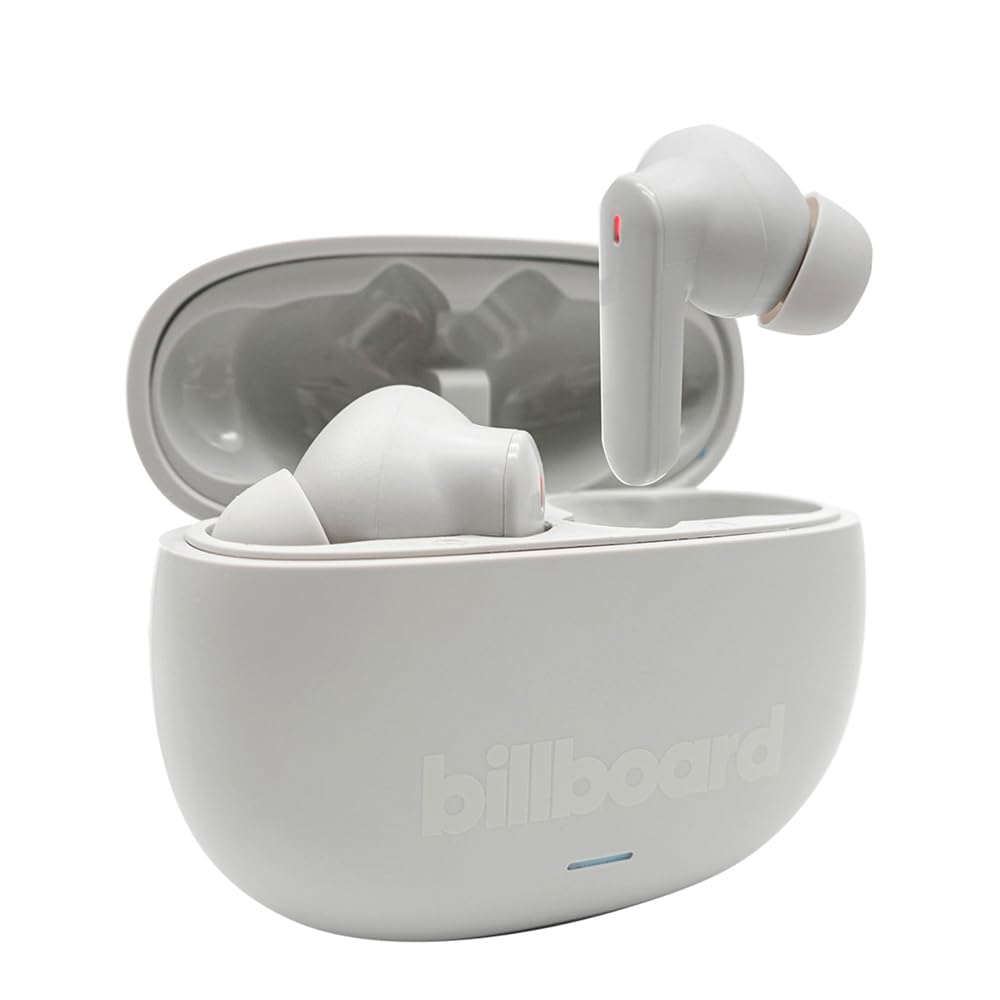
Image: The Billboard Soul Advance TWS Earbuds resting inside their open charging case. The earbuds are grey with red indicator lights visible, and the case is also grey with the 'billboard' logo embossed on the front.

Image: The Billboard Soul Advance TWS Earbuds charging case in a closed position. The case is grey with the 'billboard' logo embossed on the front and a small indicator light at the bottom.
Image: A person holding a single Billboard Soul Advance TWS earbud and the open charging case, demonstrating the compact size and design.
ማዋቀር
1. የጆሮ ማዳመጫውን እና መያዣውን መሙላት
ከመጠቀምዎ በፊት የጆሮ ማዳመጫውን እና የኃይል መሙያውን ሙሉ በሙሉ ይሙሉ።
- የጆሮ ማዳመጫውን ወደ ቻርጅ መሙያው ውስጥ ያስገቡ። በየራሳቸው ቦታዎች በትክክል መቀመጡን ያረጋግጡ።
- የዩኤስቢ ኃይል መሙያ ገመዱን ከኬዝ ላይ ካለው የኃይል መሙያ ወደብ እና ከዩኤስቢ የኃይል ምንጭ (ለምሳሌ፣ ኮምፒውተር፣ የግድግዳ አስማሚ) ጋር ያገናኙ።
- The indicator light on the case will show charging status. Once fully charged, the indicator will change or turn off. A full charge takes approximately 5 hours for the case and earbuds.
2. ከመሳሪያ ጋር ማጣመር
To connect your earbuds to a smartphone or other Bluetooth-enabled device:
- የኃይል መሙያ መያዣውን ይክፈቱ። የጆሮ ማዳመጫዎቹ በራስ-ሰር ወደ ማጣመሪያ ሁነታ ይገባሉ፣ በጆሮ ማዳመጫዎቹ ላይ በሚበሩ መብራቶች ይጠቁማሉ።
- በመሳሪያዎ ላይ ወደ የብሉቱዝ ቅንብሮች ይሂዱ እና ብሉቱዝ መንቃቱን ያረጋግጡ።
- ፈልግ available devices and select "Billboard Soul Advance" from the list.
- ከተገናኘ በኋላ የጆሮ ማዳመጫው አመልካች መብራቶች ብልጭ ድርግም ይላሉ።
- በመሳሪያው ላይ ብሉቱዝ ከነቃ የጆሮ ማዳመጫው ከጉዳይ ሲወገድ በራስ ሰር ከመጨረሻው የተጣመረ መሳሪያ ጋር ይገናኛል።
በመስራት ላይ
የንክኪ መቆጣጠሪያዎች
The earbuds feature touch-sensitive controls on their outer surface. Specific functions may vary slightly by device or app.
| ድርጊት | ተግባር |
|---|---|
| ነጠላ መታ ማድረግ (በግራ/ቀኝ) | ሙዚቃን አጫውት/ለአፍታ አቁም ፣ መልስ/ጥሪ ጨርስ |
| ሁለቴ መታ ያድርጉ (በቀኝ) | ቀጣይ ትራክ |
| ሁለቴ መታ ያድርጉ (በግራ) | የቀድሞ ትራክ |
| ሶስቴ መታ ያድርጉ (በግራ/ቀኝ) | የድምጽ ረዳትን አግብር |
| በረጅሙ ተጫን (በግራ/ቀኝ) | የANC/የግልጽነት ሁነታን ቀይር |
| ገቢ ጥሪ ለረጅም ጊዜ ተጭኗል | ጥሪን ውድቅ አድርግ |
Active Noise Cancellation (ANC) & Environmental Noise Cancellation (ENC)
The Soul Advance earbuds feature both ANC and ENC for an optimized listening and calling experience.
- ንቁ የድምጽ መሰረዝ (ኤኤንሲ)፦ Reduces external ambient noise, allowing for a more immersive audio experience. Activate/deactivate by long-pressing an earbud.
- የአካባቢ ጫጫታ ስረዛ (ENC)፦ Utilizes 4 built-in microphones to filter out background noise during calls, ensuring clearer conversations for both you and the listener. This feature is active automatically during calls.

Image: A graphic illustrating the concept of Ultra ANC (Active Noise Cancellation), showing sound waves being blocked by headphones, emphasizing a quiet listening experience.
ጥገና
ማጽዳት
- የጆሮ ማዳመጫውን እና ቻርጅ መሙያውን ለስላሳ፣ ደረቅ እና ከተሸፈነ ጨርቅ በጸዳ ጨርቅ በቀስታ ያጽዱ።
- ሻካራ ማጽጃዎችን፣ አልኮልን ወይም ኬሚካዊ ፈሳሾችን አይጠቀሙ።
- ለተመቻቸ የኃይል መሙያ በጆሮ ማዳመጫዎች እና በኬሱ ላይ ያሉት የኃይል መሙያ እውቂያዎች ንጹህ እና ደረቅ መሆናቸውን ያረጋግጡ።
ማከማቻ
ጥቅም ላይ በማይውልበት ጊዜ የጆሮ ማዳመጫዎቹን ለመጠበቅ እና እንዲከፍሉ ለማድረግ በእነሱ ቻርጅ ውስጥ ያከማቹ።
መላ መፈለግ
| ችግር | መፍትሄ |
|---|---|
| የጆሮ ማዳመጫዎች አይጣመሩም። | የጆሮ ማዳመጫዎች መሞላቸውን ያረጋግጡ። የመሣሪያዎን ብሉቱዝ ያጥፉና ያብሩት። በብሉቱዝ ቅንብሮች ውስጥ መሳሪያውን ይርሱትና እንደገና ያጣምሩ። |
| አንድ የጆሮ ማዳመጫ ብቻ ነው የሚሰራው። | Place both earbuds back in the case, close it, then open again. Ensure both are charged. |
| ድምጽ የለም። | የመሳሪያውን የድምጽ መጠን ያረጋግጡ። የጆሮ ማዳመጫዎች መገናኘታቸውን ያረጋግጡ። የተለየ ድምጽ ለማጫወት ይሞክሩ። |
| የመሙላት ጉዳዮች | Ensure charging cable is securely connected. Clean charging contacts. Try a different USB port or cable. |
ዝርዝሮች
- የሞዴል ስም፡- Soul Advance
- የግንኙነት ቴክኖሎጂ; ገመድ አልባ
- የተካተቱ አካላት፡- መሙያ ጣቢያ
- ልዩ አጠቃቀሞች፡- Outdoor activities, Sports
- የኃይል መሙያ ጊዜ: በግምት 5 ሰዓታት
- ተስማሚ መሣሪያዎች Phones, Tablets
- የውሃ መቋቋም ደረጃ; IPX4 (ስፕላሽ ተከላካይ)
- አማካይ የባትሪ ህይወት፡ 27 ሰዓታት (ከኃይል መሙያ መያዣ ጋር)
- የጆሮ አቀማመጥ; ጆሮ ውስጥ
- የቅጽ ምክንያት፡ ጆሮ ውስጥ
- የድምጽ መቆጣጠሪያ; ገባሪ የድምጽ ስረዛ

Image: A graphic highlighting long battery life, showing headphones with '40H' and earbuds with '42H*' (battery + case), indicating extended usage times.
ይፋዊ የምርት ቪዲዮዎች
Video: Product demonstration video (0:49 duration).
Video: Product feature overview (0:44 duration).
Video: Additional product details (0:44 duration).
Video: Short product highlight (0:24 duration).
Video: Product feature showcase (0:24 duration).
Video: Detailed product review/demonstration (1:57 duration).
Video: Quick product overview (0:34 duration).
Video: Comprehensive product guide (2:00 duration).
ዋስትና እና ድጋፍ
Your Billboard Soul Advance TWS Earbuds come with a standard manufacturer's warranty. For detailed warranty information, please refer to the warranty card included in your package or visit the official Billboard website. For technical support or customer service, please contact the retailer or manufacturer directly.
For returns, a 30-day free return policy is available from the purchase date.


