መግቢያ
This manual provides essential instructions for setting up, operating, and maintaining your Epson EcoTank L1270 WiFi printer. Please read this guide thoroughly to ensure proper use and to maximize the performance and longevity of your device. The Epson EcoTank L1270 is an inkjet printer designed for efficient printing with a rechargeable ink tank system and Wi-Fi connectivity.
1. ማዋቀር
1.1 ማተሚያውን በማራገፍ ላይ
ማተሚያውን ከማሸጊያው በጥንቃቄ ያስወግዱት. ሁሉም የመከላከያ ካሴቶች እና ቁሳቁሶች ከአታሚው ውጫዊ እና ውስጣዊ መወገዳቸውን ያረጋግጡ። ለወደፊት መጓጓዣ ወይም ማከማቻ የማሸጊያ ቁሳቁሶችን ያስቀምጡ.
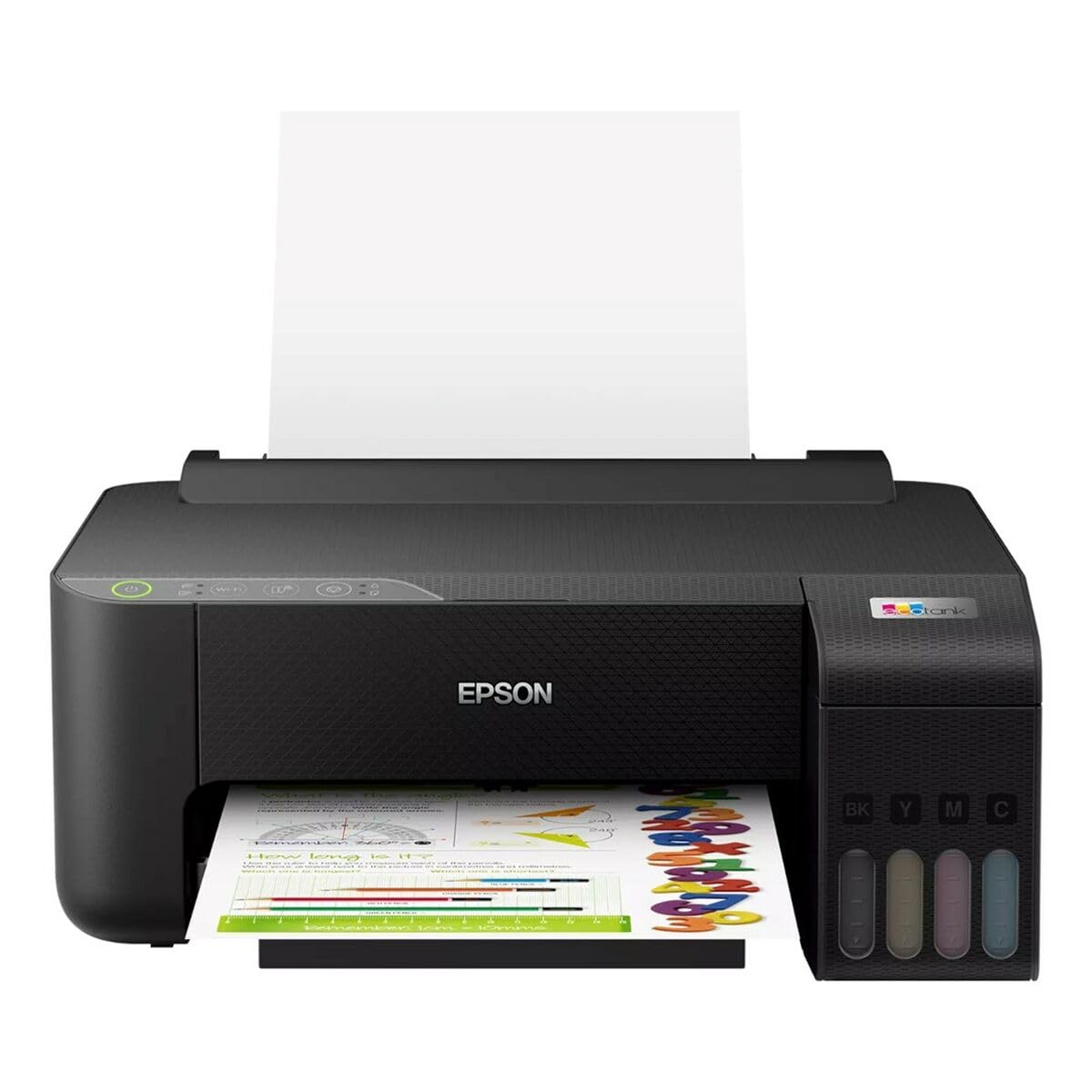
Image 1.1: Epson EcoTank L1270 WiFi Printer. This image shows the printer ready for initial setup after unpacking.
1.2 የቀለም ታንኮችን መሙላት
EcoTank L1270 እንደገና ሊሞላ የሚችል የቀለም ማጠራቀሚያ ዘዴን ይጠቀማል። የቀለም ታንኮችን ለመሙላት የሚከተሉትን ደረጃዎች ይከተሉ።
- Open the ink tank unit cover on the printer.
- Uncap the ink bottle for the corresponding color. Each bottle is keyed to fit only the correct tank.
- የቀለም ጠርሙሱን ወደ መሙያው ወደብ ያስገቡ። ቀለሙ በራስ-ሰር ታንኩን መሙላት ይጀምራል. ጠርሙሱን አይጨምቁት.
- ታንኩ ከሞላ በኋላ ጠርሙሱን አውጥተው እንደገና ይቅዱት. የቀለም ማጠራቀሚያውን ክፍል ሽፋን ይዝጉ.
- ለሁሉም ቀለሞች ይድገሙት.
ማስታወሻ፡- Use only genuine Epson ink bottles to prevent damage and ensure optimal print quality.
1.3 የኃይል ግንኙነት
Connect the power cord to the printer and then to a wall outlet. Press the power button to turn on the printer. The printer will perform an initial setup process, which may take a few minutes.
1.4 የሶፍትዌር እና የአሽከርካሪ ጭነት
To use your printer, you need to install the necessary drivers and software on your computer. Visit the official Epson support website for the EcoTank L1270 model to download the latest drivers and utilities. Follow the on-screen instructions provided by the installer.
- ወደ ሂድ Epson ድጋፍ.
- ፈልግ "EcoTank L1270".
- Download and run the recommended driver package.
1.5 ዋይ ፋይ ማዋቀር
The Epson EcoTank L1270 supports Wi-Fi connectivity. You can connect the printer to your wireless network using one of the following methods:
- Using the Printer's Control Panel: Navigate to the Wi-Fi settings on the printer's control panel, select your network, and enter the password.
- Using EpsonNet Setup: If installed, use the EpsonNet Setup utility on your computer to configure the wireless connection.
- WPS (በWi-Fi የተጠበቀ ማዋቀር) If your router supports WPS, press the WPS button on your router, then follow the instructions on the printer's control panel to establish a connection.
2. ማተሚያውን መስራት
2.1 የመጫኛ ወረቀት
Load paper into the rear paper feeder. Ensure the paper guides are adjusted to the width of the paper. The printer supports various paper types and sizes, up to A4.
- Fan the paper stack before loading to prevent misfeeds.
- Do not overload the paper feeder; refer to the maximum capacity (100 sheets for plain paper).
2.2 የህትመት ሰነዶች
ከኮምፒውተርዎ ላይ ሰነድ ለማተም፦
- ለማተም የሚፈልጉትን ሰነድ ይክፈቱ።
- ከመተግበሪያው ምናሌ ውስጥ "አትም" ን ይምረጡ (ለምሳሌ ፣ File > ማተም)።
- Choose "Epson EcoTank L1270" as your printer.
- እንደ የወረቀት መጠን፣ የህትመት ጥራት እና የቅጂዎች ብዛት ያሉ የህትመት ቅንብሮችን ያስተካክሉ።
- "አትም" ን ጠቅ ያድርጉ.
2.3 Duplex Printing (Two-Sided Printing)
The EcoTank L1270 supports manual duplex printing. To print on both sides of the paper:
- In your print settings, select the option for "Manual Duplex Printing" or "Print on Both Sides".
- መጀመሪያ ያልተለመዱ የተቆጠሩ ገጾችን ያትሙ።
- When prompted, reload the printed pages into the paper feeder according to the on-screen instructions to print the even-numbered pages on the reverse side.
3. ጥገና
3.1 የቀለም ደረጃዎችን መፈተሽ
Visually inspect the ink tanks on the front of the printer to check current ink levels. The tanks are transparent, allowing for easy monitoring. Refill ink when levels are low to avoid running out during a print job.
3.2 የቀለም ታንኮችን መሙላት
When an ink tank is low, purchase genuine Epson replacement ink bottles. Follow the same procedure as described in Section 1.2 "Filling the Ink Tanks".
3.3 የህትመት ጭንቅላትን ማጽዳት
If print quality declines (e.g., missing lines, faded colors), perform a print head cleaning. This can be done through the printer's utility software on your computer or via the printer's control panel. Refer to the software's help guide for detailed steps.
3.4 የወረቀት መንገድ ጽዳት
If you experience paper jams or streaks on prints, the paper path may need cleaning. Consult the printer's software utility or the online manual for instructions on how to perform a paper path cleaning.
4. መላ መፈለግ
ይህ ክፍል ከEpson EcoTank L1270 አታሚዎ ጋር ሊያጋጥሙዎት የሚችሉ የተለመዱ ችግሮችን ይዳስሳል።
4.1 Printer Not Printing / Blank Pages
- የቀለም ደረጃዎችን ይፈትሹ; Ensure all ink tanks have sufficient ink.
- Print Head Clogged: Perform a print head cleaning (see Section 3.3).
- Paper Loaded Correctly: Verify paper is loaded properly and not jammed.
- የአሽከርካሪ ጭነት; Ensure printer drivers are correctly installed and up to date. Reinstall if necessary.
4.2 የ Wi-Fi ግንኙነት ጉዳዮች
- Router Range: አታሚው በእርስዎ የWi-Fi ራውተር ክልል ውስጥ መሆኑን ያረጋግጡ።
- የአውታረ መረብ ይለፍ ቃል፡ Double-check that the correct Wi-Fi password has been entered.
- መሣሪያዎችን እንደገና ያስጀምሩ Try restarting your printer, computer, and Wi-Fi router.
- Reconfigure Wi-Fi: Attempt to set up the Wi-Fi connection again (see Section 1.5).
4.3 ደካማ የህትመት ጥራት
- የህትመት ጭንቅላት ማጽዳት; የህትመት ጭንቅላትን ማጽዳት እና የአፍንጫ ፍተሻ ያከናውኑ።
- የወረቀት ዓይነት፡- ለህትመት ቅንብሮችዎ ትክክለኛውን የወረቀት አይነት እየተጠቀሙ መሆንዎን ያረጋግጡ።
- Ink Quality: Use genuine Epson inks for best results.
For more complex issues, refer to the comprehensive online manual on the Epson support webጣቢያ ወይም የ Epson ደንበኛ ድጋፍን ያነጋግሩ።
5. ዝርዝሮች
| ባህሪ | ዝርዝር |
|---|---|
| የምርት ስም | ኢፕሰን |
| የሞዴል ስም | EcoTank L1270 WiFi |
| የህትመት ቴክኖሎጂ | Inkjet |
| ግንኙነት | ዋይ ፋይ |
| ከፍተኛው የህትመት ጥራት (ቀለም) | 5760 x 1440 ዲፒአይ |
| ከፍተኛ የህትመት ጥራት (ጥቁር እና ነጭ) | 5760 ዲፒአይ |
| ከፍተኛ የህትመት ፍጥነት (ሞኖክሮም) | 15 ገጾች በደቂቃ |
| Max Paper Capacity | 100 ወረቀቶች (ተራ ወረቀት) |
| Duplex ማተሚያ | አዎ (በእጅ) |
| ልዩ ባህሪ | ዳግም ሊሞላ የሚችል የቀለም ታንክ |
| ልኬቶች (L x W x H) | 26P x 42,5l x 46H ሴሜ (በግምት) |
6. የዋስትና መረጃ
The Epson EcoTank L1270 WiFi printer comes with a limited warranty. For specific terms, conditions, and duration of your warranty, please refer to the warranty documentation included with your product or visit the official Epson support webጣቢያ. ለዋስትና ጥያቄዎች የግዢ ማረጋገጫዎን ያስቀምጡ።
7. ድጋፍ
For further assistance, technical support, or to download the latest drivers and manuals, please visit the official Epson support webጣቢያ፡
እንዲሁም ጠቃሚ ግብዓቶችን እና በተደጋጋሚ የሚጠየቁ ጥያቄዎችን በእነሱ ላይ ማግኘት ይችላሉ። webጣቢያ.


