መግቢያ
This manual provides essential instructions for the safe and efficient operation of your DARAN Portable Power Station 300W with 30W Solar Panel. Please read this manual thoroughly before use and retain it for future reference.
የደህንነት መመሪያዎች
- መሳሪያውን ለረጅም ጊዜ ለከፍተኛ ሙቀት ወይም ቀጥተኛ የፀሐይ ብርሃን አያጋልጡት።
- ከውሃ እና እርጥበት ይራቁ.
- አይሰበስቡ ወይም መሳሪያውን ለመጠገን አይሞክሩ.
- የተፈቀዱ የኃይል መሙያ ገመዶችን እና መለዋወጫዎችን ብቻ ይጠቀሙ።
- በሚጠቀሙበት እና በሚሞሉበት ጊዜ ትክክለኛውን አየር ማናፈሻን ያረጋግጡ።
- ልጆች በማይደርሱበት ቦታ ያስቀምጡ.
- Note: Not suitable for high-power appliances such as rice cookers, hair dryers, or mini-fridges.
ምርት አልቋልview
The DARAN Portable Power Station 300W is a compact and lightweight power solution designed for various applications, including outdoor adventures and emergency backup. It features multiple output ports and can be recharged via AC, solar, or car.
የዋናው ክፍል ባህሪያት

Included 30W Solar Panel
The kit includes a 30W high-efficiency solar panel for convenient outdoor recharging.
ማዋቀር
የመጀመሪያ ክፍያ
For optimal performance, complete two full charge and discharge cycles after receiving the product.
የፀሐይ ፓነልን በማገናኘት ላይ
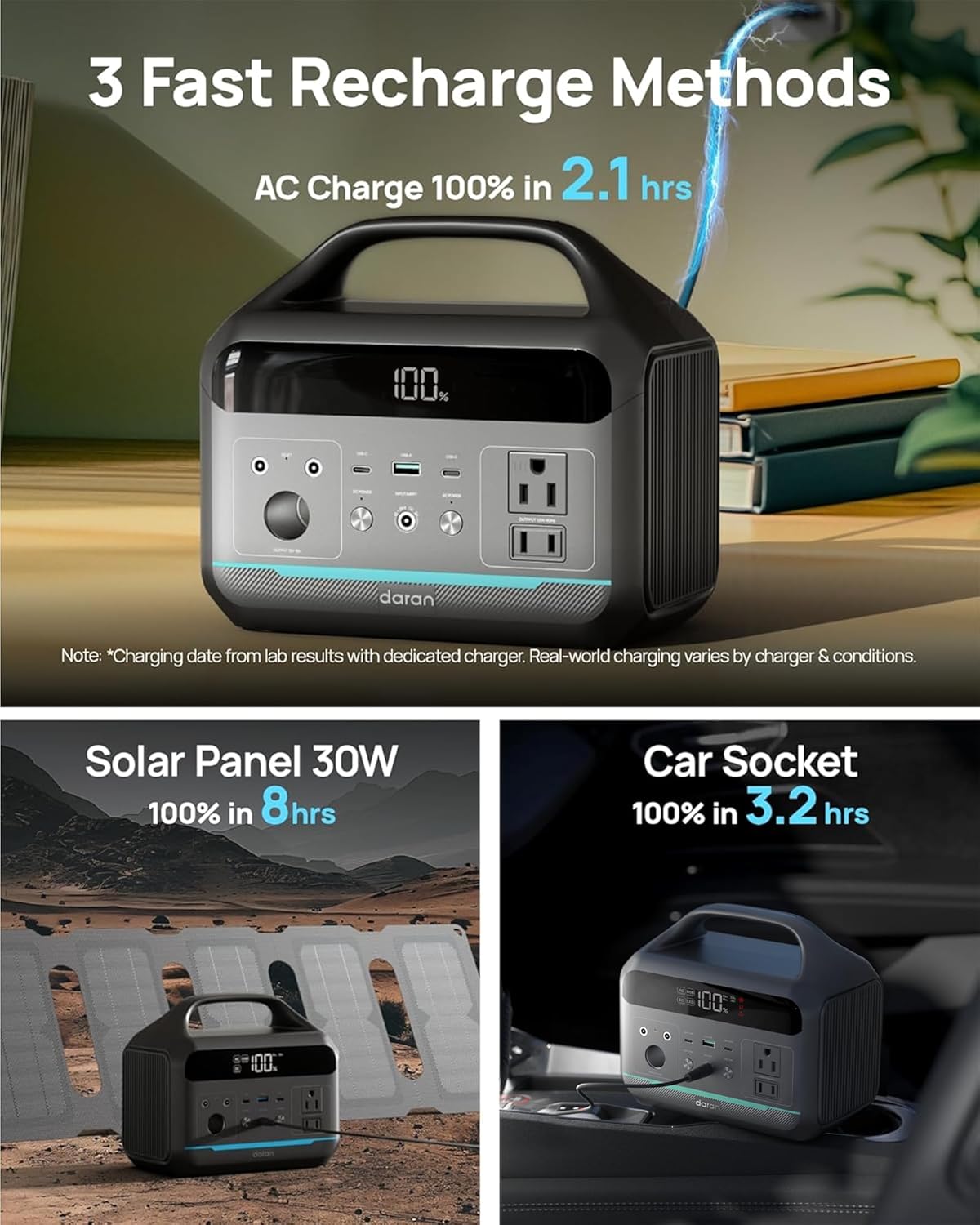
Unfold the 30W solar panel and position it in direct sunlight. Connect the solar panel's output cable to the "INPUT" port on the power station.
የኃይል ጣቢያውን መሙላት
የ AC ግድግዳ መሙላት
Use the provided AC fast charging cable to connect the power station to a standard wall outlet. The display will indicate charging status.

የፀሐይ ኃይል መሙላት
Connect the 30W solar panel to the "INPUT" port. Ensure the solar panel is positioned to receive maximum sunlight. A 30W solar panel takes approximately 8 hours to fully charge the power station. For daily charging, an 80-100W solar panel is recommended (not included).
የመኪና መሙላት
The power station can be charged via a 12V car socket. A vehicle charging cable is not included and must be purchased separately.

የአሠራር መመሪያዎች
በማብራት / በማጥፋት ላይ
Press and hold the respective "DC ON/OFF" or "AC ON/OFF" buttons to activate or deactivate the DC or AC outputs. The display will show the battery percentage and active outputs.
የውጤት ወደቦችን መጠቀም
- AC Outlets (2x 300W): Plug in small electronics and appliances rated under 300W. The pure sine wave output protects sensitive devices.
- USB-C PD (2x 60W Max): ለፈጣን ኃይል መሙላት ተኳዃኝ የዩኤስቢ-ሲ መሣሪያዎች።
- USB-A QC 3.0 (1x 18W): For quick charging compatible USB-A devices.
- DC5521 (2x 60W): በዲሲ ለሚሠሩ መሣሪያዎች።
- 12V Car Port (1x): ለ 12 ቪ የመኪና መለዋወጫዎች.
የ LED ብርሃን ተግባር
The power station includes an LED light on the back with multiple modes: bright, dim, and SOS flash. Press and hold the LED button to cycle through modes.

ጥገና
- Recharge the battery generator every 1-2 months for better maintenance.
- ከፀሐይ ብርሃን ርቆ በቀዝቃዛና ደረቅ ቦታ ውስጥ ያከማቹ።
- መሳሪያውን ንጹህ እና ከአቧራ ነጻ ያድርጉት.
መላ መፈለግ
መሣሪያ እየሞላ አይደለም።
Ensure all cables are securely connected. Verify the power source is active. If using solar, ensure the panel is in direct sunlight.
መሳሪያ አይበራም።
Check the battery level on the display. If the battery is depleted, recharge the unit.
Output Ports Not Working
Ensure the respective DC or AC output buttons are pressed and the indicators are lit. Check the power consumption of your device to ensure it is within the power station's limits.
ችግሮች ከቀጠሉ፣ እባክዎ የደንበኞች ድጋፍን ያነጋግሩ።
ዝርዝሮች
| ባህሪ | ዝርዝር መግለጫ |
|---|---|
| የሞዴል ቁጥር | NEO |
| የባትሪ አቅም | 192 ዋ (60000 ሚአሰ) |
| የባትሪ ዓይነት | LiFePO4 |
| የኤሲ ውፅዓት | 2x 300W Pure Sine Wave (600W Surge), 110V |
| የዩኤስቢ-ሲ ውፅዓት | 2x PD (60W Max) |
| ዩኤስቢ-ኤ ውፅዓት | 1x QC 3.0 (18W) |
| የዲሲ ውፅዓት | 2x DC5521 (60W), 1x 12V Car Port |
| Solar Panel Included | 30W High-Efficiency Solar Panel |
| መጠኖች | 8.41 x 5.28 x 7.44 ኢንች |
| የእቃው ክብደት | 5.84 ፓውንድ |
| የኃይል መሙያ ዑደቶች | ከ 3,500 በላይ ዑደቶች |
ዋስትና እና ድጋፍ
If you encounter any issues while using your portable power station, please do not hesitate to contact us. We will make every effort to provide a satisfactory solution for you.

For detailed warranty information, please refer to the product packaging or contact DARAN customer service.


