1. መግቢያ
Thank you for choosing the Ewent EW3295 Backlit Wireless Keyboard. This full-size keyboard offers versatile connectivity options, including Bluetooth 5.0 and 2.4GHz wireless, allowing you to connect up to three devices simultaneously. Its slim design, silent keys, and adjustable backlight provide a comfortable and efficient typing experience. This manual provides detailed instructions for setup, operation, and maintenance to ensure optimal performance of your keyboard.

Figure 1.1: Slim and sturdy design of the EW3295 keyboard.
2. ቁልፍ ባህሪያት
- Wireless Multi-Device Connection: Connect up to 3 devices simultaneously via Bluetooth 5.0 (x2) or wireless 2.4 GHz. Easily switch between devices with just one button.
- የሚስተካከለው የጀርባ ብርሃን; The keyboard's backlight is dimmable and can be turned off completely, ideal for various lighting conditions.
- Flat & Quiet Design: Flat, silent keys ensure a comfortable and low-noise typing experience, suitable for quiet environments.
- 12 የመልቲሚዲያ ቁልፎች፡- Quick access to functions like volume control, email, and other operations.
- ለረጅም ጊዜ የሚቆይ ዳግም ሊሞላ የሚችል ባትሪ፡ Equipped with a 300mAh lithium battery and intelligent energy-saving function for extended use.
- ሰፊ ተኳኋኝነት Compatible with Windows (XP, 7, 8.1, 10, 11) and Android, suitable for PCs, laptops, and tablets.
- ጠንካራ እና ዘላቂ ንድፍ; Made of high-density polycarbonate, lightweight yet durable, with a compact design.
- Italian Layout: Features an Italian QWERTY keyboard layout.
3. የጥቅል ይዘቶች
እባክዎ ቦክስ ሲወጡ የጥቅል ይዘቱን ያረጋግጡ፡-
- Ewent EW3295 Backlit Wireless Keyboard
- USB-A 2.4GHz Wireless Receiver
- ዩኤስቢ-ሲ ወደ ዩኤስቢ-ኤ ባትሪ መሙያ ገመድ
- የተጠቃሚ መመሪያ (ይህ ሰነድ)
4. የማዋቀር መመሪያ
4.1 የቁልፍ ሰሌዳውን መሙላት
The EW3295 keyboard is equipped with a built-in rechargeable 300mAh lithium battery. Before first use, it is recommended to fully charge the keyboard.
- Locate the USB Type-C charging port on the rear panel of the keyboard.
- Connect one end of the provided USB-C charging cable to the keyboard's USB-C port.
- Connect the other end of the USB-A cable to a USB power source (e.g., computer USB port, USB wall adapter).
- The charging indicator light (if present) will illuminate during charging and turn off when fully charged. A full charge takes less than 1 hour and provides over 1 month of use.

Figure 4.1: Rear panel of the keyboard with charging port and receiver compartment.
4.2 የቁልፍ ሰሌዳውን በማገናኘት ላይ
The EW3295 keyboard supports three connection modes: 2.4GHz wireless and two Bluetooth 5.0 channels (BT1, BT2). You can connect up to three devices and switch between them.
4.2.1 2.4GHz ገመድ አልባ ግንኙነት
- Locate the USB-A wireless receiver, typically stored in a compartment on the rear panel of the keyboard.
- Plug the USB-A receiver into an available USB port on your computer or device.
- የሚለውን ይጫኑ fn+1 keys on the keyboard to switch to 2.4GHz mode. The indicator light for channel 1 will illuminate.
- የቁልፍ ሰሌዳው በራስ-ሰር ከመሳሪያዎ ጋር መገናኘት አለበት።

Figure 4.2: Ewent EW3295 keyboard and its USB wireless receiver.
4.2.2 የብሉቱዝ ግንኙነት (BT1 / BT2)
- የሚለውን ይጫኑ fn+2 keys to select Bluetooth channel 1 (BT1) or fn+3 keys to select Bluetooth channel 2 (BT2). The corresponding indicator light will flash, indicating pairing mode.
- በመሳሪያዎ (ፒሲ፣ ላፕቶፕ፣ ታብሌት) ላይ ብሉቱዝን ያንቁ እና አዳዲስ መሳሪያዎችን ይፈልጉ።
- Select "EW3295" or a similar name from the list of available Bluetooth devices.
- Follow any on-screen prompts to complete the pairing process. Once connected, the indicator light will stop flashing and remain solid.
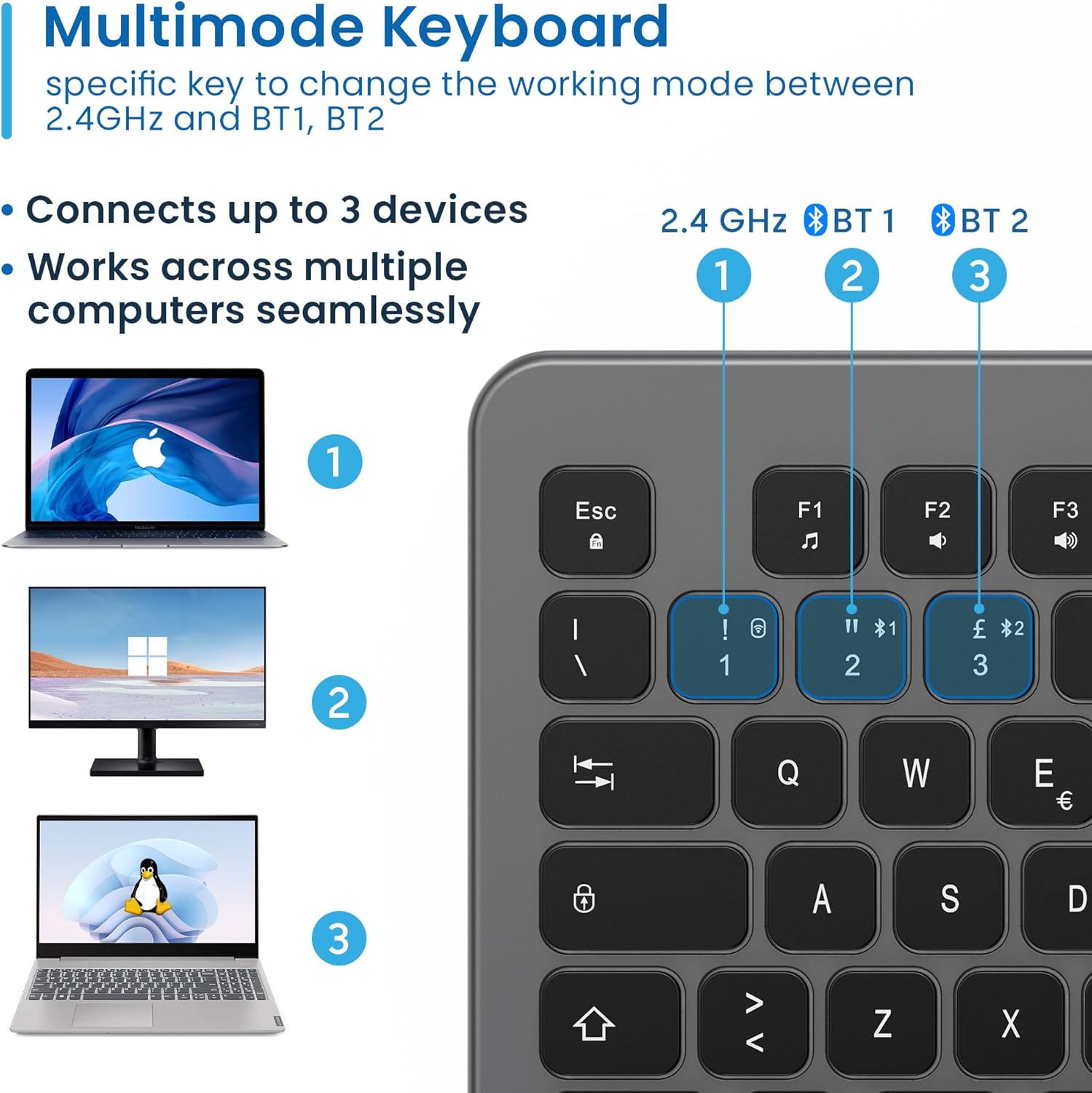
Figure 4.3: Multi-device connectivity options for the EW3295 keyboard.
4.2.3 በተገናኙ መሳሪያዎች መካከል መቀያየር
ብዙ መሳሪያዎች ከተጣመሩ በኋላ በቀላሉ በመካከላቸው መቀያየር ይችላሉ፦
- ተጫን fn+1 to switch to the 2.4GHz connected device.
- ተጫን fn+2 to switch to the Bluetooth 1 connected device.
- ተጫን fn+3 to switch to the Bluetooth 2 connected device.
5. የአሠራር መመሪያዎች
5.1 መሰረታዊ ትየባ
The EW3295 features a full-size Italian QWERTY layout. Its flat and silent keys provide a comfortable and precise typing experience, reducing noise in quiet environments.

Figure 5.1: Illuminated Italian QWERTY Keyboard Layout.

Figure 5.2: Silent keys for reduced noise.
5.2 የጀርባ ብርሃን መቆጣጠሪያ
The keyboard features an adjustable backlight for improved visibility in low-light conditions.
- የኋላ መብራት በርቷል/ ጠፍቷል፡ የሚለውን ይጫኑ Bloc ስኮር key (often labeled with a lightbulb icon) to toggle the backlight on or off.
- Backlight Brightness Up: ተጫን Fn + Pag ↑ to increase backlight brightness.
- Backlight Brightness Down: ተጫን Fn + Pag ↓ የጀርባ ብርሃን ብሩህነት ለመቀነስ።
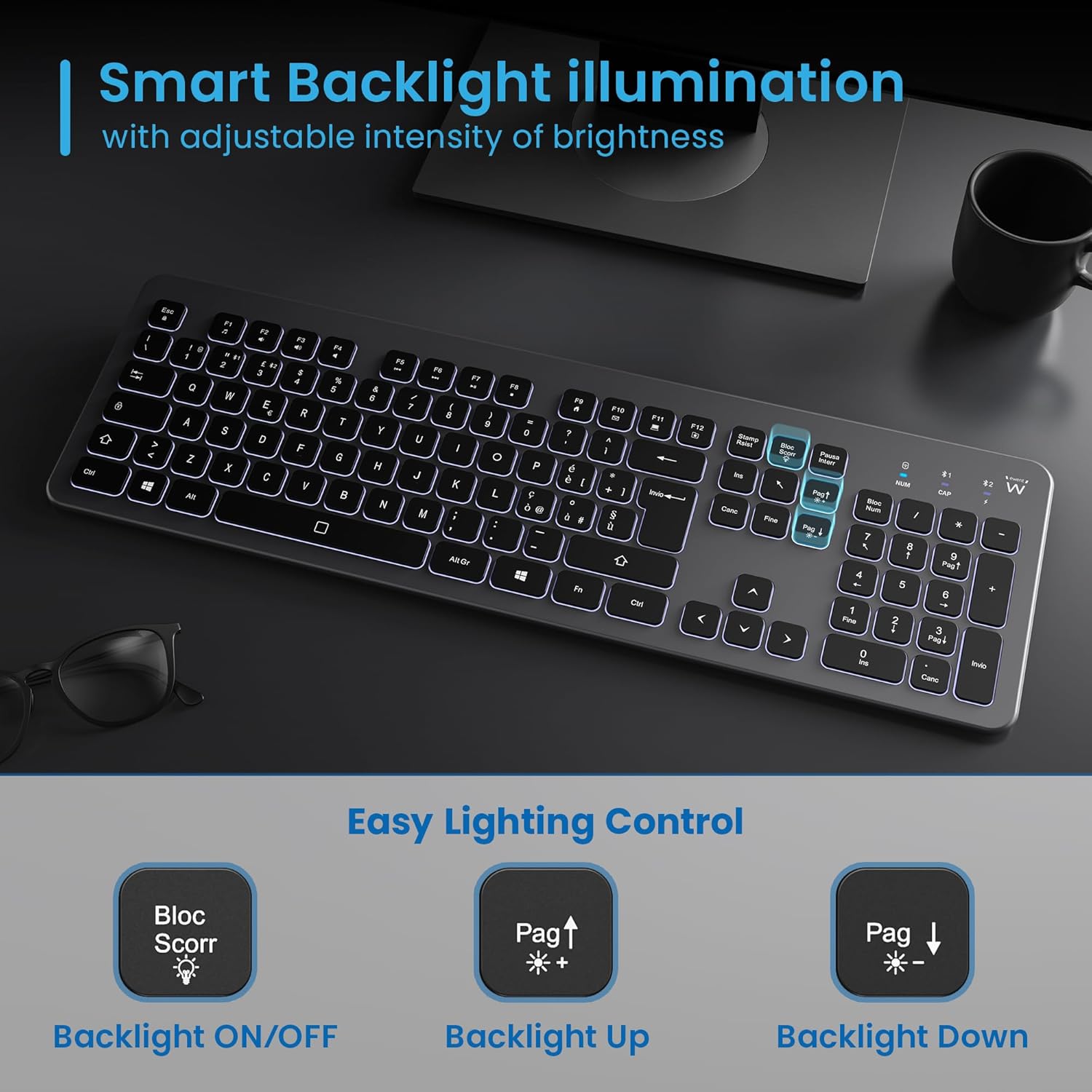
Figure 5.3: Backlight control keys.
5.3 የመልቲሚዲያ ቁልፎች
The keyboard includes 12 dedicated multimedia keys (F1-F12) that provide quick access to various functions. To use these functions, press the Fn በተመሳሳይ ጊዜ ከሚፈለገው የኤፍ-ቁልፍ ቁልፍ ጋር ቁልፍ።
| ቁልፍ ጥምረት | ተግባር |
|---|---|
| Fn + F1 | የሚዲያ ማጫወቻ |
| Fn + F2 | የድምጽ መጠን መቀነስ |
| Fn + F3 | የድምጽ መጠን መጨመር |
| Fn + F4 | ድምጸ-ከል አድርግ |
| Fn + F5 | የቀድሞ ትራክ |
| Fn + F6 | ቀጣይ ትራክ |
| Fn + F7 | ተጫወት/ ለአፍታ አቁም |
| Fn + F8 | ተወ |
| Fn + F9 | መነሻ ገጽ |
| Fn + F10 | ኢሜይል |
| Fn + F11 | የእኔ ኮምፒውተር |
| Fn + F12 | ካልኩሌተር |
6. ጥገና እና እንክብካቤ
ትክክለኛ ጥገና የቁልፍ ሰሌዳዎን ረጅም ዕድሜ እና ጥሩ አፈፃፀም ያረጋግጣል።
- ማጽዳት፡ የቁልፍ ሰሌዳውን ገጽ ለማፅዳት ለስላሳ ፣ ደረቅ ፣ ከቆሻሻ ነፃ የሆነ ጨርቅ ይጠቀሙ። ለግትር ቆሻሻ፣ በትንሹ መampጨርቁን በውሃ ወይም መለስተኛ፣ የማይበላሽ ማጽጃ ያድርጉ። ከመጠን በላይ እርጥበትን ያስወግዱ።
- ፈሳሾችን ያስወግዱ; Do not spill liquids on the keyboard. In case of accidental spills, immediately disconnect the keyboard and allow it to dry completely before re-using.
- ማከማቻ፡ ረዘም ላለ ጊዜ ጥቅም ላይ በማይውልበት ጊዜ የቁልፍ ሰሌዳውን በቀጥታ ከፀሐይ ብርሃን እና ከከፍተኛ ሙቀት ርቆ በቀዝቃዛና ደረቅ ቦታ ያከማቹ።
- የባትሪ እንክብካቤ To prolong battery life, avoid fully discharging the battery frequently. Charge the keyboard when the low battery indicator appears.
- የመቀበያ ማከማቻ፡ When transporting the keyboard, store the USB wireless receiver in its dedicated compartment on the rear panel to prevent loss.
7. መላ መፈለግ
If you encounter issues with your EW3295 keyboard, please refer to the following common solutions:
| ችግር | ሊሆን የሚችል ምክንያት | መፍትሄ |
|---|---|---|
| የቁልፍ ሰሌዳ ምላሽ እየሰጠ አይደለም (2.4GHz) | Low battery; Receiver not plugged in; Incorrect channel selected. | Charge the keyboard; Ensure USB receiver is securely plugged in; Press fn+1 to select 2.4GHz mode. |
| የቁልፍ ሰሌዳ ምላሽ አይሰጥም (ብሉቱዝ) | Low battery; Bluetooth not enabled on device; Not paired; Incorrect channel selected. | Charge the keyboard; Enable Bluetooth on your device; Re-pair the keyboard (see Section 4.2.2); Press fn+2 or fn+3 to select the correct Bluetooth channel. |
| የጀርባ ብርሃን አይሰራም | የኋላ መብራት ጠፍቷል፤ ባትሪው ዝቅተኛ ነው። | ተጫን Bloc ስኮር to turn on/off; Increase brightness with Fn + Pag ↑; Charge the keyboard. |
| ቁልፎች ተጣብቀው ወይም ምላሽ የማይሰጡ ናቸው | Dirt or debris under keys; Physical damage. | Clean the keyboard (see Section 6); If physical damage, contact support. |
| አጭር የባትሪ ህይወት | Frequent backlight use; Battery degradation over time. | Reduce backlight brightness or turn it off when not needed; Ensure full charge cycles. |
8. ዝርዝሮች
| ባህሪ | ዝርዝር |
|---|---|
| የሞዴል ስም | Tastiera Wireless Retroilluminata EW3295 |
| የንጥል ሞዴል ቁጥር | EW3295 |
| የምርት ስም | ኤውንት |
| የግንኙነት ቴክኖሎጂ | Bluetooth 5.0 (x2), 2.4GHz Wireless |
| የቁልፍ ሰሌዳ መግለጫ | Multimedia, Full-size, Italian Layout |
| ተስማሚ መሣሪያዎች | PC (Windows XP, 7, 8.1, 10, 11), Android |
| የባትሪ ዓይነት | ዳግም ሊሞላ 300mAh ሊቲየም ባትሪ |
| የጀርባ ብርሃን | የሚስተካከለው ጥንካሬ |
| ልኬቶች (L x W x H) | በግምት. 432 ሚሜ x 122 ሚሜ x 22 ሚሜ |
| ክብደት | በግምት. 390 ግ |
| ቁሳቁስ | High-density Polycarbonate |

Figure 8.1: Keyboard dimensions and weight.
9. የዋስትና መረጃ
Ewent products are designed and manufactured to the highest quality standards. This product is covered by a limited warranty from the date of purchase. Please refer to the warranty card included with your product or visit the official Ewent website for detailed warranty terms and conditions specific to your region. The warranty typically covers defects in materials and workmanship under normal use.
10. የደንበኛ ድጋፍ
For technical support, troubleshooting assistance, or any questions regarding your Ewent EW3295 keyboard, please contact Ewent customer support. You can typically find contact information (phone, email, support portal) on the official Ewent webጣቢያ ወይም በምርት ማሸጊያው ውስጥ.
Please have your product model number (EW3295) and purchase details ready when contacting support.


