1. ምርት አብቅቷልview
The JUSTONE A1 is an 11.3-inch portable touch screen designed to bring wireless CarPlay and Android Auto functionality to your vehicle. It features an in-Cell fully laminated display, 1920x720 resolution, and supports up to 60 frames per second for a smooth user experience. Control is available via the capacitive touchscreen or a wireless button knob. It also includes a BT Display Only Mode for audio streaming and offers multiple mounting options.
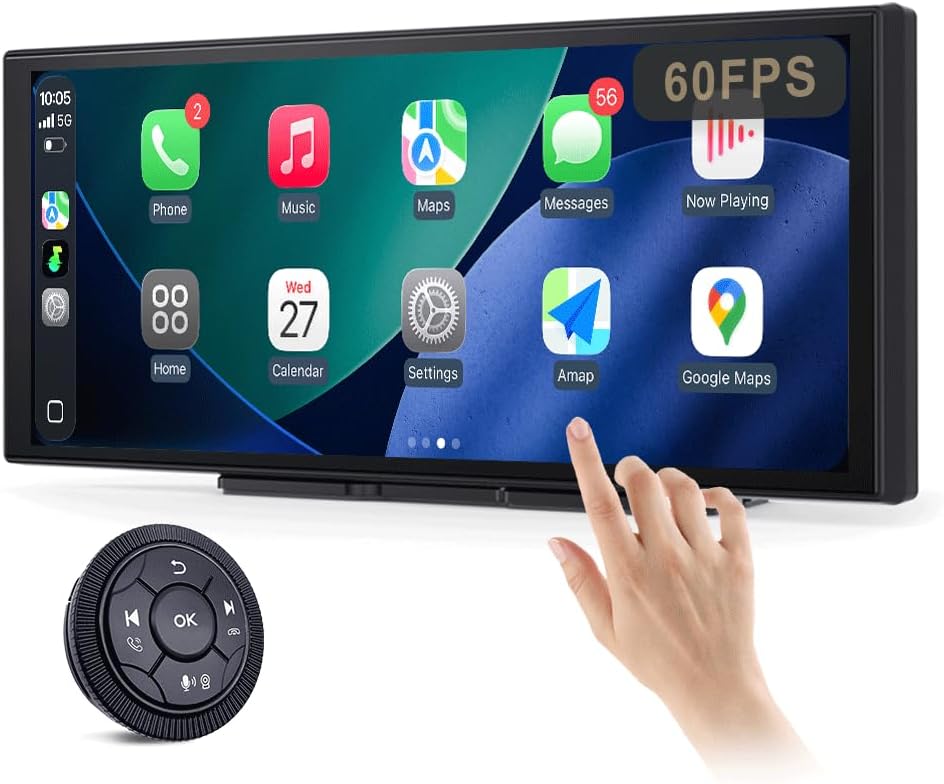
Figure 1: JUSTONE A1 Portable Touch Screen with CarPlay interface and wireless control knob.
2. የጥቅል ይዘቶች
ከዚህ በታች የተዘረዘሩት ሁሉም እቃዎች በጥቅልዎ ውስጥ መያዛቸውን ያረጋግጡ። ማንኛቸውም እቃዎች ከጠፉ ወይም ከተበላሹ፣ እባክዎ የደንበኛ ድጋፍን ያግኙ።

Figure 2: Included accessories for the JUSTONE A1.
- Screen Host
- 4 Clip Bracket
- ባለ ሁለት ጎን ቴፕ
- የመምጠጥ ዋንጫ ቅንፍ
- Control Button (Wireless Knob)
- የመኪና ኃይል አስማሚ
- Ball Shaped Bracket Converter
- TYPE-C Power Cable
- AUX የድምጽ ገመድ
- Base for Suction Cup
- Camera Input Cable (Camera optional)
- የተጠቃሚ መመሪያ
3. ማዋቀር
3.1 የመጫኛ አማራጮች
The JUSTONE A1 offers two primary mounting methods to suit various vehicle dashboards. Ensure the screen is securely mounted and does not obstruct your view የመንገዱን.

ምስል 3: ዘፀamples of suction cup and dashboard mounting.
- 4-Clip Vertical Base: Use this bracket to rest the bottom of the screen directly on your dashboard. Secure it with the provided double-sided tape for stability.
- 17mm Ball-Joint Extendable Arm Mount (Suction Cup Bracket): This option allows for more flexible positioning, typically on the windshield or a smooth dashboard surface. Ensure the suction cup is firmly attached.
ማስታወሻ፡- Always ensure the chosen mounting location complies with local traffic laws regarding windshield obstructions.
3.2 የኃይል ግንኙነት
- Connect the TYPE-C Power Cable to the screen host.
- Plug the Car Power Adapter into your vehicle's 12V power outlet (cigarette lighter socket).
- The screen will power on automatically when the vehicle's ignition is turned on.
3.3 Initial Wireless Connection (CarPlay/Android Auto)
- በእርስዎ ዘመናዊ ስልክ ላይ ብሉቱዝ እና ዋይ ፋይ መንቃታቸውን ያረጋግጡ።
- On the JUSTONE A1 screen, select either 'CarPlay' or 'Android Auto' from the main menu.
- ስልክዎን በብሉቱዝ በኩል ለማጣመር የማያ ገጽ ላይ መመሪያዎችን ይከተሉ።
- Once Bluetooth is paired, the system will automatically establish a Wi-Fi connection for wireless CarPlay or Android Auto.
- The device is designed to auto-connect to your paired phone when you start your car after the initial setup.
4. የአሠራር መመሪያዎች
4.1 የማሳያ ባህሪያት

Figure 4: Display features including 11.3-inch size and in-cell full lamination.
- 11.3" In-Cell Full-Laminated Display: Provides a premium look and feel, appearing darker when off compared to standard lamination. The actual panel size is approximately 10.5" x 4.13".
- 1920x720 ጥራት፡ Delivers clear and sharp visuals.
- 60Hz የማደሻ መጠን፡- Ensures smoother performance, especially for CarPlay.
4.2 የመቆጣጠሪያ ዘዴዎች
The device offers two ways to interact with its interface:

Figure 5: Touchscreen and wireless knob control options.
- Capacitive Touchscreen: Directly interact with the display by touching icons and swiping.
- Wireless Button Knob: For safer operation while driving, especially if the screen is difficult to reach. This knob allows navigation, volume control, and other functions without direct screen interaction.
4.3 የግንኙነት ባህሪያት

Figure 6: Supported phone connectivity options.
- ገመድ አልባ የመኪና ማጫወቻ; Access navigation, music, messages, and more from your iPhone.
- ገመድ አልባ አንድሮይድ አውቶሞቢል፡- Access navigation, music, and communication features from your Android phone.
- ኤርፕሌይ፡ Mirror content from your Apple devices.
- MiraCast፡ Mirror content from compatible Android devices.
4.4 የድምጽ ውፅዓት ሁነታዎች
The JUSTONE A1 supports multiple ways to output audio to your vehicle's sound system:
- BT Display Only Mode: When your phone is connected to the JUSTONE A1, audio streams directly from your phone to your vehicle's built-in Bluetooth audio system. This requires your vehicle to have its own Bluetooth audio input.
- AUX ውፅዓት፡ Connect the provided AUX Audio Cable from the JUSTONE A1 to your vehicle's AUX input port.
- FM ማስተላለፊያ: The device can transmit audio via an FM frequency. Tune your car radio to the same frequency set on the JUSTONE A1.
4.5 Automatic Day/Night Mode

Figure 7: Automatic brightness adjustment for day and night conditions.
The built-in light sensor automatically detects ambient light conditions and switches between dark and light themes, adjusting screen brightness for optimal visibility and glare resistance during both day and night driving.
5. ጥገና
- ማጽዳት፡ ስክሪኑን ለማጽዳት ለስላሳ፣ ከላጣ ነፃ የሆነ ጨርቅ ይጠቀሙ። ለጠንካራ ቆሻሻዎች፣ ትንሽ ቆልampጨርቁን በውሃ ወይም በስክሪኑ ደህንነቱ የተጠበቀ ማጽጃ። ኃይለኛ ኬሚካሎችን ወይም ገላጭ ቁሳቁሶችን ያስወግዱ.
- የሙቀት መጠን፡ መሳሪያውን ለከፍተኛ ሙቀት፣ ለሁለቱም ሙቅ እና ቀዝቃዛ፣ ለረጅም ጊዜ ከማጋለጥ ይቆጠቡ።
- ማከማቻ፡ መሳሪያውን ለረጅም ጊዜ ካከማቸ፣ ከኤሌክትሪክ ያላቅቁት እና ቀዝቃዛና ደረቅ ቦታ ያስቀምጡት።
- ኬብሎች Regularly check power and audio cables for any signs of wear or damage. Replace if necessary.
6. መላ መፈለግ
- መሣሪያው አይበራም፦
- Ensure the car power adapter is securely plugged into the vehicle's 12V outlet and the TYPE-C cable is firmly connected to the screen.
- Check if the vehicle's 12V outlet is receiving power (e.g., by testing with another device).
- Wireless CarPlay/Android Auto fails to connect:
- Verify Bluetooth and Wi-Fi are enabled on your smartphone.
- Ensure your phone is not connected to another CarPlay/Android Auto device.
- በስልክዎ የብሉቱዝ ቅንብሮች ውስጥ ያለውን መሳሪያ መርሳት እና እንደገና ለማጣመር ይሞክሩ።
- Restart both your phone and the JUSTONE A1 device.
- ምንም የድምጽ ውፅዓት የለም፡
- If using BT Display Only Mode, ensure your phone is connected to your car's native Bluetooth audio system.
- If using AUX, check that the AUX cable is properly connected to both the JUSTONE A1 and your car's AUX input, and your car's audio source is set to AUX.
- If using FM transmitter, ensure the frequency on the JUSTONE A1 matches your car radio's frequency and there is no strong interference on that frequency.
- Check the volume levels on both the JUSTONE A1 and your car's audio system.
- Screen is unresponsive or frozen:
- Disconnect the power cable from the JUSTONE A1 for 10 seconds, then reconnect it to perform a restart.
- Wireless control knob is not working:
- Ensure the knob's battery is not depleted. Replace if necessary.
- Re-pair the knob with the main unit if it has become disconnected.
7. ዝርዝሮች
| ባህሪ | ዝርዝር መግለጫ |
|---|---|
| የሞዴል ስም | A1 |
| የምርት ስም | JUSTONE |
| የማሳያ መጠን | 11.3 Inches (10.5" x 4.13" actual panel) |
| የማሳያ ዓይነት | In-Cell Full-Laminated Touch Screen |
| ጥራት | 1920x720 |
| የማደስ ደረጃ | Up to 60Hz (for CarPlay) |
| የግንኙነት ቴክኖሎጂ | Bluetooth, Wi-Fi (for Wireless CarPlay/Android Auto) |
| የድምጽ ውፅዓት ሁኔታ | BT Display Only, AUX, FM Transmitter |
| የመቆጣጠሪያ በይነገጽ | Touchscreen, Wireless Button Knob |
| የመጫኛ አይነት | Panel Mount (4-clip vertical base), Dashboard Mount (17mm ball-joint extendable arm) |
| ልዩ ባህሪ | Portable, Auto Day/Night Mode (Light Sensor) |
| የእቃው ክብደት | 14.8 አውንስ (420 ግራም) |
| የጥቅል ልኬቶች | 12.01 x 5.51 x 3.98 ኢንች |
8. ዋስትና እና ድጋፍ
8.1 የዋስትና መረጃ
The JUSTONE A1 portable touch screen comes with a የአንድ ዓመት የአምራች ዋስትና ከተገዛበት ቀን ጀምሮ. ይህ ዋስትና በመደበኛ አጠቃቀም ላይ የቁሳቁሶች እና የአሠራር ጉድለቶችን ይሸፍናል ። አላግባብ መጠቀም፣ አደጋዎች፣ ያልተፈቀዱ ማሻሻያዎች ወይም ተገቢ ባልሆነ ጭነት ምክንያት የሚደርስ ጉዳትን አይሸፍንም።
ለዋስትና ጥያቄዎች እባክዎ የግዢ ማረጋገጫዎን ያቆዩ።
8.2 የደንበኛ ድጋፍ
For technical assistance, troubleshooting, or warranty inquiries, please contact JUSTONE customer support through the retailer's platform where the product was purchased or visit the official JUSTONE webየእውቂያ መረጃ ለማግኘት ጣቢያ.
When contacting support, please have your product model (A1) and purchase details ready.


