1. መግቢያ
Thank you for choosing the Codnida Cell 2T 4G LTE Solar Security Camera. This device provides reliable outdoor surveillance with its 4G LTE connectivity, solar power capabilities, and advanced features like 2K color night vision and intelligent motion detection. This manual will guide you through the setup, operation, and maintenance of your camera to ensure optimal performance.

ምስል 1.1፡ አልቋልview of the Codnida Cell 2T 4G LTE Solar Security Camera.
2. በሳጥኑ ውስጥ ያለው
መጫኑን ከመቀጠልዎ በፊት እባክዎ ሁሉም አካላት መኖራቸውን ያረጋግጡ።
- 1 x Codnida Cell 2T Camera
- 1 x የፀሐይ ፓነል
- 1 x SIM Card (with free trial data)
- 1 x Screw Kit for mounting
- 1 x የተጠቃሚ መመሪያ (ይህ ሰነድ)
- 1 x የዩኤስቢ ባትሪ መሙያ ገመድ

Image 2.1: All included components in the Codnida Cell 2T package.
3. የምርት ባህሪዎች
- 4G LTE ግንኙነት፡- Operates independently without Wi-Fi, ideal for remote locations. Includes a trial SIM card.
- Solar Powered & Long-Life Battery: Equipped with a high-efficiency solar panel and a built-in 10400mAh battery for continuous operation.
- 2K HD Resolution & Color Night Vision: Captures clear 2K video with three night vision modes (color, black & white, smart).
- 355° Pan/Tilt Rotation: Offers wide area coverage with remote control via the app.
- Intelligent PIR Motion Detection: Detects human movement and sends instant notifications. Customizable detection zones and sensitivity.
- ባለሁለት መንገድ ኦዲዮ፡- አብሮ የተሰራ ማይክሮፎን እና ድምጽ ማጉያ ለእውነተኛ ጊዜ ግንኙነት።
- የድምፅ እና የብርሃን ማንቂያ; Deters intruders with an audible alarm and flashing LED lights upon detection.
- IP65 የአየር ሁኔታ መከላከያ; Designed for outdoor use, resistant to rain, humidity, and dust.
- ተለዋዋጭ ማከማቻ፡ Supports cloud storage and local Micro SD card storage up to 256GB.
4. የማዋቀር መመሪያ
4.1. የመነሻ ኃይል መሙላት
Before first use, fully charge the camera's internal battery using the provided USB cable and a 5V/2A power adapter (not included). The charging indicator light will turn solid blue when fully charged.
4.2. የሲም ካርድ እና የማይክሮ ኤስዲ ካርድ መጫኛ
- Locate the SIM card and Micro SD card slot on the camera, usually protected by a rubber cover.
- ሽፋኑን በጥንቃቄ ይክፈቱ።
- Insert the provided 4G SIM card into the SIM card slot with the gold contacts facing down and the notched corner aligned correctly. Push until it clicks into place.
- If using a Micro SD card for local storage (up to 256GB, not included), insert it into the Micro SD card slot with the gold contacts facing down.
- Ensure both cards are securely seated. Close the rubber cover firmly to maintain IP65 weather resistance.

Image 4.2: Illustration of SIM card insertion into the camera.
4.3. የፀሐይ ፓነል ግንኙነት
Connect the solar panel cable to the designated charging port on the camera. Ensure the connection is secure and the rubber seal is properly seated to prevent water ingress. Position the solar panel in an area that receives maximum direct sunlight throughout the day for optimal charging.
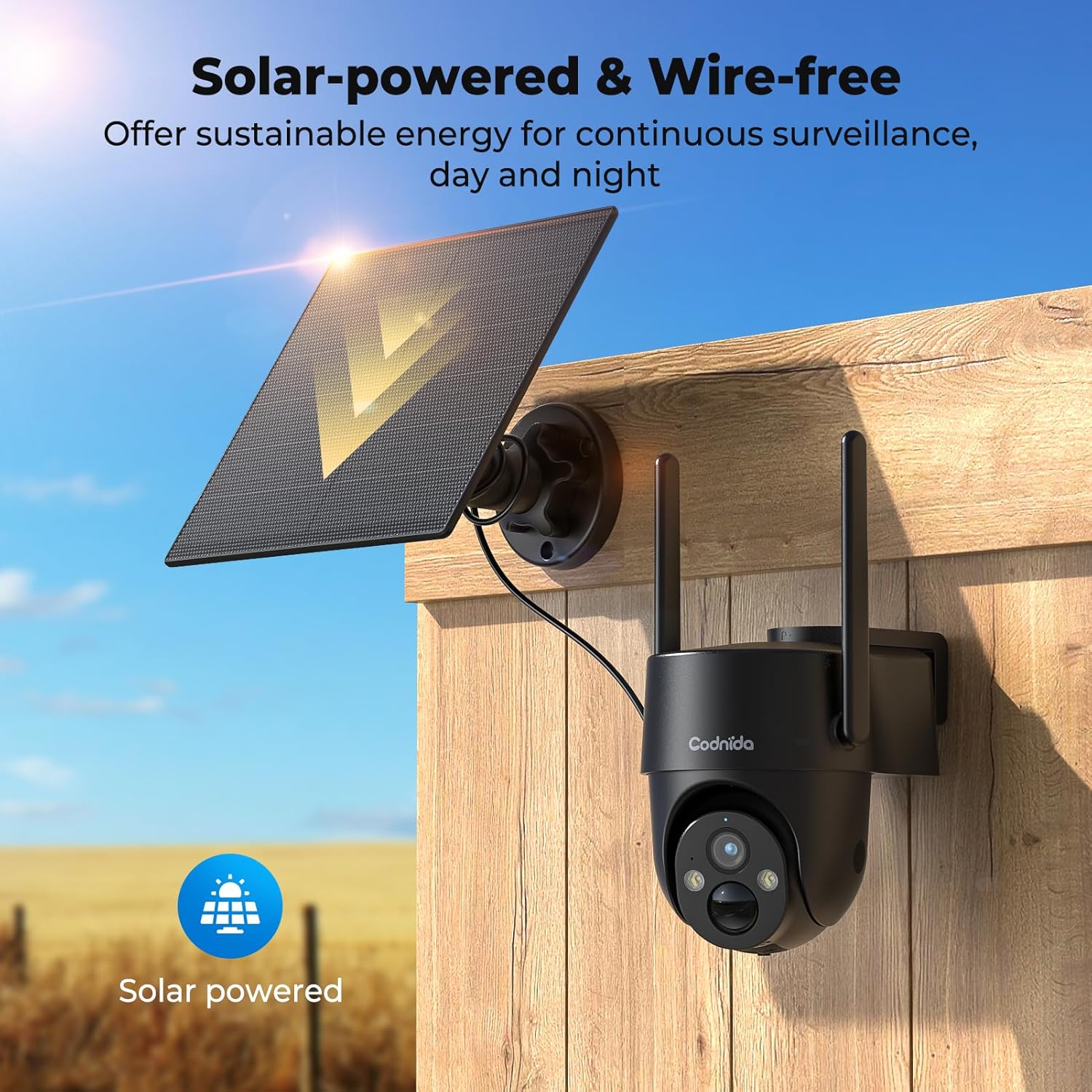
Image 4.3: The camera and solar panel installed, demonstrating wire-free operation.
4.4. ካሜራውን መትከል
- Choose a suitable outdoor location that provides the desired surveillance view and allows the solar panel to receive ampለ የፀሐይ ብርሃን.
- Use the provided screw kit to securely mount the camera bracket to a wall or pole.
- Attach the camera to the mounted bracket. Adjust the angle for optimal coverage.
- Ensure the camera is within a good 4G signal range.
4.5. የመተግበሪያ ጭነት እና ማጣመር
- አውርድ CloudEdge መተግበሪያ ከስማርትፎንዎ የመተግበሪያ መደብር (አይኦኤስ ወይም አንድሮይድ)።
- ለአዲስ መለያ ይመዝገቡ ወይም አስቀድመው ካለዎት ይግቡ።
- Turn on the camera by pressing the power button. The indicator light will flash.
- In the CloudEdge app, tap the "+" icon to add a new device.
- Select the appropriate camera model or scan the QR code on the camera if available.
- Follow the on-screen instructions to complete the pairing process. Ensure your phone's Bluetooth and location services are enabled during pairing.
5. የአሠራር መመሪያዎች
5.1. ቀጥታ ስርጭት View
የቀጥታ ቪዲዮ ምግቡን ለመድረስ የCloudEdge መተግበሪያን ይክፈቱ እና ካሜራዎን ከመሳሪያዎች ዝርዝር ውስጥ ይምረጡ። view የእውነተኛ ጊዜ footage from your camera anytime, anywhere with 4G connectivity.
5.2. የፓን / ዘንበል መቆጣጠሪያ
ከቀጥታ view interface in the CloudEdge app, use the directional controls to remotely pan (horizontal) and tilt (vertical) the camera lens. The camera supports 355° PTZ rotation for comprehensive coverage.

Image 5.2: The camera's 360° pan/tilt capability for wide area surveillance.
5.3. የእንቅስቃሴ ማወቂያ ቅንጅቶች
The camera features PIR human motion detection. In the app settings, you can:
- Enable/Disable motion detection.
- Adjust sensitivity levels (low, medium, high).
- Set detection zones to focus on specific areas and reduce false alarms.
- Schedule detection times.
When motion is detected, the camera will record a clip and send a notification to your smartphone.

Image 5.3: The camera's PIR human motion detection accurately identifies people.
5.4. የምሽት እይታ ሁነታዎች
The camera offers three night vision modes, configurable in the app:
- የቀለም የምሽት እይታ; Utilizes built-in spotlights to provide full-color images in low light.
- Black & White Night Vision: Uses infrared (IR) LEDs for clear black and white images in complete darkness.
- ስማርት የምሽት እይታ፡- Automatically switches between black & white and color night vision when motion is detected.

Image 5.4: Demonstrating the camera's 2K color night vision capability.
5.5. ባለሁለት መንገድ ኦዲዮ
በቀጥታ ስርጭት ውስጥ የማይክሮፎን አዶውን ይንኩ። view to speak through the camera's speaker. This allows for communication with visitors or to deter unwanted individuals.
5.6. Sound and Light Alarm
When motion is detected at night, the camera can automatically activate a loud siren and flash its LED spotlights to warn off intruders. This feature can be configured in the app's alarm settings.

Image 5.6: The camera's sound and light alarm system deterring an intruder.
5.7. የማከማቻ አስተዳደር
የተቀረጹ ቪዲዮዎች በሁለት መንገዶች ሊቀመጡ ይችላሉ፡
- የደመና ማከማቻ፡ Subscribe to a CloudEdge cloud plan for secure online storage.
- የማይክሮ ኤስዲ ካርድ If an SD card is installed, recordings will be saved locally. You can view and manage these recordings through the app.
6. ጥገና
- ማጽዳት፡ በየጊዜው የካሜራውን ሌንስ እና የፀሐይ ፓነልን በሶላር ያፅዱ፣ መamp ግልጽ ምስሎችን እና ውጤታማ የፀሐይ ኃይል መሙላትን ለማረጋገጥ ጨርቅ። ጠንከር ያሉ ኬሚካሎችን አይጠቀሙ።
- የባትሪ እንክብካቤ While solar-powered, ensure the camera receives adequate sunlight. If the battery level drops significantly, consider temporarily charging it via USB. Avoid prolonged exposure to extreme temperatures.
- የጽኑዌር ዝማኔዎች ፦ Check the CloudEdge app regularly for firmware updates. Keeping the firmware updated ensures optimal performance and access to new features.
- የሲም ካርድ ውሂብ፡ Monitor your SIM card data usage to ensure continuous connectivity, especially after the trial period.
7. መላ መፈለግ
| ችግር | መፍትሄ |
|---|---|
| ካሜራው ከ4ጂ ኔትወርክ ጋር አልተገናኘም። |
|
| ባትሪው በፀሐይ ፓነል በኩል አይሞላም። |
|
| እንቅስቃሴን ማወቅ አይሰራም ወይም በጣም ብዙ የውሸት ማንቂያዎች። |
|
| Cannot access live view. |
|
8. ዝርዝሮች
| ባህሪ | ዝርዝር |
|---|---|
| ሞዴል | Cell 2T |
| ግንኙነት | 4ጂ ኤልቲኢ (ሴሉላር) |
| የኃይል ምንጭ | Solar Powered, 10400mAh Rechargeable Battery |
| የቪዲዮ ጥራት | 2ኪ (1440ፒ) |
| ውጤታማ አሁንም ጥራት | 3 ሜፒ |
| የምሽት ራዕይ | Color Night Vision, Black & White IR Night Vision, Smart Mode (up to 10 meters) |
| የፓን / ዘንበል አንግል | 355° ፓን፣ 90° ዘንበል |
| እንቅስቃሴ ማወቂያ | የሰው እንቅስቃሴ PIR ማወቂያ |
| ኦዲዮ | ባለሁለት መንገድ ኦዲዮ (አብሮ የተሰራ ማይክሮፎን እና ድምጽ ማጉያ) |
| ማንቂያ | የድምጽ እና የብርሃን ማስጠንቀቂያ |
| የአየር ሁኔታ መቋቋም | IP65 |
| ማከማቻ | የደመና ማከማቻ፣ ማይክሮ ኤስዲ ካርድ (እስከ 256 ጊባ) |
| የመቆጣጠሪያ ዘዴ | CloudEdge መተግበሪያ |
| ልኬቶች (L x W x H) | 6 x 6 x 6 ሴ.ሜ |
| ክብደት | 1.31 ኪ.ግ |
| ቁሳቁስ | ፕላስቲክ |
| ጥራዝtage | 5 ቮልት |
| ዋትtage | 4.5 ዋት |
9. ዋስትና እና ድጋፍ
Codnida products typically come with a standard manufacturer's warranty. Please refer to the warranty card included in your package or visit the official Codnida webለዝርዝር የዋስትና ውሎች እና ሁኔታዎች ጣቢያ።
For technical support, troubleshooting assistance, or any product-related inquiries, please contact Codnida customer service through the contact information provided on the official website or within the CloudEdge app. When contacting support, please have your product model (Cell 2T) and purchase details ready.


