1. ምርት አብቅቷልview
The Xprinter XP-420B is a high-speed direct thermal label printer designed for various applications, including shipping labels. It offers a maximum print speed of 152 mm/s (6 inches/second) and a resolution of 203 DPI, ensuring clear and precise prints. Its robust double-walled clamshell design enhances durability, and the intelligent print head temperature control system ensures stable output. This printer is compatible with both Windows and Mac operating systems, making it a versatile solution for your labeling needs.
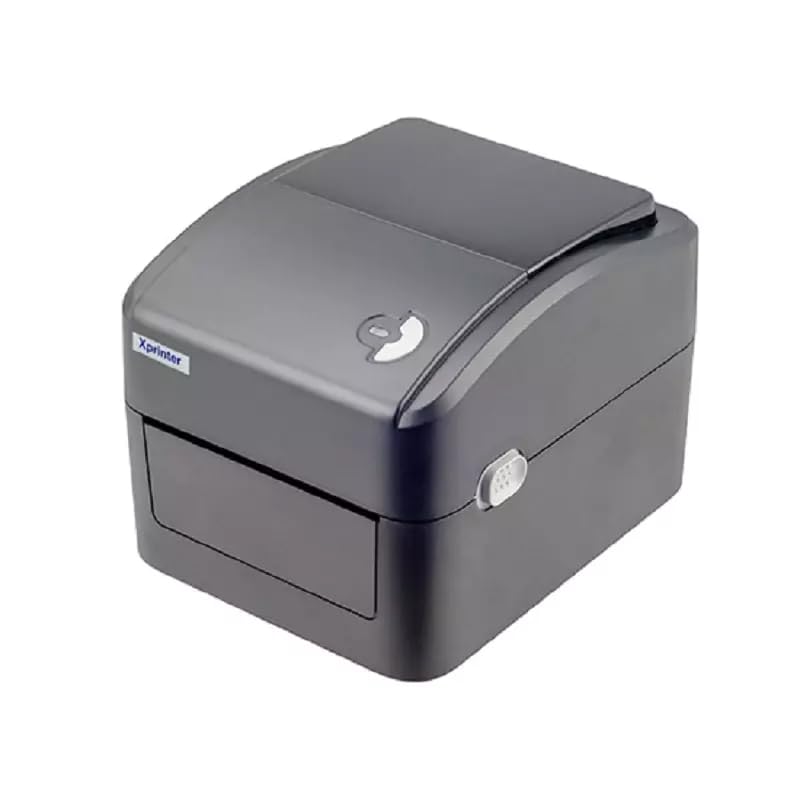
ምስል 1: የፊት view of the Xprinter XP-420B thermal label printer.
2. የማዋቀር መመሪያ
2.1 ማሸግ እና የመጀመሪያ ምርመራ
- አታሚውን እና ሁሉንም መለዋወጫዎች ከማሸጊያው በጥንቃቄ ያስወግዱ።
- Verify that all components are present: printer unit, power adapter, USB cable, and user manual.
- Inspect the printer for any visible damage that may have occurred during transit.
2.2 ማተሚያውን በማገናኘት ላይ
- Connect the power adapter to the printer's power port and then plug it into a power outlet.
- የቀረበውን የዩኤስቢ ገመድ አንድ ጫፍ ከአታሚው የዩኤስቢ ወደብ እና ሌላኛውን ጫፍ ደግሞ በኮምፒውተርዎ ላይ ካለ የዩኤስቢ ወደብ ጋር ያገናኙ።
- Power on the printer using the power switch, usually located on the side or rear.

Figure 2: Xprinter XP-420B showing USB connectivity.
2.3 መለያዎችን መጫን
- Open the printer's top cover by pressing the release latches on both sides.
- Place the roll of thermal labels onto the label spindle, ensuring the labels feed from the bottom of the roll.
- Feed the leading edge of the labels through the label guide until it extends slightly past the print head.
- Adjust the movable label guides to fit the width of your labels snugly, without pinching them.
- Close the top cover firmly until it latches securely.
- The printer will automatically calibrate and detect the label size.
2.4 የአሽከርካሪዎች መጫኛ
Before printing, you must install the appropriate printer drivers on your computer. Drivers are typically provided on a CD included with the printer or can be downloaded from the official Xprinter website. The XP-420B supports both Windows and Mac operating systems.
- ለዊንዶውስ: Run the setup executable from the driver CD or downloaded file እና በስክሪኑ ላይ ያሉትን መመሪያዎች ይከተሉ።
- ለማክ፡ Download the Mac driver from the Xprinter website and follow the installation prompts.
3. የአሠራር መመሪያዎች
3.1 መሰረታዊ ማተሚያ
- አታሚው መብራቱን እና ከኮምፒዩተርዎ ጋር መገናኘቱን ያረጋግጡ።
- ማተም የሚፈልጉትን ሰነድ ወይም አፕሊኬሽን ይክፈቱ (ለምሳሌ የመላኪያ ሶፍትዌር፣ የቃል ፕሮሰሰር)።
- ከመተግበሪያው ምናሌ ውስጥ "አትም" የሚለውን ይምረጡ.
- Choose "Xprinter XP-420B" as your printer.
- In the printer settings or preferences, ensure the correct label size is selected. The printer supports adjustable label sizes.
- ስራውን ወደ አታሚው ለመላክ "አትም" ን ጠቅ ያድርጉ.
3.2 Adjusting Label Size
The XP-420B allows for adjustable label sizes. This adjustment is primarily done through the printer driver settings on your computer and by physically adjusting the label guides within the printer.
- Software Adjustment: In your printing application or printer driver settings, navigate to the "Page Setup" or "Paper Size" options. Select or define the custom dimensions for your labels (e.g., 4x6 inches for shipping labels).
- Physical Adjustment: As described in Section 2.3, ensure the internal label guides are set correctly to the width of your loaded labels.
4. ጥገና
4.1 የህትመት ጭንቅላትን ማጽዳት
Regular cleaning of the print head is crucial for maintaining print quality and extending the printer's lifespan. It is recommended to clean the print head after every roll of labels or if print quality degrades.
- አታሚውን ያጥፉ እና የኃይል ገመዱን ያላቅቁ።
- የአታሚውን የላይኛው ሽፋን ይክፈቱ.
- Wait a few minutes for the print head to cool down if the printer has been recently used.
- Gently wipe the print head surface with an alcohol swab or a lint-free cloth lightly dampበ isopropyl አልኮሆል የተስተካከለ።
- ሽፋኑን ከመዝጋት እና ኃይልን እንደገና ከማገናኘትዎ በፊት የህትመት ጭንቅላት ሙሉ በሙሉ እንዲደርቅ ይፍቀዱለት.
4.2 አጠቃላይ ጽዳት
- የአታሚውን ውጫዊ ክፍል ለማጽዳት ለስላሳ እና ደረቅ ጨርቅ ይጠቀሙ።
- Remove any dust or label debris from the inside of the printer using a soft brush or compressed air.
- ገላጭ ማጽጃዎችን ወይም ፈሳሾችን አይጠቀሙ.
5. መላ መፈለግ
| ችግር | ሊሆን የሚችል ምክንያት | መፍትሄ |
|---|---|---|
| አታሚ ምላሽ እየሰጠ አይደለም። | Power off; USB cable disconnected; Driver issue. | Ensure power is on and connected. Check USB cable. Reinstall printer driver. |
| ደካማ የህትመት ጥራት (የደበዘዘ፣ መስመሮች) | Dirty print head; Incorrect label type; Low print density setting. | Clean the print head (Section 4.1). Ensure you are using direct thermal labels. Adjust print density in driver settings. |
| መለያዎች በትክክል አይመገቡም። | Labels improperly loaded; Label guides not adjusted; Sensor obstruction. | Reload labels correctly. Adjust label guides. Clean any dust or debris from sensors. |
| Printer prints blank labels | Labels loaded upside down; Not a direct thermal label. | Ensure labels are loaded with the printable side facing up. Verify labels are direct thermal. |
6. የምርት ዝርዝሮች
| ባህሪ | ዝርዝር |
|---|---|
| የምርት ስም | Xprinter |
| የሞዴል ስም | XP-420B |
| የግንኙነት ቴክኖሎጂ | ዩኤስቢ |
| የህትመት ቴክኖሎጂ | ቀጥተኛ የሙቀት |
| ጥራት | 203 ዲፒአይ |
| ከፍተኛ የህትመት ፍጥነት | 152 mm/s (6 inches/second) |
| ማህደረ ትውስታ | 8ሜባ SDRAM፣ 8MB ፍላሽ |
| የአታሚ ውፅዓት | ሞኖክሮም |
| የእቃው ክብደት | 3 ኪ |
| የምርት ልኬቶች | 20D x 6W x 10H ሴንቲሜትር |
| ተኳኋኝነት | ዊንዶውስ ፣ ማክ |
7. ዋስትና እና ድጋፍ
7.1 የዋስትና መረጃ
The Xprinter XP-420B comes with a የ1-ዓመት ዋስትና ከተገዛበት ቀን ጀምሮ. ይህ ዋስትና በመደበኛ አጠቃቀም ላይ የምርት ጉድለቶችን እና ጉድለቶችን ይሸፍናል። ለዋስትና ጥያቄዎች እባክዎ የግዢ ማረጋገጫዎን ያቆዩ።
7.2 የደንበኛ ድጋፍ
For technical assistance, troubleshooting beyond this manual, or warranty service, please contact Xprinter customer support. Refer to the contact information provided with your product packaging or visit the official Xprinter webበጣም ወቅታዊ የድጋፍ ዝርዝሮች ለማግኘት ጣቢያ.


