1. መግቢያ
Thank you for choosing the Baseus Qi2 Certified 15W Wireless Magnetic Power Bank. This device is designed to provide convenient and efficient charging for your compatible mobile devices, featuring both wireless and wired charging capabilities. Please read this manual thoroughly before use to ensure proper operation and to maximize the product's lifespan.

Image 1.1: The Baseus Qi2 Certified 15W Wireless Magnetic Power Bank.
2. ምርት አብቅቷልview
2.1 የጥቅል ይዘቶች
- Baseus Qi2 Certified 15W Wireless Magnetic Power Bank (10000mAh)
- ዩኤስቢ-ሲ ወደ ዩኤስቢ-ሲ ባትሪ መሙያ ገመድ
- የተጠቃሚ መመሪያ
2.2 ቁልፍ ባህሪያት
- Qi2 Certified Wireless Charging: ለተኳሃኝ መሳሪያዎች እስከ 15 ዋት ገመድ አልባ የኃይል መሙያ ይሰጣል።
- High-Speed Wired Charging: Features a USB-C port with up to 22.5W Power Delivery (PD) output.
- መግነጢሳዊ አባሪ፡ Strong magnetic connection compatible with MagSafe-enabled devices (iPhone 12-17 series).
- 10000mAh አቅም; Offers substantial power for multiple charges.
- የላቀ የደህንነት ባህሪያት: Equipped with AI temperature monitoring and graphene for enhanced heat dissipation, preventing overheating.
- የታመቀ እና ተንቀሳቃሽ ንድፍ; ቀጭን ፕሮfile በቀላሉ ለመሸከም.
- በመሙላት ማለፍ፡- የኃይል ባንኩን እና የተገናኘ መሣሪያን በአንድ ጊዜ መሙላት ይፈቅዳል።
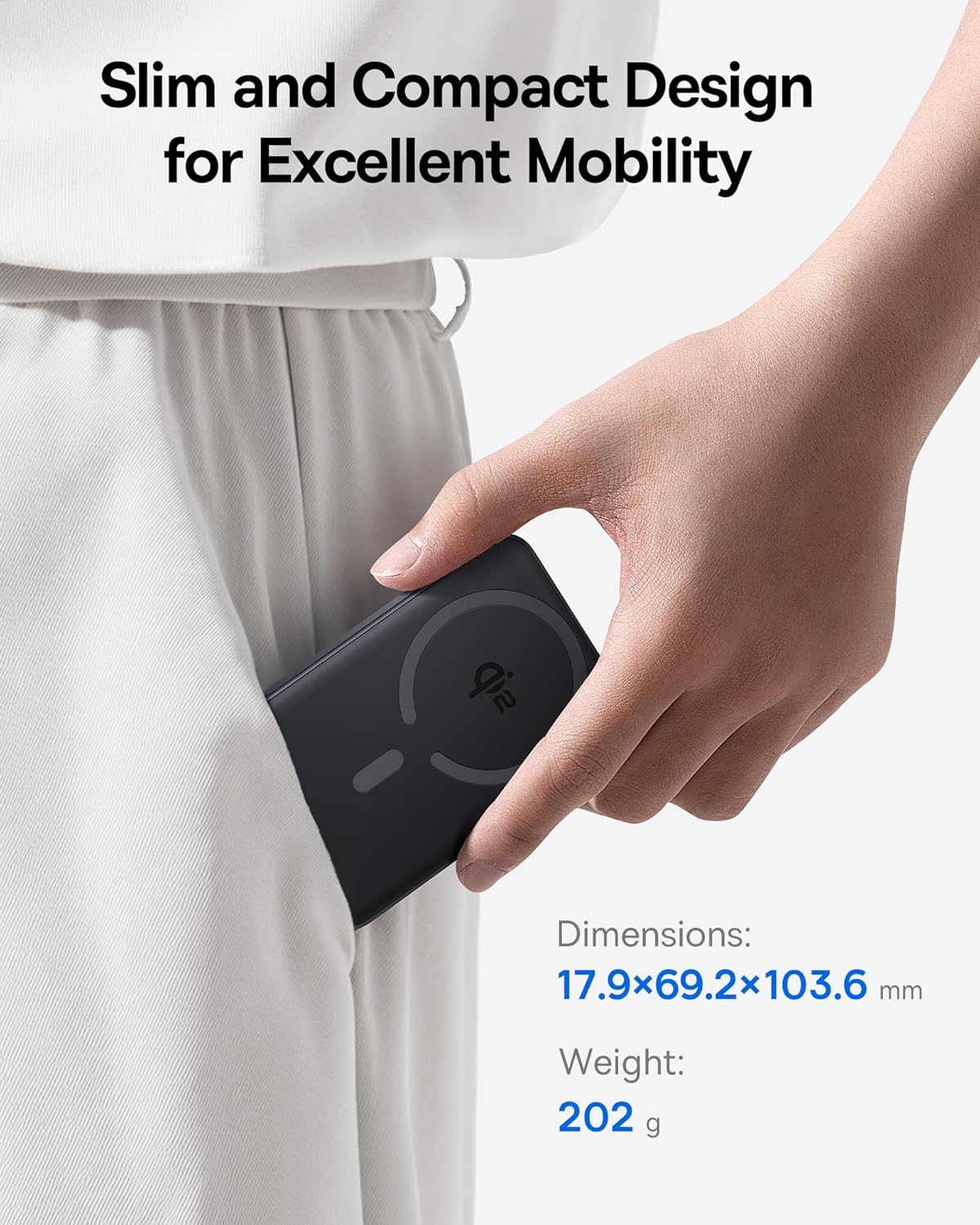
Image 2.1: The power bank's compact design allows for easy portability.
3. ማዋቀር
3.1 የመጀመሪያ ክፍያ
- ከመጠቀምዎ በፊት የኃይል ባንክን ሙሉ በሙሉ ይሙሉ.
- የቀረበውን የዩኤስቢ-ሲ ገመድ ከኃይል ባንኩ የዩኤስቢ-ሲ ወደብ ጋር ያገናኙ።
- የዩኤስቢ-ሲ ገመድ ሌላኛውን ጫፍ ወደ ተኳሃኝ የዩኤስቢ ኃይል አስማሚ (ያልተካተተ) ያገናኙ።
- በሃይል ባንኩ ላይ ያሉት የ LED አመልካቾች የኃይል መሙያ ሁኔታውን ለማሳየት ያበራሉ። ሁሉም LEDዎች ሙሉ በሙሉ ሲሞሉ ጠንካራ ይሆናሉ።
4. የአሠራር መመሪያዎች
4.1 የኃይል ባንክን መሙላት
To recharge the power bank, use the included USB-C cable and connect it to a power source. The power bank supports fast input charging.
4.2 መሳሪያዎን በገመድ አልባ መሙላት
- Ensure your device is compatible with MagSafe or Qi2 wireless charging (e.g., iPhone 12-17 series).
- Align the back of your compatible device with the magnetic charging area of the power bank. The magnets will snap into place, securing the connection.
- Wireless charging will begin automatically. The power bank does not require a power button for wireless charging.

Image 4.1: Wireless charging in progress, demonstrating the magnetic connection.

Image 4.2: Magnetic attachment for effortless charging.
4.3 Wired Charging Your Device
- የዩኤስቢ-ሲ ገመዱን አንድ ጫፍ ከኃይል ባንኩ የዩኤስቢ-ሲ ወደብ ጋር ያገናኙ።
- የዩኤስቢ-ሲ ገመዱን ሌላኛውን ጫፍ ከመሳሪያዎ የኃይል መሙያ ወደብ ጋር ያገናኙ።
- የኃይል ባንኩ የተገናኘውን መሣሪያ በራስ-ሰር ያገኝና ባትሪ መሙላት ይጀምራል።
4.4 በመሙላት ማለፍ
The power bank supports pass-through charging, allowing you to charge both the power bank and a connected device simultaneously. Connect the power bank to a wall adapter, and then connect your device to the power bank via either wireless or wired connection.

Image 4.3: The power bank supports both wired and wireless charging simultaneously.
4.5 ሁለንተናዊ ተኳኋኝነት

ምስል 4.4፡ ተኳሃኝነት ከview for wireless and wired charging.
5. የደህንነት መረጃ
ደህንነቱ የተጠበቀ አሰራርን ለማረጋገጥ እና በመሳሪያው ላይ ጉዳት እንዳይደርስ ለመከላከል እና ጉዳት እንዳይደርስ ለመከላከል የሚከተሉትን የደህንነት መመሪያዎች ይከተሉ።
- የኃይል ባንኩን ለከፍተኛ ሙቀት፣ ለቀጥታ የፀሐይ ብርሃን ወይም ለእሳት አያጋልጡት።
- መሳሪያውን አትሰብስቡ፣ አይቀይሩት ወይም አይጠግኑት።
- የኃይል ባንኩን ከውሃ እና ከሌሎች ፈሳሾች ያርቁ.
- መሳሪያውን ለጠንካራ ተጽእኖዎች ከመጣል ወይም ከማስገዛት ተቆጠብ።
- የተረጋገጡ የኃይል መሙያ ገመዶችን እና አስማሚዎችን ብቻ ይጠቀሙ።
- ልጆች በማይደርሱበት ቦታ ያስቀምጡ.
- The power bank features multiple built-in protections, including over-voltagሠ ፣ ከግርጌ በታችtage, overcharge, over-discharge, over-temperature, over-current, short circuit, recovery, and over-power protection.

Image 5.1: Advanced thermal management for safe charging.

Image 5.2: Comprehensive safety protections integrated into the power bank.
6. ጥገና
Proper maintenance ensures the longevity and optimal performance of your power bank:
- መሳሪያውን ለስላሳ እና ደረቅ ጨርቅ ያጽዱ. ገላጭ ማጽጃዎችን ወይም ፈሳሾችን አይጠቀሙ.
- ጥቅም ላይ በማይውልበት ጊዜ የኃይል ባንኩን በቀዝቃዛና ደረቅ ቦታ ያከማቹ።
- ለረጅም ጊዜ ማከማቻ ከሆነ፣ የባትሪውን ጤና ለመጠበቅ በየሶስት ወሩ የኃይል ባንኩን በግምት 50% ይሙሉ።
7. መላ መፈለግ
7.1 መሳሪያው ገመድ አልባ ባትሪ እየሞላ አይደለም
- Ensure your device is Qi2 or MagSafe compatible.
- Check for proper alignment of your device on the power bank's charging surface.
- Remove any thick cases or metallic objects between your device and the power bank.
- Verify the power bank has sufficient charge.
7.2 Device Not Charging Via USB-C
- የዩኤስቢ-ሲ ገመድ ከኃይል ባንክ እና ከመሳሪያዎ ጋር ደህንነቱ በተጠበቀ ሁኔታ መገናኘቱን ያረጋግጡ።
- የኬብሉ ችግር እንዳይፈጠር ለመከላከል የተለየ የዩኤስቢ-ሲ ገመድ ለመጠቀም ይሞክሩ።
- Verify the power bank has sufficient charge.
7.3 የኃይል ባንክ እየሞላ አይደለም
- Ensure the USB-C cable is securely connected to the power bank and the wall adapter.
- Try a different wall adapter and/or USB-C cable.
- Ensure the wall adapter provides sufficient power output.
8. ዝርዝሮች
| የሞዴል ቁጥር | E00285 |
| የባትሪ አቅም | 10000mAh (3.7V/37Wh) |
| የዩኤስቢ-ሲ ግቤት | 5V=3A; 9V=2.22A |
| የዩኤስቢ-ሲ ውፅዓት | 5V=3A; 9V=2.22A; 12V=1.5A; 10V=2.25A (Max 22.5W) |
| የገመድ አልባ ውፅዓት | 5W/7.5W/15W (Max 15W) |
| ጠቅላላ ውፅዓት | 5V=3A |
| የምርት ልኬቶች | 4.6 x 2.7 x 0.7 ኢንች (17.9 x 69.2 x 103.6 ሚሜ) |
| የእቃው ክብደት | 8.8 አውንስ (202 ግ) |
| ቀለም | Black (also available in Moon White, Baby Pink) |
9. ዋስትና እና ድጋፍ
Baseus products are designed and manufactured to the highest quality standards. This product is covered by a limited warranty from the date of purchase. For detailed warranty information, product support, or to register your product, please visit the official Baseus webጣቢያ ወይም የደንበኛ አገልግሎታቸውን ያነጋግሩ።
ለዋስትና ጥያቄዎች እባክዎ የግዢ ማረጋገጫዎን ያቆዩ።


