መግቢያ
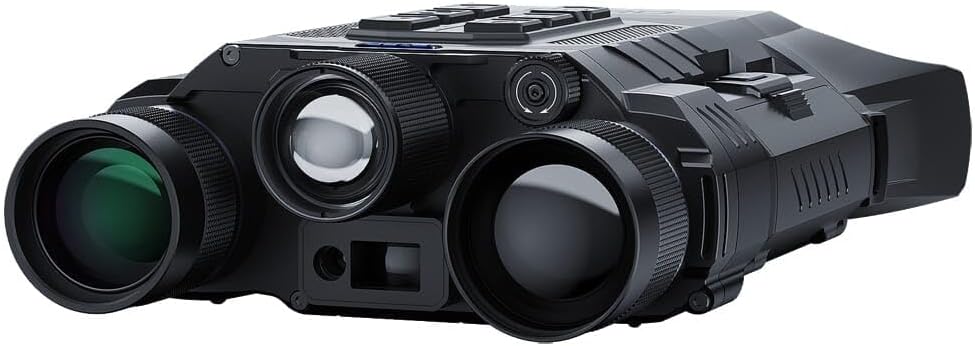
Image: The Pard Osprey 640-35 Dual-Spectral Binocular, showcasing its dual lenses and robust design.
The Pard Osprey 640-35 Dual-Spectral Binocular is an advanced optical device designed for enhanced observation in various conditions. It combines thermal imaging for long-distance detection with night vision for clear identification. This manual provides comprehensive instructions for the proper setup, operation, maintenance, and troubleshooting of your Osprey binocular.
The Osprey allows users to operate either thermal or night vision channels independently, or view them both simultaneously using the picture-in-picture feature. Its innovative design ensures clear target identification across thermal, night vision, and daytime scope channels.
ቁልፍ ባህሪያት
- Dual-Spectral Capability: Seamless integration of thermal and night vision for versatile observation.
- High-Performance Thermal Sensor: Features a Vanadium Oxide (Vox) sensor with ≤20mK NETD rating and 12µm pixel pitch for detailed thermal images in low contrast conditions.
- Integrated Laser Range Finder (LRF): Accurate 1200-yard true laser range finding capability.
- Adjustable Interpupillary Distance: Ensures comfortable viewing for various users.
- IP67 የውሃ መከላከያ ደረጃ ከአቧራ እና ከውሃ መጥለቅ መከላከያ ይሰጣል።
- Multiple Thermal Image Modes: Includes White Hot/Black, Hot/Red, Hot/Iron, Hot/Edge, and Sky options.
- የትዕይንት ሁነታዎች፡ Three individual scene modes to enhance environmental characteristics.
- Picture-In-Picture (PIP): Allows 2x magnification of a target inset over the main image.
- Hot Image Tracking: Automatically tracks heat sources on the display.
- ተጠባባቂ ሁኔታ Conserves power with instant wake-up functionality.
ማዋቀር እና የመጀመሪያ አጠቃቀም
1. ማሸግ እና መፈተሽ
Carefully remove the Pard Osprey binocular and all accessories from its packaging. Inspect the device for any signs of damage. Retain the packaging for future storage or transport.
2. የባትሪ ጭነት
Locate the battery compartment. Insert the recommended batteries according to the polarity indicators. Ensure the compartment cover is securely closed to maintain the device's waterproof rating.
3. ማብራት / ማጥፋት
To power on the device, press and hold the power button (usually marked with a power symbol) until the display illuminates. To power off, press and hold the power button again until the display shuts down.
4. የኢንተርፑፒላሪ ርቀትን ማስተካከል
The Osprey has a fully adjustable interpupillary range. Use the built-in wheel located on the bottom of the frame to adjust the distance between the eyepieces until you see a single, clear circular field of view.
ምስል: የኋላ view of the Pard Osprey binocular, illustrating the adjustable eyepieces and the soft silicone eye cups designed to block peripheral light.
5. ዳይፕተር ማስተካከያ
If applicable, adjust the diopter on the eyepiece (usually the right one) to compensate for differences in vision between your eyes. Look through the binocular at a distant object and rotate the diopter ring until the image is sharp for that eye, then adjust the main focus for both eyes.
የአሠራር መመሪያዎች
Viewሁነታዎች
The Osprey offers multiple viewየመግቢያ አማራጮች:
- የሙቀት ሁነታ; Provides detection capabilities based on heat signatures.
- የምሽት እይታ ሁነታ፡ በዝቅተኛ ብርሃን ሁኔታዎች ውስጥ ታይነትን ያሳድጋል.
- Daytime Scope Mode: For use in well-lit environments.
- Picture-In-Picture (PIP): Activates a magnified 2x inset of the target area within the main view. This allows for detailed observation of a specific point while maintaining situational awareness of the broader scene.
Thermal Image Modes
Customize your thermal view by selecting from the following palettes:
- ነጭ ትኩስ; ትኩስ ነገሮች ነጭ ሆነው ይታያሉ።
- ጥቁር ሙቅ; ትኩስ ነገሮች ጥቁር ሆነው ይታያሉ።
- ቀይ ሙቅ፡ Hot objects are highlighted in red.
- Iron Hot: Displays a spectrum of colors from black to white, with red and yellow in between.
- ጠርዝ፡ Highlights the edges of objects.
- ሰማይ፡ A specialized mode for specific environmental conditions.
የትዕይንት ሁነታዎች
The device features a quick switch function to instantly move between 3 individual scene modes. These modes enhance environmental characteristics to increase visibility and contrast, optimizing performance for different scenarios (e.g., forest, city, open field).
Hot Image Tracking
When activated, the Osprey can detect and display heat signatures on the screen. It will automatically track the hottest point in the field of view, helping you maintain focus on your target.
Laser Range Finder (LRF) Operation
To use the built-in LRF, aim the reticle at your target and activate the range finder function (refer to button layout for specific button). The distance to the target will be displayed on the screen. The LRF has a range of up to 1200 yards.
የመጠባበቂያ ሁነታ
To enter standby mode, briefly press the power button. The display will turn off, conserving battery life. To instantly awaken the device, quickly press the power button again.
የ Wi-Fi ግንኙነት
The Osprey supports Wi-Fi connectivity for remote viewing, recording, and firmware updates via a compatible mobile application. Refer to the app's instructions for pairing and usage.
መቆጣጠሪያዎች እና አዝራሮች
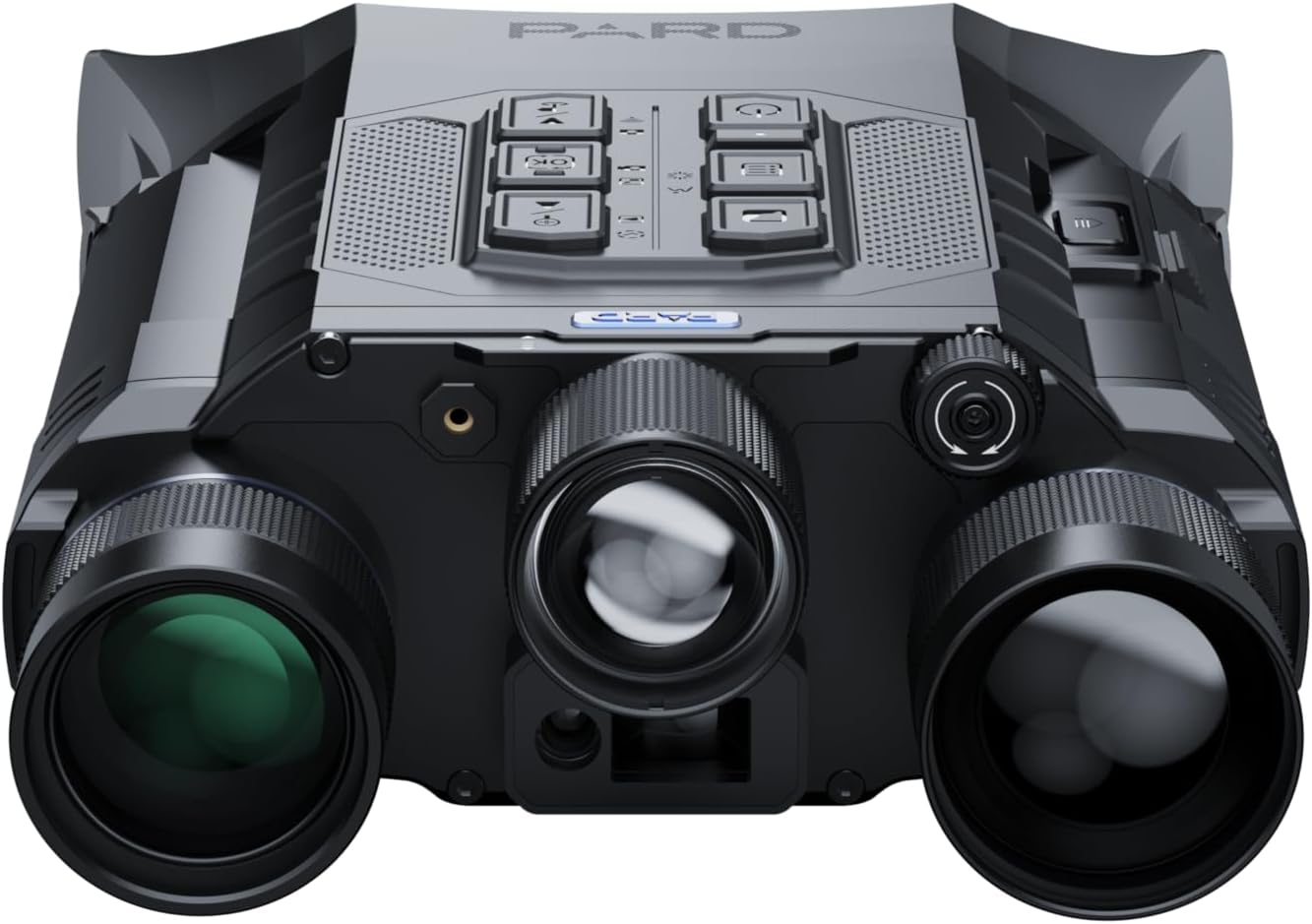
Familiarize yourself with the control buttons on the device. A typical layout includes:

ምስል: ከፍተኛ view of the Pard Osprey binocular, highlighting the arrangement of control buttons for power, menu, navigation, and recording functions.
- የኃይል ቁልፍ፡- On/Off, Standby.
- የምናሌ አዝራር፡- ቅንብሮችን እና አማራጮችን ይደርሳል።
- የማውጫ ቁልፎች (ላይ/ታች/ግራ/ቀኝ/እሺ)፡ ምናሌዎችን ለማሰስ እና አማራጮችን ለመምረጥ።
- የማጉላት አዝራር፡- Adjusts magnification.
- የመዝገብ አዝራር፡- Initiates video recording.
- የፎቶ ቁልፍ፡ የማይንቀሳቀሱ ምስሎችን ይቀርጻል።
- LRF Button: Activates the laser range finder.
ጥገና እና እንክብካቤ
ሌንሶችን ማጽዳት
Use a soft, lint-free cloth specifically designed for optical lenses. Gently wipe the lens surfaces to remove dust or smudges. For stubborn dirt, use a small amount of lens cleaning solution applied to the cloth, not directly to the lens.
ሰውነትን ማጽዳት
Wipe the body of the binocular with a soft, damp ጨርቅ. ማጽጃዎችን ወይም ፈሳሾችን ከመጠቀም ይቆጠቡ ፣ ምክንያቱም እነዚህ መጨረሻውን ወይም የውስጥ ክፍሎችን ሊጎዱ ይችላሉ።
ማከማቻ
When not in use, store the Osprey binocular in its protective case in a cool, dry place, away from direct sunlight and extreme temperatures. Remove batteries if storing for extended periods to prevent leakage.
የውሃ መከላከያ ደረጃ (IP67)
The device is rated IP67, meaning it is protected from dust ingress and can withstand immersion in water up to 1 meter for 30 minutes. Ensure all port covers and battery compartments are securely closed before exposure to water.
መላ መፈለግ
| ችግር | ሊሆን የሚችል ምክንያት | መፍትሄ |
|---|---|---|
| መሣሪያው አይበራም። | ዝቅተኛ ወይም የሞቱ ባትሪዎች፤ በተሳሳተ መንገድ የተጫኑ ባትሪዎች። | Replace batteries with fresh ones; check battery polarity. |
| ምስሉ ደብዛዛ ወይም ትኩረት የለሽ ነው። | Improper focus adjustment; dirty lenses; diopter not adjusted. | Adjust the focus wheel; clean lenses; adjust diopter for individual eye. |
| Laser Range Finder not working. | Obstruction in front of LRF; target too far or too close; low battery. | Ensure clear line of sight; check target distance within 1200 yards; replace batteries. |
| የWi-Fi ግንኙነት ችግሮች። | Incorrect Wi-Fi settings; app not updated; interference. | Verify Wi-Fi settings on device and phone; update mobile app; move closer to device. |
| Display flickering or distorted. | Extreme temperature; software glitch. | Allow device to acclimate to ambient temperature; restart the device. |
ዝርዝሮች
| ባህሪ | ዝርዝር |
|---|---|
| የሞዴል ቁጥር | OS6-35/50/850/LRF-PARD |
| የሙቀት መለኪያ | Vanadium Oxide (Vox) |
| NETD Rating | ≤20 ሚ.ኬ |
| ፒክስል ፒች | 12µm |
| መነፅር | 35 ሚሜ |
| IR IRuminator | 850 nm |
| Laser Range Finder Range | እስከ 1200 ሜትሮች ድረስ |
| የውሃ መከላከያ ደረጃ | IP67 |
| ግንኙነት | ዋይ ፋይ |
| አምራች | PARD አሜሪካ |
| ዩፒሲ | 850050408307 |
ዋስትና እና ድጋፍ
For detailed warranty information and terms of service, please refer to the official Pard USA webጣቢያ ወይም የደንበኞቻቸውን ድጋፍ በቀጥታ ያነጋግሩ። ለዋስትና ጥያቄዎች የግዢ ማረጋገጫዎን ያስቀምጡ።
የደንበኛ ድጋፍ፡ For technical assistance, repairs, or general inquiries, please visit the Pard Store on Amazon or the official PARD USA webጣቢያ.


