1. መግቢያ እና ስርዓቱ ተጠናቋልview
The Blink Outdoor 2K+ is a next-generation wireless smart security camera system designed to provide enhanced visual and audio monitoring for your home. This system features 2K video resolution, improved audio capabilities, and a two-year battery life, ensuring reliable performance with minimal maintenance. The included Sync Module Core facilitates communication between your cameras and the Blink app.

ምስል 1.1፡ The Blink Outdoor 2K+ camera, showcasing its compact design and outdoor placement. This image highlights the camera's ability to blend into various outdoor environments while providing security.
ቁልፍ ባህሪዎች
- የ2ኬ ቪዲዮ ጥራት፡ ግልጽ እና ዝርዝር foo ያንሱtage with 2560 x 1440 resolution.
- Color Vision in Low Light: Experience color video in ambient low-light conditions before switching to infrared black and white.
- Enhanced Two-Way Audio: Communicate clearly with visitors or deter intruders using the built-in microphone and speaker with noise cancellation.
- ስማርት ማወቂያ፡- Receive intelligent notifications for person and vehicle detection with an optional Blink Subscription Plan (sold separately).
- 4x ማጉላት፡ Digitally zoom in on live or recorded video for closer inspection.
- የአየር ሁኔታን መቋቋም የሚችል ንድፍ; IP-65 rated for protection against rain, dust, and severe weather.
- Two-Year Battery Life: Operates for up to two years on two AA lithium batteries (included).
2. በሳጥኑ ውስጥ ያለው
Your Blink Outdoor 2K+ 5-Camera System package includes the following components:
- Five (5) Blink Outdoor 2K+ Cameras
- One (1) Blink Sync Module Core
- Ten (10) AA 1.5V Lithium Energizer Batteries
- Five (5) Mounting Kits
- አንድ (1) የኃይል አስማሚ (ለማመሳሰል ሞዱል ኮር)
- አንድ (1) የዩኤስቢ-ሲ ገመድ (ለማመሳሰል ሞዱል ኮር)
3. የማዋቀር መመሪያ
Follow these steps to set up your Blink Outdoor 2K+ camera system. For a detailed visual guide, refer to the official Blink setup guide እዚህ.
3.1. Install the Blink Home Monitor App
- አውርድ ብልጭልጭ የቤት ውስጥ መቆጣጠሪያ app from your device's app store. The app is compatible with iOS 16.4 and above, Android 10 and above, and Fire OS 8 only.
- Create a new Blink account or log in with an existing one.
3.2. Set Up the Sync Module Core
- Plug the Sync Module Core into a power outlet using the provided power adapter and USB-C cable.
- Place the Sync Module Core in a central location within your home, ensuring it is within range of your Wi-Fi router and the cameras. Avoid placing it near walls or in corners that may obstruct the signal.
- Follow the in-app instructions to connect the Sync Module Core to your 2.4 GHz Wi-Fi network.

ምስል 3.1፡ The Blink Sync Module Core, essential for connecting your Blink cameras to the internet and managing your system. It supports up to 10 devices.
3.3. Install Batteries in Cameras
- Open the battery compartment on the back of each Blink Outdoor 2K+ camera.
- Insert the two (2) included AA 1.5V lithium Energizer batteries, ensuring correct polarity.
- የባትሪውን ክፍል ደህንነቱ በተጠበቀ ሁኔታ ይዝጉ።
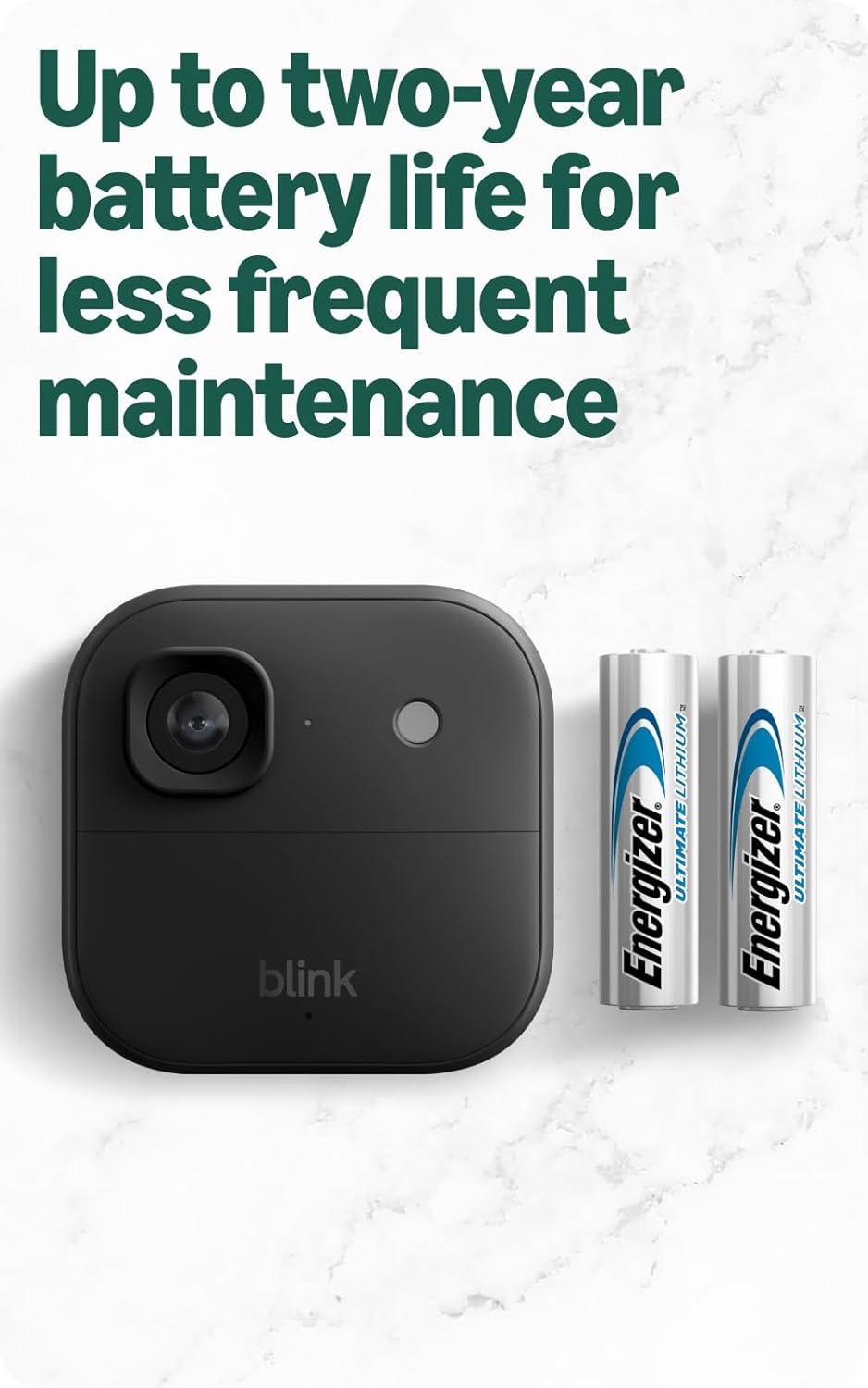
ምስል 3.2፡ The Blink Outdoor 2K+ camera with its long-lasting AA lithium batteries. These batteries provide up to two years of power, reducing the need for frequent maintenance.
3.4. Add Cameras to Your System
- In the Blink app, tap the + አዲስ መሣሪያ ለመጨመር አዶ።
- ይምረጡ Blink Wireless Camera and scan the QR code located inside the camera's battery compartment.
- Follow the on-screen prompts to link each camera to your Sync Module Core.
3.5. Mount Your Cameras
- Choose optimal locations for your cameras, considering coverage area, Wi-Fi signal strength, and power source proximity (if using an optional power adapter).
- Use the included mounting kits to securely attach the cameras to walls or other surfaces. Ensure the camera is positioned to capture the desired view.
4. Operating Your Blink Outdoor 2K+ System
Once your cameras are set up, you can begin monitoring your property using the Blink Home Monitor app.
4.1. ቀጥታ ስርጭት View
መታ ያድርጉ ቀጥታ View icon in the app to stream real-time video from any of your cameras. This feature allows you to check on your property at any time.

ምስል 4.1፡ A smartphone screen displaying a live 2K video feed from a Blink Outdoor 2K+ camera. The image demonstrates the clarity and detail available through the app.
4.2. የእንቅስቃሴ ማወቂያ
Configure motion detection settings for each camera within the app. You can adjust sensitivity, activity zones, and retrigger time to optimize performance and battery life.
- ስማርት ማወቂያ፡- With an optional Blink Subscription Plan, enable person and vehicle detection to receive more relevant alerts and reduce false alarms.

ምስል 4.2፡ A smartphone displaying a smart detection notification from the Blink app. This feature, available with a subscription, alerts users to specific types of motion, such as vehicle detection.
4.3. ባለሁለት መንገድ ኦዲዮ
በቀጥታ ስርጭት ወቅት View or when responding to a motion alert, tap the microphone icon in the app to speak through the camera's speaker. Listen to audio from the camera through your smartphone.
4.4. የቪዲዮ ቀረጻ እና ማከማቻ
Motion-activated recordings are stored in the cloud. Access these clips through the Blink app. An optional Blink Subscription Plan provides extended cloud storage and additional features.
4.5. Color Vision in Low Light
The Blink Outdoor 2K+ utilizes ambient light to provide color video in low-light conditions. If light levels are insufficient, the camera will automatically switch to infrared black and white night vision.
4.6. 4x Zoom
እያለ viewing live or recorded video, you can pinch to zoom up to 4x to get a closer look at specific details.
5. ጥገና
Proper maintenance ensures the longevity and optimal performance of your Blink Outdoor 2K+ system.
5.1. የባትሪ መተካት
The cameras are powered by two (2) AA 1.5V lithium metal batteries, offering up to two years of battery life under typical usage. When the app indicates low battery, replace both batteries with new AA 1.5V lithium metal (non-rechargeable) batteries. Do not use alkaline or rechargeable batteries, as they may affect performance and battery life.
5.2. ካሜራውን ማጽዳት
Periodically inspect the camera lens and housing for dirt, dust, or debris. Gently wipe the lens with a soft, clean, lint-free cloth. Avoid using harsh chemicals or abrasive materials that could scratch the lens.
5.3. የአየር ሁኔታ መቋቋም
The Blink Outdoor 2K+ camera has an IP-65 weather-resistant rating, designed to withstand rain, dust, and varying temperatures from -4° to 113° F (-20° to 45°C). Ensure the battery compartment is securely closed to maintain its weather resistance.

ምስል 5.1፡ The Blink Outdoor 2K+ camera enduring snowy conditions. Its IP-65 weather-resistant design ensures reliable operation in various environmental challenges.
6. መላ መፈለግ
If you encounter issues with your Blink Outdoor 2K+ system, refer to the following common troubleshooting tips:
6.1. Connectivity Issues (Wi-Fi / Sync Module)
- የWi-Fi ምልክትን ያረጋግጡ፡- Ensure your Wi-Fi network is 2.4 GHz 802.11b/g/n and has a strong signal where the Sync Module Core and cameras are located.
- Sync Module Placement: Position the Sync Module Core in an open area, away from obstructions like thick walls or large appliances, to maximize signal strength to your cameras.
- የበይነመረብ ፍጥነት; Verify your internet upload speed meets the recommended requirements for video quality (e.g., 2 Mbps for Saver, 3 Mbps for Standard, 6 Mbps for Best).
- መሣሪያዎችን እንደገና ያስጀምሩ Try restarting your Wi-Fi router, Sync Module Core, and cameras (by removing and reinserting batteries) to refresh connections.
6.2. የባትሪ ዕድሜ ስጋቶች
- የእንቅስቃሴ ቅንጅቶች High motion detection sensitivity, frequent Live View usage, and long recording clips can reduce battery life. Adjust these settings in the Blink app.
- የሙቀት መጠን፡ Extreme cold temperatures can temporarily reduce battery performance.
- Subscription Features: Utilizing smart detection features (person/vehicle) with a Blink Subscription Plan can help optimize battery life by reducing unnecessary recordings.
6.3. Video Quality Issues
- ንጹህ ሌንስ; የካሜራ ሌንስ ንፁህ እና ከቆሻሻ ወይም ከቆሻሻ የጸዳ መሆኑን ያረጋግጡ።
- የመተግበሪያ ቅንብሮች ፦ Check the video quality settings in the Blink app. Higher quality settings require better Wi-Fi and internet upload speeds.
- መብራት፡ While the camera has Color Vision in low light, very dark environments will result in black and white infrared video. Ensure adequate ambient light for color footage.
7. ዝርዝሮች
Detailed technical specifications for the Blink Outdoor 2K+ camera and Sync Module Core:
| ባህሪ | ዝርዝር መግለጫ |
|---|---|
| የካሜራ ጥራት | 2ኬ (2560 x 1440) |
| መስክ የ View | 115° x 62° x 135° |
| ምጥጥነ ገጽታ | 16፡9 |
| የካሜራ ፍሬም ደረጃ | 24/25 FPS (Max) |
| ኦዲዮ | የሁለት መንገድ ንግግር |
| የካሜራ ልኬቶች | 2.8 x 2.8 x 1.6 inches (70mm x 70 mm x 41 mm) |
| Sync Module Core Dimensions | 3.19 በ x 1.77 በ x 0.85 ኢንች (81ሚሜ x 45 ሚሜ x 21.55 ሚሜ) |
| የካሜራ ክብደት | 5.0 አውንስ (136 ግ) |
| Sync Module Core Weight | 1.5 አውንስ (43.6 ግ) |
| Electrical Rating (Camera) | 2 AA 1.5V lithium metal (non-rechargeable) batteries |
| Electrical Rating (Sync Module) | 5V ⎓ 1 ኤ |
| የ Wi-Fi ግንኙነት | 2.4 ጊኸ 802.11b/g/n |
| የአሠራር ሙቀት | -4° እስከ 113°F (-20° እስከ 45°ሴ) |
| ዝቅተኛ የስማርትፎን መስፈርቶች | iOS 16.4+, Android 10+, Fire OS 8 only |
| የብልጭታ መተግበሪያ | ብልጭልጭ የቤት ውስጥ መቆጣጠሪያ |
| ትውልድ | 5 ኛ ትውልድ |
8. ዋስትና እና ድጋፍ
8.1. የዋስትና መረጃ
The Blink Outdoor 2K+ system includes a one-year limited warranty and service. Use of Blink devices is subject to the terms found on the official Blink webጣቢያ.
8.2. የደንበኛ ድጋፍ
For additional information, troubleshooting assistance, or to view the full setup guide, please visit the official Blink Outdoor 2K+ support page. You can find more resources and contact support through the Blink Home Monitor app or the Blink webጣቢያ.


