1. መግቢያ
This manual provides essential information for setting up, operating, maintaining, and troubleshooting your ASUS Gaming V16 laptop. Please read this manual thoroughly to ensure proper use and to maximize the performance and longevity of your device.
2. ምርት አብቅቷልview
The ASUS Gaming V16 (Model V3607VM-RP057WS) is a high-performance gaming laptop designed for immersive gaming and demanding creative tasks. It features an Intel Core 7 240H processor, NVIDIA GeForce RTX 5060 Laptop GPU, 16GB DDR5 RAM, and a 512GB NVMe PCIe 4.0 SSD. The laptop is built to US MIL-STD 810H military-grade standards for durability.
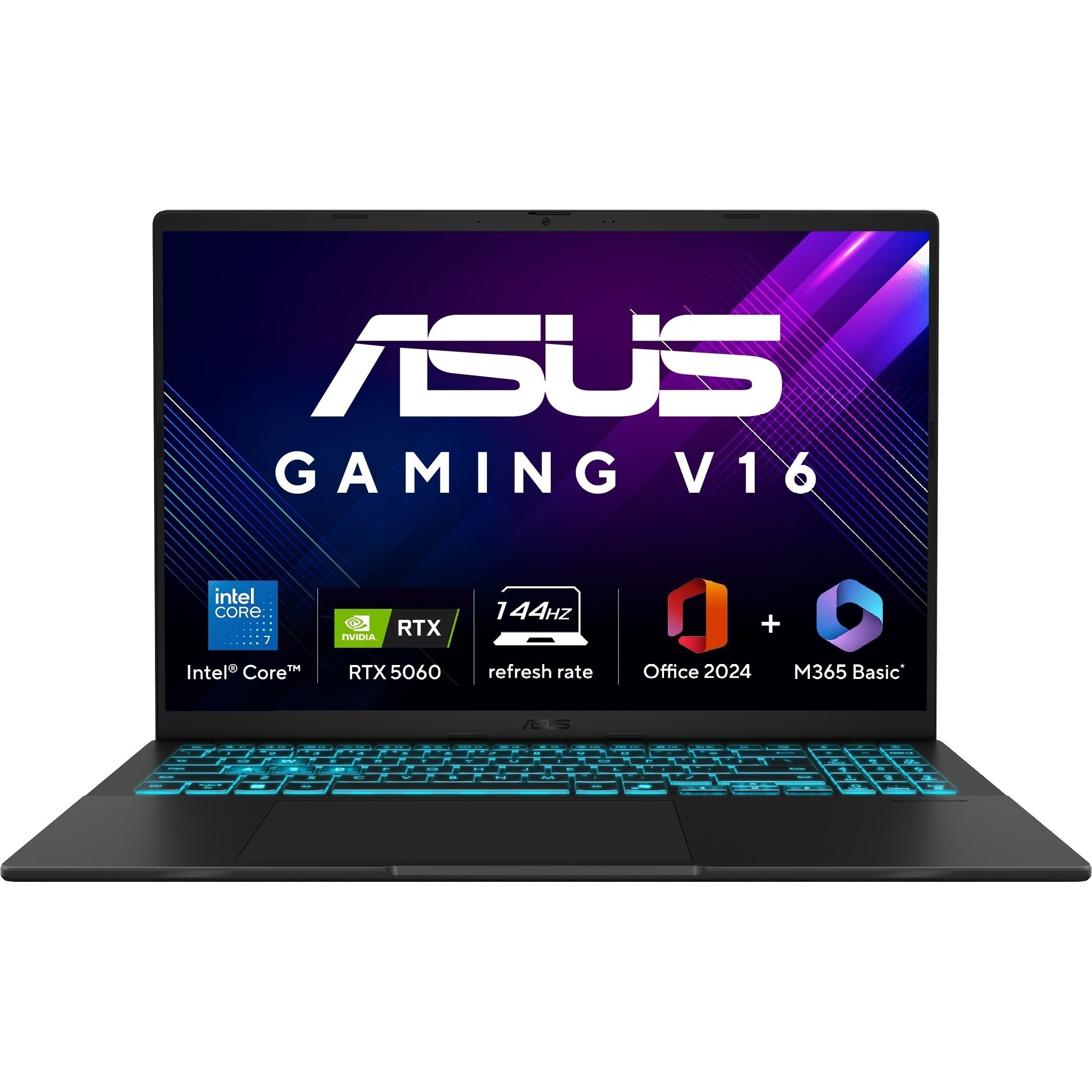
Image 2.1: ASUS Gaming V16 Laptop. This image displays the overall design of the ASUS Gaming V16 laptop.
ቁልፍ ባህሪዎች
- ፕሮሰሰር፡ Intel Core 7 Processor 240H (2.5 GHz, up to 5.2 GHz, 10 cores, 16 Threads)
- ግራፊክስ፡ NVIDIA GeForce RTX 5060 Laptop GPU, 8GB GDDR7
- ማሳያ፡- 16.0-inch, FHD+ (1920 x 1200) 16:10 aspect ratio, 144Hz refresh rate, 300nits Brightness, 45% NTSC color gamut, Anti-glare display, 89% Screen-to-body ratio
- ማህደረ ትውስታ፡ 16GB DDR5 ራም
- ማከማቻ፡ 512GB M.2 NVMe PCIe 4.0 SSD
- ስርዓተ ክወና፡ ዊንዶውስ 11 መነሻ
- የቁልፍ ሰሌዳ፡ የኋላላይ የቺክሊት ቁልፍ ሰሌዳ ከNum-key ጋር
- ባትሪ፡ 63WHrs፣ 3S1P፣ 3-cell Li-ion
- ዘላቂነት፡ US MIL-STD 810H ወታደራዊ-ደረጃ
3. የማዋቀር መመሪያ
3.1 Unboxing እና የመጀመሪያ ምርመራ
Carefully remove the laptop and all accessories from the packaging. Inspect for any signs of damage. The package should include the laptop, power adapter, user guide, and warranty documents.
3.2 የኃይል አስማሚን ማገናኘት
- Connect the power adapter to the DC-in port on the side of the laptop.
- የኃይል ገመዱን ወደ ግድግዳ መውጫ ይሰኩት.
- ለመጀመሪያ ጊዜ ከመጠቀምዎ በፊት ላፕቶፑ ቢያንስ ለ30 ደቂቃዎች እንዲሞላ ይፍቀዱለት።
3.3 የመጀመሪያ ቡት እና ዊንዶውስ ማዋቀር
- የላፕቶፑን ክዳን ይክፈቱ እና የኃይል አዝራሩን ይጫኑ.
- ቋንቋ፣ ክልል፣ የአውታረ መረብ ግንኙነት እና የተጠቃሚ መለያ መፍጠርን ጨምሮ የዊንዶውስ 11 የቤት ማዋቀርን ለማጠናቀቅ የማያ ገጽ ላይ መመሪያዎችን ይከተሉ።
4. ላፕቶፕዎን መስራት
4.1 የቁልፍ ሰሌዳ እና የመዳሰሻ ሰሌዳ
The laptop features a backlit chiclet keyboard with a numeric keypad. The touchpad supports Smart Gestures for various functions.

Image 4.1: ASUS Gaming V16 Backlit Keyboard. This image highlights the backlit keyboard and its layout.

Image 4.2: ASUS Gaming V16 Enlarged Touchpad. This image shows the large touchpad for precise control.

Image 4.3: ASUS Gaming V16 Smart Gesture Controls. This image illustrates the smart gesture functionalities for brightness, volume, and media control.
4.2 ማሳያ
The 16-inch FHD+ display offers a 144Hz refresh rate for smooth visuals. It features an anti-glare coating to reduce reflections.

Image 4.4: ASUS Gaming V16 144Hz Display. This image demonstrates the high refresh rate display during gameplay.
4.3 I/O ወደቦች
The ASUS Gaming V16 provides a comprehensive set of ports for connectivity:
- 1x USB 3.2 Gen 1 Type-C (supports display / power delivery, up to 5Gbps data speed)
- 2x USB 3.2 Gen 1 Type-A (up to 5Gbps data speed)
- 1 x HDMI 2.1 FRL
- 1 x 3.5 ሚሜ ጥምር ኦዲዮ ጃክ
- 1x DC-in for power adapter

Image 4.5: ASUS Gaming V16 I/O Ports. This image labels the various input/output ports available on the laptop.
4.4 Webካሜራ እና ግላዊነት
The laptop includes a 1080p FHD camera with a physical privacy shutter for enhanced security. It also supports Windows Hello Infrared (IR) camera for secure login.

Image 4.6: ASUS Gaming V16 Webcam Privacy Features. This image illustrates the Windows Hello IR camera and the physical webየካም ግላዊነት ጋሻ።
5. የአፈጻጸም ባህሪያት
5.1 ፕሮሰሰር እና ግራፊክስ
The ASUS Gaming V16 is equipped with an Intel Core 7 240H processor and an NVIDIA GeForce RTX 5060 Laptop GPU, providing robust performance for gaming and content creation.

Image 5.1: ASUS Gaming V16 Processor and GPU. This image highlights the Intel Core 7 processor and NVIDIA GeForce RTX 5060 GPU.

Image 5.2: Intel Core 7 240H Processor Details. This image details the 10 cores and up to 5.2 GHz Turbo boost performance of the Intel Core 7 processor.

Image 5.3: NVIDIA GeForce RTX 5060 Features. This image showcases features like DLSS 3.0, real-time ray tracing, and AI-augmented computing process optimization.
5.2 ማህደረ ትውስታ እና ማከማቻ
The laptop comes with 16GB of DDR5 RAM and a 512GB M.2 NVMe PCIe 4.0 SSD for fast loading times and efficient multitasking. The RAM is expandable up to 32GB.

Image 5.4: ASUS Gaming V16 Memory Slots. This image shows the dual memory slots supporting up to 32GB of 5600 MHz DDR5 memory.
5.3 የማቀዝቀዣ ዘዴ
The ASUS IceCool 2 thermal technology with liquid-crystal polymer (LCP) fan and two heat pipes ensures efficient heat dissipation during intense gaming sessions.

Image 5.5: ASUS Gaming V16 Cooling System. This image illustrates the internal cooling components, including fans and heat pipes.
6. Software and AI Tools
The laptop comes pre-installed with Windows 11 Home, Microsoft 365 Basic (1-year subscription), and Office Home 2024 (lifetime validity). It also features AI-powered tools for enhanced productivity and creativity.

Image 6.1: ASUS Gaming V16 Pre-installed Software. This image shows the pre-installed software including Windows 11, Microsoft 365 Basic, and Office Home 2024.
6.1 AI-Powered Tools
Leverage the dedicated Copilot Key and AI-powered tools for tasks such as document drafting, text-to-image generation, text extraction, photo retouching, and video creation.

Image 6.2: ASUS Gaming V16 Copilot Key. This image shows the dedicated Copilot key on the keyboard.

Image 6.3: ASUS Gaming V16 AI Tools. This image displays various AI-powered tools for creative and productivity tasks.
6.2 Smart Conferencing
The laptop integrates ASUS AI Camera with Windows Studio effects and AI Noise Cancellation to enhance your video conferencing experience by reducing background noise.

Image 6.4: ASUS Gaming V16 Smart Conferencing Features. This image highlights the ASUS AI Camera and AI Noise Cancellation for improved online meetings.
7. ጥገና
7.1 የባትሪ እንክብካቤ
The laptop is equipped with a 63WHrs battery. To prolong battery life:
- በተደጋጋሚ ባትሪውን ሙሉ በሙሉ ከመሙላት ይቆጠቡ።
- በማይጠቀሙበት ጊዜ ላፕቶፑን በቀዝቃዛና ደረቅ ቦታ ያከማቹ።
- If storing for an extended period, charge the battery to approximately 50-60%.

Image 7.1: ASUS Gaming V16 Battery Life. This image emphasizes the high-capacity 63Wh battery for extended use.
7.2 ጽዳት
ማያ ገጹን እና ውጫዊውን ለማጽዳት ለስላሳ እና ለስላሳ ጨርቅ ይጠቀሙ. ግትር ለሆኑ ማጭበርበሮች፣ መampen the cloth with a small amount of water or a screen-cleaning solution. Avoid harsh chemicals.
8. መላ መፈለግ
8.1 የተለመዱ ጉዳዮች እና መፍትሄዎች
- ላፕቶፕ አይበራም የኃይል አስማሚው ደህንነቱ በተጠበቀ ሁኔታ መገናኘቱን እና ባትሪው በቂ ክፍያ እንዳለው ያረጋግጡ። የተለየ የኃይል መውጫ ይሞክሩ።
- ማያ ባዶ ነው ፦ Connect an external monitor to check if the display output is working. Restart the laptop.
- ዝቅተኛ አፈጻጸም; Close unnecessary applications, check for background processes, ensure drivers are updated, and verify sufficient free storage space.
- ከመጠን በላይ ማሞቅ; Ensure ventilation vents are clear and not obstructed. Consider using a cooling pad.
9. ዝርዝሮች
| ባህሪ | ዝርዝር መግለጫ |
|---|---|
| የምርት ስም | ASUS |
| የሞዴል ስም | ASUS V16 (V3607VM-RP057WS) |
| ፕሮሰሰር | Intel Core 7 Processor 240H (2.5 GHz, up to 5.2 GHz, 10 cores, 16 Threads) |
| ግራፊክስ | NVIDIA GeForce RTX 5060 Laptop GPU, 8GB GDDR7 |
| ራም | 16GB DDR5 (እስከ 32GB ሊሰፋ የሚችል) |
| ማከማቻ | 512GB M.2 NVMe PCIe 4.0 SSD |
| ማሳያ | 16.0-inch, FHD+ (1920 x 1200) 16:10 aspect ratio, 144Hz, 300nits, Anti-glare |
| ስርዓተ ክወና | ዊንዶውስ 11 መነሻ |
| የቁልፍ ሰሌዳ | የኋላላይ የቺክሊት ቁልፍ ሰሌዳ ከNum-key ጋር |
| አይ/ኦ ወደቦች | 1x USB 3.2 Gen 1 Type-C, 2x USB 3.2 Gen 1 Type-A, 1x HDMI 2.1 FRL, 1x 3.5mm Combo Audio Jack, 1x DC-in |
| ካሜራ | 1080p FHD camera with privacy shutter |
| ባትሪ | 63WHrs, 3-cell Li-ion |
| ክብደት | 1.95 ኪ.ግ |
| መጠኖች | 48.6 x 31.2 x 6.4 ሴሜ (ጥቅል) |
| ልዩ ባህሪያት | Anti-glare display, US MIL-STD 810H military-grade standard |
10. ኦፊሴላዊ የምርት ቪዲዮዎች
NVIDIA RTX 5000 Series Laptops Overview
ቪዲዮ 10.1፡ ይህ ቪዲዮ ማጠቃለያ ይሰጣልview of the NVIDIA RTX 5000 series laptops, highlighting features like DLSS 4, NVIDIA Reflex 2, and Ray Tracing, which are relevant to the ASUS Gaming V16's GPU capabilities. It also touches on creator-friendly aspects.
ASUS Gaming V16 Product Overview
Video 10.2: This video offers a detailed look at the ASUS Gaming V16 laptop, covering its design, build quality, display, keyboard, touchpad, I/O ports, internal specifications, and weight, providing a comprehensive product overview.
11. ዋስትና እና ድጋፍ
Your ASUS Gaming V16 laptop comes with a manufacturer's warranty. Please refer to the included warranty documents for detailed terms and conditions. For technical support, driver downloads, or service inquiries, visit the official ASUS support webጣቢያ ወይም የደንበኛ አገልግሎታቸውን ያነጋግሩ።
- የተካተቱ አካላት፡- Laptop, Power Adaptor, User Guide, Warranty Documents