1. የደህንነት መረጃ
Please read all safety instructions carefully before operating this product. Retain this manual for future reference.
- የኃይል ምንጭ፡- አሃዱን በዚህ መመሪያ ውስጥ ከተገለጸው ወይም በመሳሪያው ላይ ከተጠቀሰው አይነት የኃይል አቅርቦት ጋር ብቻ ያገናኙ።
- የአየር ማናፈሻ; ትክክለኛውን አየር ማናፈሻ ማረጋገጥ. የአየር ማናፈሻ ክፍተቶችን አያግዱ።
- ውሃ እና እርጥበት; ክፍሉን ለዝናብ ወይም ለእርጥበት አያጋልጡት። በፈሳሽ የተሞሉ ዕቃዎችን ለምሳሌ የአበባ ማስቀመጫዎች በክፍሉ ላይ አታስቀምጡ።
- ሙቀት፡ ክፍሉን እንደ ራዲያተሮች፣ ሙቀት መመዝገቢያዎች፣ ምድጃዎች ወይም ሌሎች መሳሪያዎች (እንደ በራዲያተሮች) ባሉ የሙቀት ምንጮች አጠገብ አታስቀምጥ ampማሞቂያዎች) ሙቀትን ያመነጫሉ.
- ማጽዳት፡ በደረቅ ጨርቅ ብቻ አጽዳ.
- አገልግሎት መስጠት፡ ይህንን ምርት እራስዎ ለማገልገል አይሞክሩ። ሁሉንም አገልግሎት ወደ ብቃት ላለው የአገልግሎት ሠራተኛ ያማክሩ።
- Speaker Stands: Ensure speaker stands are properly assembled and stable before mounting speakers. Do not overload stands.
2. የጥቅል ይዘቶች
ከዚህ በታች የተዘረዘሩት ሁሉም እቃዎች በጥቅልዎ ውስጥ መካተታቸውን ያረጋግጡ፡-
- 1 x PA System (main unit with integrated mixer)
- 2 x የድምጽ ማጉያ ማቆሚያዎች
- 1 x ባለገመድ ማይክሮፎን
- 1 x 4.92 ft Power Cable
- 1 x 19.69 ft Speaker Cable
- 1 x የርቀት መቆጣጠሪያ
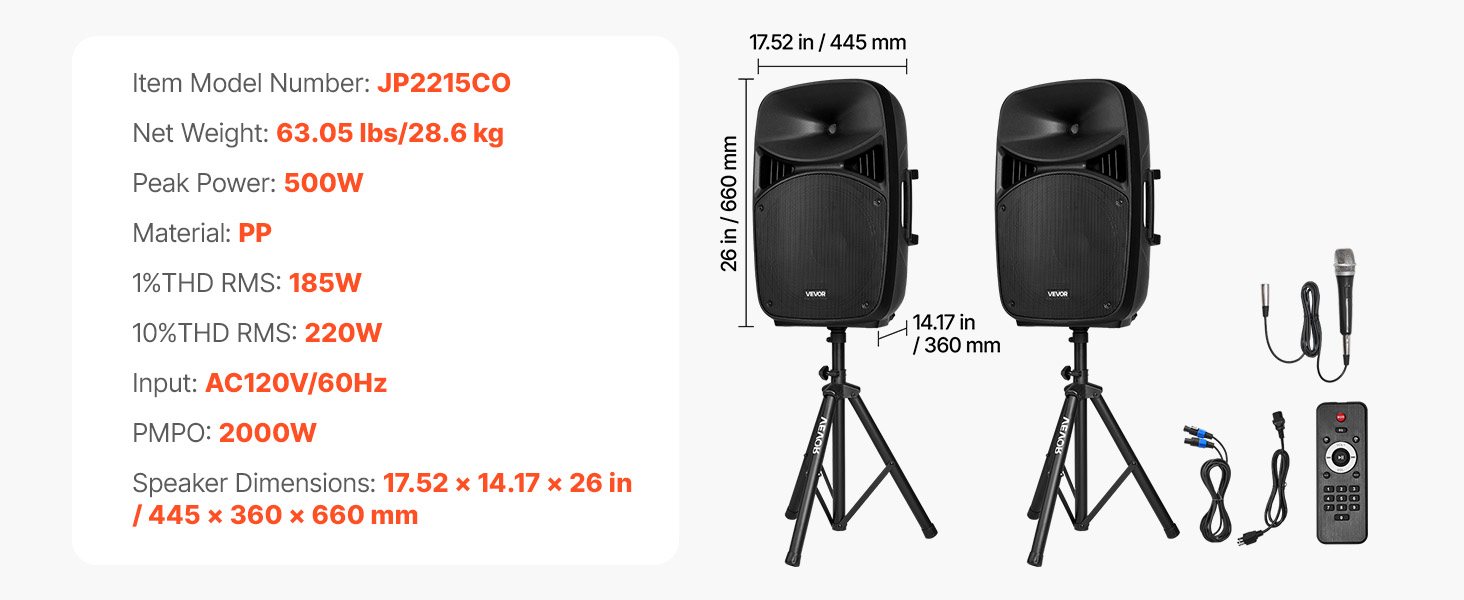
Image: All components included in the VEVOR 2000W Portable PA System package.
3. ምርት አብቅቷልview
The VEVOR 2000W Portable PA System is designed for versatile audio amplification in various settings. It features a 3-channel mixer, dual speakers, Bluetooth connectivity, and multiple input options.
3.1 ቁልፍ ባህሪያት
- 2000W PMPO Peak Output: Delivers powerful sound suitable for large audiences.
- 3-የሰርጥ ማደባለቅ፡ Allows connection of multiple instruments and microphones.
- የብሉቱዝ 5.0 ግንኙነት፡- Wireless audio streaming up to 10 meters (32.81 ft).
- Adjustable Speaker Stands: Height adjustable from 63 to 73.23 inches for optimal sound projection.
- ተንቀሳቃሽ ንድፍ; Features grooved handles and rolling wheels for easy transport.
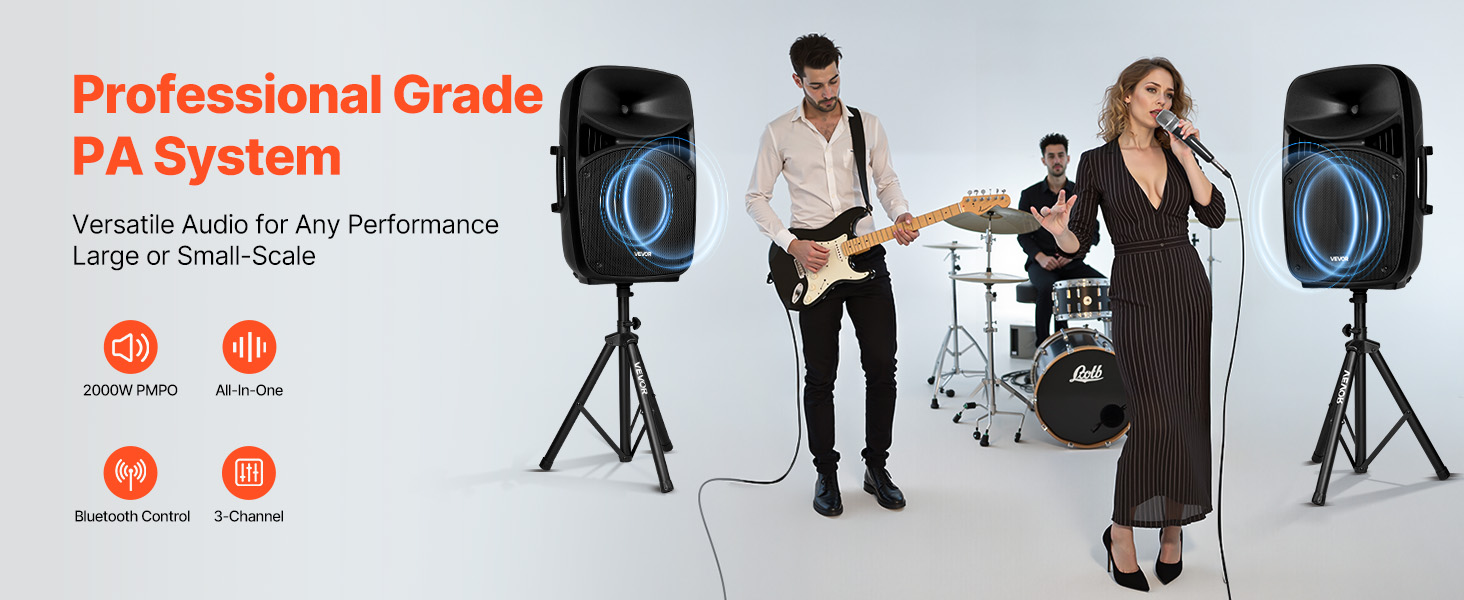
Image: VEVOR PA System in use, illustrating peak output and sound quality.
4. የማዋቀር መመሪያዎች
4.1 Assembling Speaker Stands
- Unfold the tripod base of each speaker stand until it is stable.
- Loosen the fastener adjustment knob on the stand.
- Extend the upper pole to the desired height (between 63 and 73.23 inches).
- Tighten the fastener adjustment knob securely to lock the height.
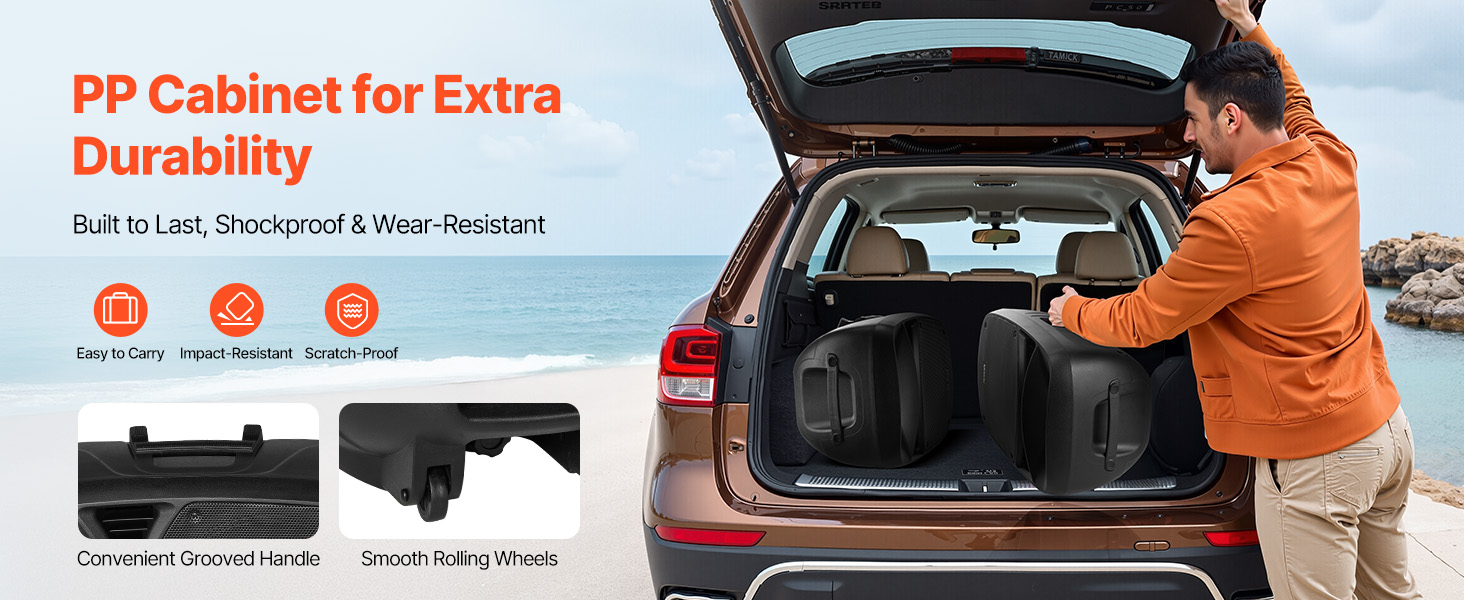
Image: Speaker stand height adjustment mechanism.
4.2 ስርዓቱን በማገናኘት ላይ
- Place the speakers onto the assembled stands. Ensure they are stable.
- Connect the main PA system unit to a power outlet using the provided power cable.
- Use the speaker cable to connect the main unit to the passive speaker.
- Connect the wired microphone to the MIC Input on the mixer panel.
- For additional audio sources, use the appropriate inputs (RCA, Auxiliary, USB, SD).
5. የአሠራር መመሪያዎች
5.1 Mixer Panel Overview
The rear panel of the main speaker unit houses the 3-channel mixer and various controls.
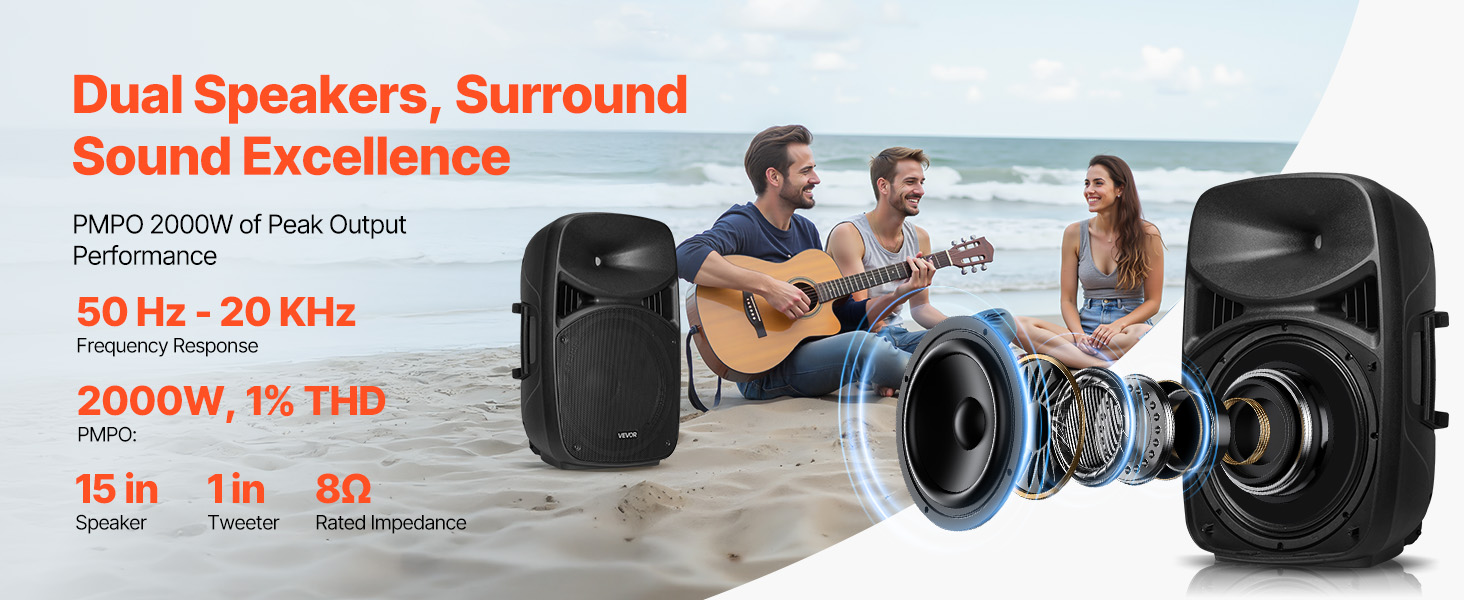
Image: Mixer panel with labeled inputs and controls.
- 1. MIC Input: Connect microphones.
- 2. RCA Connector: For RCA audio input.
- 3. Auxiliary Input: For 3.5mm auxiliary audio input.
- 4. MP3 Volume: Adjusts volume for MP3/USB/SD sources.
- 5. ECHO Volume: የማይክሮፎኖች የኢኮ ተጽእኖን ይቆጣጠራል።
- 6. MIC Volume: የማይክሮፎን ግቤት መጠንን ያስተካክላል።
- 7. Line Input / Auxiliary Input / RCA Volume: Controls volume for these specific inputs.
- 8. ዋና ጥራዝ፡ Overall system volume control.
- USB Port / SD/MMC Port: ከዩኤስቢ ድራይቮች ወይም ከኤስዲ ካርዶች ሚዲያ ለማጫወት።
- 5-ባንድ ግራፊክ አመጣጣኝ፡ Adjusts frequency response for desired sound.
5.2 የብሉቱዝ ግንኙነት
- የPA ስርዓቱን ያብሩ።
- Select the Bluetooth input mode on the mixer. The display will indicate Bluetooth pairing mode.
- On your mobile device, search for Bluetooth devices and select "VEVOR PA System" (or similar).
- አንዴ ከተጣመረ በኋላ፣ ድምጽን ያለገመድ መልቀቅ ይችላሉ።
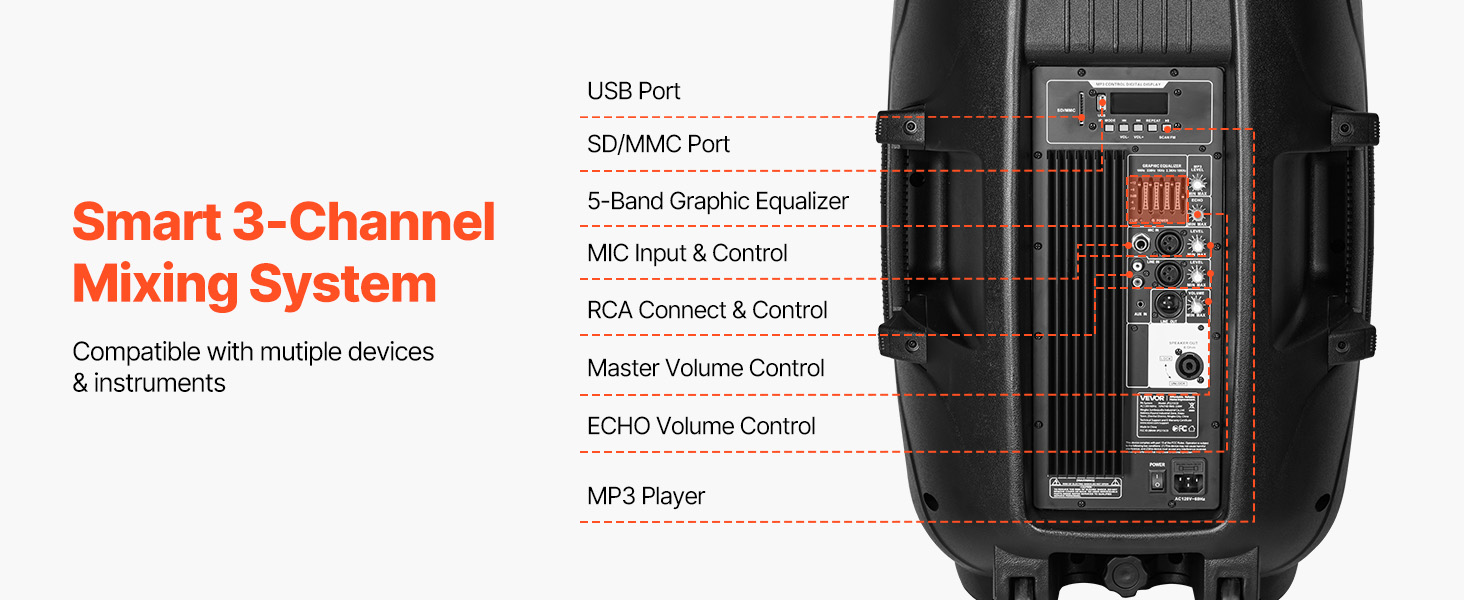
Image: Bluetooth connectivity and remote control for the PA system.
5.3 የርቀት መቆጣጠሪያውን በመጠቀም
The included remote control allows for convenient adjustment of various functions from a distance of up to 16.4 ft (5 m).
- ኃይል፡- ክፍሉን አብራ / አጥፋ ፡፡
- ሁነታ፡ Switch between input modes (Bluetooth, USB, SD, Aux).
- መጠን፡- ዋናውን ድምጽ ያስተካክሉ።
- የመልሶ ማጫወት መቆጣጠሪያዎች፡- Play/Pause, Next/Previous track for USB/SD/Bluetooth.
- የቁጥር ቁልፍ ሰሌዳ፡ For direct track selection on USB/SD.
6. ጥገና
- ማጽዳት፡ ክፍሉን ለስላሳ እና ደረቅ ጨርቅ ይጥረጉ. ገላጭ ማጽጃዎችን ወይም ፈሳሾችን አይጠቀሙ.
- ማከማቻ፡ When not in use, store the PA system in a cool, dry place, away from direct sunlight and extreme temperatures.
- ኬብሎች Regularly check all cables for damage. Replace any frayed or damaged cables immediately.
- ተንቀሳቃሽነት፡- Utilize the grooved handles and rolling wheels for transport to minimize wear and tear on the unit.
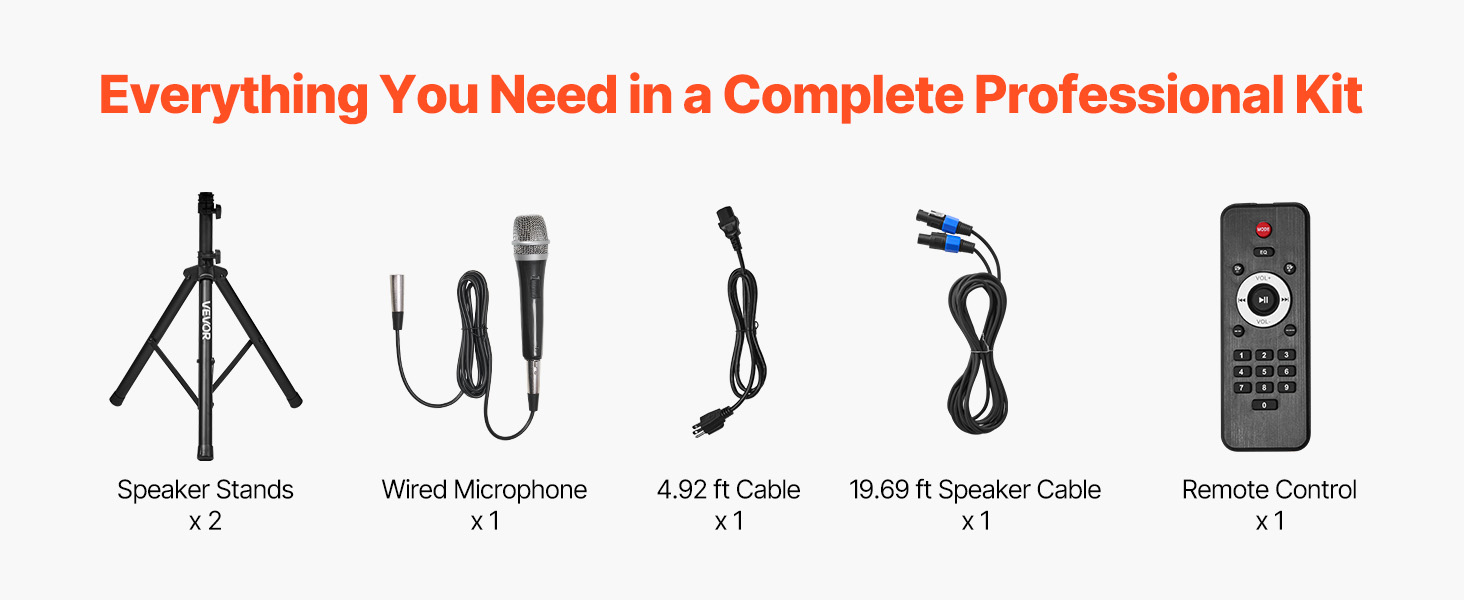
Image: Portable design with handles and wheels for easy transport.
7. መላ መፈለግ
| ችግር | ሊሆን የሚችል ምክንያት | መፍትሄ |
|---|---|---|
| ኃይል የለም | Power cable not connected; Power outlet faulty; Unit not switched on. | Check power cable connection; Try a different outlet; Ensure power switch is ON. |
| ምንም የድምፅ ውፅዓት የለም። | Volume too low; Incorrect input selected; Speaker cables disconnected; Source device issues. | Increase Master Volume and individual channel volumes; Select correct input mode; Check speaker cable connections; Verify source device is playing audio. |
| ብሉቱዝ አይጣመርም። | Bluetooth mode not selected; Device too far; Device already paired to another unit. | Ensure Bluetooth mode is active; Move device closer to PA system; Disconnect from other Bluetooth devices. |
| የተዛባ ድምጽ | Volume too high (clipping); Incorrect equalizer settings; Faulty cable/microphone. | Reduce volume levels; Adjust equalizer settings; Test with different cables/microphones. |
| የማይክሮፎን ግብረመልስ | Microphone too close to speakers; Microphone volume too high; Room acoustics. | Reposition microphone away from speakers; Reduce MIC Volume; Adjust ECHO Volume. |
8. ዝርዝሮች
| ባህሪ | ዝርዝር መግለጫ |
|---|---|
| የሞዴል ቁጥር | JP2215CO |
| Peak Power (PMPO) | 2000 ዋ |
| RMS Power (1% THD) | 185 ዋ |
| RMS Power (10% THD) | 220 ዋ |
| ግብዓት Voltage | AC120V/60Hz |
| የሰርጦች ብዛት | 3 |
| የግንኙነት ቴክኖሎጂ | ብሉቱዝ 5.0 |
| የብሉቱዝ ሽቦ አልባ ክልል | እስከ 10 ሜ (32.81 ጫማ) |
| የርቀት መቆጣጠሪያ ክልል | እስከ 5 ሜ (16.4 ጫማ) |
| Speaker Dimensions (L x W x H) | 17.52 x 14.17 x 25.98 ኢንች (445 x 360 x 660 ሚሜ) |
| የእቃው ክብደት | 63.05 ፓውንድ (28.6 ኪ.ግ) |
| ቁሳቁስ | Plastic (PP), Metal, Rubber |
| የመጫኛ አይነት | የወለል ንጣፍ |
9. ዋስትና እና ድጋፍ
VEVOR offers a 30-day easy return policy for this product. For any questions, technical assistance, or warranty claims, please contact VEVOR Customer Support.
You can find contact information and further support details on the official VEVOR webጣቢያ ወይም በግዢ መድረክዎ በኩል።