1. መግቢያ
ስለገዙ እናመሰግናለንasing the SENCOR SPT 3907 Bluetooth Radio Player. This compact and versatile device offers multiple audio playback options, including CD, Bluetooth, USB, and FM radio. This manual provides essential information for safe and efficient use of your new player. Please read it thoroughly before operation and retain it for future reference.
2. የደህንነት መመሪያዎች
- የኃይል ምንጭ፡- የኃይል አቅርቦቱን ጥራዝ ያረጋግጡtage matches the rating indicated on the unit. Use only the provided power cable.
- ውሃ እና እርጥበት; መሳሪያውን ለዝናብ፣ ለእርጥበት ወይም ለሚያንጠባጥብ/ለሚያረጭ ፈሳሽ አያጋልጡት። እንደ የአበባ ማስቀመጫዎች ባሉ ፈሳሾች የተሞሉ ነገሮችን በመሳሪያው ላይ አያስቀምጡ።
- የአየር ማናፈሻ; የአየር ማናፈሻ ክፍተቶችን አይዝጉ። በመሳሪያው ዙሪያ በቂ የአየር ዝውውር እንዲኖር ያድርጉ።
- ሙቀት፡ ክፍሉን ከሙቀት ምንጮች ለምሳሌ ራዲያተሮች፣ ሙቀት መመዝገቢያዎች፣ ምድጃዎች ወይም ሌሎች መሳሪያዎችን (ያጠቃልላል) ያርቁ ampማሞቂያዎች) ሙቀትን ያመነጫሉ.
- ማጽዳት፡ ከማጽዳትዎ በፊት ክፍሉን ከግድግዳው መውጫ ያላቅቁት. ለስላሳ እና ደረቅ ጨርቅ ይጠቀሙ. ፈሳሽ ማጽጃዎችን ወይም የአየር ማጽጃዎችን አይጠቀሙ.
- አገልግሎት መስጠት፡ ይህንን ምርት እራስዎ ለማገልገል አይሞክሩ። ሁሉንም አገልግሎት ወደ ብቃት ላለው የአገልግሎት ሠራተኛ ያማክሩ።
- ባትሪዎች፡ When using batteries, ensure correct polarity. Do not mix old and new batteries, or different types of batteries. Remove batteries if the unit is not used for extended periods.
3. የጥቅል ይዘቶች
ሁሉም እቃዎች በጥቅሉ ውስጥ መኖራቸውን ያረጋግጡ፡-
- SENCOR SPT 3907 Radio Player
- የርቀት መቆጣጠሪያ
- የ AC ኃይል ገመድ
- ሰነድ (ይህ መመሪያ)
4. የምርት ባህሪዎች
The SENCOR SPT 3907 is designed for versatile audio entertainment:
- የውጤት ኃይል፡ 4W RMS for clear sound.
- ሲዲ ማጫወቻ፡ Supports CD-R/RW discs with programmable playback for up to 20 songs.
- የብሉቱዝ ግንኙነት; Bluetooth V2.1 + EDR for wireless audio streaming from compatible devices.
- የዩኤስቢ መልሶ ማጫዎቻ USB connection for MP3 file playback with programmable playback for up to 99 songs.
- ኤፍኤም ሬዲዮ Stereo FM radio receiver with digital tuning and 30 station presets.
- ቀጣዩ ፦ ውጫዊ የድምጽ ምንጮችን ለማገናኘት 3.5ሚሜ ረዳት ግብዓት።
- ማሳያ፡- Backlight LCD display for easy navigation.
- የርቀት መቆጣጠሪያ፡- Full-function remote control for convenient operation.
- የኃይል አማራጮች: Operates on AC 100-240V or D/LR20 batteries for portability.
- ተጨማሪ ተግባራት፡- Repeat and random playback modes.
5. መቆጣጠሪያዎች እና ተግባራት
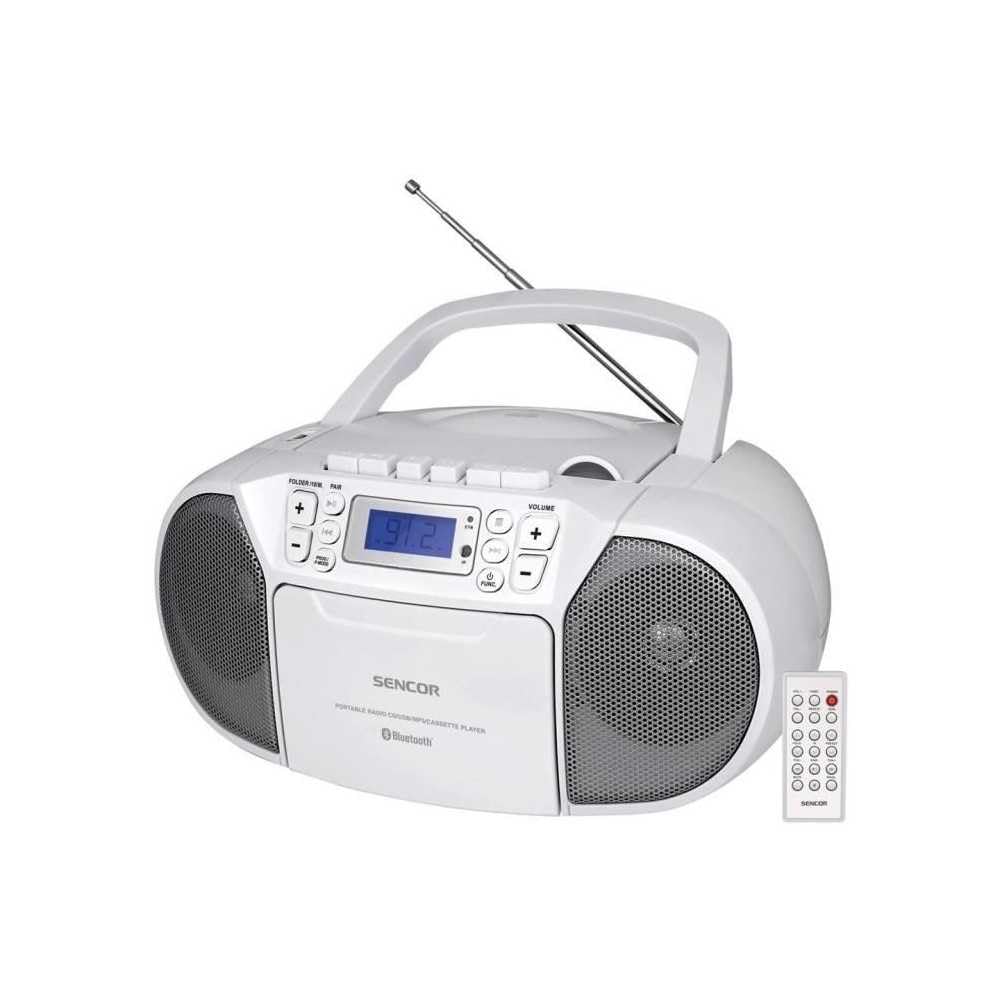
ፊት ለፊት view of the SENCOR SPT 3907 unit, highlighting the control buttons, LCD screen, CD tray, and speakers. The remote control is also visible.
የፊት ፓነል መቆጣጠሪያዎች;
- ማብሪያ ማጥፊያ: ክፍሉን ያበራል ወይም ያጠፋል.
- MODE አዝራር፡- Switches between CD, Bluetooth, USB, FM Radio, and AUX-IN modes.
- ድምጽ +/- አዝራሮች፡- የድምጽ ውፅዓት ደረጃን ያስተካክላል።
- PLAY/PAUSE (►/▮▮) Button: Starts or pauses playback in CD, Bluetooth, or USB mode.
- SKIP (◀◀ / ►►) Buttons: ወደ ቀዳሚው ወይም ወደሚቀጥለው ትራክ/ጣቢያ ይዝለላል።
- STOP (■) Button: መልሶ ማጫወት ያቆማል።
- FOLDER / PAIR Button: Navigates folders in USB mode; initiates Bluetooth pairing.
- FUNC አዝራር፡- Accesses additional functions (e.g., program, repeat, random).
- LCD ማሳያ፡- የአሁኑን ሁነታ፣ የትራክ ቁጥር፣ ድግግሞሽ እና ሌላ መረጃ ያሳያል።
- የሲዲ ክፍል፡ የድምጽ ሲዲዎችን ለማስገባት።
- የዩኤስቢ ወደብ፡ የዩኤስቢ ማከማቻ መሳሪያዎችን ለማገናኘት.
- AUX-IN ጃክ፡ ውጫዊ የድምጽ መሳሪያዎችን ለማገናኘት.
- የጆሮ ማዳመጫ ውፅዓት ለግል ማዳመጥ።
የኋላ ፓነል መቆጣጠሪያዎች;
- የኤሲ የኃይል ግቤት የኤሲ ኤሌክትሪክ ገመድ ያገናኛል።
- ኤፍኤም አንቴና ለኤፍኤም መቀበያ ሊራዘም የሚችል ቴሌስኮፒክ አንቴና።
የርቀት መቆጣጠሪያ፡-
The remote control duplicates most of the front panel functions for convenient operation from a distance. Refer to the remote control diagram in the included documentation for specific button layouts.
6. ማዋቀር
6.1 የኃይል ግንኙነት
The SENCOR SPT 3907 can be powered by AC mains or batteries.
የኤሲ ኃይል
- ክፍሉ መጥፋቱን ያረጋግጡ።
- Connect the supplied AC power cable to the AC input jack on the rear of the unit.
- Plug the other end of the AC power cable into a standard wall outlet (AC 100-240V, 50/60Hz).
የባትሪ ሃይል፡-
- በንጥሉ ታችኛው ክፍል ላይ የተቀመጠውን የባትሪ ክፍል ሽፋን ይክፈቱ ፡፡
- Insert 6 x D/LR20 size batteries (not included), ensuring correct polarity (+/-) as indicated inside the compartment.
- የባትሪውን ክፍል ደህንነቱ በተጠበቀ ሁኔታ ይዝጉ።
Note: When the AC power cable is connected, battery power is automatically disconnected. Remove batteries if the unit will not be used for an extended period to prevent leakage.
6.2 አንቴና ማዋቀር
For optimal FM radio reception, fully extend the telescopic FM antenna located on the rear of the unit. Adjust its position for the best signal.
7. የአሠራር መመሪያዎች
7.1 የመብራት / ማጥፊያ እና ሁነታ ምርጫ
- የሚለውን ይጫኑ ኃይል button to turn the unit on. The LCD display will light up.
- የሚለውን ይጫኑ MODE button repeatedly to cycle through available modes: CD, Bluetooth, USB, FM Radio, AUX-IN. The selected mode will be shown on the LCD display.
- የሚለውን ይጫኑ ኃይል ክፍሉን ለማጥፋት እንደገና አዝራር.
7.2 ሲዲ መልሶ ማጫወት
- የሚለውን ይጫኑ MODE ሲዲ ሁነታን ለመምረጥ አዝራር።
- የሲዲውን ክፍል ክዳን ይክፈቱ.
- Place a CD (CD-R/RW compatible) with the label side facing up onto the spindle.
- የሲዲውን ክፍል ክዳን ይዝጉ። ክፍሉ ዲስኩን ያነባል፣ እና አጠቃላይ የትራኮች ብዛት በማሳያው ላይ ይታያል።
- የሚለውን ይጫኑ አጫውት/አፍታ አቁም መልሶ ማጫወት ለመጀመር አዝራር።
- የሚለውን ተጠቀም SKIP (◀◀ / ►►) ትራኮችን ለመዝለል ቁልፎች.
- የሚለውን ይጫኑ አቁም (■) መልሶ ማጫዎትን ለማስቆም አዝራር።
- የፕሮግራም መልሶ ማጫወት; በSTOP ሁነታ ላይ እያሉ፣ ይጫኑ አዝናኝ የፕሮግራም ሁነታን ለማስገባት አዝራሩን ይጠቀሙ። ዝለል buttons to select tracks and አዝናኝ again to confirm. Up to 20 CD songs can be programmed.
7.3 የብሉቱዝ ኦፕሬሽን
- የሚለውን ይጫኑ MODE button to select Bluetooth mode. The display will show 'BT' and flash, indicating it's in pairing mode.
- በብሉቱዝ የነቃለት መሳሪያዎ (ለምሳሌ፣ ስማርትፎን፣ ታብሌት) ላይ፣ ብሉቱዝን ያንቁ እና የሚገኙ መሳሪያዎችን ይፈልጉ።
- Select 'SPT 3907' from the list of devices. Once paired, the 'BT' indicator on the display will stop flashing and remain solid.
- Start playing audio on your connected device. The sound will be streamed through the SENCOR SPT 3907.
- የሚለውን ተጠቀም አጫውት/አፍታ አቁም እና ዝለል መልሶ ማጫወትን ለማስተዳደር በዩኒቱ ላይ ያሉ አዝራሮች ወይም የርቀት መቆጣጠሪያ።
7.4 የዩኤስቢ መልሶ ማጫወት
- Insert a USB flash drive (containing MP3 files) ወደ ዩኤስቢ ወደብ።
- የሚለውን ይጫኑ MODE button to select USB mode. The unit will automatically read the files.
- የሚለውን ይጫኑ አጫውት/አፍታ አቁም መልሶ ማጫወት ለመጀመር አዝራር።
- የሚለውን ተጠቀም SKIP (◀◀ / ►►) ትራኮችን ለመዝለል ቁልፎች.
- የሚለውን ይጫኑ FOLDER በዩኤስቢ ድራይቭ ላይ ባሉ አቃፊዎች መካከል ለማሰስ የሚያስችል ቁልፍ።
- የፕሮግራም መልሶ ማጫወት; በSTOP ሁነታ ላይ እያሉ፣ ይጫኑ አዝናኝ የፕሮግራም ሁነታን ለማስገባት አዝራሩን ይጠቀሙ። ዝለል buttons to select tracks and አዝናኝ again to confirm. Up to 99 MP3 songs can be programmed.
7.5 ኤፍኤም ሬዲዮ ኦፕሬሽን
- የሚለውን ይጫኑ MODE button to select FM Radio mode. The current frequency will appear on the display.
- ለተሻለ አቀባበል የቴሌስኮፒክ አንቴናውን ያራዝሙ።
- ራስ-ሰር ማስተካከያ; ተጭነው ይያዙት። SKIP (◀◀ / ►►) የሚቀጥለውን የሚገኝ ጣቢያ በራስ-ሰር ለመቃኘት ለጥቂት ሰከንዶች አዝራሮች።
- በእጅ ማስተካከል በአጭሩ ይጫኑ SKIP (◀◀ / ►►) buttons to fine-tune the frequency step-by-step.
- አስቀድመው የተቀመጡ ጣቢያዎች፡ To save a station, tune to the desired frequency, then press the አዝናኝ አዝራር። ተጠቀም ዝለል አስቀድሞ የተዘጋጀ ቁጥር (P01-P30) ለመምረጥ አዝራሮችን ይጫኑ፣ ከዚያም ይጫኑ አዝናኝ እንደገና ለማረጋገጥ.
- አስቀድሞ የተቀመጠ ጣቢያን ለማስታወስ፣ ይጫኑ አዝናኝ በተቀመጡ ጣቢያዎች ውስጥ ለማሽከርከር በተደጋጋሚ አዝራር።
7.6 የኤክስ-ኢን ግንኙነት
- Connect one end of a 3.5mm audio cable (not included) to the AUX-IN jack on the SENCOR SPT 3907.
- የኬብሉን ሌላኛውን ጫፍ ከጆሮ ማዳመጫ መሰኪያ ወይም ከውጪ የድምጽ መሳሪያዎ የድምጽ ውፅዓት ጋር ያገናኙ (ለምሳሌ MP3 ማጫወቻ, ስማርትፎን).
- የሚለውን ይጫኑ MODE የ AUX-IN ሁነታን ለመምረጥ አዝራር።
- Start playback on your external device. The audio will be played through the SENCOR SPT 3907.
- በመጠቀም ድምጹን ያስተካክሉ ድምጽ +/- buttons on the unit or remote control, and also on your external device.
8. ጥገና
8.1 ክፍሉን ማጽዳት
Wipe the exterior of the unit with a soft, dry cloth. Do not use abrasive cleaners, waxes, or solvents as they may damage the finish. Ensure the unit is unplugged from the power source before cleaning.
8.2 የሲዲ ሌንስ እንክብካቤ
If the CD player experiences reading errors, the lens may need cleaning. Use a commercially available CD lens cleaner disc. Do not touch the lens directly.
8.3 የባትሪ መተካት
When the unit operates on batteries and the sound becomes distorted or the unit stops functioning, replace all batteries with new D/LR20 batteries, ensuring correct polarity.
9. መላ መፈለግ
| ችግር | ሊሆን የሚችል ምክንያት | መፍትሄ |
|---|---|---|
| ኃይል የለም | የኃይል ገመድ አልተገናኘም; ባትሪዎች ተሟጠዋል ወይም በስህተት ገብተዋል። | Check AC power connection; Replace batteries, ensuring correct polarity. |
| ድምጽ የለም። | የድምጽ መጠኑ በጣም ዝቅተኛ ነው፤ የተሳሳተ ሁነታ ተመርጧል፤ የጆሮ ማዳመጫዎች ተገናኝተዋል። | Increase volume; Select correct mode (CD, BT, USB, FM, AUX); Disconnect headphones. |
| ሲዲ አይጫወትም / አይዘልም | CD dirty or scratched; CD inserted incorrectly; CD lens dirty. | Clean or replace CD; Insert CD with label side up; Use a CD lens cleaner. |
| ብሉቱዝ አይገናኝም። | Unit not in pairing mode; Device too far; Bluetooth not enabled on external device. | Ensure unit is in BT pairing mode; Move device closer; Enable Bluetooth on your device. |
| ደካማ ኤፍኤም አቀባበል | አንቴናው በትክክል አልተዘረጋም ወይም አልተቀመጠም፤ ደካማ ምልክት። | ቴሌስኮፒክ አንቴናውን ሙሉ በሙሉ ዘርጋ እና አስተካክል፤ ክፍሉን ወደ ሌላ ቦታ ለማንቀሳቀስ ሞክር። |
10. ዝርዝሮች
| ባህሪ | ዝርዝር መግለጫ |
|---|---|
| ሞዴል | SPT 3907 |
| የውጤት ኃይል | 4 ዋ አርኤምኤስ |
| የሚደገፍ ሚዲያ | CD-R, CD-RW, Bluetooth, MP3, USB |
| የብሉቱዝ ስሪት | V2.1 + ኢዲአር |
| የኤፍኤም ሬዲዮ ቅድመ-ቅምጦች | 30 ጣቢያዎች |
| ግንኙነት | ረዳት (3.5ሚሜ)፣ ዩኤስቢ |
| የኃይል ምንጭ | AC 100-240V, 50/60Hz; 6 x D/LR20 batteries |
| የእቃው ክብደት | 1 ኪ.ግ 960 ግራም |
| መጠኖች | (Not specified in provided data) |
11. ዋስትና እና ድጋፍ
SENCOR products are manufactured to high-quality standards and are warranted against manufacturing defects. For specific warranty terms and conditions, please refer to the warranty card included with your purchase or visit the official SENCOR website. For technical support, service, or inquiries, please contact your local SENCOR distributor or authorized service center.


