1. መግቢያ
The Tiqvi 10-inch Digital Photo Frame is designed to help you easily store and share your most cherished memories. Featuring a vibrant IPS touch screen and seamless WiFi connectivity, this frame allows you to receive photos and videos directly from family and friends via the Frameo app. With ample internal storage and a rechargeable battery, it offers a convenient and elegant way to display your digital photos.
ቁልፍ ባህሪዎች
- WiFi & Frameo App Compatibility: Effortlessly share photos and videos through the Frameo application, supporting up to 500 users.
- ትልቅ የማከማቻ አቅም፡ Equipped with expandable internal memory, capable of storing thousands of photos and videos.
- ግልጽ እና ብሩህ ማሳያ; The IPS screen delivers vivid colors and sharp details for a beautiful viewing experience of your memories.
- የሚታወቅ የንክኪ ቁጥጥር፡- Provides easy and intuitive navigation for all users.
- የሚያምር እና ተግባራዊ ንድፍ; Includes a stand, offers wall-mounting options, and features an energy-efficient design.
2. በሳጥኑ ውስጥ ያለው
ሁሉም እቃዎች መኖራቸውን ለማረጋገጥ እባክዎ የጥቅል ይዘቱን ያረጋግጡ፡-
- Tiqvi 10-inch Digital Photo Frame (with WiFi and Frameo App)
- የኃይል አስማሚ
- ዴስክቶፕ duro
- የተጠቃሚ መመሪያ (ይህ ሰነድ)
3. ምርት አብቅቷልview
ከዲጂታል የፎቶ ፍሬምዎ ክፍሎች ጋር እራስዎን ይወቁ።
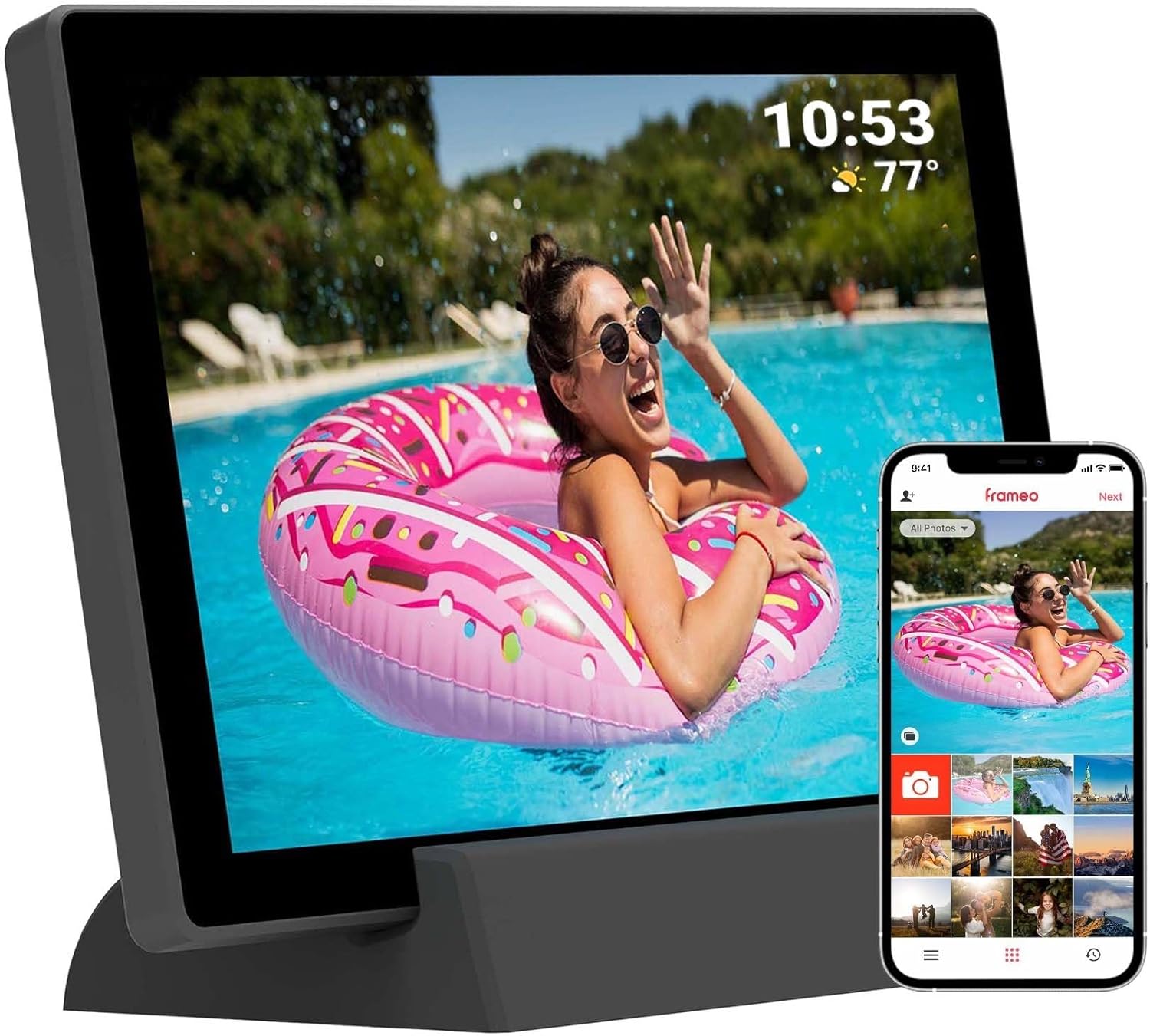
ምስል 3.1: የፊት view of the Tiqvi 10-inch Digital Photo Frame, showcasing its display and the accompanying Frameo app on a smartphone. The frame is designed for easy photo sharing and display.

Figure 3.2: The Tiqvi 10-inch Digital Photo Frame positioned on a surface, illustrating its dimensions and how it fits into a home environment. A "10"" label indicates its screen size.
የአካል ክፍሎች፡-
- 10-ኢንች IPS ንክኪ ስክሪን፡ Main display for photos and videos, with touch functionality for navigation.
- የኃይል ቁልፍ፡- Located on the back or side, used to turn the frame on/off or put it to sleep.
- የኃይል ወደብ የኃይል አስማሚውን ለማገናኘት.
- የማይክሮ ኤስዲ ካርድ ማስገቢያ; For expanding storage or importing photos directly.
- ቀዳዳውን ዳግም አስጀምር; A small pinhole for factory reset.
- Built-in Stand/Mounting Holes: For desktop placement or wall mounting.
4. ማዋቀር
4.1 የመጀመሪያ የኃይል ማብራት እና መሰረታዊ ቅንብሮች
- Charge the Frame: Before first use, connect the power adapter to the frame's power port and plug it into a wall outlet. Allow the frame to charge fully. The frame has a 3000mAh rechargeable battery.
- አብራ፡ Press and hold the power button on the back of the frame for a few seconds until the screen lights up.
- የቋንቋ ምርጫ፡- የሚመርጡትን ቋንቋ ለመምረጥ በማያ ገጽ ላይ ያሉትን ጥያቄዎች ይከተሉ።
- የሰዓት ሰቅ እና ቀን፡- ትክክለኛውን የሰዓት ሰቅ ፣ ቀን እና ሰዓት ያዘጋጁ።
4.2 ከ Wi-Fi ጋር በመገናኘት ላይ
- From the initial setup wizard or the settings menu, select "Wi-Fi".
- The frame will scan for available Wi-Fi networks. Select your network from the list.
- Enter your Wi-Fi password using the on-screen keyboard and tap "Connect".
- Once connected, a Wi-Fi icon will appear on the status bar.
4.3 Setting Up the Frameo App
The Frameo app is essential for sending photos and videos to your digital frame.
- መተግበሪያውን ያውርዱ፡- On your smartphone or tablet, download the "Frameo" app from the App Store (iOS) or Google Play Store (Android).
- መለያ ፍጠር፡- Open the Frameo app and follow the instructions to create a new account or log in if you already have one.
- Connect to Your Frame:
- On your Tiqvi frame, go to "Add Friend" or "Connect to App" in the settings.
- A unique code will be displayed on the frame's screen.
- In the Frameo app on your phone, enter this code to link your device to the frame.
- Add Users/Friends: You can invite family and friends to send photos to your frame by sharing the unique code with them. The frame supports adding up to 500 users.
5. የአሠራር መመሪያዎች
5.1 የንክኪ ስክሪን ማሰስ
The Tiqvi frame features an intuitive touch screen interface:
- መታ ያድርጉ፡ To select an item or open a menu.
- ያንሸራትቱ To scroll through photos or menu options.
- መቆንጠጥ-ለማጉላት፡ To zoom in or out on a photo (if supported by software).
5.2 ፎቶዎችን እና ቪዲዮዎችን ማከል
There are two primary ways to add media to your frame:
- በFrameo መተግበሪያ በኩል (የሚመከር):
- የFrameo መተግበሪያን በስማርትፎንዎ ላይ ይክፈቱ።
- ለመላክ የሚፈልጓቸውን ፎቶዎች ወይም ቪዲዮዎች ይምረጡ።
- Choose the recipient frame(s) and tap "Send". The media will appear on your frame once downloaded.
- Via MicroSD Card:
- Insert a MicroSD card containing your photos/videos into the frame's MicroSD card slot.
- The frame will prompt you to import the media. Follow the on-screen instructions to transfer fileወደ ክፈፉ ውስጣዊ ማህደረ ትውስታ።
- The frame has 32GB internal memory and supports expansion via microSD.
5.3 Managing Photos and Settings
Access the frame's settings by tapping the gear icon (⚙️) on the home screen or during a slideshow.
- My Photos: View all photos stored on the frame. You can delete individual photos or select multiple for deletion.
- ጓደኞች፡- Manage connected users and add new ones.
- ቅንብሮች፡-
- ማሳያ፡- Adjust brightness, sleep mode, and slideshow interval.
- ስላይድ ትዕይንት፡ Customize transition effects and display order.
- ዋይ ፋይ፡ Change or reconnect to Wi-Fi networks.
- ማከማቻ፡ View storage usage and manage imported media.
- ስለ፡ Check firmware version and device information.
- ራስ-ሰር ማሽከርከር; The frame supports automatic rotation, adjusting the display orientation based on how it's positioned.
6. ጥገና
Proper care will extend the life of your digital photo frame.
- ማያ ገጹን ማጽዳት; ስክሪኑን በቀስታ ለማጽዳት ለስላሳ፣ ከላጣ ነፃ የሆነ ጨርቅ (ለምሳሌ፣ ማይክሮፋይበር ጨርቅ) ይጠቀሙ። ለጠንካራ ቆሻሻዎች፣ ትንሽ ይጥረጉ።ampጨርቁን በውሃ ወይም በስክሪን ማጽጃ መፍትሄ. Do not spray liquids directly onto the screen.
- አጠቃላይ ጽዳት; Wipe the frame's body with a dry, soft cloth. Avoid abrasive cleaners or solvents.
- የሶፍትዌር ማሻሻያ Periodically check for software updates in the frame's settings menu (if available). Updates can improve performance and add new features.
- Battery Care (for Rechargeable Model): To prolong battery life, avoid fully discharging the battery frequently. If storing the frame for an extended period, charge it to about 50% before storage and recharge every few months.
- የአካባቢ ሁኔታዎች; Keep the frame away from extreme temperatures, direct sunlight, and high humidity. Ensure proper ventilation.
7. መላ መፈለግ
If you encounter issues with your Tiqvi digital photo frame, refer to the following common problems and solutions:
| ችግር | ሊሆን የሚችል ምክንያት | መፍትሄ |
|---|---|---|
| Frame does not turn on. | ዝቅተኛ የባትሪ ወይም የኃይል አስማሚ ችግር። | Ensure the power adapter is securely connected and plugged into a working outlet. Allow the frame to charge for at least 30 minutes before attempting to power on again. |
| ከWi-Fi ጋር መገናኘት አልተቻለም። | የተሳሳተ የይለፍ ቃል፣ ደካማ ምልክት ወይም የራውተር ችግር። | Double-check the Wi-Fi password. Move the frame closer to the Wi-Fi router. Restart your router and the frame. Ensure your Wi-Fi network is 2.4GHz (most frames do not support 5GHz). |
| ፎቶዎች በክፈፉ ላይ አይታዩም። | Not sent correctly via app, or storage issues. | Verify that photos were successfully sent from the Frameo app. Check the frame's storage capacity in settings. Ensure the frame is connected to Wi-Fi to receive new photos. |
| የንክኪ ማያ ገጽ ምላሽ አይሰጥም። | ጊዜያዊ የሶፍትዌር ችግር። | Restart the frame by holding the power button until it turns off, then power it back on. If the issue persists, perform a factory reset (refer to the manual for specific instructions, usually involves a pinhole reset button). |
| ባትሪ እየሞላ አይደለም። | Faulty adapter or cable, or battery issue. | Ensure the power adapter and cable are not damaged. Try a different power outlet. If the issue persists, contact customer support. |
If the problem persists after trying these solutions, please contact Tiqvi customer support for further assistance.
8. ዝርዝሮች
| ባህሪ | ዝርዝር |
|---|---|
| የሞዴል ቁጥር | TVH10009 |
| የስክሪን መጠን | 10 ኢንች |
| የማሳያ ዓይነት | አይፒኤስ ንክኪ ማያ ገጽ |
| የውስጥ ማከማቻ | 32GB (stores up to 80,000 photos) |
| ሊሰፋ የሚችል ማከማቻ | የማይክሮሶርድ ካርድ ጥቅል |
| ግንኙነት | WiFi (Frameo App compatible) |
| ባትሪ | 3000mAh ዳግም ሊሞላ የሚችል ባትሪ |
| መጠኖች | 29 x 19 x 2.51 ሴ.ሜ |
| ክብደት | 7.1 ግ |
| ቀለም | ጥቁር |
| የትውልድ ሀገር | ቻይና |
9. ዋስትና እና ድጋፍ
የዋስትና መረጃ፡- This product comes with a standard manufacturer's warranty. Please refer to the purchase documentation or contact your retailer for specific warranty terms and conditions. Keep your proof of purchase for warranty claims.
የደንበኛ ድጋፍ፡ For technical assistance, troubleshooting beyond this manual, or warranty inquiries, please contact Tiqvi customer support. Contact information can typically be found on the product packaging, the manufacturer's official webጣቢያ, ወይም በግዢዎ ነጥብ በኩል.
We recommend visiting the official Frameo website for app-specific support and updates: https://frameo.net/


