1. መግቢያ እና በላይview
Welcome to the Vibox V-525 Gaming PC. This manual provides essential information for setting up, operating, maintaining, and troubleshooting your new computer. The Vibox V-525 is a high-performance gaming system featuring an AMD Ryzen 5 5500 processor, an Nvidia RTX 4060 8GB graphics card, 16GB of DDR4 RAM, and a 1TB SSD, pre-installed with Windows 11.
Please read this manual carefully before using your PC to ensure optimal performance and longevity.
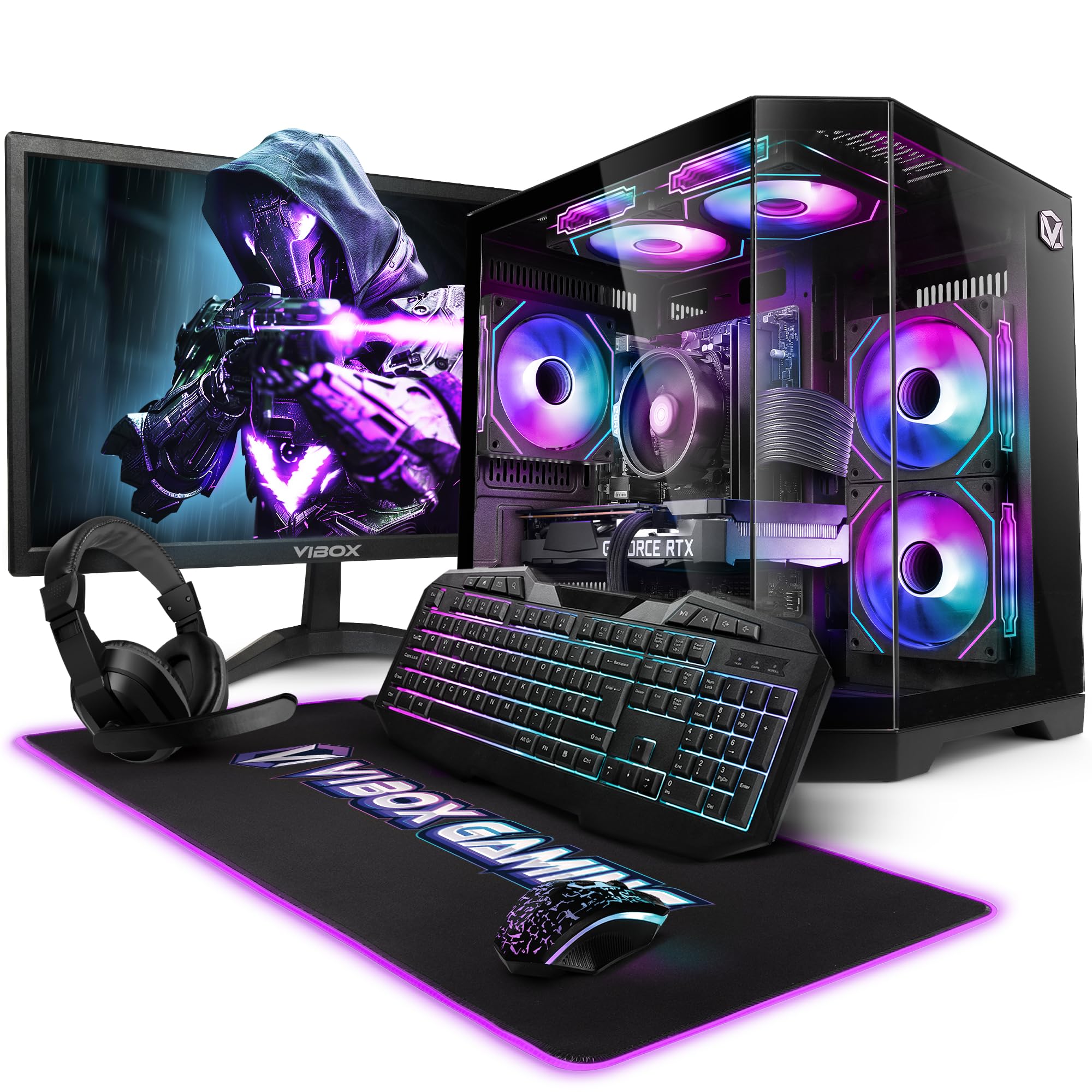
Figure 1.1: Vibox V-525 Gaming PC
2. የማዋቀር መመሪያ
2.1 ማሸግ
Carefully remove all components from the packaging. Ensure you have the PC tower, 23-inch monitor, gaming keyboard, gaming mouse, headset, mouse pad, Wi-Fi adapter, and power cables.
2.2 ማገናኛ ፔሪፈራል
- ተቆጣጠር፥ Connect the 23-inch monitor to the graphics card (Nvidia RTX 4060) using an HDMI or DisplayPort cable. Ensure the cable is securely fastened.
- የቁልፍ ሰሌዳ እና መዳፊት; Connect the gaming keyboard and mouse to the available USB ports on the rear or front of the PC.
- የጆሮ ማዳመጫ: Plug your headset into the dedicated audio jacks on the front panel or rear I/O.
- Wi-Fi Adapter: Insert the 300 Mbps Wi-Fi adapter into an available USB port.
- ኃይል፡- Connect the power cable to the PC's power supply unit (PSU) and then to a wall outlet. Connect the monitor's power cable as well.
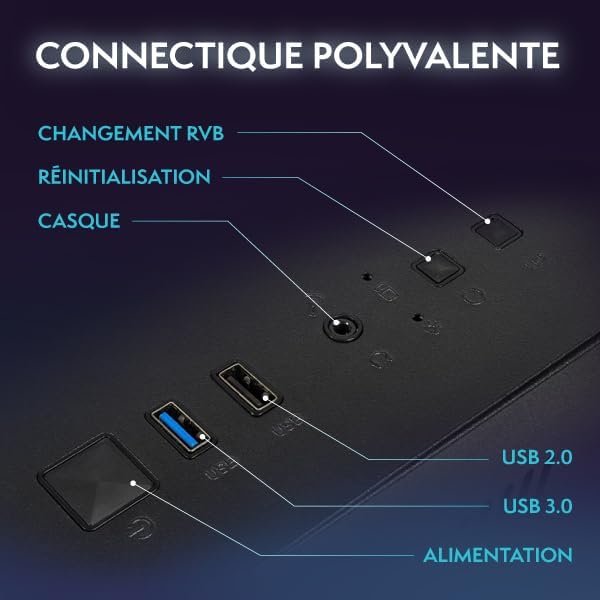
Figure 2.1: Front Panel Connectivity (Power, USB 2.0, USB 3.0, Headset, Reset, RGB Change)
2.3 Initial Boot-Up and Windows 11 Setup
- በፒሲው ፊት ላይ የኃይል አዝራሩን ይጫኑ.
- Follow the on-screen instructions to complete the Windows 11 setup process. This typically involves selecting your region, language, creating a user account, and connecting to a network.
- Once Windows 11 is set up, ensure all drivers are installed. You can check this in Device Manager.

Figure 2.2: Windows 11 Home Features
3. የአሠራር መመሪያዎች
3.1 ማብራት / ማጥፋት
- ለማብራት፡- በፊት ፓነል ላይ የኃይል አዝራሩን ይጫኑ.
- ለመዝጋት፡- Click the Start button in Windows, then select Power > Shut down. Avoid simply holding the power button to turn off, as this can lead to data loss.
- ዳግም ለመጀመር፡- የጀምር አዝራሩን ጠቅ ያድርጉ፣ ከዚያ Power > Restart የሚለውን ይምረጡ።
3.2 Basic Windows 11 Navigation
Windows 11 features a redesigned user interface. The Start menu is centrally located, and widgets provide quick access to information. Explore the settings menu to personalize your experience.
3.3 ከ Wi-Fi ጋር በመገናኘት ላይ
- Ensure your USB Wi-Fi adapter is plugged in.
- Click the network icon (Wi-Fi symbol) in the taskbar.
- Select your desired Wi-Fi network from the list and click 'Connect'.
- ከተጠየቁ የአውታረ መረብ ደህንነት ቁልፍ (የይለፍ ቃል) ያስገቡ።
3.4 RGB የመብራት መቆጣጠሪያ
Your Vibox V-525 features Hex RGB Infinity 120mm fans. Use the 'RGB Change' button on the front panel to cycle through various lighting modes and colors. Refer to the software provided by Vibox (if applicable) for more advanced customization.

Figure 3.1: Hex RGB Infinity 120mm Fans
4. ጥገና
4.1 ፒሲዎን ማጽዳት
አዘውትሮ ማጽዳት ጥሩ አፈፃፀምን ለመጠበቅ እና የአካል ክፍሎችዎን ዕድሜ ለማራዘም ይረዳል።
- ውጫዊ፡ ለስላሳ ይጠቀሙ, መamp cloth to wipe down the exterior of the case. Avoid harsh chemicals.
- Interior (Dust): Periodically, and with the PC powered off and unplugged, use compressed air to remove dust from inside the case, especially from fans, heatsinks, and vents. Pay attention to the Hex RGB Infinity fans and the GPU heatsink.
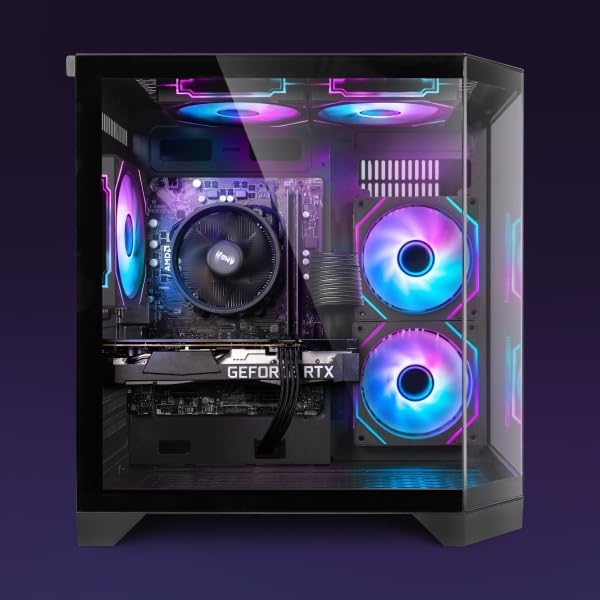
ምስል 4.1 - ውስጣዊ View of PC Components
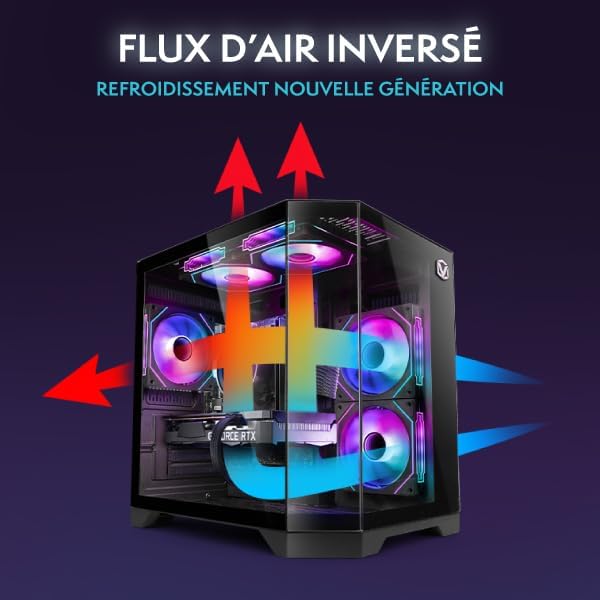
Figure 4.2: Reverse Airflow Next Generation Cooling Diagram
4.2 የሶፍትዌር ዝመናዎች
- የዊንዶውስ ዝመናዎች; Regularly check for and install Windows updates via Settings > Windows Update.
- የአሽከርካሪ ማሻሻያ Keep your graphics card drivers (Nvidia GeForce Experience) and other component drivers up to date for optimal performance and stability.
4.3 የውሂብ ምትኬ
አስፈላጊዎትን በመደበኛነት ያስቀምጡ fileየውሂብ መጥፋትን ለመከላከል ወደ ውጫዊ ድራይቭ ወይም የደመና ማከማቻ።
5. መላ መፈለግ
ይህ ክፍል ሊያጋጥሙዎት የሚችሉ የተለመዱ ጉዳዮችን ይመለከታል።
5.1 ምንም ኃይል የለም
- የኃይል ገመዱ ከፒሲው እና ከግድግዳው መውጫ ጋር ደህንነቱ በተጠበቀ ሁኔታ መገናኘቱን ያረጋግጡ።
- Check if the power switch on the PSU (at the back of the PC) is in the 'On' position.
- የተለየ የኃይል መውጫ ይሞክሩ።
5.2 በሞኒተር ላይ ምንም ማሳያ የለም
- Verify that the monitor's power cable is connected and the monitor is turned on.
- Ensure the video cable (HDMI/DisplayPort) is securely connected to both the graphics card (Nvidia RTX 4060) and the monitor.
- የተለየ የቪዲዮ ገመድ ይሞክሩ ወይም ካለ ይቆጣጠሩ።
5.3 ቀርፋፋ አፈጻጸም
- Check Task Manager (Ctrl+Shift+Esc) for applications consuming excessive CPU, RAM, or disk resources.
- ዊንዶውስ እና ሾፌሮች ወቅታዊ መሆናቸውን ያረጋግጡ።
- የቫይረስ ቅኝት ያሂዱ።
- Ensure adequate airflow and clean any dust buildup (refer to Section 4.1).
5.4 የአውታረ መረብ ግንኙነት ጉዳዮች
- Verify the Wi-Fi adapter is properly installed and recognized by Windows.
- የእርስዎን ራውተር/ሞደም እንደገና ያስጀምሩ።
- የዊንዶውስ ኔትወርክ መላ ፈላጊን ያሂዱ።
6. ዝርዝሮች
The following table details the key specifications of your Vibox V-525 Gaming PC:
| አካል | ዝርዝር መግለጫ |
|---|---|
| ፕሮሰሰር | AMD Ryzen 5 5500 (6 Cores, Max 4.2 GHz) |
| ግራፊክስ ካርድ | Nvidia GeForce RTX 4060 (8 GB GDDR6 RAM, HDMI 2.1, DisplayPort 1.4a) |
| ራም | 16 GB DDR4 Dual Channel (3200 MHz) |
| ማከማቻ | 1 ቲቢ SSD |
| ስርዓተ ክወና | ዊንዶውስ 11 መነሻ |
| ተቆጣጠር | 23-inch (Max Resolution: 1920 x 1080) |
| ግንኙነት | Wi-Fi (300 Mbps adapter included), 4 Total USB Ports |
| መሸጎጫ ማህደረ ትውስታ | 16 ሜባ |
| የጉዳይ ንድፍ | 3-Panel Tempered Glass |
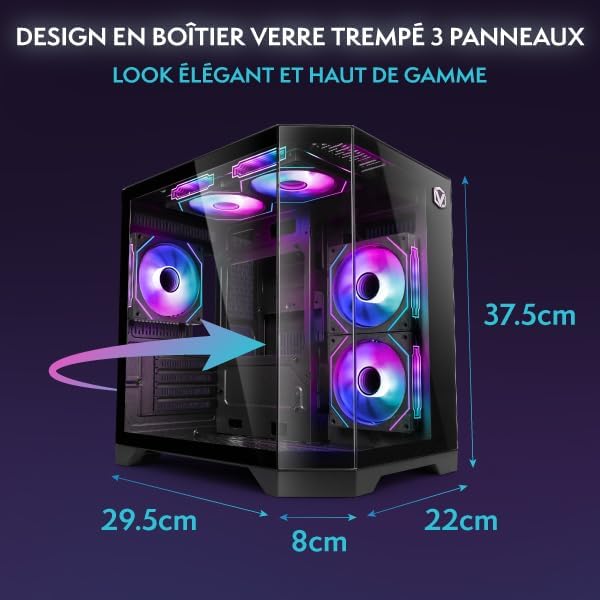
Figure 6.1: PC Case Dimensions
7. ዋስትና እና ድጋፍ
Your Vibox V-525 Gaming PC comes with a manufacturer's warranty. Please refer to the warranty card included in your product packaging for specific terms and conditions, including the warranty period and coverage details.
For technical support, troubleshooting assistance beyond this manual, or warranty claims, please contact Vibox customer service through their official webከግዢ ሰነድዎ ጋር የቀረበው ጣቢያ ወይም የእውቂያ መረጃ።
Always provide your product model (V-525) and purchase date when contacting support.


