መግቢያ
ስለገዙ እናመሰግናለንasing the Mistral MHV9812DRW-SB 12-inch DC High Velocity Stand Fan. This manual provides important information for the safe operation, installation, and maintenance of your fan. Please read it thoroughly before use and retain it for future reference.
ጠቃሚ የደህንነት መረጃ
የእሳት፣ የኤሌክትሪክ ንዝረት ወይም የጉዳት አደጋን ለመቀነስ የሚከተሉትን የደህንነት ጥንቃቄዎች ይከተሉ፡
- ማራገቢያው እንዳይወድቅ ለመከላከል ሁልጊዜ በተረጋጋና ደረጃ ባለው ወለል ላይ መቀመጡን ያረጋግጡ።
- የአየር ማራገቢያው በሚሠራበት ጊዜ ጣቶችን ወይም እቃዎችን በፍርግርግ ውስጥ አያስገቡ።
- ከማጽዳት፣ ከማንቀሳቀስ ወይም ማንኛውንም ጥገና ከማድረግዎ በፊት የአየር ማራገቢያውን ከኃይል መውጫው ያላቅቁ።
- ማራገቢያውን በተበላሸ ገመድ ወይም መሰኪያ አያሰራው. ገመዱ ወይም መሰኪያው ከተበላሸ፣ ብቁ የሆኑ የአገልግሎት ሰራተኞችን ያግኙ።
- የአየር ማራገቢያውን ከውሃ እና ከእርጥበት ያርቁ። በመታጠቢያ ቤቶች ወይም በሌሎች እርጥብ አካባቢዎች አይጠቀሙበት።
- ይህ መሳሪያ ለደህንነታቸው ኃላፊነት ባለው ሰው ቁጥጥር ወይም መመሪያ ካልተሰጣቸው በስተቀር የአካል፣ የስሜት ወይም የአዕምሮ ችሎታዎች ወይም የልምድ እና የእውቀት እጥረት ላላቸው ሰዎች (ልጆችን ጨምሮ) ለመጠቀም የታሰበ አይደለም።
- ልጆች ከመሳሪያው ጋር እንደማይጫወቱ ለማረጋገጥ ክትትል ሊደረግባቸው ይገባል.
- Do not cover the fan or restrict airflow during operation.
- የቀረበውን የኃይል አስማሚ ብቻ ይጠቀሙ።
የጥቅል ይዘቶች
ሁሉም ክፍሎች መኖራቸውን እና በጥሩ ሁኔታ ላይ መሆናቸውን ያረጋግጡ፡-
- የደጋፊ ዋና ስብሰባ
- የሚስተካከለው የመቆሚያ ምሰሶ
- መሰረት
- የርቀት መቆጣጠሪያ
- የ AC አስማሚ
- የተጠቃሚ መመሪያ (ይህ ሰነድ)
ማዋቀር እና መሰብሰብ
የእንፋሎት ማራገቢያዎን ለማዘጋጀት የሚከተሉትን ደረጃዎች ይከተሉ:
- የመቆሚያውን ምሰሶ ከመሠረቱ ጋር ያያይዙት፦ Carefully insert the adjustable stand pole into the base. Ensure it is securely fastened according to the markings or locking mechanism.
- የደጋፊ ጭንቅላትን ያያይዙ፡ Connect the fan head assembly to the top of the stand pole. Ensure it clicks into place or is tightened securely.
- ቁመትን አስተካክል; Loosen the height adjustment knob/collar on the stand pole, extend or retract the pole to your desired height, and then securely tighten the knob/collar. The fan is height adjustable from approximately 860mm to 1050mm.
- ደጋፊውን ያስቀምጡ፡ Place the assembled fan on a firm, level surface, ensuring there is adequate space around it for proper airflow.
- የግንኙነት ኃይል; Plug the AC adapter into the fan's power input, then plug the adapter into a standard 220-240V~, 50/60Hz electrical outlet.
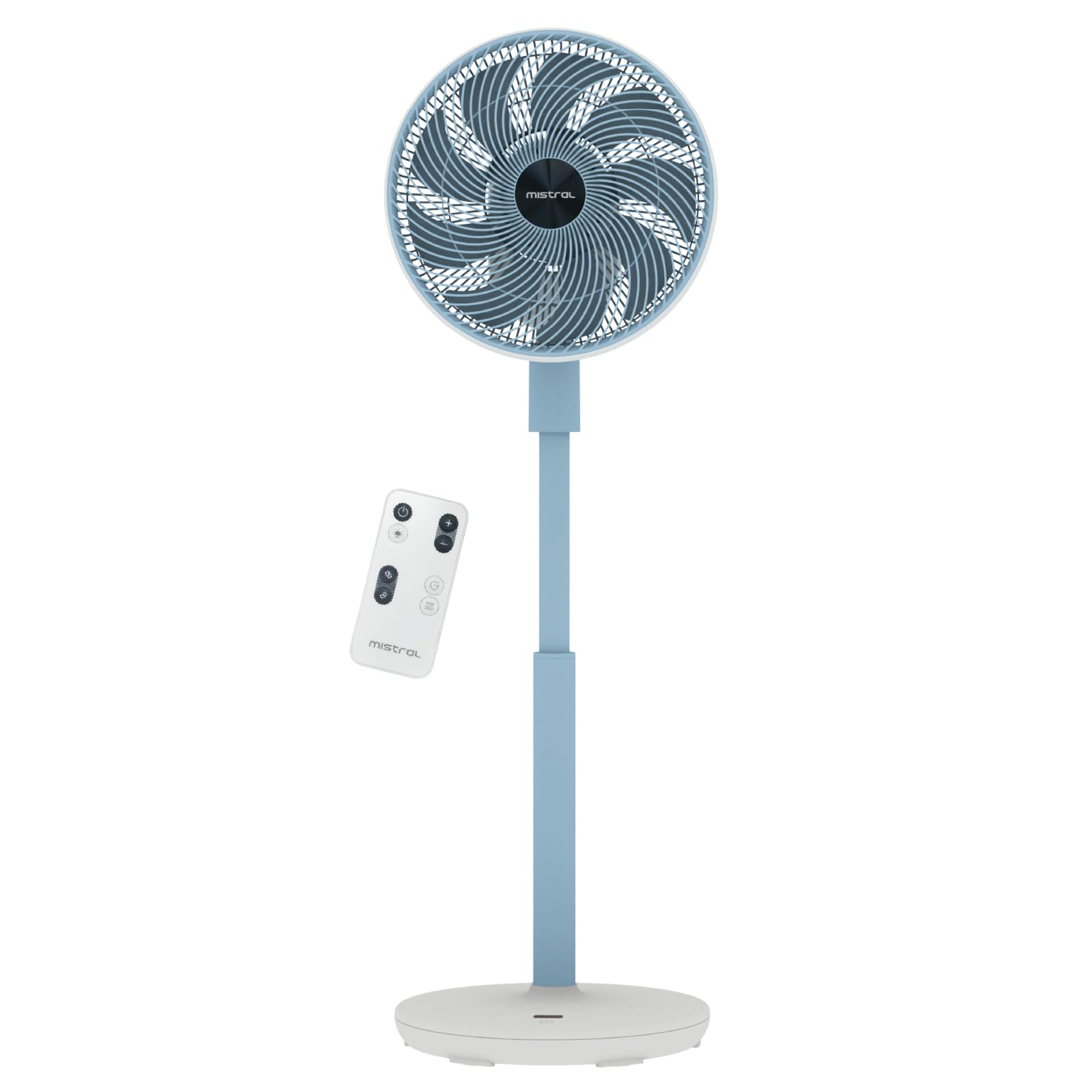
Image: The Mistral MHV9812DRW-SB stand fan in Sky Blue, illustrating its assembled form with the fan head tilted upwards, adjustable pole, and stable base. The image also shows icons for Wi-Fi and voice control features.
የአሠራር መመሪያዎች
Your Mistral fan can be operated using the touch control panel on the unit, the included remote control, or via Wi-Fi voice control.
የመቆጣጠሪያ ፓነል እና የ LED ማሳያ
The fan features an LED display and touch control panel on its base for direct operation. Refer to the specific icons on the panel for power, speed, mode, oscillation, and timer functions.
የርቀት መቆጣጠሪያ
The remote control provides convenient access to all fan functions from a distance. Ensure batteries are correctly inserted (not included, typically AAA). Point the remote control towards the fan's receiver.
ዋይ ፋይ እና የድምጽ መቆጣጠሪያ
This fan supports Wi-Fi connectivity and voice control for smart home integration. Download the "Mayer Home" application (or specified app) from your device's app store and follow the in-app instructions to connect your fan to your home Wi-Fi network. Once connected, you can control the fan using the app or compatible voice assistants.
የደጋፊዎች ተግባራት
- ማብራት/ማጥፋት፡ በመቆጣጠሪያ ፓኔል ወይም በርቀት ላይ ያለውን የኃይል አዝራሩን ይጫኑ.
- የፍጥነት ቅንብሮች፡- The fan offers 12 speed settings. Adjust using the speed control buttons.
- የአሠራር ሁነታዎች፡- Select from 4 distinct modes:
- ተፈጥሯዊ: የተፈጥሮ ንፋስን በተለያየ የደጋፊ ፍጥነት ያስመስላል።
- እንቅልፍ፡ ላልተረብሸ እንቅልፍ በዝቅተኛ እና ጸጥ ያለ ፍጥነት ይሰራል።
- ኢኮ Adjusts fan speed based on ambient temperature for energy efficiency.
- ዑደት፡ Provides a continuous, consistent airflow.
- መፍሰስ
- Left-Right Oscillation: Choose between 45° or 90° horizontal oscillation.
- Up-Down Oscillation: Choose between 45° or 90° vertical oscillation.
- ሰዓት ቆጣሪ፡ ማራገቢያው ከተወሰነ ጊዜ በኋላ እስከ 12 ሰዓታት ድረስ በራስ-ሰር እንዲጠፋ ያቀናብሩት።
- Moodlight: The fan includes a moodlight feature with 2 settings. Activate and adjust via the control panel or remote.
ጥገና እና ጽዳት
አዘውትሮ ማጽዳት የአየር ማራገቢያውን አፈፃፀም ለመጠበቅ እና የአገልግሎት እድሜውን ለማራዘም ይረዳል.
- ኃይልን አቋርጥ፡ ከማጽዳትዎ በፊት ሁል ጊዜ የአየር ማራገቢያውን ከኃይል ማሰራጫው ያላቅቁት።
- ንጹህ ውጫዊ ገጽታዎች; የማራገቢያውን ውጫዊ ገጽታዎች ለስላሳ, መamp ጨርቅ. ገላጭ ማጽጃዎችን ወይም ፈሳሾችን አይጠቀሙ.
- Clean Fan Grilles and Blades: Use a vacuum cleaner with a brush attachment or a soft cloth to remove dust from the front and rear grilles and fan blades. For thorough cleaning, the front grille may be removable (refer to specific assembly instructions if applicable, not detailed here).
- ማከማቻ፡ የአየር ማራገቢያውን ለረጅም ጊዜ ካከማቹ፣ ከአቧራ ለመከላከል ይሸፍኑትና ቀዝቃዛና ደረቅ ቦታ ያስቀምጡት።
መላ መፈለግ
ከደጋፊዎ ጋር ችግሮች ካጋጠሙዎት የሚከተሉትን የተለመዱ ችግሮች እና መፍትሄዎች ይመልከቱ፡
| ችግር | ሊሆን የሚችል ምክንያት | መፍትሄ |
|---|---|---|
| ደጋፊ አይበራም። | የኃይል አቅርቦት የለም፤ የኃይል ቁልፉ አልተጫነም፤ የርቀት መቆጣጠሪያ ባትሪዎች ተሟጠዋል። | Ensure the power cord is securely plugged into a working outlet. Press the power button on the unit or remote. Replace remote control batteries. |
| ደካማ የአየር ፍሰት. | Fan speed too low; Grilles are blocked by dust. | Increase the fan speed setting. Clean the fan grilles and blades as per maintenance instructions. |
| ደጋፊ ያልተለመደ ድምጽ ያሰማል. | Fan not on a level surface; Loose parts; Obstruction. | Place the fan on a stable, level surface. Check for any loose components or foreign objects near the blades. Unplug and inspect. |
| የርቀት መቆጣጠሪያ አይሰራም። | ባትሪዎች ተሟጠዋል ወይም በትክክል አልተገቡም፤ በርቀት መቆጣጠሪያ እና በአድናቂው መካከል እንቅፋት። | Replace batteries, ensuring correct polarity. Remove any obstructions and ensure the remote is pointed at the fan's receiver. |
| የWi-Fi ግንኙነት ችግሮች። | የተሳሳተ የWi-Fi የይለፍ ቃል፤ ማራገቢያው ከራውተሩ በጣም ርቆ ነበር፤ የራውተር ችግሮች። | Verify Wi-Fi password. Move the fan closer to the Wi-Fi router. Restart your router. Follow the app's troubleshooting guide for connection. |
እነዚህን መፍትሄዎች ከሞከሩ በኋላ ችግሩ ከቀጠለ፣ እባክዎ የደንበኛ ድጋፍን ያግኙ።
ዝርዝሮች
| ባህሪ | ዝርዝር |
|---|---|
| ሞዴል | MHV9812DRW-SB |
| ጥራዝtage | 220-240V~፣ 50/60Hz |
| ዋትtage | 30 ዋ |
| የአየር መጠን | 38.12 m³ / ደቂቃ |
| ከፍተኛ የአየር ፍሰት | 6.9 ሜ / ሰ |
| የድምጽ ደረጃ | 23dBA (Lowest Speed) | 45dBA (Highest Speed) |
| የምርት መጠን (L*W*H) | 350 * 350 * 860-1050 mm |
| የተጣራ ክብደት | 3.7 ኪ.ግ |
| የAC አስማሚ ግቤት | 100-240V~፣ 50/60Hz |
| የ AC አስማሚ ውፅዓት | 12.0V 3.0A 36.0 ዋ |
| የመቆጣጠሪያ ዓይነት | LED Display Touch Control Panel, Remote Control, Wi-Fi Voice Control |
| የፍጥነት ቅንብሮች | 12 ፍጥነት |
| የክወና ሁነታዎች | Natural, Sleep, Eco, Cycle |
| ማላቀቅ | Left-Right (45°/90°), Up-Down (45°/90°) |
| ሰዓት ቆጣሪ | 12 ሰዓታት |
| ልዩ ባህሪያት | Moodlight (2 settings) |
| የደህንነት ምልክት | 240788-11 |
ዋስትና እና ድጋፍ
የዋስትና መረጃ
This Mistral MHV9812DRW-SB fan comes with a የ 1 ዓመት ዋስትና on the entire unit and an extended የ 3 ዓመት ዋስትና specifically for the motor. This warranty covers manufacturing defects under normal use. Please retain your proof of purchase for warranty claims.
ዋስትናው አላግባብ መጠቀም፣ አደጋ፣ ያልተፈቀደ ማሻሻያ ወይም በዚህ መመሪያ ውስጥ ያሉትን መመሪያዎች አለመከተል የሚመጣ ጉዳትን አይሸፍንም።
የደንበኛ ድጋፍ
For technical assistance, warranty claims, or general inquiries, please contact Mistral customer support through their official website or the retailer where the product was purchased. Please have your model number (MHV9812DRW-SB) and proof of purchase ready when contacting support.
Note: Contact information for specific regions may vary. Refer to the official Mistral webበጣም ወቅታዊ የድጋፍ ዝርዝሮች ለማግኘት ጣቢያ.


