1. መግቢያ
Thank you for choosing the Olvy A10 Cordless Stick Vacuum Cleaner with Mop Function. This appliance is designed for efficient cleaning of various floor types, offering both vacuuming and mopping capabilities. Please read this manual thoroughly before use to ensure proper operation, maintenance, and safety.
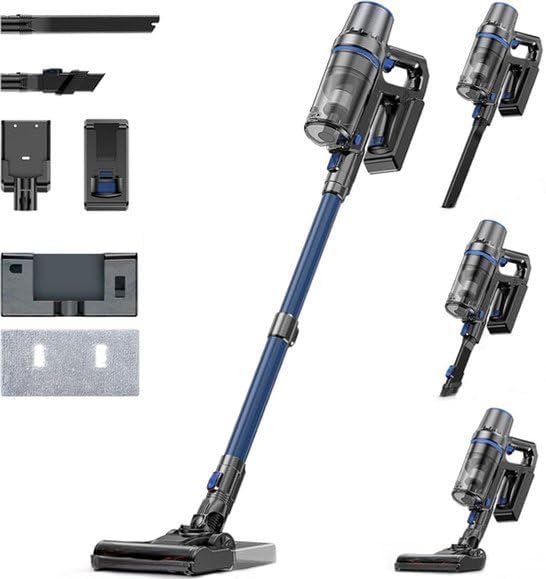
Image: The Olvy A10 Cordless Stick Vacuum Cleaner in its full assembly, alongside various attachments and the wall mount.
2. የደህንነት መመሪያዎች
የእሳት፣ የኤሌክትሪክ ንዝረት ወይም የጉዳት አደጋን ለመቀነስ፣ የኤሌክትሪክ መሳሪያ ሲጠቀሙ ሁልጊዜ መሰረታዊ የደህንነት ጥንቃቄዎችን ይከተሉ።
- መሳሪያውን ከመጠቀምዎ በፊት ሁሉንም መመሪያዎች ያንብቡ.
- ከቤት ውጭ ወይም እርጥብ በሆኑ ቦታዎች ላይ አይጠቀሙ.
- እንደ አሻንጉሊት መጠቀም አትፍቀድ. በልጆች ወይም በአቅራቢያው በሚጠቀሙበት ጊዜ የቅርብ ትኩረት አስፈላጊ ነው.
- በዚህ ማኑዋል ውስጥ እንደተገለፀው ብቻ ይጠቀሙ። የአምራቹን የሚመከሩ አባሪዎችን ብቻ ይጠቀሙ።
- በተበላሸ ገመድ ወይም መሰኪያ አይጠቀሙ. መገልገያው በሚፈለገው መልኩ የማይሰራ ከሆነ፣ ከተጣለ፣ ከተበላሸ፣ ከቤት ውጭ ከወጣ ወይም ወደ ውሃ ከተጣለ ወደ አገልግሎት ማዕከል ይመልሱት።
- በገመድ አይጎትቱ ወይም አይያዙ ፣ ገመዱን እንደ እጀታ አይጠቀሙ ፣ በገመድ ላይ በር አይዝጉ ፣ ወይም ገመድ በሹል ጠርዞች ወይም ማዕዘኖች አይጎትቱ ። መሣሪያውን በገመድ ላይ አያሂዱ። ገመዱን ከተሞቁ ቦታዎች ያርቁ.
- ገመዱን በማንሳት አይንቀሉት። ሶኬቱን ለመንቀል ገመዱን ሳይሆን መሰኪያውን ይያዙ።
- ሶኬቱን ወይም ዕቃውን በእርጥብ እጆች አይያዙ።
- ማንኛውንም ዕቃ ወደ ክፍት ቦታዎች አታስቀምጡ. በማንኛውም ክፍት የታገደ አይጠቀሙ; ከአቧራ፣ ከጥጥ፣ ከፀጉር እና የአየር ፍሰት ሊቀንስ ከሚችል ከማንኛውም ነገር ይርቁ።
- ፀጉርን፣ ልቅ ልብሶችን፣ ጣቶችን እና ሁሉንም የሰውነት ክፍሎችን ከመክፈትና ከሚንቀሳቀሱ ክፍሎች ያርቁ።
- ከመንቀልዎ በፊት ሁሉንም መቆጣጠሪያዎች ያጥፉ።
- በደረጃዎች ላይ ሲያጸዱ ተጨማሪ ጥንቃቄ ይጠቀሙ.
- እንደ ነዳጅ ያሉ ተቀጣጣይ ወይም ተቀጣጣይ ፈሳሾችን ለማንሳት አይጠቀሙ ወይም በሚገኙባቸው ቦታዎች አይጠቀሙ።
- የሚቃጠል ወይም የሚያጨስ ማንኛውንም ነገር እንደ ሲጋራ፣ ክብሪት ወይም ትኩስ አመድ አይውሰዱ።
- ያለ አቧራ ስኒ እና/ወይም ማጣሪያዎች በቦታ አይጠቀሙ።
- ሳይታሰብ መጀመርን ይከላከሉ. ከባትሪ ጥቅል ጋር ከመገናኘትዎ፣ መሳሪያውን ከማንሳትዎ ወይም ከመያዙ በፊት ማብሪያው በጠፋ ቦታ ላይ መሆኑን ያረጋግጡ።
- በአምራቹ በተጠቀሰው ባትሪ መሙያ ብቻ ይሙሉ. ለአንድ የባትሪ ጥቅል ተስማሚ የሆነ ቻርጀር ከሌላ የባትሪ ጥቅል ጋር ሲጠቀሙ የእሳት አደጋ ሊፈጥር ይችላል።
- በአሰቃቂ ሁኔታዎች ውስጥ ፈሳሽ ከባትሪው ሊወጣ ይችላል; ግንኙነትን ያስወግዱ. ግንኙነቱ በድንገት ከተከሰተ በውሃ ያጠቡ። ፈሳሽ ዓይኖችን የሚነካ ከሆነ, በተጨማሪ የሕክምና እርዳታ ይፈልጉ. ከባትሪው የሚወጣ ፈሳሽ ብስጭት ወይም ማቃጠል ሊያስከትል ይችላል።
3. የጥቅል ይዘቶች
ሁሉም ክፍሎች በጥቅሉ ውስጥ መገኘታቸውን ያረጋግጡ፡-
- ዋና ክፍል (በእጅ የሚይዘው ቫኩም)
- የሚስተካከለው የኤክስቴንሽን ቱቦ
- የወለል ብሩሽ ራስ
- ተንቀሳቃሽ ባትሪ
- የውሃ ማጠራቀሚያ (ለመቅዳት)
- የሞፕ ፓድ
- 2-በ-1 ብሩሽ መሣሪያ
- የክሪቪስ መሣሪያ
- የግድግዳ ተራራ ቅንፍ
- የኃይል አስማሚ
- Replacement HEPA Filter (2x)
- የተጠቃሚ መመሪያ

Image: A visual representation of all components included with the Olvy A10 Cordless Stick Vacuum Cleaner.
4. ምርት አብቅቷልview
The Olvy A10 features a powerful 350W motor providing up to 35,000 Pa suction, an integrated mop function, and a multi-stage HEPA filtration system. It includes an intelligent LED display for monitoring status and an auto-mode for adaptive cleaning.
ቁልፍ ባህሪዎች
- ኃይለኛ መምጠጥ; 350W motor with 35,000 Pa for deep cleaning on various surfaces.
- 2-በ-1 ተግባራዊነት፡- Seamlessly switch between vacuuming and mopping.
- ብልህ የ LED ማሳያ; Provides real-time information on battery level, suction mode, and dust concentration.
- ራስ-ሁናቴ በተገኙት የአቧራ ደረጃዎች ላይ በመመስረት የመምጠጥ ኃይልን በራስ-ሰር ያስተካክላል።
- HEPA 13 Filtration: Captures 99.99% of fine particles, suitable for allergy sufferers.
- የረጅም ጊዜ ሩጫ; Up to 60 minutes on a single charge with a 2200 mAh removable battery.
- ቀላል እና ሁለገብ; Easy to maneuver and convert into a handheld vacuum for various cleaning tasks.

Image: Close-up of the intelligent LED display showing battery indicator, low power warning, auto mode, dust concentration, and control panel.

Image: The LED display indicating 'Auto-mode' and the current power level during operation.
5. ማዋቀር እና መሰብሰብ
5.1 የመጀመሪያ ደረጃ መሙላት
Before first use, fully charge the battery. The battery takes approximately 4-5 hours to fully charge.
- Remove the battery from the main unit by pressing the release button.
- የኃይል አስማሚውን በባትሪው ላይ ካለው የኃይል መሙያ ወደብ ጋር ያገናኙ።
- Plug the adapter into a power outlet. The battery indicator on the LED display will show charging status.
- አንዴ ሙሉ ኃይል ከሞላ በኋላ አስማሚውን ያላቅቁ።

Image: The removable battery unit, highlighting its 2200 mAh capacity, 4-5 hour charging time, and up to 60 minutes run time.
5.2 የቫኩም ማጽጃውን መሰብሰብ
- ባትሪውን አያይዝ፡ Slide the charged battery into the main unit until it clicks into place.
- የኤክስቴንሽን ቱቦውን ያያይዙ፡ Connect the adjustable extension tube to the main unit. Ensure it clicks securely.
- የወለል ብሩሽን ያያይዙ; Connect the floor brush head to the other end of the extension tube.
- የግድግዳ ተራራን ጫን (ከተፈለገ) ለግድግዳው መጫኛ ተስማሚ ቦታ ይምረጡ። የተሰጡትን ዊንጮችና መልሕቆች በመጠቀም ከግድግዳው ጋር ያስጠብቁት። ይህም ምቹ ማከማቻና ኃይል መሙላት ያስችላል።
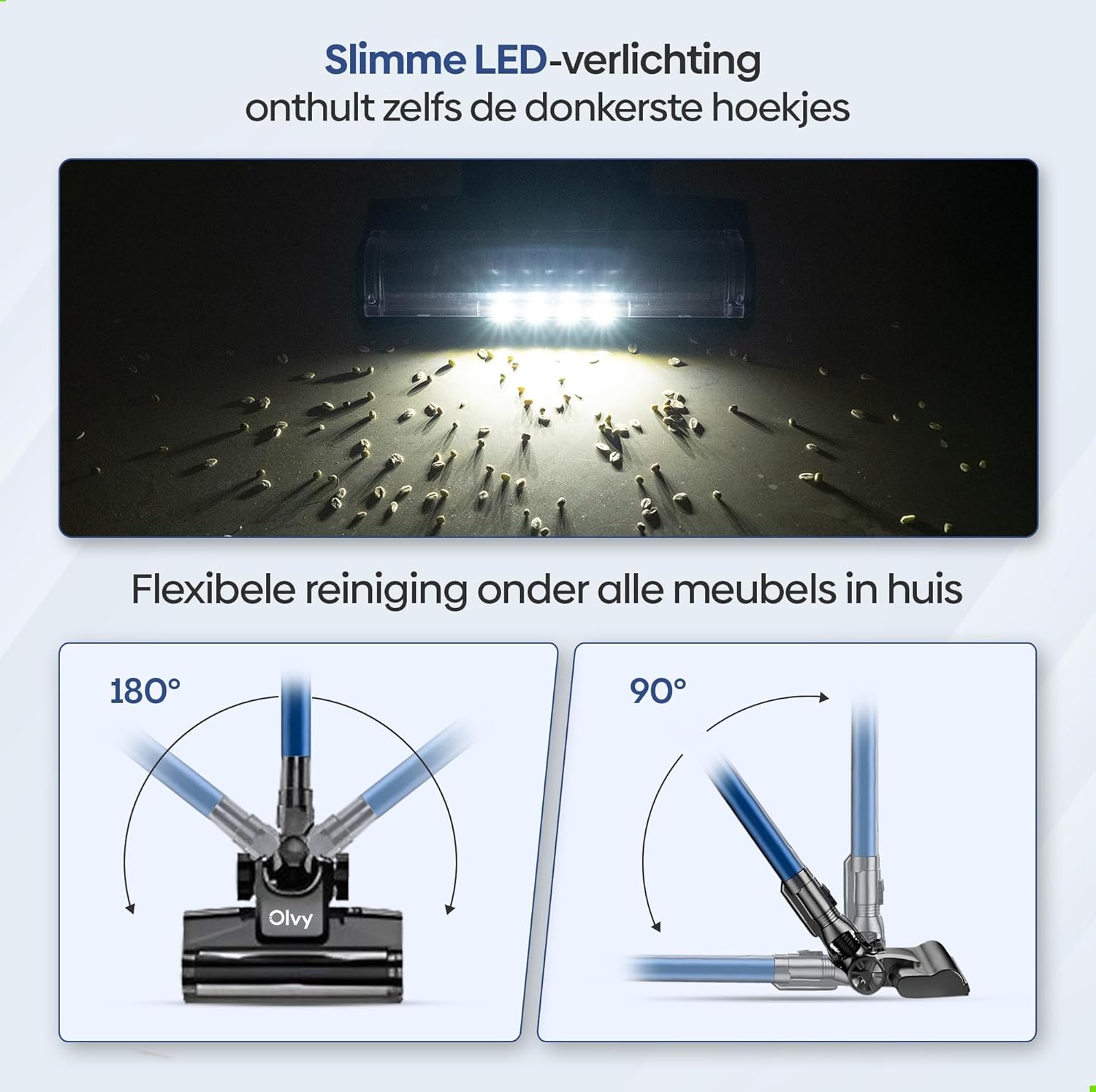
Image: The vacuum cleaner demonstrating both wall-mounted storage and self-standing capability.
6. የአሠራር መመሪያዎች
6.1 መሠረታዊ አሠራር
- ማብራት/ማጥፋት፡ ቫክዩም ማጽጃውን ለማብራት ወይም ለማጥፋት በዋናው ክፍል ላይ ያለውን የኃይል ቁልፍ ተጫን።
- የመምጠጥ ኃይልን ያስተካክሉ; The vacuum offers 5 suction levels. Use the control panel on the LED display to cycle through the power modes (Low, Normal, High, Turbo).
- ራስ-ሁናቴ Activate the intelligent auto mode for automatic suction adjustment based on dirt detection. The LED display will show 'Auto' when this mode is active.
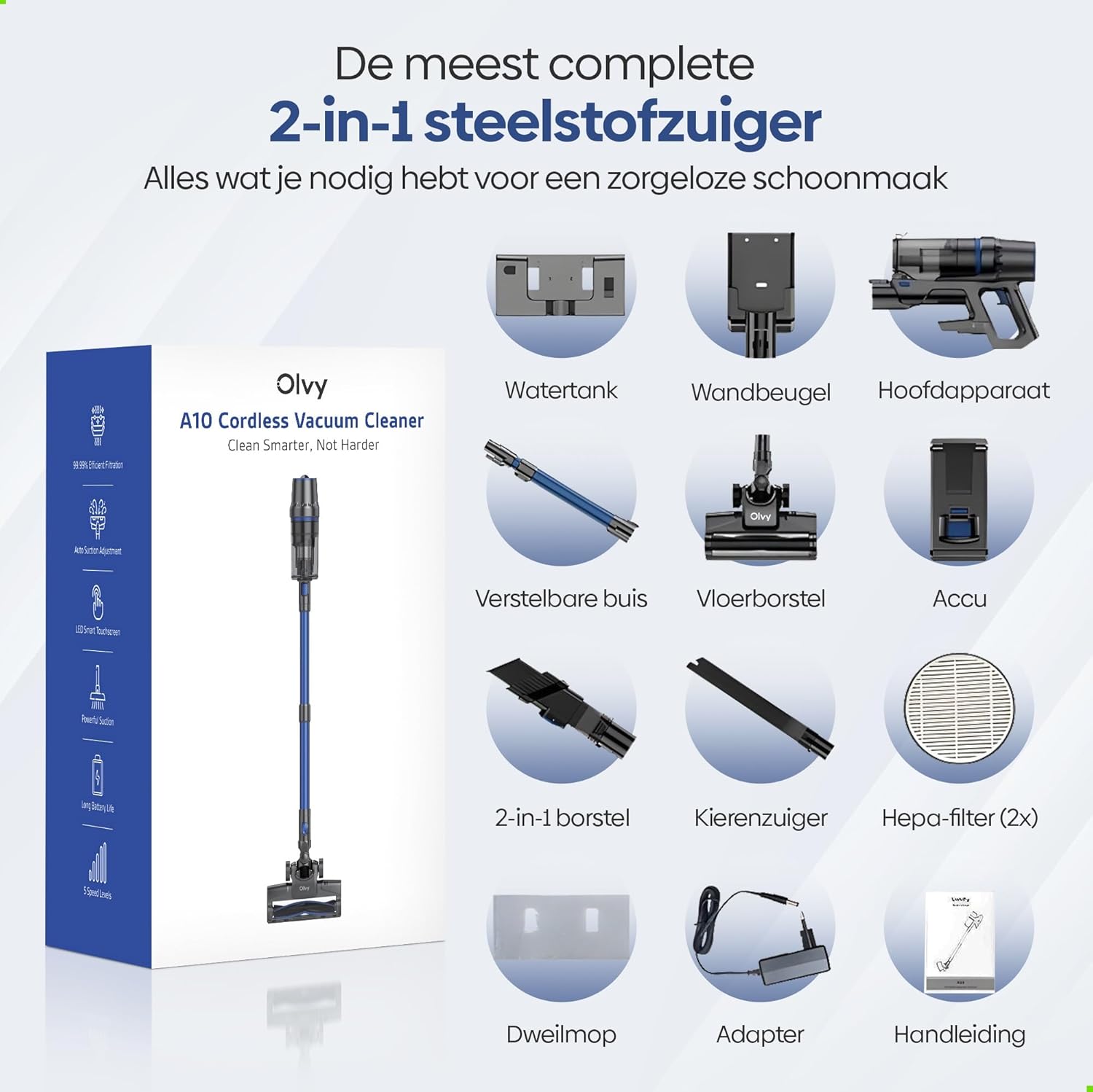
Image: The vacuum cleaner demonstrating its 4 suction levels (Low, Normal, High, Turbo) and intelligent auto mode, which adapts to dirt levels.
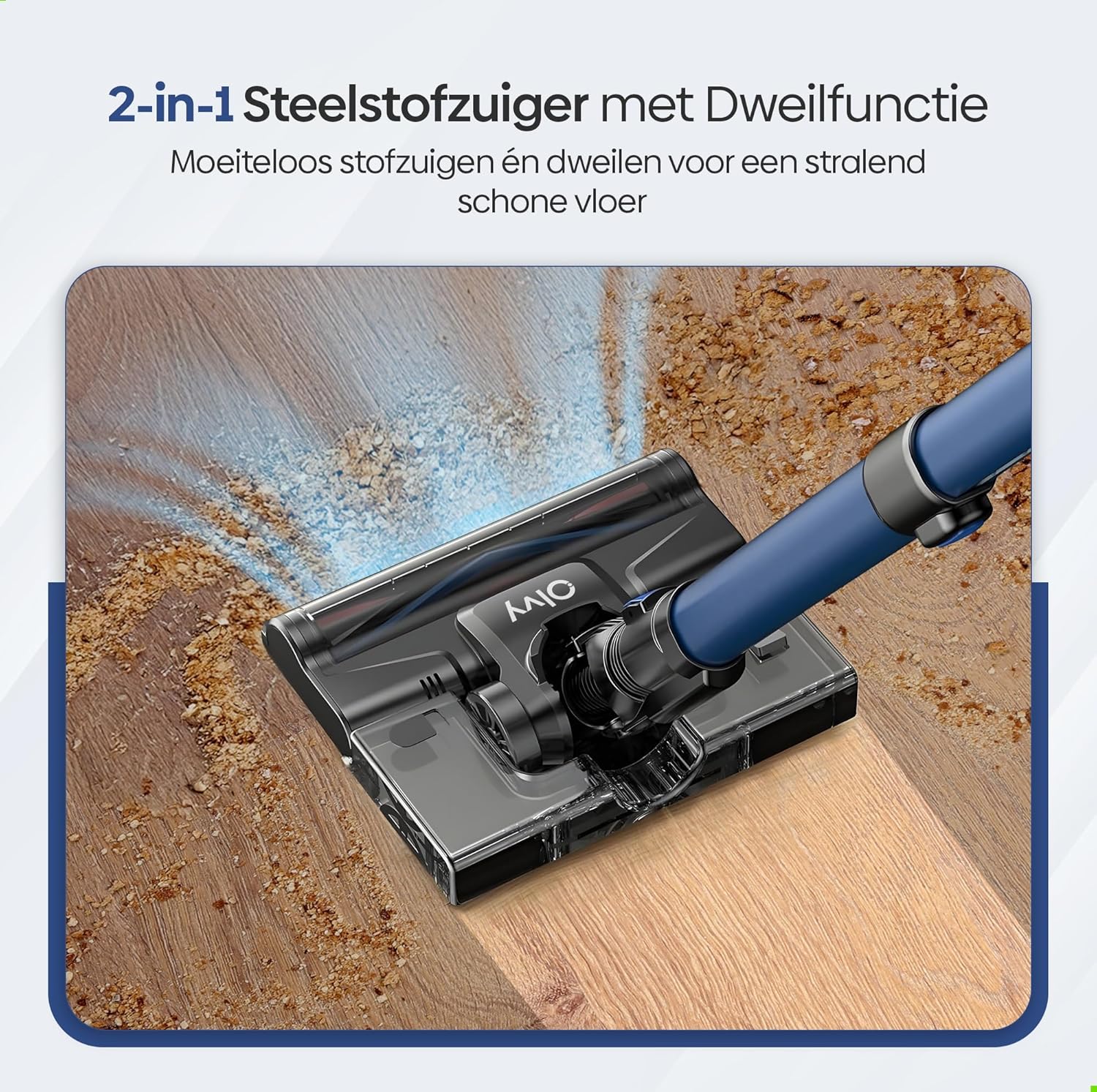
Image: A user operating the Olvy A10, showcasing its powerful 350W motor and 35,000 Pa suction for effective cleaning of various debris like hair, dust, crumbs, and sand.
6.2 የሞፕ ተግባርን መጠቀም
The integrated mop function allows for simultaneous vacuuming and wet cleaning of hard floors.
- የውሃ ማጠራቀሚያ መሙላት; Detach the water tank from the floor brush head. Fill it with clean water. Do not use corrosive liquids or detergents that may damage the tank or floor.
- የሞፕ ፓድን ያያይዙ፦ Securely attach the mop pad to the bottom of the water tank.
- የውሃ ማጠራቀሚያውን እንደገና ያያይዙት፦ Reinstall the filled water tank onto the floor brush head.
- Begin Mopping: Operate the vacuum cleaner as usual. The mop pad will dampen the floor as you vacuum, providing a streak-free clean.

ምስል: ዝርዝር view of the 2-in-1 stick vacuum with mop function, showing water being dispensed for simultaneous vacuuming and mopping on a hard floor.

Image: The mop function of the Olvy A10 actively cleaning a hard floor, demonstrating its effectiveness in removing dirt and leaving a clean surface.
6.3 አባሪዎችን መጠቀም
- ባለ 2-በ-1 ብሩሽ መሳሪያ፡ የቤት ዕቃዎችን፣ መጋረጃዎችን እና ስስ የሆኑ ቦታዎችን ለማጽዳት ተስማሚ።
- የክሪቪስ መሣሪያ ጠባብ ቦታዎችን፣ ማዕዘኖችን እና ጠርዞችን ለመድረስ ተስማሚ።
- To use, detach the extension tube and connect the desired attachment directly to the main unit.

Image: The Olvy A10 being used in different configurations, including as a stick vacuum for floors, a handheld for high areas, and for cleaning under furniture.

Image: The vacuum's LED lighting revealing hidden dust particles on the floor, and diagrams illustrating its 180° and 90° flexible head rotation for cleaning under furniture.
7. ጥገና
Regular maintenance ensures optimal performance and extends the lifespan of your Olvy A10 vacuum cleaner.
7.1 Dustbinን ባዶ ማድረግ
Empty the dustbin regularly, especially when the 'Dust Concn' indicator on the LED display shows high concentration.
- ቫክዩም መጥፋቱን ያረጋግጡ።
- ከዋናው አሃድ ለማላቀቅ የአቧራ መልቀቂያ አዝራሩን ይጫኑ።
- Hold the dustbin over a trash can and press the bottom release latch to open the lid and empty the contents.
- ሽፋኑን ይዝጉ እና የቆሻሻ መጣያውን ወደ ዋናው ክፍል እንደገና ያያይዙት.

Image: The dustbin being emptied with a single click, demonstrating its large 0.8L capacity.

Image: A user washing the dustbin under running water, illustrating the washable components for easy cleaning.
7.2 ማጣሪያዎችን ማጽዳት
The Olvy A10 uses a multi-stage filtration system, including an HEPA filter, which should be cleaned regularly.
- ቆሻሻ መጣያውን ያስወግዱ.
- Twist and pull out the filter assembly (HEPA filter, dust filter, stainless steel filter).
- Tap off loose dirt from each filter component.
- Rinse the filters under cold running water. Do not use hot water or detergents.
- እንደገና ከመገጣጠምዎ በፊት ሁሉም የማጣሪያ ክፍሎች ቢያንስ ለ24 ሰዓታት ሙሉ በሙሉ በአየር እንዲደርቁ ይፍቀዱላቸው። እርጥብ ማጣሪያዎችን በመጠቀም ቫክዩሙን አይጠቀሙ።
- Reassemble the filters and place them back into the dustbin, then reattach the dustbin to the main unit.

Image: A cutaway diagram illustrating the multi-stage HEPA filtration system, including the dustbin filter, stainless steel filter, dust filter, HEPA air filter, and air outlet filter.
7.3 የብሩሽ ጥቅልን ማጽዳት
ለተደባለቀ ፀጉር ወይም ፍርስራሹ የብሩሽ ጥቅልን በየጊዜው ያረጋግጡ።
- የቫኩም ማጽጃውን ያጥፉ.
- Press the release tab on the side of the floor brush head to remove the brush roll cover.
- የብሩሽ ጥቅሉን ያንሱ ፡፡
- ማንኛውንም የተዘበራረቀ ጸጉር ወይም ፋይበር ለመቁረጥ እና ለማስወገድ መቀስ ወይም ማጽጃ መሳሪያ ይጠቀሙ።
- የብሩሽ ጥቅልሉን እንደገና ያስገቡ እና ሽፋኑን ያያይዙ።
7.4 የሞፕ ፓድን ማጽዳት
After each use of the mop function, remove and clean the mop pad.
- የሞፕ ፓዱን ከውሃ ማጠራቀሚያው ያላቅቁ።
- Rinse the mop pad under running water or machine wash it with mild detergent.
- Allow the mop pad to air dry completely before storing or reusing.
8. መላ መፈለግ
If you encounter any issues with your Olvy A10, refer to the following common problems and solutions:
| ችግር | ሊሆን የሚችል ምክንያት | መፍትሄ |
|---|---|---|
| ቫኩም አይበራም። | ባትሪ አልተሞላም ወይም በትክክል አልተጫነም። | Charge the battery fully. Ensure the battery is securely clicked into the main unit. |
| ዝቅተኛ የመሳብ ኃይል | Dustbin is full. Filters are clogged. Brush roll is tangled. Obstruction in the nozzle or tube. | Empty the dustbin. Clean all filters thoroughly and ensure they are dry. Remove any hair or debris from the brush roll. Check for and remove any blockages. |
| ብሩሽ ጥቅል አይሽከረከርም | የብሩሽ ጥቅል የተጣበቀ ወይም የተጨናነቀ ነው። | Turn off the vacuum. Remove the brush roll and clear any obstructions. |
| የሞፕ ተግባር እየሰራ አይደለም | Water tank is empty or not properly installed. Mop pad is dry. | Fill the water tank. Ensure the water tank is securely attached to the floor brush. Dampen the mop pad slightly before use if needed. |
| አጭር የሩጫ ጊዜ | ባትሪው ሙሉ በሙሉ አልሞላም። ያለማቋረጥ ከፍተኛ የመምጠጥ ሁነታን መጠቀም። የባትሪ መበላሸት። | Ensure battery is fully charged. Use lower suction modes for longer run time. If battery life significantly decreases, consider replacing the battery. |
9. ዝርዝሮች
| ባህሪ | ዝርዝር መግለጫ |
|---|---|
| የምርት ስም | Olvy |
| የሞዴል ቁጥር | አ10 |
| ቀለም | ጥቁር |
| የምርት ልኬቶች | 32 x 19 x 32 ሴ.ሜ |
| ክብደት | 5 ኪ.ግ |
| የሞተር ኃይል | 350 ዋ |
| የመሳብ ኃይል | እስከ 35,000 ፓ |
| የፍጥነት ብዛት | 5 (including Auto Mode) |
| የድምጽ ደረጃ | 55 ዲሴብል |
| የሩጫ ጊዜ | እስከ 1 ሰዓት (60 ደቂቃዎች) |
| የባትሪ አቅም | 2200 ሚአሰ |
| የኃይል መሙያ ጊዜ | 4-5 ሰዓታት |
| የማጣሪያ ዓይነት | HEPA 13 (Washable) |
| Dustbin አቅም | 0.8 ሊ |
| የኃይል ምንጭ | ባትሪ |
| የሚመከሩ ወለሎች | All floors (carpets, hard floors) |
| ልዩ ባህሪያት | 2-in-1 Vacuum & Mop, LED Display, Auto Mode, Pet-friendly, Lightweight |
10. ዋስትና እና ድጋፍ
Olvy products are manufactured to high-quality standards. For warranty information, technical support, or service inquiries, please refer to the contact information provided with your purchase documentation or visit the official Olvy webጣቢያ. ለዋስትና ጥያቄዎች እባክዎ የግዢ ማረጋገጫዎን ያቆዩ።


