1. መግቢያ
Thank you for choosing the Nelko PM220 Bluetooth Thermal Label Printer. This portable device is designed for efficient label printing without the need for ink cartridges, making it ideal for small businesses, address labeling, logo printing, and various organizational tasks. This manual provides detailed instructions for setup, operation, maintenance, and troubleshooting to ensure optimal performance.
2. ምርት አብቅቷልview
The Nelko PM220 is a compact thermal label printer that connects wirelessly via Bluetooth to your smartphone or PC. It supports various label sizes and offers clear, high-resolution printing for text, barcodes, and QR codes.
2.1 የጥቅል ይዘቶች
- Nelko PM220 Label Printer
- Label Paper Roll (starter roll)
- የዩኤስቢ ባትሪ መሙያ ገመድ
- የተጠቃሚ መመሪያ

ምስል 1፡ The Nelko PM220 Bluetooth Thermal Label Printer shown with a roll of blank labels. The printer features a sleek navy blue design with a power button and a paper feed button on the front panel.
3. የማዋቀር መመሪያ
3.1 የላብል ቴፕ መጫን
- Open the printer cover by gently pushing the release button or lifting the designated area.
- Insert the label roll into the paper bin, ensuring the labels face upwards and the leading edge extends slightly out of the printer slot.
- Adjust the paper slot guide to the right to ensure the label paper is tightly attached to the far right side of the paper bin, preventing misalignment during printing.
- የአታሚውን ሽፋን በጥንቃቄ ይዝጉ.

ምስል 2፡ A label roll being correctly inserted into the paper compartment of the Nelko PM220 printer. The roll is placed with the labels facing upwards.
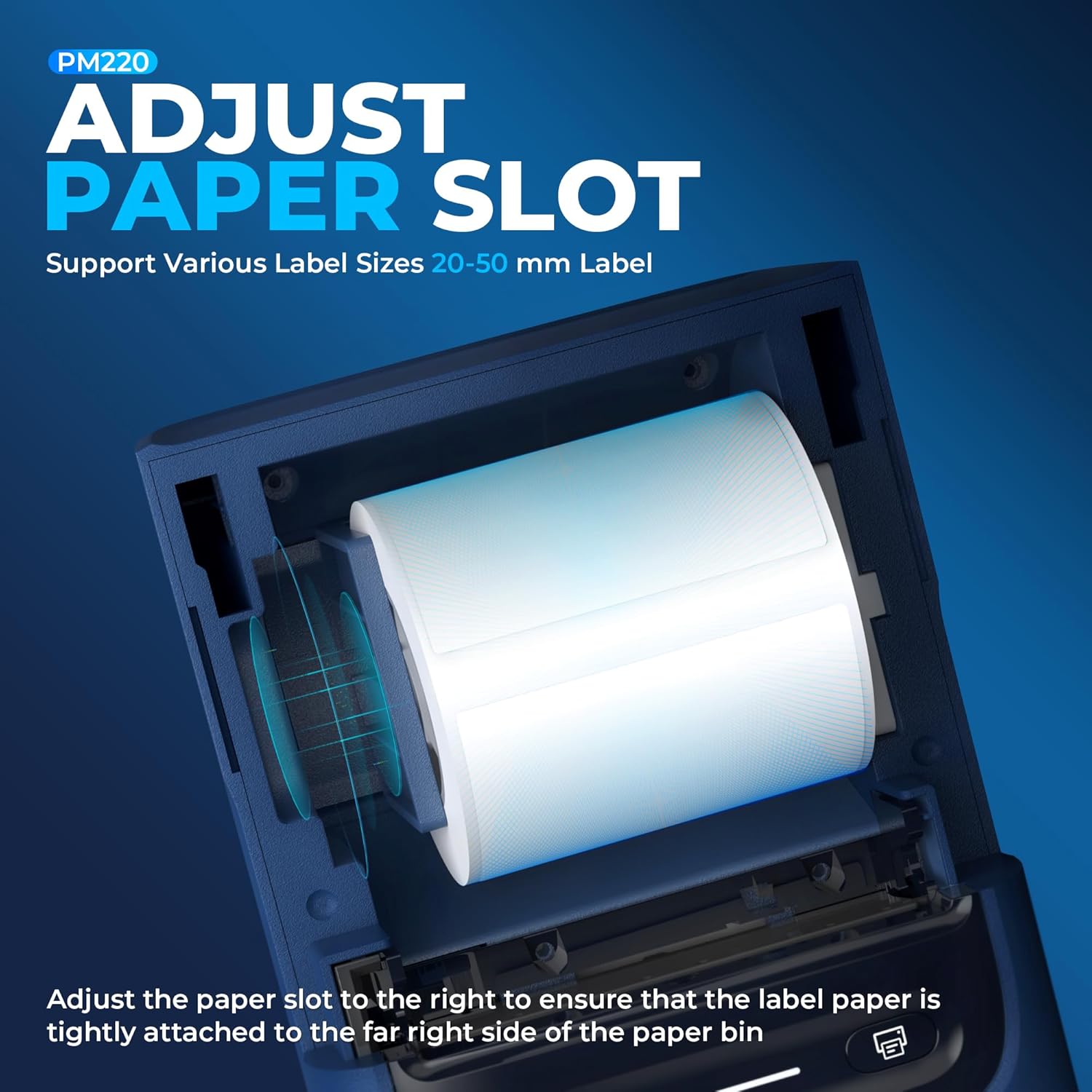
ምስል 3፡ መቀራረብ view demonstrating how to adjust the paper slot guide within the Nelko PM220 printer. The guide is moved to the right to secure the label roll.
3.2 ከኃይል ጋር መገናኘት
- Connect the provided USB charging cable to the printer's charging port.
- የዩኤስቢ ገመዱን ሌላኛውን ጫፍ ከዩኤስቢ የኃይል አስማሚ (ያልተካተተ) ወይም ከኮምፒዩተር የዩኤስቢ ወደብ ጋር ይሰኩ።
- Allow the printer to charge fully before first use. The indicator light will typically change color to indicate a full charge.
3.3 የመተግበሪያ ጭነት እና የብሉቱዝ ማጣመር
- Download the official Nelko label printing application from your device's app store (e.g., Apple App Store for iOS, Google Play Store for Android). For PC connectivity, download the appropriate driver and software from the official Nelko webጣቢያ.
- Ensure Bluetooth is enabled on your smartphone or PC.
- Power on the Nelko PM220 printer by pressing and holding the power button until the indicator light illuminates.
- Open the Nelko app (or PC software) and navigate to the device connection section.
- ፈልግ available Bluetooth devices and select 'Nelko PM220' from the list.
- Follow any on-screen prompts to complete the pairing process. A successful connection will be indicated by a change in the printer's indicator light or a message within the app.
4. የአሠራር መመሪያዎች
4.1 ማብራት / ማጥፋት
- ለማብራት፡- Press and hold the power button for approximately 2-3 seconds until the indicator light turns on.
- ለማጥፋት፡- Press and hold the power button for approximately 2-3 seconds until the indicator light turns off.
4.2 መለያ ማተም
- Ensure the printer is powered on and successfully connected to your device via Bluetooth.
- Open the Nelko app or PC software.
- Select your desired label template or create a new label design.
- Enter the text, add images, barcodes, or QR codes as needed.
- Adjust label size and print settings within the app to match the loaded label tape.
- ቅድመview the label to ensure accuracy.
- Tap the 'Print' button in the app. The printer will feed and print the label.
- Carefully tear off the printed label along the serrated edge.

ምስል 4፡ The Nelko PM220 printer actively printing various labels, including shipping labels, product labels, and decorative stickers, demonstrating its versatility.
5. ጥገና
5.1 የህትመት ጭንቅላትን ማጽዳት
Regular cleaning of the print head ensures optimal print quality and extends the life of your printer. Use a soft, lint-free cloth lightly dampበ isopropyl አልኮሆል የተስተካከለ።
- Ensure the printer is powered off and disconnected from power.
- የአታሚውን ሽፋን ይክፈቱ.
- Gently wipe the print head surface with the dampened cloth. Avoid touching the print head with bare hands.
- ሽፋኑን ከመዝጋት እና አታሚውን ከማብራትዎ በፊት የህትመት ጭንቅላቱ ሙሉ በሙሉ እንዲደርቅ ይፍቀዱለት።
5.2 ማከማቻ
Store the printer in a cool, dry place away from direct sunlight and extreme temperatures. Remove any label rolls if storing for an extended period.
6. መላ መፈለግ
If you encounter issues with your Nelko PM220 printer, refer to the table below for common problems and solutions.
| ችግር | ሊሆን የሚችል ምክንያት | መፍትሄ |
|---|---|---|
| አታሚ አይበራም። | ዝቅተኛ ባትሪ ወይም የኃይል ግንኙነት የለም | አታሚውን በተሰጠው የዩኤስቢ ገመድ በመጠቀም ይሙሉት። የኃይል አስማሚው እየሰራ መሆኑን ያረጋግጡ። |
| በብሉቱዝ መገናኘት አልተቻለም | Bluetooth is off, printer is not in pairing mode, or incorrect device selected | Ensure Bluetooth is enabled on your device. Restart the printer and try pairing again. Verify you are selecting 'Nelko PM220'. |
| ደካማ የህትመት ጥራት (ደካማ፣ ደብዛዛ) | Dirty print head, incorrect label type, or low battery | Clean the print head as described in Section 5.1. Ensure you are using thermal labels. Charge the printer. |
| Labels are not feeding correctly | Label roll improperly loaded or paper slot not adjusted | Re-load the label roll, ensuring it is seated correctly and the paper slot guide is adjusted tightly against the roll (refer to Section 3.1). |
| አታሚው መካከለኛ መለያ ማተም ያቆማል | Out of labels or low battery | Replace the label roll. Charge the printer. |
7. ቴክኒካዊ ዝርዝሮች
| ባህሪ | ዝርዝር መግለጫ |
|---|---|
| የምርት ስም | ኔልኮ |
| የሞዴል ስም | PM220 |
| የህትመት ቴክኖሎጂ | ሙቀት |
| የግንኙነት ቴክኖሎጂ | ብሉቱዝ |
| የአታሚ ውፅዓት | ሞኖክሮም |
| ከፍተኛው የጥቁር እና ነጭ የህትመት ጥራት | 203 ዲፒአይ |
| ከፍተኛ የህትመት ፍጥነት ሞኖክሮም | 45 ሚሜ / ሰ |
| የሚደገፉ የሚዲያ መጠኖች | 23-54ሚሜ (ስፋት) |
| የምርት ልኬቶች | 13.3 x 8 x 10.2 ኢንች |
| የእቃው ክብደት | 13.4 አውንስ |
| የአታሚ ቀለም አይነት | ቀለም የለም (ቴርማል) |
| የተካተቱ አካላት | Printer, Paper |
8. ዋስትና እና ድጋፍ
Nelko products are designed for reliability and performance. For specific warranty information, please refer to the warranty card included with your purchase or visit the official Nelko website. If you require technical assistance or have questions not covered in this manual, please contact Nelko customer support through their official channels.
የመስመር ላይ ድጋፍ Visit the official Nelko webለተደጋጋሚ ጥያቄዎች፣ ለአሽከርካሪዎች እና ለሶፍትዌር ማውረዶች የሚሆን ጣቢያ።
የኢሜል ድጋፍ የምርት ማሸጊያውን ወይም ኦፊሴላዊውን ይመልከቱ webለደንበኞች አገልግሎት ኢሜል አድራሻዎች ጣቢያ.


