1. መግቢያ
The SMSL AS400 is a versatile audio device combining a Digital-to-Analog Converter (DAC), a headphone amplifier (HPA), and a power ampማስታገሻ (AMP) into a single unit. Designed for high-fidelity audio reproduction, it supports various input sources and offers powerful output for both speakers and headphones. This manual provides detailed instructions for the proper setup, operation, and maintenance of your AS400 unit.

Figure 1.1: The SMSL AS400 functions as a DAC, Headphone Amplifier, and Power Ampማብሰያ
2. የደህንነት መረጃ
- የኃይል አቅርቦት; የቀረበውን የኃይል አስማሚ ብቻ ይጠቀሙ። ጥራዝ ያረጋግጡtagሠ ከአካባቢዎ የኃይል አቅርቦት መስፈርቶች ጋር ይዛመዳል።
- የአየር ማናፈሻ; የአየር ማናፈሻ ክፍተቶችን አያግዱ. ከመጠን በላይ ሙቀትን ለመከላከል በክፍሉ ዙሪያ በቂ የአየር ዝውውርን ያረጋግጡ.
- እርጥበት፡- Keep the unit away from water, moisture, and high humidity environments.
- ማጽዳት፡ ከማጽዳትዎ በፊት ኃይሉን ያላቅቁ። ደረቅና ለስላሳ ጨርቅ ይጠቀሙ። ፈሳሽ ወይም ኤሮሶል ማጽጃዎችን አይጠቀሙ።
- አገልግሎት መስጠት፡ ይህንን ምርት እራስዎ ለማገልገል አይሞክሩ። ሁሉንም አገልግሎት ወደ ብቃት ላለው የአገልግሎት ሠራተኛ ያማክሩ።
- አቀማመጥ፡- መሳሪያውን በተረጋጋና ተስተካክሎ መሬት ላይ ያስቀምጡት። ከሙቀት ምንጮች አጠገብ ወይም በቀጥታ የፀሐይ ብርሃን ውስጥ አያስቀምጡት።
3. የጥቅል ይዘቶች
እባክዎ ሁሉም እቃዎች በጥቅሉ ውስጥ እንዳሉ ያረጋግጡ፡-
- የኤስኤምኤስኤል AS400 ዩኒት
- Remote Control (RC-8A)
- የኃይል ገመድ
- የዩኤስቢ ገመድ
- የብሉቱዝ አንቴና
- የተጠቃሚ መመሪያ (ይህ ሰነድ)
4. ምርት አብቅቷልview
4.1 የፊት ፓነል

Figure 4.1: Front Panel of the SMSL AS400 and included remote control.

Figure 4.2: Front Panel Component Identification.
- ማሳያ ማያ: የአሁኑን ግቤት ያሳያል፣ ኤስampየሊ ተመን፣ የድምጽ መጠን እና የምናሌ አማራጮች።
- Remote Window: የኢንፍራሬድ ተቀባይ ለርቀት መቆጣጠሪያ።
- የተግባር ቁልፍ፡
- Press: Enter menu / OK
- Hold: Exit menu
- Rotate: Change value / Volume control
- 4.4 ሚሜ የጆሮ ማዳመጫ ጃክ; ሚዛናዊ የጆሮ ማዳመጫ ውፅዓት።
- 6.35 ሚሜ የጆሮ ማዳመጫ ውፅዓት; Unbalanced headphone output.
4.2 የኋላ ፓነል

Figure 4.3: Rear Panel Component Identification.
- የመሬት ማረፊያ ተርሚናል; For connecting a turntable ground wire.
- የፎን ግቤት፡ RCA inputs for turntables with MM cartridges.
- LINE Input (AUX): RCA analog input for external audio sources.
- Coaxial ግቤት፡ ዲጂታል የድምጽ ግብዓት.
- ደቡብ ምዕራብ (ቅድመ-ቅዳሜ)amp): የሱብዎፈር ቅድመ-ውጪ።
- የዩኤስቢ ግብዓት (PRE): USB-B input for connecting to a computer or other digital source.
- የጨረር ግቤት፡ ዲጂታል የድምጽ ግብዓት.
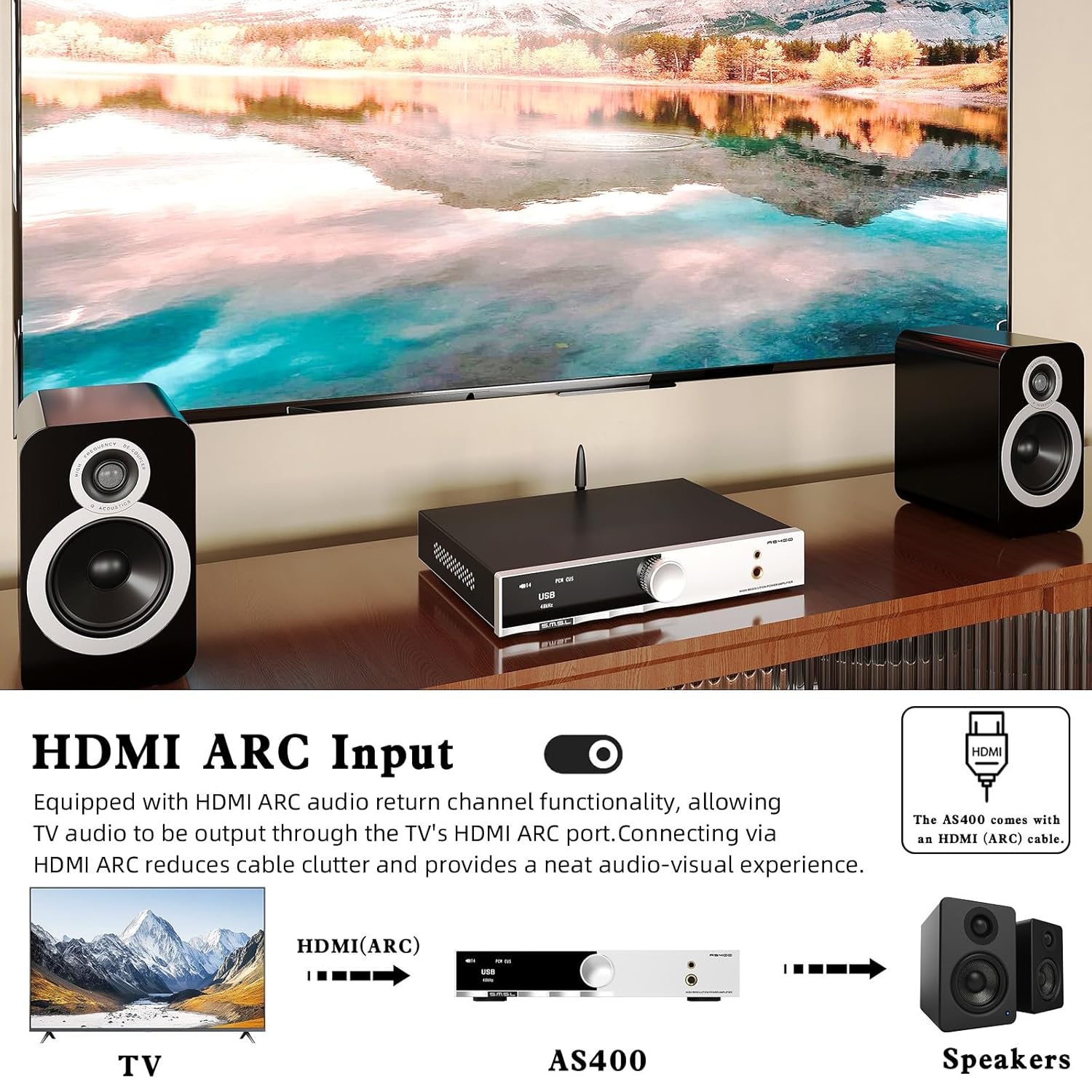
- HDMI (ARC) ግቤት፡- Audio Return Channel for connecting to a TV.
- የብሉቱዝ አንቴና: ለገመድ አልባ የብሉቱዝ ግንኙነት።
- Left/Right Channel Output: ለተዘዋዋሪ ድምጽ ማጉያዎች የድምጽ ማጉያ ተርሚናሎች።
- የኤሲ የኃይል ግቤት የኃይል ገመዱን እዚህ ያገናኙ.
4.3 የርቀት መቆጣጠሪያ (RC-8A)
ምስል 4.4: የርቀት መቆጣጠሪያ ተግባራት.
- አብራ/አጥፋ፡ ክፍሉን ያበራል ወይም ያጠፋል.
- ላይ ታች: የምናሌ አማራጮችን ያስሱ ወይም ቅንብሮችን ያስተካክሉ።
- ምናሌ/እሺ፡ Enters the main menu or confirms a selection.
- FN (Function): Enters the secondary interface for additional settings.
- የግቤት ምርጫ፡- በሚገኙ የግቤት ምንጮች ዑደቶች።
- ድምጸ-ከል አድርግ፡ የድምጽ ውፅዓት ድምጸ-ከል ያደርገዋል ወይም ያጠፋል።
- የውጤት መቀያየር፦ በድምጽ ማጉያ እና በጆሮ ማዳመጫዎች መካከል ይቀያየራል።
- ጥራዝ +/- የውጤቱን መጠን ያስተካክላል.
5. ማዋቀር
5.1 የድምጽ ማጉያዎችን ማገናኘት
- AS400 መብራቱን ያረጋግጡ።
- Connect your passive speakers to the Left and Right Channel Output terminals on the rear panel. Ensure correct polarity (+ to + and - to -).
- If using a powered subwoofer, connect it to the SW Out (Preamp) port using an RCA cable.
5.2 የድምጽ ምንጮችን ማገናኘት
The AS400 supports multiple input types:
- ዩኤስቢ፡ Connect a computer or other USB audio source to the USB Input (PRE) port using the provided USB cable.
- ኦፕቲካል/Coaxial፡ Connect digital audio sources (e.g., CD player, game console) to the Optical or Coaxial Input ports.
- RCA (LINE): Connect analog audio sources (e.g., media player) to the LINE Input (AUX) ports.
- ፎኖ ፦ Connect a turntable with an MM cartridge to the PHONO Input ports. Ensure the turntable's ground wire is connected to the Grounding Terminal on the AS400.
- ኤችዲኤምአይ (አርአክ) Connect your TV's HDMI ARC port to the AS400's HDMI (ARC) Input for TV audio output.
- ብሉቱዝ፡ Screw the Bluetooth antenna onto its designated port for wireless connectivity.

Figure 5.1: HDMI ARC and Bluetooth Connectivity.
5.3 የኃይል ግንኙነት
- Connect the power cable to the AC Power Input on the rear panel of the AS400.
- የኃይል ገመዱን ሌላኛውን ጫፍ ተስማሚ በሆነ የግድግዳ መውጫ ላይ ይሰኩት።
6. የአሠራር መመሪያዎች
6.1 ማብራት / ማጥፋት
Press the Power ON/OFF button on the remote control or the function knob to turn the unit on or off.
6.2 የግቤት ምርጫ
Use the 'Input Select' button on the remote or rotate the function knob to cycle through available inputs (USB, Optical, Coaxial, RCA, PHONO, HDMI ARC, Bluetooth).
6.3 የድምጽ መቆጣጠሪያ
Adjust the volume using the 'Volume +/-' buttons on the remote or by rotating the function knob.
6.4 ሜኑ አሰሳ እና ቅንብሮች
Press the function knob or the 'MENU/OK' button on the remote to enter the main menu. Use the 'Up/Down' buttons or rotate the knob to navigate. Press 'MENU/OK' to select an option. Hold the function knob or press the 'FN' button to exit the menu.
Key menu options include:
- ግቤት፡ Selects the active audio input.
- ውጤት፡ በድምጽ ማጉያ እና በጆሮ ማዳመጫዎች መካከል ይቀያየራል።
- EQ: Select from 8 preset EQ modes (Direct, Bass, Rock, etc.) to tailor sound.
- ባስ/ትሬብል፡ Adjust bass and treble levels for personalized sound.
- አጣራ፡ Select from 5 PCM digital filters.
- ቀለም፡ Change the display screen color.
- BT Clear: Clears paired Bluetooth devices.

Figure 6.1: Setup Menu and Sound Customization Options.
6.5 የብሉቱዝ ማጣመር
- የብሉቱዝ አንቴና መገናኘቱን ያረጋግጡ።
- Select 'Bluetooth' as the input source on the AS400.
- On your mobile device, search for Bluetooth devices and select 'SMSL AS400'.
- Once paired, audio from your device will stream to the AS400.
- To clear paired devices, navigate to 'BT Clear' in the menu.
6.6 MQA/MQA-ሲዲ መልሶ ማጫወት
The AS400 supports MQA and MQA-CD decoding. When playing MQA content via USB, Optical, or Coaxial inputs, the display will indicate MQA status, ensuring studio-quality audio reproduction.
7. ጥገና
- ማጽዳት፡ የክፍሉን ውጫዊ ክፍል ለማጽዳት ለስላሳና ደረቅ ጨርቅ ይጠቀሙ። የማጽጃ ማጽጃዎችን ወይም መሟሟቶችን ያስወግዱ።
- አቧራ፡ Regularly dust the unit, especially around ventilation areas, to prevent dust buildup.
- ግንኙነቶች፡ ሁሉንም የኬብል ግንኙነቶች ደህንነታቸው የተጠበቀ መሆኑን ለማረጋገጥ በየጊዜው ያረጋግጡ።
- ማከማቻ፡ ክፍሉን ረዘም ላለ ጊዜ ካስቀመጠው ከኃይል ጋር ያለውን ግንኙነት ያላቅቁት እና በቀዝቃዛና ደረቅ ቦታ ያስቀምጡት።
8. መላ መፈለግ
If you encounter issues with your AS400, please refer to the following common problems and solutions:
| ችግር | ሊሆን የሚችል ምክንያት | መፍትሄ |
|---|---|---|
| ኃይል የለም | Power cable disconnected; power outlet faulty. | የኃይል ገመድ ግንኙነትን ያረጋግጡ; የተለየ መውጫ ይሞክሩ። |
| ምንም የድምፅ ውፅዓት የለም። | Incorrect input selected; volume too low; speakers/headphones not connected; output mode incorrect. | Verify input source; increase volume; check speaker/headphone connections; ensure correct output mode (speaker/headphone) is selected in the menu. |
| የብሉቱዝ ግንኙነት ያልተረጋጋ | Antenna not connected; interference; device too far. | Ensure Bluetooth antenna is securely attached; move device closer to AS400; clear paired devices via 'BT Clear' in menu and re-pair. |
| Subwoofer output is weak or not triggering. | Subwoofer sensitivity setting; AS400 subwoofer output level. | Adjust the gain/volume setting on your powered subwoofer. Ensure the subwoofer is powered on. Note that the AS400's subwoofer output is a pre-out and its level is tied to the main volume. |
| የተዛባ ድምጽ | Input signal too high; faulty cable; speaker impedance mismatch. | Reduce input source volume; check/replace cables; ensure speaker impedance is within AS400's supported range. |
እነዚህን መፍትሄዎች ከሞከሩ በኋላ ችግሩ ከቀጠለ፣ እባክዎ የደንበኛ ድጋፍን ያግኙ።
9. ዝርዝሮች

ምስል 9.1፡ ዝርዝር የምርት ዝርዝር መግለጫዎች።
| ባህሪ | ዝርዝር መግለጫ |
|---|---|
| ግብዓቶች | RCA / BT / USB / Optical / Coaxial / Phono / I²S / HDMI (ARC) |
| THD+N | 0.003% |
| የውጤት ኃይል (RMS) | 165W x2 (4Ω), 85W x2 (8Ω) |
| የግቤት ትብነት/እገዳ | 280mV/22kΩ |
| ልኬቶች (WxHxD) | 210.4 x 46 x 254 ሚ.ሜ |
| ክብደት | 1.57 ኪግ (3.46 ፓውንድ) |
| የዩኤስቢ ተኳኋኝነት | ዊንዶውስ 7/8/8.1/10/11፣ ማክ ኦኤስኤክስ፣ ሊኑክስ |
| ቢት ጥልቀት | ዩኤስቢ፡ 1ቢት፣ 16-32ቢት፤ ኦፕቲካል/ኮአክሲያል፡ 1ቢት፣ 16-32ቢት |
| ኤስኤንአር | 107 ዲቢ |
| የሰርጥ መለያየት | 98 ዲቢ |
| የዩኤስቢ ማስተላለፊያ | ያልተመሳሰለ ማስተላለፍ |
| የኃይል ፍጆታ | 40 ዋት (መደበኛ መጠን) |
| MQA ዲኮደር | ዩኤስቢ / ኦፕቲካል / Coaxial |
| MQA-ሲዲ ዲኮደር | ኦፕቲካል / ኮአክሲያል |
| Sampling Rate (USB) | PCM: 44.1-768kHz; DSD: 2.8224-11.2896MHz |
| Sampling Rate (Optical/Coaxial) | PCM: 44.1-192kHz; DSD: DSD64 (DoP) |
10. ዋስትና እና ድጋፍ
The SMSL AS400 comes with a standard manufacturer's warranty. Please refer to the warranty card included in your package for specific terms and conditions, including warranty period and coverage.
For technical support, troubleshooting assistance beyond this manual, or warranty claims, please contact your authorized SMSL dealer or visit the official SMSL webየእውቂያ መረጃ ለማግኘት ጣቢያ.
እባክዎ ለዋስትና ዓላማዎች የግዢ ማረጋገጫዎን ያቆዩ።


