1. ጠቃሚ የደህንነት መመሪያዎች
እባክዎ ይህንን መሳሪያ ከመጠቀምዎ በፊት ሁሉንም መመሪያዎች በጥንቃቄ ያንብቡ። ይህንን መመሪያ ለወደፊት ማጣቀሻ ያቆዩት።
- ጥራዝ ያረጋግጡtagበደረጃ አሰጣጥ መለያው ላይ የተገለጸው ኢ ከዋናው ድምጽዎ ጋር ይዛመዳልtage.
- ማራገቢያውን፣ መሰኪያውን ወይም ገመዱን በውሃ ወይም ሌሎች ፈሳሾች ውስጥ አታስጡ።
- በማይጠቀሙበት ጊዜ፣ ከማጽዳትዎ በፊት ወይም ከመንቀሳቀስዎ በፊት ማራገቢያውን ከውጪው ያላቅቁት።
- Do not operate the fan with a damaged cord or plug. Contact authorized service personnel for repair.
- ጣቶችን እና ሌሎች ነገሮችን ከደጋፊዎች እና ክፍት ቦታዎች ያርቁ።
- Do not use the fan near windows, in bathrooms, or in wet environments.
- ይህ መሳሪያ ለደህንነታቸው ኃላፊነት ባለው ሰው ቁጥጥር ወይም መመሪያ ካልተሰጣቸው በስተቀር የአካል፣ የስሜት ወይም የአዕምሮ ችሎታዎች ወይም ልምድ እና እውቀት ዝቅተኛ ለሆኑ ሰዎች (ልጆችን ጨምሮ) ለመጠቀም የታሰበ አይደለም። .
- ልጆች ከመሳሪያው ጋር እንደማይጫወቱ ለማረጋገጥ ክትትል ሊደረግባቸው ይገባል.
2. ምርት አብቅቷልview
The Mistral MFD4389DRW is a 43-inch DC Turbo Tower Fan designed for efficient air circulation. It features a DC brushless motor, 12 speed settings, and multiple operating modes. Control options include a full touch screen, remote control, and Wi-Fi with online voice control capabilities. The fan also offers a unique height conversion feature and 60-degree left-right oscillation.

ምስል 2.1: የፊት view of the Mistral MFD4389DRW DC Turbo Tower Fan, showcasing its sleek design and touch control panel.

ምስል 2.2: ጎን view of the Mistral MFD4389DRW DC Turbo Tower Fan, highlighting its slim profile.

ምስል 2.3፡ ተመለስ view of the Mistral MFD4389DRW DC Turbo Tower Fan, showing the air intake grille.
3. የጥቅል ይዘቶች
ሁሉም ክፍሎች በማሸጊያው ውስጥ መኖራቸውን ያረጋግጡ፡-
- Mistral MFD4389DRW DC Turbo Tower Fan Unit
- የርቀት መቆጣጠሪያ
- የተጠቃሚ መመሪያ (ይህ ሰነድ)
- Base components (if not pre-assembled)
- Height extension component (for convertible height models)
4. ስብሰባ
The Mistral MFD4389DRW fan features simple assembly. Typically, this involves attaching the base to the main fan unit. For models with height conversion, an additional extension piece may need to be secured.
- ሁሉንም ንጥረ ነገሮች ከማሸጊያው ውስጥ በጥንቃቄ ያስወግዱ.
- Place the main fan unit upside down on a soft, flat surface to avoid scratching.
- Align the base with the bottom of the fan unit. Ensure the power cord passes through the designated opening in the base.
- Secure the base to the fan unit using the provided screws (if applicable).
- For height conversion, insert the extension component between the base and the main unit, ensuring it clicks securely into place or is fastened as per instructions.
- Place the fan upright on a stable, level surface.
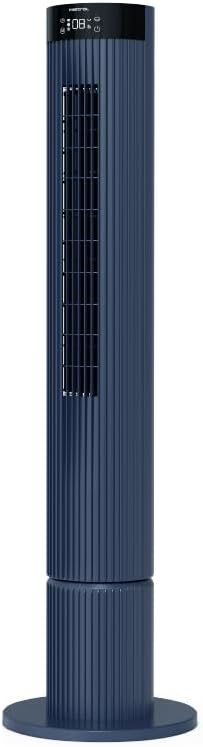
Figure 4.1: The fan demonstrating its convertible height feature, allowing adjustment between two different heights.
5. ማዋቀር እና የመጀመሪያ አጠቃቀም
After assembly, position the fan in your desired location. Ensure it is on a stable, flat surface and away from curtains or objects that could obstruct airflow.
- Plug the power cord into a suitable electrical outlet (220-240V~, 50-60Hz).
- The fan will enter standby mode. The touch screen display may illuminate briefly.
- To power on, touch the power icon on the control panel or press the power button on the remote control.
6. የአሠራር መመሪያዎች
The fan can be operated via the full touch screen control panel on the unit or the included remote control.
6.1 የቁጥጥር ፓነል ተግባራት
The touch screen control panel provides access to all fan functions:
- የኃይል ቁልፍ፡- አድናቂውን ያበራል ወይም ያጠፋል።
- የፍጥነት ማስተካከያ; በ12 የአድናቂዎች ፍጥነት ይሽከረከራል።
- ሁነታ ምርጫ፡- Switches between Turbo, One-key Cycle, and Baby modes.
- መፍሰስ Activates or deactivates 60-degree left-right oscillation.
- ሰዓት ቆጣሪ፡ Sets the pre-set On/Off timer for up to 12 hours.
- የWi-Fi አመልካች፡- የWi-Fi ግንኙነት ሁኔታን ያሳያል።
6.2 የርቀት መቆጣጠሪያ
The remote control duplicates all functions available on the touch screen panel for convenient operation from a distance.
- የርቀት መቆጣጠሪያው የሚሰሩ ባትሪዎች እንዳሉት ያረጋግጡ።
- Point the remote control towards the fan's control panel for optimal signal reception.
6.3 የአሠራር ሁነታዎች
- ቱርቦ ሁነታ፡ ፈጣን ቅዝቃዜን ለማመቻቸት ከፍተኛውን የአየር ፍሰት ያቀርባል።
- One-key Cycle Mode: Automatically cycles through different fan speeds to simulate natural breeze.
- የሕፃናት ሁኔታ Operates at a gentle, quiet speed suitable for nurseries or light sleeping.
7. Wi-Fi and Online Voice Control
The Mistral MFD4389DRW fan can be connected to your home Wi-Fi network for smart control via a mobile application and online voice commands.
7.1 የ Wi-Fi ግንኙነት
- Download the official Mistral smart home application from your device's app store.
- በመተግበሪያው ውስጥ ይመዝገቡ ወይም ወደ መለያዎ ይግቡ።
- ተንቀሳቃሽ መሣሪያዎ ከ2.4GHz Wi-Fi አውታረ መረብ ጋር መገናኘቱን ያረጋግጡ።
- Follow the in-app instructions to add a new device. This typically involves putting the fan into pairing mode (refer to the app or fan display for specific instructions, often by holding a Wi-Fi button).
- Once connected, the Wi-Fi indicator on the fan's control panel will illuminate steadily.
7.2 Online Voice Control
After successful Wi-Fi connection, you can link your fan to compatible smart home voice assistants (e.g., Google Assistant, Amazon Alexa) through the Mistral app settings.
- Open the Mistral app and navigate to the 'Integrations' or 'Voice Control' section.
- Select your preferred voice assistant and follow the prompts to link your Mistral account.
- አንዴ ከተገናኘ በኋላ የሚከተሉትን የመሳሰሉ የድምጽ ትዕዛዞችን መጠቀም ይችላሉ፦
- "Turn on the fan."
- "Set fan speed to 5."
- "Turn off oscillation."
- "Change fan mode to Baby."
8. ጥገና
አዘውትሮ ማጽዳት የአየር ማራገቢያውን አፈፃፀም ለመጠበቅ እና የአገልግሎት እድሜውን ለማራዘም ይረዳል.
8.1 ጽዳት
- ከማጽዳትዎ በፊት ሁል ጊዜ የአየር ማራገቢያውን ከኃይል ማሰራጫው ያላቅቁት።
- ለስላሳ ይጠቀሙ, መamp የማራገቢያውን ውጫዊ ገጽታዎች ለማጽዳት ጨርቅ. ገላጭ ማጽጃዎችን ወይም ፈሳሾችን አይጠቀሙ.
- አቧራውን ከአየር ማስገቢያ እና ከውጪ ግሪሎች ለማስወገድ ብሩሽ ያለው የቫክዩም ማጽጃ ይጠቀሙ።
- መልሰው ከመስካት እና ከመስራቱ በፊት ማራገቢያው ሙሉ በሙሉ ደረቅ መሆኑን ያረጋግጡ።
8.2 ማከማቻ
If storing the fan for an extended period, unplug it, clean it thoroughly, and store it in its original packaging or a dust-free environment.
9. መላ መፈለግ
ከደጋፊዎ ጋር ችግሮች ካጋጠሙዎት የሚከተሉትን የተለመዱ ችግሮች እና መፍትሄዎች ይመልከቱ፡
| ችግር | ሊሆን የሚችል ምክንያት | መፍትሄ |
|---|---|---|
| ደጋፊ አይበራም። | የኃይል አቅርቦት የለም። | የኤሌትሪክ ገመዱ ደህንነቱ በተጠበቀ ሁኔታ በሚሰራ ሶኬት ውስጥ መጫኑን ያረጋግጡ። |
| ደካማ የአየር ፍሰት. | Air intake/outlet blocked; Fan speed too low. | Clean grilles to remove dust. Increase fan speed. |
| ደጋፊ ያልተለመደ ድምጽ ያሰማል. | እንቅፋት፤ ልቅ ክፍሎች። | Unplug and check for any foreign objects. Ensure base is securely attached. |
| የርቀት መቆጣጠሪያ አይሰራም። | የሞቱ ባትሪዎች፤ እንቅፋት። | Replace remote control batteries. Ensure no objects are blocking the signal path. |
| የWi-Fi ግንኙነት አልተሳካም። | Incorrect Wi-Fi password; Router issues; Fan too far from router. | Verify Wi-Fi password. Ensure fan is within range of a 2.4GHz Wi-Fi network. Restart router and fan. |
እነዚህን መፍትሄዎች ከሞከሩ በኋላ ችግሩ ከቀጠለ፣ እባክዎ የደንበኛ ድጋፍን ያግኙ።
10. ዝርዝሮች
| ባህሪ | ዝርዝር መግለጫ |
|---|---|
| ሞዴል | MFD4389DRW |
| ጥራዝtage | 220-240V~, 50-60Hz 1.3A |
| ዋትtage | 40 ዋ |
| የአየር መጠን | 29.54 m³ / ደቂቃ |
| ከፍተኛ የአየር ፍሰት | 4.26 ሜ / ሰ |
| የጫጫታ ደረጃ (ዝቅተኛው ፍጥነት) | 33.2 ዲቢ |
| Noise Level (Highest Speed) | 68.3 ዲቢ |
| የምርት ልኬቶች (L*W*H) | 168 * 300 * 900 OR 1104 mm |
| የተጣራ ክብደት | 4.46 ኪ.ግ |
| የደህንነት ምልክት | 250467-11 |
| ልዩ ባህሪያት | Remote Controlled, Timer, Wi-Fi Enabled |
| የፍጥነት ብዛት | 12 |
11. ዋስትና እና ድጋፍ
This Mistral MFD4389DRW DC Turbo Tower Fan comes with a comprehensive warranty:
- አጠቃላይ ዋስትና፡- ከተገዛበት ቀን ጀምሮ 1 ዓመት.
- የሞተር ዋስትና; An additional 3 Years for the motor only, totaling 4 years for the motor.
For warranty claims, technical support, or service inquiries, please contact your local Mistral authorized service center or refer to the contact information provided on the official Mistral webጣቢያ.


