መግቢያ
Welcome to the OUKITEL C3 Cell Phone user manual. This guide provides essential information to help you set up, operate, and maintain your new smartphone. Please read this manual thoroughly to ensure proper usage and to maximize your device's potential.
በሣጥኑ ውስጥ ያለው
Upon opening your OUKITEL C3 package, you should find the following items:
- 1x OUKITEL C3 Cell Phone
- 1 x 10 ዋ ኃይል መሙያ
- 1 x የውሂብ ገመድ
- 1 x የስልክ መያዣ
- 1 x የተጠቃሚ መመሪያ

Image: Contents of the OUKITEL C3 package, including the phone, charger, data cable, phone case, and manual.
Video: An unboxing demonstration of the OUKITEL C3 Cell Phone, showing the phone and its included accessories.
ምርት አልቋልview
The OUKITEL C3 is a 4G Android smartphone featuring a 6.52-inch waterdrop screen, a 5000mAh battery, and a dual-camera system. It is designed for everyday communication and multimedia use.
ቁልፍ ባህሪዎች
- ማሳያ፡- 6.52-inch HD Waterdrop Screen (540x1200 resolution, 450nit brightness)
- ፕሮሰሰር፡ Unisoc T310
- ማህደረ ትውስታ፡ 16GB RAM (4GB fixed + 12GB virtual) + 64GB ROM, expandable up to 1TB via TF card
- ባትሪ፡ 5000mAh with 10W fast charging and OTG reverse charging support
- ካሜራዎች፡ 13MP Main Camera, 5MP Front Camera
- ስርዓተ ክወና፡ አንድሮይድ 14
- ግንኙነት፡ 4G Dual SIM, Bluetooth 5.0, Wi-Fi, GPS, GLONASS, Beidou, Galileo
- ደህንነት፡ የፊት መታወቂያ
- መጠኖች፡- 9.3 ሚሜ ውፍረት ፣ 198 ግ ክብደት
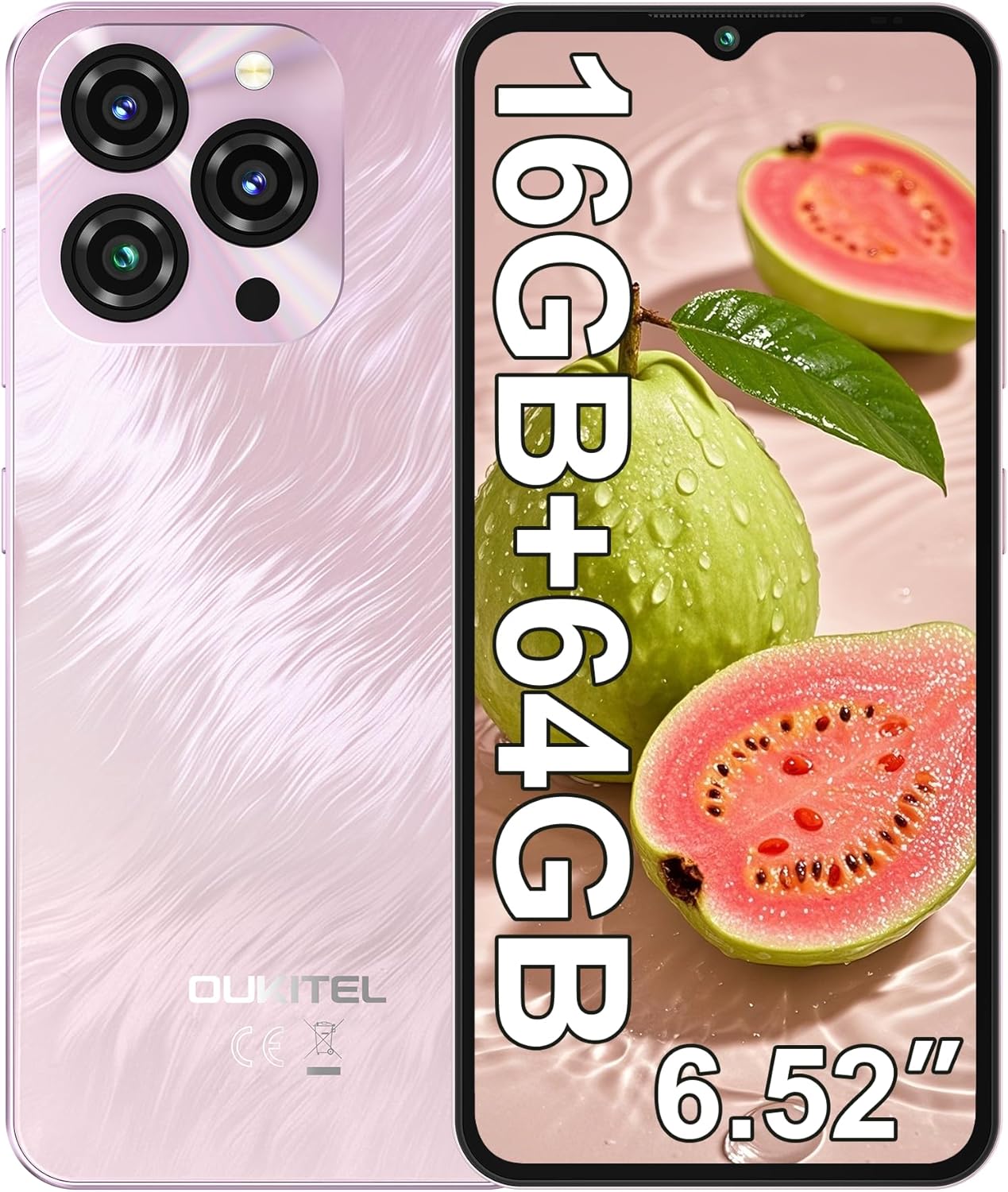
Image: The OUKITEL C3 Cell Phone, showcasing የእሱ ንድፍ እና የካሜራ ሞጁል.

Image: Close-up of the OUKITEL C3's 6.52-inch waterdrop display, highlighting its visual quality.

Image: Visual representation of the OUKITEL C3's slim 9.3mm thickness and 198g weight.
ማዋቀር
1. ሲም ካርድ እና TF ካርድ መጫን
The OUKITEL C3 supports dual Nano SIM cards or one Nano SIM card and one TF (microSD) card for expanded storage.
- የሲም ካርዱን ትሪ ከስልኩ ጎን ያግኙት።
- Insert the SIM ejector tool (included in the box) into the small hole next to the tray and push gently until the tray pops out.
- Place your Nano SIM card(s) and/or TF card into the designated slots on the tray. Ensure the gold contacts face downwards and the cards are correctly oriented.
- ትሪውን ከመሳሪያው ጎን ጋር እስኪያያዝ ድረስ በጥንቃቄ ወደ ስልኩ ያስገቡት።

Image: Diagram showing the SIM card tray, 3.5mm audio jack, and USB-C port on the OUKITEL C3.
2. የመነሻ ኃይል ማብራት እና ማዋቀር
- የOUKITEL አርማ እስኪታይ ድረስ የኃይል ቁልፉን ተጭነው ይቆዩ (በስልኩ በቀኝ በኩል የሚገኘውን)።
- ቋንቋዎን ለመምረጥ፣ ከWi-Fi አውታረ መረብ ጋር ለመገናኘት እና የGoogle መለያዎን ለማዋቀር የማያ ገጽ ላይ ጥያቄዎችን ይከተሉ።
- You will also be guided through setting up security features like Face ID during this process.
3. መሣሪያውን በመሙላት ላይ
ከመጀመሪያው ጥቅም በፊት የእርስዎን OUKITEL C3 ሙሉ በሙሉ እንዲሞሉ ይመከራል።
- Connect the USB data cable to the 10W charger.
- ቻርጅ መሙያውን ወደ ኤሌክትሪክ ሶኬት ይሰኩት.
- የኬብሉን የዩኤስቢ-ሲ ጫፍ በስልክዎ ግርጌ ላይ ካለው የኃይል መሙያ ወደብ ጋር ያገናኙ።
- በስክሪኑ ላይ ያለው የባትሪ ምልክት የኃይል መሙያ ሁኔታን ያሳያል።

Image: Illustration of the OUKITEL C3's 5000mAh battery and charging process.
የአሠራር መመሪያዎች
1. መሰረታዊ ዳሰሳ (አንድሮይድ 14)
Your OUKITEL C3 runs on Android 14, offering an intuitive user experience.
- መነሻ ስክሪን፡ Swipe left or right to navigate between home screens. Tap and hold an empty space to customize widgets, wallpapers, and settings.
- የመተግበሪያ መሳቢያ፡ ሁሉንም የተጫኑ መተግበሪያዎች ለመድረስ ከማያ ገጹ ግርጌ ወደ ላይ ያንሸራትቱ።
- ማሳወቂያዎች እና ፈጣን ቅንብሮች፡- ከማያ ገጹ አናት ወደ ታች ያንሸራትቱ view ማሳወቂያዎችን እና ፈጣን የቅንብሮችን መዳረሻ (Wi-Fi፣ ብሉቱዝ፣ ወዘተ)።
- የቅርብ ጊዜ መተግበሪያዎች፡- በቅርብ ጊዜ ጥቅም ላይ የዋሉ መተግበሪያዎችን ለማየት ከታች ወደ ላይ ያንሸራትቱና ይያዙ (ወይም ከነቃ የካሬ ዳሰሳ አዝራሩን መታ ያድርጉ)።

Image: The OUKITEL C3 displaying the Android 14 operating system interface with various applications.
2. የካሜራ አጠቃቀም
The OUKITEL C3 is equipped with a 13MP main camera and a 5MP front camera.
- "ካሜራ" የሚለውን መተግበሪያ ከመነሻ ማያ ገጽዎ ወይም ከመተግበሪያ መሳቢያዎ ይክፈቱ።
- Switch between the front and rear cameras using the camera switch icon.
- ፎቶ ለማንሳት የመዝጊያ አዝራሩን መታ ያድርጉ።
- Explore different modes like Video, Portrait, or Panorama if available in the camera app.

Image: Visual detailing of the OUKITEL C3's 13MP main camera and 5MP front camera capabilities.
3. ግንኙነት
- ዋይ ፋይ፡ ከሚገኙ አውታረ መረቦች ጋር ለመገናኘት ወደ ቅንብሮች > አውታረ መረብ እና ኢንተርኔት > ዋይ ፋይ ይሂዱ።
- ብሉቱዝ፡ Go to Settings > Connected devices > Bluetooth to pair with Bluetooth devices like headphones or speakers.
- ጂፒኤስ፡ Location services are enabled by default. You can manage them in Settings > Location. The phone supports GPS, GLONASS, Beidou, and Galileo for accurate positioning.
- ኦቲጂ The OUKITEL C3 supports USB On-The-Go (OTG), allowing you to connect USB devices like flash drives or keyboards using an OTG adapter (sold separately).
4. Face ID
Face ID provides a convenient and secure way to unlock your phone.
- ወደ ቅንብሮች > ደህንነት እና ግላዊነት > የመሣሪያ መክፈቻ > የፊት መክፈቻ ይሂዱ።
- Follow the on-screen instructions to register your face. Ensure good lighting and hold the phone at eye level.
- አንዴ ከተመዘገቡ በኋላ፣ የፊት ካሜራውን በመመልከት ስልክዎን መክፈት ይችላሉ።
ጥገና
1. የባትሪ እንክብካቤ
- ስልኩን ለከፍተኛ ሙቀት ከማጋለጥ ይቆጠቡ።
- ለተሻለ የኃይል መሙያ አፈጻጸም እና ደህንነት የቀረበውን ቻርጀር እና ገመድ ብቻ ይጠቀሙ።
- ለረጅም ጊዜ ማከማቻ ባትሪውን ወደ 50% ገደማ ይሙሉት እና መሳሪያውን ያጥፉት።
2. የሶፍትዌር ዝመናዎች
Regularly check for and install software updates to ensure your phone has the latest features, security patches, and performance improvements.
- ወደ ቅንብሮች> ስርዓት> የስርዓት ዝመና ይሂዱ።
- Tap "Check for update" and follow the instructions if an update is available.
3. መሳሪያዎን ማጽዳት
- የስልኩን ስክሪፕት እና ጀርባ ለማፅዳት ለስላሳ እና ለስላሳ ጨርቅ ይጠቀሙ።
- ኃይለኛ ኬሚካሎችን ወይም ሻካራ ቁሳቁሶችን ከመጠቀም ይቆጠቡ.
- ለግትር ማጭበርበሮች በትንሹ መampጨርቁን በውሃ ወይም ለኤሌክትሮኒክስ የተነደፈ ስክሪን ማጽጃ።
መላ መፈለግ
| ችግር | ሊሆን የሚችል መፍትሄ |
|---|---|
| ስልክ አይበራም። | ባትሪው መሙላቱን ያረጋግጡ። ባትሪ መሙያውን ያገናኙ እና እንደገና ለማብራት ከመሞከርዎ በፊት ጥቂት ደቂቃዎችን ይጠብቁ። |
| ጥሪዎችን/ጽሑፍ መልዕክቶችን ማድረግ ወይም መቀበል አይቻልም። |
|
| መተግበሪያዎች ቀርፋፋ ወይም በረዶ ናቸው። |
|
| ባትሪ በፍጥነት ይጠፋል. |
|
| የፊት መታወቂያ አይሰራም። |
|

Image: Important information regarding OUKITEL C3's carrier compatibility, specifically T-Mobile support.
ዝርዝሮች
| ባህሪ | ዝርዝር |
|---|---|
| የሞዴል ስም | OUKITEL C3 |
| ስርዓተ ክወና | አንድሮይድ 14 |
| ማሳያ | 6.52 Inches HD Waterdrop Screen, 540 x 1200 Resolution, 60 Hz Refresh Rate |
| ራም | 16 GB (4GB fixed + 12GB virtual) |
| የውስጥ ማከማቻ (ሮም) | 64 ጊባ |
| ሊሰፋ የሚችል ማከማቻ | እስከ 1 ቴባ በቲኤፍ ካርድ በኩል |
| ዋና ካሜራ | 13 ሜፒ |
| የፊት ካሜራ | 5 ሜፒ |
| የባትሪ አቅም | 5000 ሚአሰ |
| በመሙላት ላይ | 10W Fast Charging, Supports OTG Reverse Charging |
| ግንኙነት | 4G Cellular Technology, Bluetooth 5.0, Wi-Fi |
| አሰሳ | GPS፣ GLONASS፣ Beidou፣ Galileo |
| ኦዲዮ ጃክ | 3.5 ሚ.ሜ |
| የሲም ካርድ አይነት | ድርብ ናኖ ሲም |
| መጠኖች | 9.3 ሚሜ ውፍረት |
| ክብደት | 198 ግራም (በግምት 14.9 አውንስ) |
| Supported Carrier | T-Mobile (Does not support Metro PCS, AT&T, Verizon) |
ቪዲዮ: አልቋልview of the OUKITEL C3 Cell Phone's main features and specifications.
ዋስትና እና ድጋፍ
ለዋስትና መረጃ እና የቴክኒክ ድጋፍ፣ እባክዎ በምርት ጥቅልዎ ውስጥ የተካተተውን የዋስትና ካርድ ይመልከቱ ወይም ኦፊሴላዊውን OUKITEL ይጎብኙ። webጣቢያ. ለዋስትና ጥያቄዎች የግዢ ማረጋገጫዎን ያስቀምጡ።
የእውቂያ መረጃ፡- Please refer to the contact details provided in your product documentation or on the OUKITEL official webለደንበኛ አገልግሎት እና ድጋፍ ጣቢያ።