መግቢያ
Thank you for choosing the GMBACK Wireless Pro Controller. This manual provides detailed instructions for setting up, operating, and maintaining your controller to ensure optimal performance and an enhanced gaming experience. Please read this manual thoroughly before use.
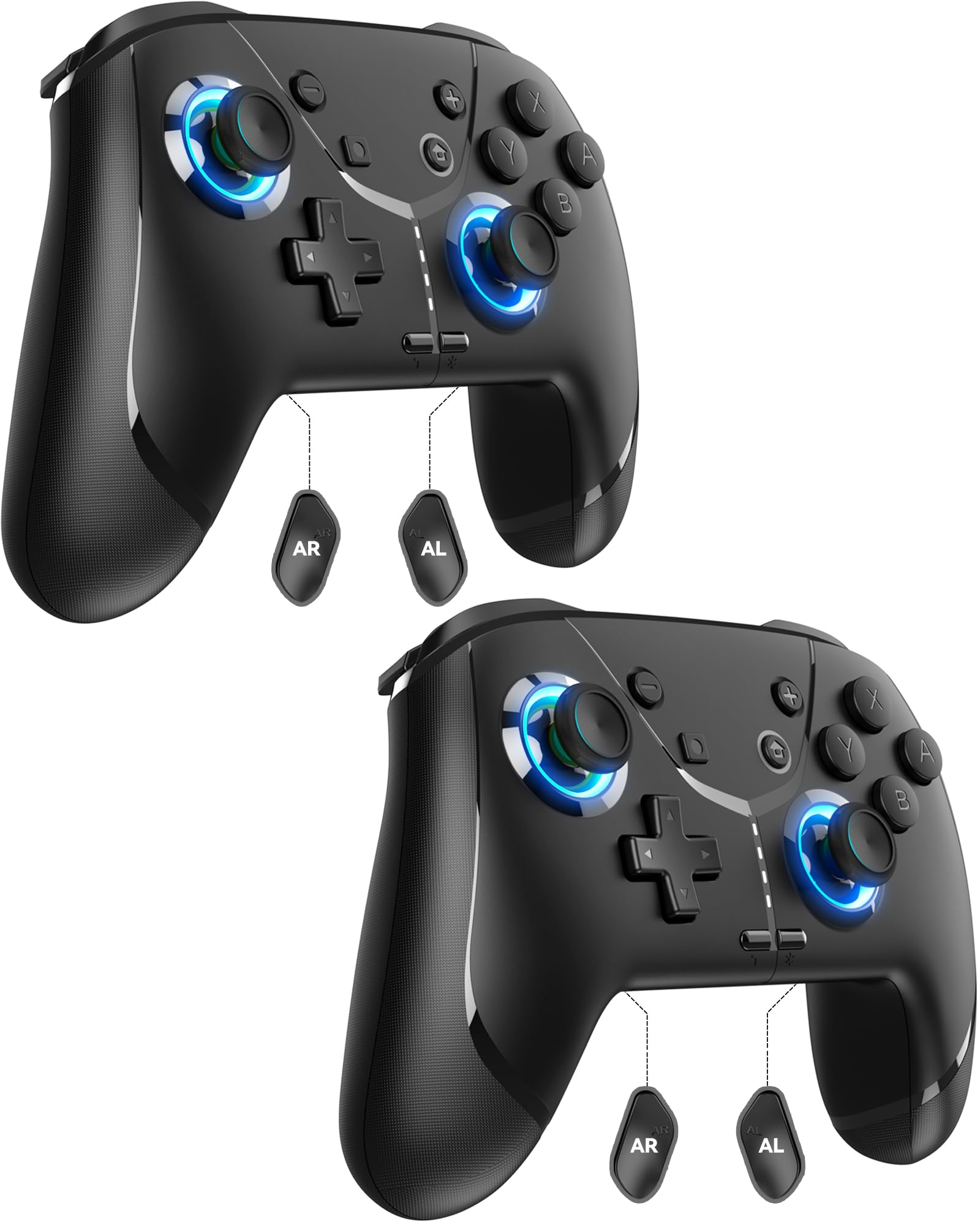
Image: GMBACK Wireless Pro Controller, front view.
የጥቅል ይዘቶች
- 2 x GMBACK Wireless Pro Controllers
- 2 x የዩኤስቢ-ሲ ኃይል መሙያ ገመዶች
- 1 x የተጠቃሚ መመሪያ
እንደ መጀመር
1. ከኒንቴንዶ ስዊች ጋር ማጣመር
- የኒንቴንዶ ቀይር ኮንሶልዎ መብራቱን እና ወደ የቅርብ ጊዜው የስርዓት ሶፍትዌር መዘመኑን ያረጋግጡ።
- ከ HOME ምናሌ ውስጥ ይምረጡ 'ተቆጣጣሪዎች', ከዚያም 'መያዝ/ትዕዛዝ ለውጥ'.
- On the GMBACK controller, press and hold the የማመሳሰል አዝራር (located on the top edge near the USB-C port) for 3-5 seconds until the LED indicators begin to flash rapidly.
- The controller will automatically pair with the Switch. Once paired, the player LED(s) on the bottom of the controller will light up solid.

Image: GMBACK Wireless Pro Controller connected to a Nintendo Switch console.
2. ከፒሲ ጋር መገናኘት (ባለገመድ)
- Connect the GMBACK controller to your PC using the provided USB-C cable.
- The controller will be recognized as a standard gamepad. Drivers may install automatically.
- For optimal compatibility, ensure your PC's operating system is up to date.
3. መቆጣጠሪያውን መሙላት
- Connect the controller to a USB power source (e.g., Switch dock, PC, USB wall adapter) using the provided USB-C cable.
- The LED indicators will show charging status. A full charge typically takes 2-3 hours.
- The controller features an 800mAh battery, providing approximately 15-20 hours of playtime on a full charge.

Image: Visual representation of the 800mAh battery, 15-20 hours playtime, and 2-3 hours charging time.
ቁልፍ ባህሪያት እና ተግባራት
1. Loop Macro Function
The controller supports a loop macro function, allowing you to record and replay a sequence of up to 30 seconds of button presses and joystick movements. This includes joysticks, triggers, D-pad, ABXY, and +/- buttons.
- ለመቅዳት: Refer to the detailed instructions in the included user manual for specific recording steps.
- To Start/Stop Loop: ያዝ የቱርቦ ቁልፍ እና የ ማክሮ አዝራር simultaneously. The controller will automatically replay your recorded actions in a continuous loop.

ምስል: የኋላ view of the controller highlighting the AR and AL programmable buttons and the text 'Loop Macro Function'.
2. 6-Axis Gyro Sensor
The integrated 6-axis gyro sensor provides precise motion detection, allowing for intuitive control in compatible games that utilize motion sensing. This enhances immersion and gameplay accuracy.

Image: Controller being used for a racing game, illustrating the 6-Axis Gyro Sensor feature.
3. Customizable Turbo Function
The controller offers three adjustable turbo speeds for rapid-fire actions. This feature can be set to either auto-fire or manual-fire mode.
- To Adjust Turbo Speed: Refer to the included user manual for specific button combinations to cycle through the three turbo speeds.
- To Activate/Deactivate Turbo: የሚለውን ይጫኑ የቱርቦ ቁልፍ along with the desired action button.

Image: Controller displaying the 'Auto & Manual Turbo' feature with a gaming background.
4. Dual Vibration Adjustment
Experience immersive feedback with four levels of dual vibration intensity: None, Weak, Medium, and Strong. Adjust the vibration to your preference for different games.
- ንዝረትን ለማስተካከል፦ Consult the user manual for the specific button combination to cycle through vibration levels.

Image: Controller illustrating the four levels of dual vibration: None, Weak, Medium, Strong.
5. RGB መብራት
The controller features dynamic RGB lighting around the joysticks, enhancing the visual appeal during gameplay. The lighting can be adjusted or turned off.
- To Adjust RGB Lighting: Refer to the user manual for instructions on changing lighting modes or turning off the lights.

Image: Controller showcasing its RGB lighting feature around the joysticks.
6. Remappable ABXY Buttons
The ABXY buttons can be remapped to switch between Nintendo Switch and Xbox layouts, providing flexibility for different gaming preferences without needing to physically remove any buttons.
- To Remap ABXY: Follow the instructions in the user manual for the specific button sequence to switch layouts.

Image: Controller illustrating the ABXY button function switching between Nintendo Switch and Xbox layouts.
7. Screenshot and Home Wake-up
- The controller includes a dedicated የቅጽበታዊ ገጽ እይታ ቅጽበታዊ ገጽ እይታ for capturing in-game moments.
- የ የመነሻ አዝራር can be used to wake up your Nintendo Switch console from sleep mode.
ጥገና
- ማጽዳት፡ መቆጣጠሪያውን ለማጽዳት ለስላሳና ደረቅ ጨርቅ ይጠቀሙ። ጠበኛ ኬሚካሎችን ወይም ሻካራ ቁሳቁሶችን ከመጠቀም ይቆጠቡ።
- ማከማቻ፡ መቆጣጠሪያውን በቀጥታ ከፀሀይ ብርሀን እና ከከፍተኛ ሙቀት ርቆ በቀዝቃዛና ደረቅ ቦታ ያከማቹ።
- የባትሪ እንክብካቤ የባትሪውን ዕድሜ ለማራዘም፣ መቆጣጠሪያውን በተደጋጋሚ ሙሉ በሙሉ ከመሙላት ይቆጠቡ። ያለማቋረጥ ጥቅም ላይ ባይውልም እንኳ በመደበኛነት ይሙሉት።
መላ መፈለግ
- ተቆጣጣሪ አለመገናኘት;
- ተቆጣጣሪው መሙላቱን ያረጋግጡ።
- Verify the Switch is in 'Change Grip/Order' mode.
- Try restarting both the Switch and the controller.
- ሌሎች ገመድ አልባ መሳሪያዎች ጣልቃ እየገቡ አለመሆናቸውን ያረጋግጡ።
- ምላሽ የማይሰጡ አዝራሮች፡-
- Check if the controller is properly paired.
- Test button functionality in Switch system settings.
- Ensure the controller's firmware is up to date (if applicable, check GMBACK support webጣቢያ)
- የመሙላት ችግሮች፡-
- የቀረበውን የዩኤስቢ-ሲ ገመድ ይጠቀሙ።
- የተለየ የዩኤስቢ የኃይል ምንጭ ይሞክሩ።
- በመቆጣጠሪያው ላይ ያለው የኃይል መሙያ ወደብ ንጹህ እና ከቆሻሻ የጸዳ መሆኑን ያረጋግጡ።
ዝርዝሮች
| ባህሪ | ዝርዝር |
|---|---|
| ሞዴል | HD6900 |
| ተኳኋኝነት | Nintendo Switch 2, Switch, Switch Lite, Switch OLED, Windows PC (wired) |
| የባትሪ አቅም | 800mAh |
| የጨዋታ ጊዜ | 15-20 ሰዓታት |
| የኃይል መሙያ ጊዜ | 2-3 ሰዓታት |
| ግንኙነት | ገመድ አልባ (ብሉቱዝ)፣ ባለገመድ (ዩኤስቢ-ሲ) |
| ልዩ ባህሪያት | Loop Macro, 6-Axis Gyro Sensor, Dual Vibration (4 levels), Adjustable Turbo (3 speeds), RGB Lighting, Remappable ABXY, Screenshot, Home Wake-up |
| የእቃው ክብደት | 8.5 አውንስ |
| የጥቅል ልኬቶች | 6.54 x 5.31 x 5.28 ኢንች |
ይፋዊ የምርት ቪዲዮ
ቪዲዮ: አልቋልview of the GMBACK Wireless Switch Controller, demonstrating its features and compatibility with Nintendo Switch, Switch Lite, and Switch OLED consoles.
ዋስትና እና ድጋፍ
GMBACK products come with a standard manufacturer's warranty. For detailed warranty information, technical support, or any inquiries regarding your controller, please refer to the contact information provided on the product packaging or visit the official GMBACK webጣቢያ.

Image: Icon representing customer support.
