1. መግቢያ
Welcome to the user manual for the MARSTEK 63A 110V Automatic/Manual Transfer Switch. This device is engineered to provide seamless power management by automatically or manually switching between primary (L1) and backup (L2) power sources. It features an LED display for real-time monitoring and incorporates comprehensive protection features to ensure the safety and reliability of your electrical system.
This manual provides essential information for the safe and efficient installation, operation, and maintenance of your transfer switch. Please read it thoroughly before installation and use.
2. ጠቃሚ የደህንነት መረጃ
Always follow basic safety precautions when installing, operating, and maintaining this product to reduce the risk of fire, electric shock, and injury to persons.
- በሁሉም የአካባቢ እና የሀገር ውስጥ የኤሌክትሪክ ኮዶች መሰረት መጫኑ ብቃት ባለው ኤሌክትሪክ ባለሙያ መከናወን አለበት.
- Disconnect all power sources before performing any installation, wiring, or maintenance.
- ማብሪያው የተበላሸ መስሎ ከታየ አይስሩ።
- የኤሌክትሪክ ንዝረትን ለመከላከል ትክክለኛውን የመሬት አቀማመጥ ያረጋግጡ.
- This device is designed for indoor use in a dry environment.
- ልጆችን ከኤሌክትሪክ መሳሪያዎች ያርቁ።
3. የጥቅል ይዘቶች
- 1 x MARSTEK 63A 110V Automatic/Manual Transfer Switch
- 1 x DIN Rail
- 1 x የተጠቃሚ መመሪያ (ይህ ሰነድ)
4. ምርት አብቅቷልview
The MARSTEK 63A 110V Automatic/Manual Transfer Switch is a compact device designed for reliable power source switching. It features an LED display for real-time voltage and operational status, and offers both automatic and manual control options.
ቁልፍ ባህሪያት
- Automatic or Manual Switching: Seamless transfer between primary (L1) and backup (L2) power sources.
- አጠቃላይ ጥበቃ; ከመጠን በላይ መጨናነቅን ያካትታልtagሠ, undervoltagሠ, እና ከመጠን በላይ መከላከያ.
- የእውነተኛ ጊዜ ክትትል፡- High-definition LED display shows voltagሠ እና ሁኔታ.
- ቀላል መጫኛ; DIN rail mountable design.
- ሰፊ መተግበሪያ፡ Suitable for commercial, industrial, and residential backup power systems.
የምርት ንድፍ

This image displays the main unit of the transfer switch, highlighting its compact design and the integrated LED display. The DIN rail is also shown, indicating its mounting method.
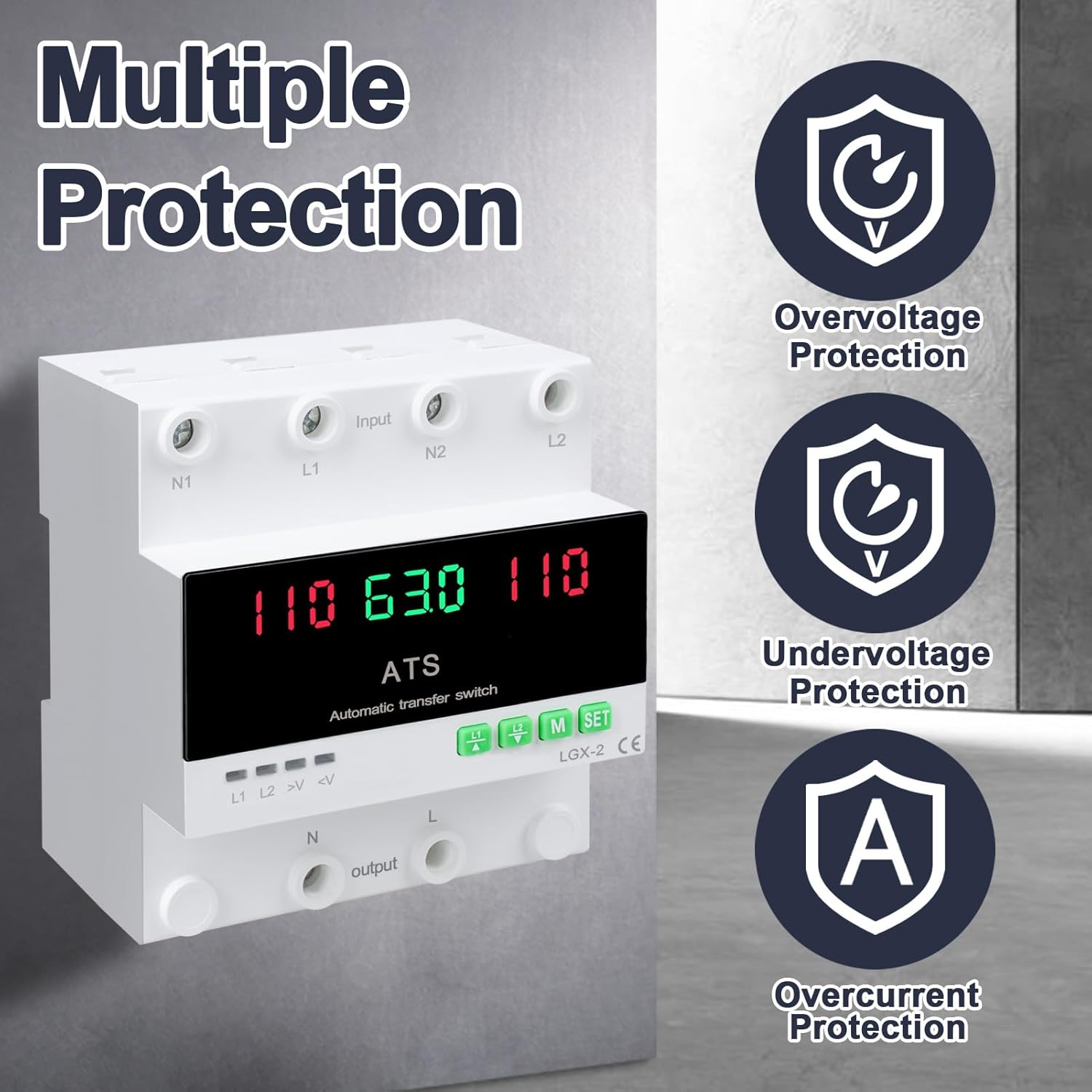
This image illustrates the built-in safety mechanisms of the transfer switch, emphasizing its capability to protect connected devices from electrical instability through overvoltagሠ, undervoltage, and overcurrent safeguards.
5. ዝርዝሮች
| መለኪያ | ዋጋ |
|---|---|
| ሞዴል | Dual Power 63A |
| የአሁኑ ደረጃ አሰጣጥ | 63 Amps |
| ኦፕሬቲንግ ቁtage | 120 ቮልት |
| የክወና ሁነታ | ON-AUTO-MANUAL |
| የምርት ልኬቶች (L x W x H) | 4.3 x 3.5 x 3.3 ኢንች |
| ክብደት | 13.12 አውንስ |
| የእውቂያ አይነት | በመደበኛነት ተዘግቷል |
| የማገናኛ አይነት | መሰካት |
| ተርሚናል | ስከር |
| የወረዳ ዓይነት | 2-መንገድ |
| የእውቂያ ቁሳቁስ | መዳብ |
| ደረጃ የተሰጠው ድግግሞሽ | 50/60Hz |
| ከመጠን በላይ መጨናነቅtagሠ ጥበቃ ገደብ | AC140V |
| Undervoltagሠ ጥበቃ ገደብ | AC90V |
6. ማዋቀር እና መጫን
Proper installation is crucial for the safe and reliable operation of the transfer switch. This device is designed for DIN rail mounting.
ከመጫኑ በፊት
- Ensure all power sources are disconnected at the main breaker before beginning installation.
- ጥራዝ መሆኑን ያረጋግጡtage and current ratings of the transfer switch match your electrical system requirements.
- Prepare the installation location, ensuring it is dry, well-ventilated, and easily accessible.
ሽቦ ዲያግራም

This diagram illustrates the correct wiring connections for the transfer switch. It shows the input terminals for primary power (N1, L1) and backup power (N2, L2), and the output terminals (N, L) to the load. The diagram also labels the LED indicators for L1 output, L2 output, overvoltagሠ, እና undervoltage, as well as the menu/reset and manual ON/OFF buttons.
የመጫኛ ደረጃዎች
- Mount the DIN rail securely in your electrical panel or enclosure.
- Attach the transfer switch onto the DIN rail.
- Connect the primary power source (N1, L1) to the designated input terminals.
- Connect the backup power source (N2, L2) to the designated input terminals.
- Connect the load (N, L) to the output terminals.
- ጥብቅነት እና ትክክለኛነት ሁሉንም ግንኙነቶች ደግመው ያረጋግጡ።
- Once all wiring is complete and verified, restore power to the system.
7. ኦፕሬሽን
The MARSTEK transfer switch offers both automatic and manual operation modes.
ራስ-ሰር ሁነታ

In automatic mode, the switch prioritizes the primary power source (L1). If L1 fails or experiences voltage fluctuations (undervoltagሠ ወይም ከመጠን በላይtage), the switch will automatically transfer the load to the backup power source (L2). When L1 is restored and stable, the switch will automatically transfer the load back to L1.
በእጅ ሁነታ

The transfer switch can be manually operated using the buttons on the front panel.
- To close L1: Press the button labeled "L1" (often indicated by an up arrow or similar icon). Press again to open L1.
- To close L2: Press the button labeled "L2" (often indicated by a down arrow or similar icon). Press again to open L2.
In manual mode, the automatic transfer function is overridden. Ensure you understand the implications of manual switching before use.
LED Display and Indicators
The LED display provides real-time information about the system status.
- The main display shows voltage readings for the active power source.
- L1 Indicates L1 output is active.
- L2 Indicates L2 output is active.
- >V: ከመጠን በላይ መጨናነቅtagሠ አመልካች ብርሃን.
- <V: Undervoltagሠ አመልካች ብርሃን.
- M: Menu selection/Reset button.
- SET: Manual ON/OFF button.
8. ጥገና
The MARSTEK transfer switch requires minimal maintenance.
- የሽቦዎቹ ግንኙነቶች ደህንነታቸው የተጠበቀ እና ከዝገት የፀዱ መሆናቸውን ለማረጋገጥ በየጊዜው ይመርምሩ።
- Keep the device clean and free from dust and debris. Use a dry, soft cloth for cleaning.
- ገላጭ ማጽጃዎችን ወይም ፈሳሾችን አይጠቀሙ.
- ከመጠን በላይ ሙቀትን ለመከላከል በክፍሉ ዙሪያ በቂ የአየር ዝውውርን ያረጋግጡ.
Warning: Always disconnect all power sources before performing any maintenance.
9. መላ መፈለግ
ይህ ክፍል ሊያጋጥሙህ ለሚችሉ የተለመዱ ጉዳዮች መፍትሄዎችን ይሰጣል።
| ችግር | ሊሆን የሚችል ምክንያት | መፍትሄ |
|---|---|---|
| መሣሪያ እየበራ አይደለም። | የግቤት ኃይል የለም፤ የተሳሳተ ሽቦ፤ የውስጥ ችግር። | Check main breakers and power sources. Verify all wiring connections. If the problem persists, contact support. |
| አውቶማቲክ ዝውውር የለም። | Device in manual mode; power source within acceptable limits; fault in L1 or L2 detection. | Ensure the device is set to automatic mode. Check voltage levels of both L1 and L2. Contact support if automatic transfer fails despite correct settings. |
| ከመጠን በላይ መጨናነቅtage (>V) or Undervoltage (<V) indicator lit. | የግቤት ጥራዝtagከተጠቀሰው ክልል ውጭ። | ጥራዝ ይመልከቱtage of the active power source. The device will automatically switch if the voltage is outside the set parameters (AC140V overvoltage, AC90V undervoltage). Address the power source issue. |
| Overcurrent protection triggered. | Load exceeds the 63A current rating. | Reduce the connected load. Ensure total current draw does not exceed 63 Amps. |
10. ዋስትና እና ድጋፍ
For warranty information and technical support, please refer to the MARSTEK official webጣቢያ ወይም ቸርቻሪዎን ያነጋግሩ። የግዢ ደረሰኝህን እንደ ግዢ ማረጋገጫ አቆይ።
አምራች፡ JUXIANG
የምርት ስም: MARSEK