1. መግቢያ
This manual provides essential instructions for setting up, operating, and maintaining your IMSVEPR Smart Watch LC211. Please read this manual thoroughly before using the device to ensure proper function and safety. The IMSVEPR Smart Watch LC211 is designed to enhance your daily life with features such as Bluetooth calling, GPS tracking, health monitoring, and various sports modes.

Image 1.1: The IMSVEPR Smart Watch LC211 displaying time and date.
2. የጥቅል ይዘቶች
ሁሉም እቃዎች በምርት ጥቅልዎ ውስጥ መኖራቸውን ያረጋግጡ፡-
- IMSVEPR Smart Watch LC211 (1 unit)
- Watch Band (1 unit)
- የኃይል መሙያ ገመድ (1 አሃድ)
- የተጠቃሚ መመሪያ (1 ክፍል)

Image 2.1: Illustration of the IMSVEPR Smart Watch LC211 and its included accessories, along with product dimensions.
3. ማዋቀር
3.1 መሳሪያውን መሙላት
Before initial use, fully charge your smart watch. Connect the magnetic charging cable to the charging contacts on the back of the watch and plug the USB end into a standard USB power adapter (not included). A full charge typically takes 2-3 hours.

Image 3.1: The smart watch connected to its magnetic charging cable, illustrating the charging process.
3.2 መተግበሪያ መጫን እና ማጣመር
To unlock the full functionality of your IMSVEPR Smart Watch, download and install the companion app on your smartphone. The app is typically named 'Da Fit' and can be found on the App Store (iOS) or Google Play Store (Android).
- Scan the QR code in the manual or on the watch screen (if available) to download the 'Da Fit' app, or search for it directly in your phone's app store.
- በእርስዎ ዘመናዊ ስልክ ላይ ብሉቱዝ መንቃቱን ያረጋግጡ።
- 'Da Fit' የሚለውን መተግበሪያ ይክፈቱ እና መለያ ለመፍጠር ወይም ለመግባት የማያ ገጽ ላይ መመሪያዎችን ይከተሉ።
- In the app, navigate to 'Device' or 'Add Device' and select your IMSVEPR Smart Watch from the list of available devices.
- በሁለቱም የእጅ ሰዓትዎ እና ስማርትፎንዎ ላይ የማጣመር ጥያቄን ያረጋግጡ።
4. የአሠራር መመሪያዎች
4.1 መሰረታዊ ዳሰሳ
- የንክኪ ማያ ገጽ፡ Swipe left/right to navigate between main screens, swipe up/down to access quick settings or notifications. Tap to select.
- የጎን አዝራር፡- ማያ ገጹን ለማንቃት፣ ወደ መነሻ ማያ ገጽ ለመመለስ ወይም የመተግበሪያውን ምናሌ ለመድረስ ይጫኑ።
4.2 የብሉቱዝ ጥሪ እና ማሳወቂያዎች
አንዴ ከስማርት ስልክዎ ጋር ከተጣመረ በኋላ ሰዓቱ የብሉቱዝ ጥሪዎችን እና የመልእክት ማሳወቂያዎችን ይደግፋል።
- ጥሪዎችን ማድረግ; ጥሪን ለመጀመር በእጅ ሰዓትዎ ላይ ያለውን የመደወያ ፓድ ወይም የእውቂያዎች ዝርዝር ይድረሱ።
- ጥሪዎችን መቀበል፡- When a call comes in, you can answer or reject it directly from your watch.
- ማሳወቂያዎች፡- The watch will vibrate and display notifications from social media apps (e.g., Facebook, WhatsApp, Instagram, Twitter) and other applications configured in the 'Da Fit' app.

Image 4.1: The smart watch displaying call functions, including dial pad, contacts, and incoming call interface.
4.3 ሊበጁ የሚችሉ የሰዓት መልኮች
Personalize your watch by choosing from over 200 watch faces available through the 'Da Fit' app. You can also upload your own photos to create custom watch faces.
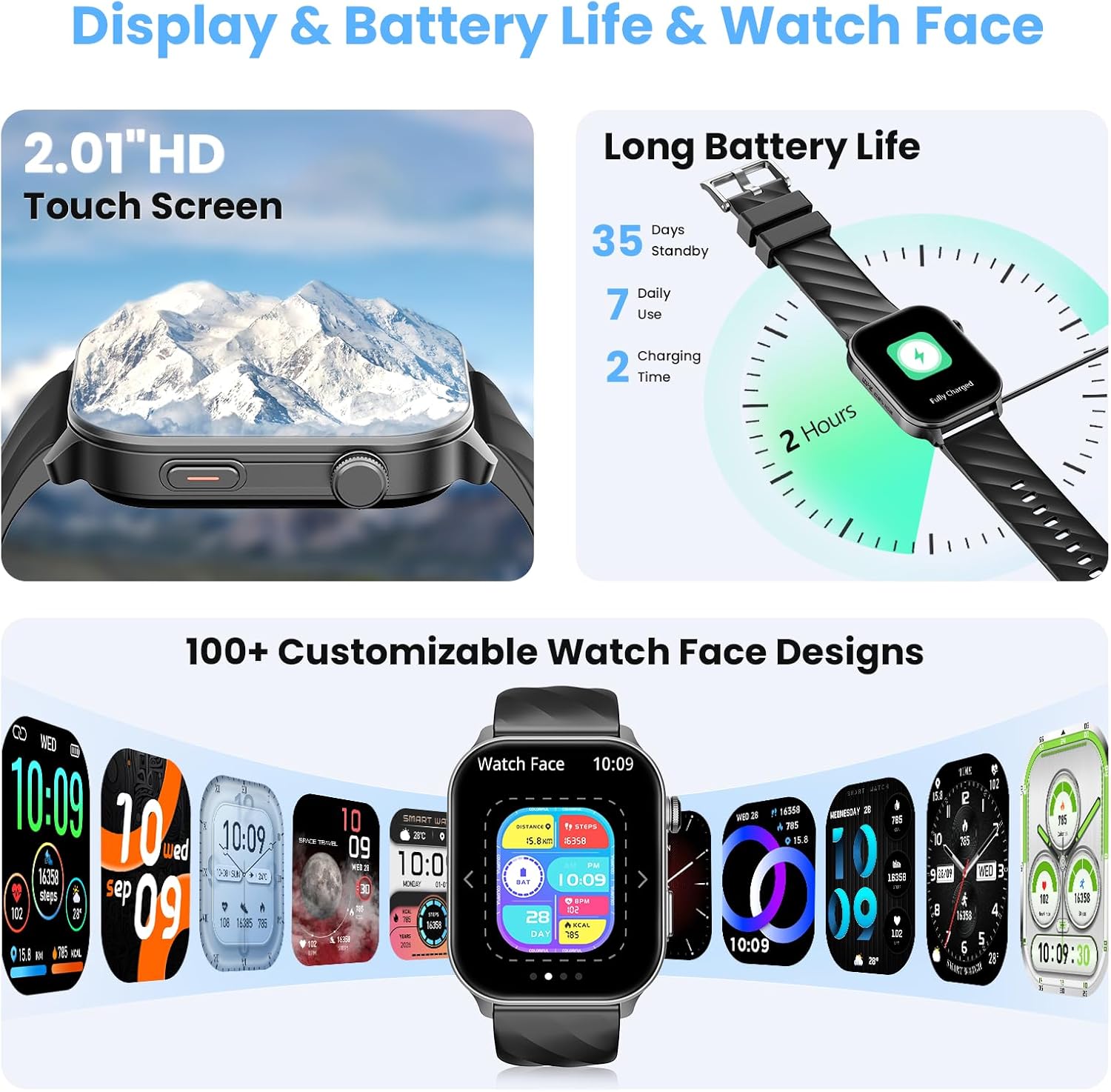
Image 4.2: A selection of customizable watch faces available for the IMSVEPR Smart Watch LC211.
5. የጤና ክትትል
The IMSVEPR Smart Watch LC211 is equipped with an optical sensor for comprehensive health tracking.
- የልብ ምት ክትትል; የልብ ምትዎን ቀኑን ሙሉ ያለማቋረጥ ይከታተላል። View real-time data and historical trends in the app.
- የደም ኦክስጅን (SpO2) ክትትል; የደምዎን የኦክስጂን ሙሌት መጠን ይለካል።
- የእንቅልፍ ክትትል; Monitors your sleep patterns, including deep sleep, light sleep, and awake times, providing a detailed sleep quality report.
- የጭንቀት ክትትል; Assesses your stress levels over time.
- የሴት ዑደት ክትትል; Provides scientific cycle tracking to predict menstruation and ovulation, helping you manage your body rhythms.
- የውሃ መጠጥ ማሳሰቢያ፡ በቂ የሆነ እርጥበት እንዲኖርዎት አስታዋሾችን ያዘጋጁ።
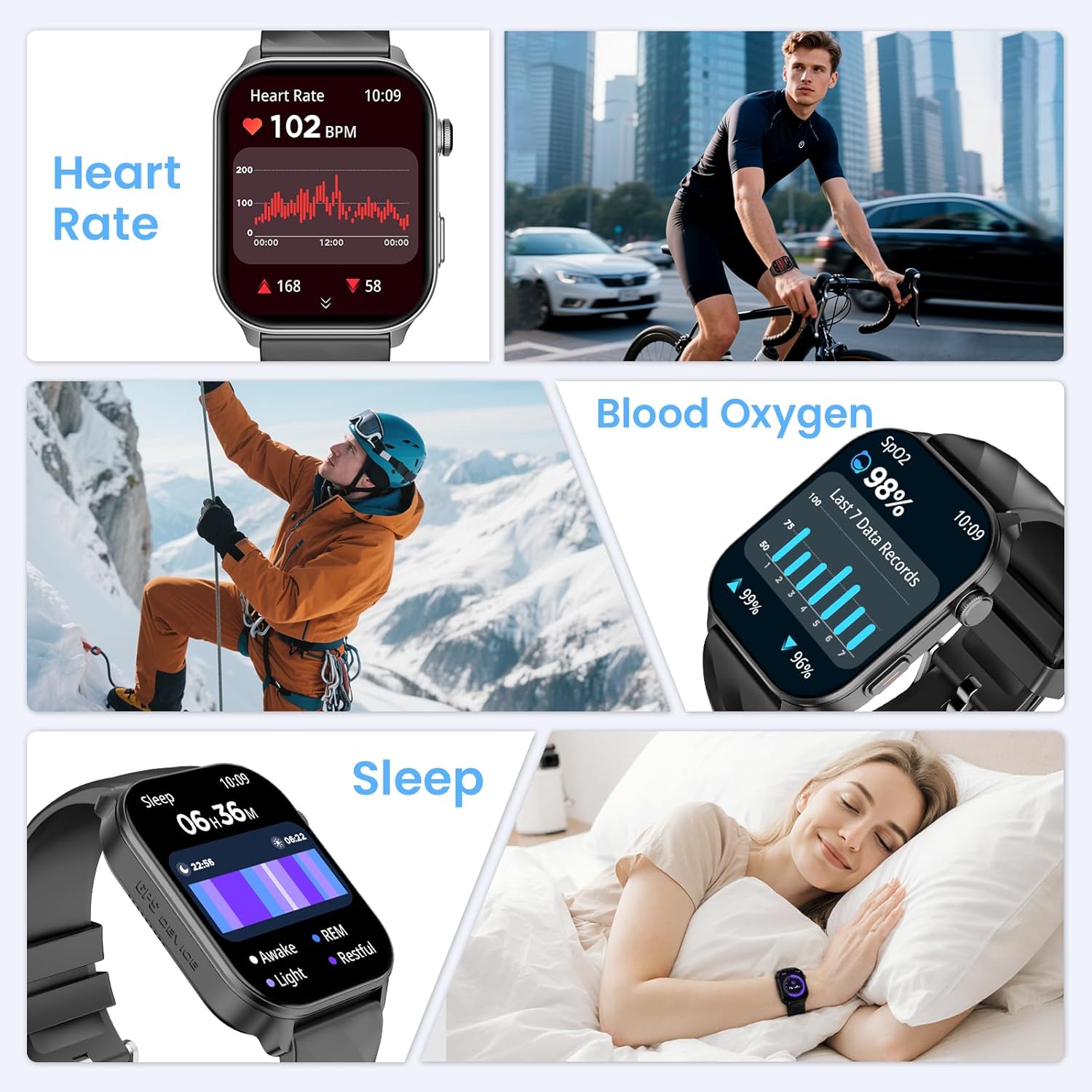
Image 5.1: Displays of heart rate, blood oxygen, and sleep tracking data on the smart watch.
6. Sports Tracking
The watch features built-in GPS and supports over 110 sport modes to accurately track your physical activities.
- አብሮ የተሰራ ጂፒኤስ Provides precise location tracking for outdoor activities like running, cycling, and hiking.
- የኮምፓስ ዳሰሳ፡- Utilize the high-precision outdoor compass for navigation during adventures.
- 110+ የስፖርት ሁነታዎች፡ Select from a wide range of activities to track real-time data such as calorie consumption, steps, distance, pace, and duration.
- የእንቅስቃሴ ክትትል፡ Monitors daily steps, distance covered, and calories burned.

Image 6.1: The smart watch displaying compass navigation and GPS outdoor sports tracking with a map route.
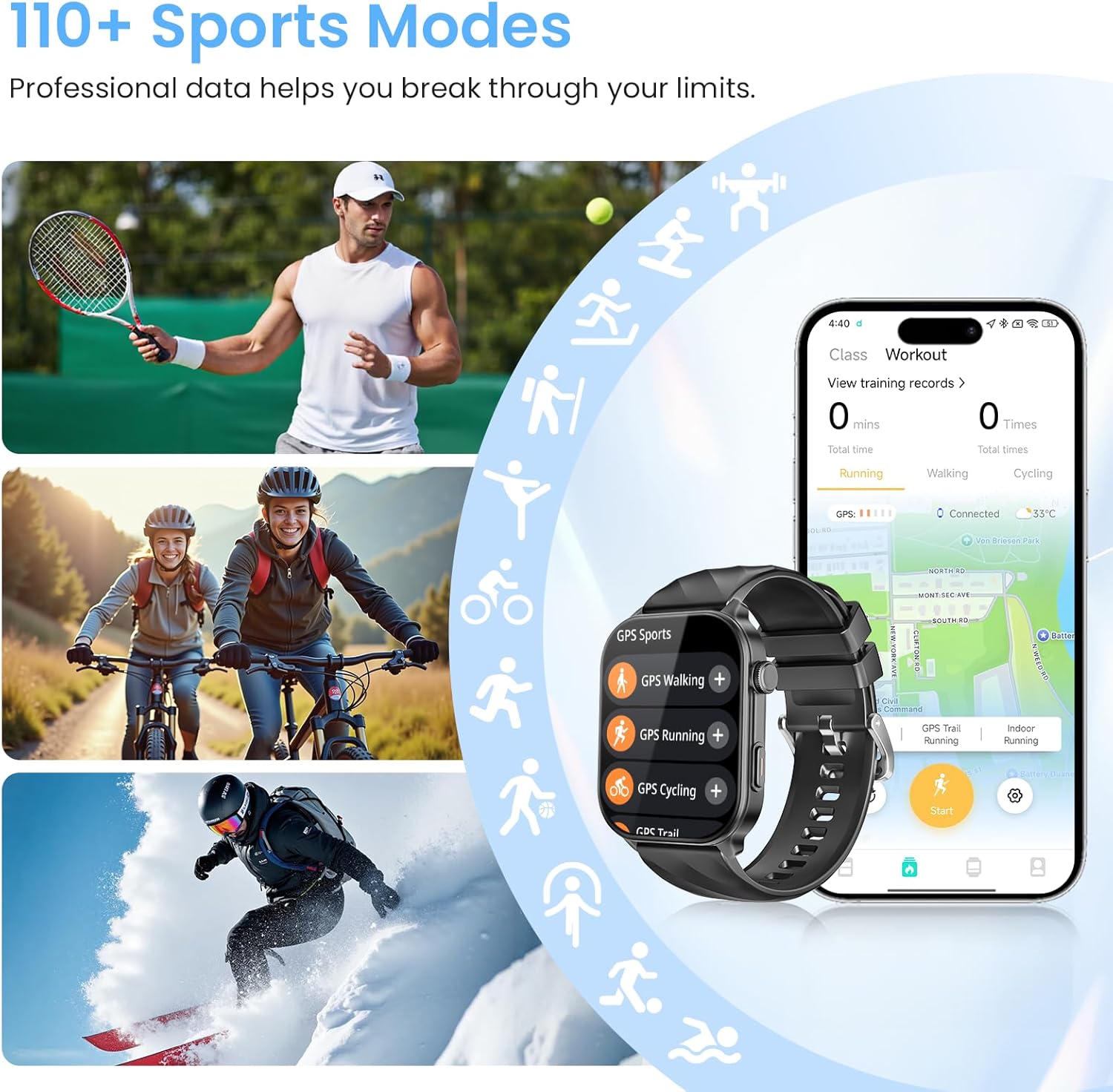
Image 6.2: Various sports activities being tracked by the smart watch, highlighting the 110+ sports modes feature.
7. የውሃ መቋቋም
The IMSVEPR Smart Watch LC211 boasts a 1 ATM water resistance rating. This means it is suitable for daily activities such as hand washing, showering, and sweating during workouts. It is not recommended for swimming, diving, or exposure to high-pressure water.

Image 7.1: Visual representation of the smart watch's 1 ATM water resistance, showing it can withstand hand washing, showering, and sweating.
8. የባትሪ ህይወት
The smart watch is equipped with a 360mAh battery, offering:
- እስከ 35 ቀናት የመጠባበቂያ ጊዜ።
- Up to 7 days of typical daily use.
- Approximately 3 days with extended use of calls and GPS.
Charging time is 2-3 hours for a full charge.
9. Multifunctional Applications
Beyond core features, the IMSVEPR Smart Watch LC211 includes several practical applications:
- የድምፅ ረዳት ሰዓትዎን እና ስልክዎን በድምጽ ትዕዛዞች ይቆጣጠሩ።
- የሙዚቃ ቁጥጥር፡- Manage music playback on your smartphone directly from your wrist.
- የአየር ሁኔታ ትንበያ: የእውነተኛ ጊዜ የአየር ሁኔታ ዝመናዎችን ያግኙ።
- የፎቶ ቁጥጥር የእጅ ሰዓትዎን ለስልክዎ ካሜራ እንደ የርቀት መዝጊያ ይጠቀሙ።
- ስልክህን አግኝ፡ Locate your misplaced smartphone by triggering an alarm.
- የሰዓት ቆጣሪ እና የሩጫ ሰዓት፡ የጊዜ እንቅስቃሴዎች አስፈላጊ መሣሪያዎች.
- ማንቂያ ደውል: ጸጥ ያሉ የንዝረት ማንቂያዎችን ያዘጋጁ።
- ሚኒ-ጨዋታዎች፡ Includes 'Jumping Bird' and '2048' for entertainment.

ምስል 9.1፡ አልቋልview of various multifunctional applications available on the smart watch, including music control, weather, and find phone.
10. መላ መፈለግ
If you encounter issues with your IMSVEPR Smart Watch LC211, refer to the following common solutions:
| ጉዳይ | ሊሆን የሚችል መፍትሄ |
|---|---|
| ሳይበራ ይመልከቱ | ሰዓቱ ሙሉ በሙሉ መሙላቱን ያረጋግጡ። ቢያንስ ለ 30 ደቂቃዎች ከኃይል መሙያው ጋር ያገናኙት. |
| ከስልክ ጋር ማጣመር አልተቻለም | Make sure Bluetooth is enabled on your phone. Restart both the watch and phone. Ensure the 'Da Fit' app is open and searching for devices. Check if the watch is already paired with another device. |
| ማሳወቂያዎች አይታዩም። | Verify that notification permissions are enabled for the 'Da Fit' app in your phone's settings. Ensure app notifications are enabled within the 'Da Fit' app itself. |
| ትክክለኛ ያልሆነ የጤና መረጃ | ሰዓቱ በእጅ አንጓዎ ላይ በጥብቅ መያዙን ያረጋግጡ፣ በጣም ጥብቅ ወይም በጣም ልቅ አይደለም። በሰዓት ጀርባ ላይ ያለውን ዳሳሽ ያጽዱ። በመለኪያ ጊዜ ከመጠን በላይ እንቅስቃሴ ያስወግዱ። |
| አጭር የባትሪ ህይወት | Reduce screen brightness, disable continuous heart rate monitoring if not needed, limit GPS usage, and turn off unnecessary notifications. |
11. ዝርዝሮች
| ባህሪ | ዝርዝር |
|---|---|
| የሞዴል ስም | LC211 |
| የምርት ስም | IMSVEPR |
| የስክሪን መጠን | 2.01 ኢንች |
| የማሳያ ዓይነት | HD የማያንካ |
| ጂፒኤስ | አብሮ የተሰራ ጂፒኤስ |
| የውሃ መቋቋም | 1 ኤቲኤም |
| የባትሪ አቅም | 360mAh |
| ግንኙነት | ብሉቱዝ |
| ስርዓተ ክወና | watchOS 3 (as per product data, though this is typically Apple's OS, it's listed in the source) |
| የእቃው ክብደት | 3.84 አውንስ |
| የጥቅል ልኬቶች | 5.87 x 2.99 x 1.22 ኢንች |
12. ጥገና
- ማጽዳት፡ የእጅ ሰዓትዎንና የእጅ ሰዓት ማሰሪያዎን ለስላሳና ደረቅ ጨርቅ አዘውትረው ያጽዱ። አስፈላጊ ከሆነ ትንሽ ጨርቅ ይጠቀሙ።amp ጨርቅ እና ለስላሳ ሳሙና, ከዚያም ያለቅልቁ እና በደንብ ያድርቁ.
- ኬሚካሎችን ያስወግዱ; Do not expose the watch to strong chemicals, solvents, or detergents, as these can damage the finish and seals.
- ማከማቻ፡ በማይጠቀሙበት ጊዜ ሰዓቱን በቀዝቃዛና ደረቅ ቦታ ያከማቹ። ከፍተኛ የሙቀት መጠንን ያስወግዱ.
- በመሙላት ላይ፡ የቀረበውን የኃይል መሙያ ገመድ ብቻ ይጠቀሙ። ባትሪውን ከመጠን በላይ ከመሙላት ይቆጠቡ።
13. ዋስትና እና ድጋፍ
IMSVEPR is committed to providing quality products and customer satisfaction.
- ዋስትና፡- The product includes a 2-year free replacement warranty.
- የዕድሜ ልክ ድጋፍ; IMSVEPR offers lifetime support and satisfied solutions for its products.
- የደንበኛ አገልግሎት፡ For any inquiries or support needs, quick service is available via email within 24 hours. Please refer to the contact information provided in your product packaging or on the official IMSVEPR webጣቢያ.
14. የደህንነት መረጃ
- ሰዓቱን ለመበተን ወይም ለመቀየር አይሞክሩ።
- Keep the watch away from extreme heat or open flames.
- Consult a medical professional before starting any new exercise regimen or if you have pre-existing health conditions. The health monitoring features are for informational purposes and not intended for medical diagnosis or treatment.
- ልጆች በማይደርሱበት ቦታ ያስቀምጡ.


