1. መግቢያ
This manual provides essential instructions for the assembly, operation, and maintenance of your Arcade1Up Ms. Pac-Man Classic SE Arcade Machine. Please read this manual thoroughly before use to ensure proper function and safety.

Image 1: The Arcade1Up Ms. Pac-Man Classic SE Arcade Machine, featuring vibrant blue and pink artwork with Ms. Pac-Man characters.
2. የደህንነት መረጃ
እባክዎን የሚከተሉትን የደህንነት ጥንቃቄዎች ያክብሩ።
- Keep the arcade machine away from water or excessive moisture.
- የኤሌክትሪክ ገመዱ ያልተበላሸ ወይም የተበላሸ መሆኑን ያረጋግጡ.
- Do not attempt to open or modify the machine. Refer all servicing to qualified personnel.
- ማሽኑን እንዳይወዛወዝ በተረጋጋና ደረጃ ባለው ቦታ ላይ ያድርጉት።
- በሚጠቀሙበት ጊዜ ልጆችን ይቆጣጠሩ.
3. የጥቅል ይዘቶች
Your Arcade1Up Ms. Pac-Man Classic SE Arcade Machine package includes:
- Arcade Machine Cabinet
- የኃይል አስማሚ
- የትምህርት መመሪያ (ይህ ሰነድ)
Note: An optional riser may be sold separately.
4. ማዋቀር
4.1 ስብሰባ
The Arcade1Up Ms. Pac-Man Classic SE Arcade Machine requires some assembly. Follow the detailed instructions provided in the separate assembly guide included with your product. Ensure all screws and fasteners are securely tightened before use.

Image 2: Dimensions of the Arcade1Up Ms. Pac-Man Classic SE Arcade Machine, showing its height of 45.4 inches without a riser and indicating an optional riser is sold separately.
4.2 የኃይል ግንኙነት
- Locate the power input port on the back of the arcade machine.
- Connect the provided power adapter to the machine.
- የኃይል አስማሚውን ወደ መደበኛ የኤሌክትሪክ ሶኬት ይሰኩት።
- ከመሰካትዎ በፊት የኃይል ማብሪያ / ማጥፊያው (ካለ) 'ጠፍቷል' በሚለው ቦታ ላይ መሆኑን ያረጋግጡ።
ቪዲዮ 1: አልቋልview of the Arcade1Up Ms. Pac-Man Classic SE Arcade Machine, demonstrating its features and setup in a home environment. This video is provided by the seller.
5. የአሠራር መመሪያዎች
5.1 ማብራት / ማጥፋት
Locate the power switch on the control panel. Flip the switch to 'ON' to power on the machine. Flip to 'OFF' to power off.
5.2 Game Selection
Upon powering on, you will see a game selection menu. Use the joystick to navigate through the available games. Press the 'Start Game' button to select and launch your desired game.
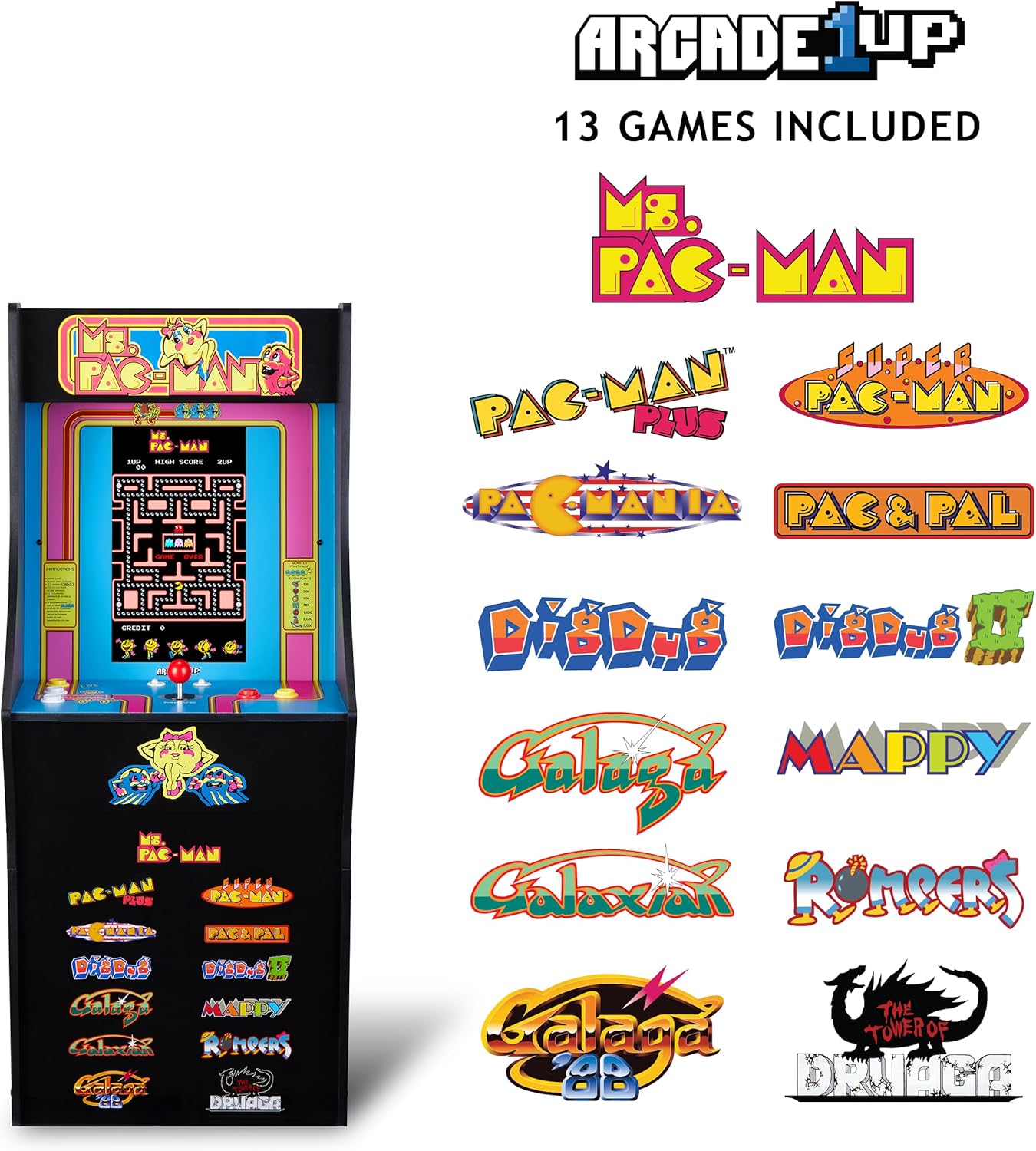
Image 3: The Arcade1Up Ms. Pac-Man Classic SE Arcade Machine displaying the list of 13 included games, such as Ms. Pac-Man, Dig Dug, and Galaga.
5.3 መቆጣጠሪያዎች
- ጆይስቲክ Used for character movement in games.
- Start Game Button: Initiates a game or confirms selection.
- የተግባር አዝራሮች፡- Used for specific in-game actions (e.g., firing, jumping).
- የድምጽ መቆጣጠሪያ፡- Adjust the game sound level using the dedicated volume buttons.
- To return to the game selection menu or save a high score, hold the 'Start Game' button for 5 seconds.
- To reset a game, hold the 'Start Game' button for 5 seconds.

ምስል 4፡ ዝርዝር view of the control panel, highlighting the joystick, start game button, and other action buttons for gameplay.
5.4 Included Games
Your Arcade1Up Ms. Pac-Man Classic SE Arcade Machine includes 13 classic games:
- Ms. PAC-MAN
- PAC-MAN PLUS
- SUPER PAC-MAN
- PAC & PAL
- PACMANIA
- DIG DUG
- DIG DUG 2
- GALAGA
- GALAXIAN
- GALAGA 88
- MAPPY
- ROMPERS
- THE TOWER OF DRUAGA
5.5 WiFi Leaderboards
Connect your arcade machine to WiFi to access online leaderboards and compete for high scores globally. Refer to the on-screen prompts for WiFi setup and leaderboard access.
Video 2: Gameplay footage of the Arcade1Up Ms. Pac-Man Classic SE Arcade Machine, showcasing the classic arcade experience and the online leaderboard feature. This video is provided by the seller.
6. ጥገና
- ማጽዳት፡ Use a soft, dry cloth to wipe down the cabinet and screen. Avoid abrasive cleaners or excessive moisture.
- ማከማቻ፡ ማሽኑን ከፀሐይ ብርሃን እና ከፍተኛ የሙቀት መጠን ራቅ ባለ ቀዝቃዛና ደረቅ ቦታ ያስቀምጡት።
- የኃይል ገመድ; የጉዳት ምልክቶችን በየጊዜው የኤሌክትሪክ ገመዱን ይፈትሹ.
7. መላ መፈለግ
| ችግር | ሊሆን የሚችል ምክንያት | መፍትሄ |
|---|---|---|
| ማሽኑ አይበራም. | የኃይል ገመድ አልተገናኘም; መውጫው አይሰራም. | የኃይል ገመዱ ደህንነቱ በተጠበቀ ሁኔታ መሰካቱን ያረጋግጡ። መውጫውን በሌላ መሳሪያ ይሞክሩት። |
| ድምጽ የለም። | Volume turned down; speaker issue. | Check volume settings on the control panel. If problem persists, contact support. |
| ጨዋታው ይቆማል ወይም ይበላሻል። | የሶፍትዌር ብልሽት፤ ጊዜያዊ ስህተት። | Power off the machine, wait 10 seconds, then power back on. |
8. ዝርዝሮች
| ባህሪ | ዝርዝር |
|---|---|
| የሞዴል ቁጥር | MSP-A-405629 |
| ልኬቶች (H x W x D) | 45.4" x 17.35" x 45.4" (without riser) |
| የስክሪን መጠን | 15.6 Inches IPS Color Monitor |
| የጨዋታዎች ብዛት | 13 |
| የመቆጣጠሪያ አይነት | ጆይስቲክ |
| የኃይል ምንጭ | ባለገመድ ኤሌክትሪክ |
| ቁሳቁስ | ፕላስቲክ፣ አሲሪሎኒትሪል ቡታዲየን ስቲሪን (ኤቢኤስ) |
| የእቃው ክብደት | 47 ፓውንድ |
| አምራቹ የሚመከር ዕድሜ | 10 ዓመት እና ከዚያ በላይ |
| ግንኙነት | WiFi Leaderboards |
9. ዋስትና እና ድጋፍ
For warranty information, technical support, or service inquiries, please refer to the official Arcade1Up webጣቢያ ወይም የደንበኞች አገልግሎት ክፍልን ያነጋግሩ። ለዋስትና ጥያቄዎች የግዢ ማረጋገጫዎን ያስቀምጡ።
የመስመር ላይ ድጋፍ www.arcade1up.com


